Query smart contract data without writing indexing code
The Goldsky subgraph wizard turns one contract address into a GraphQL endpoint with one CLI command. A worked example on the Nouns contract, one query, and three paths compared.

Software Engineer
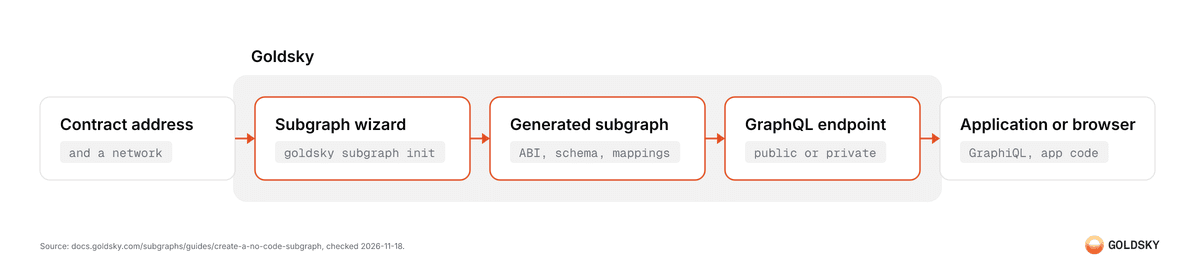
A team can query the data of a smart contract and write no indexing code. The Goldsky subgraph wizard is one CLI command that takes a contract address and a network. It fetches the ABI, generates the subgraph, and deploys it as a GraphQL endpoint. One person runs the command once. After that, anyone with the link can query the data in a browser. This guide runs the wizard on a real contract, queries the result, and compares the wizard with two other Goldsky paths.
What the wizard needs
The no-code subgraph guide (opens in a new tab) lists one requirement: the contract address. The wizard also asks for the network. It fetches the ABI from a block explorer and the start block from a remote source. Then it generates the subgraph code.
One run can cover several contracts and several networks. The wizard deploys one subgraph per network. Two contracts on two networks give two subgraphs, and each subgraph indexes both contracts.
A reader needs two facts before the first run: the contract address and the network.
The worked example
The guide indexes the Nouns contract (opens in a new tab) on Ethereum mainnet. The prompts below are copied from the guide. Run goldsky login first, then start the wizard:
goldsky subgraph initThe wizard asks for a name:
│
◆  Subgraph name
│  nouns-demo
┕It then asks for a version, a target path for the generated files, and an optional path to local ABI files. This example uses the version 1.0.0-demo+docs and leaves the ABI path blank. Next is the contract address:
│
◆  Contract address
│  0x9C8fF314C9Bc7F6e59A9d9225Fb22946427eDC03
┕Then the network:
│
◆  Contract network
│  mainnet
┕The wizard finds the start block:
│
◇  Found start block: 12985438
│
◆  Start block
│  12985438
┕It asks whether to add another network, asks for a contract name, and asks whether to add another contract. This example answers no to both questions:
│
◆  Add another network?
│  ○ Yes / ● No
┕│
◆ Contract name
│ NOUNS
┕│
◆ Add another contract?
│ ○ Yes / ● No
┕After a description prompt, the wizard offers call handlers. With call handlers, the subgraph indexes contract calls and events. The guide notes that this adds data and can make indexing take longer.
│
◆  Enable subgraph call handlers?
│  ● Yes / ○ No
┕The wizard shows a summary. It then asks for a yes at three steps: initialization, build, and deploy.
│
◆  Proceed with subgraph initialization?
│  ● Yes / ○ No
┕│
◆ Proceed with subgraph build?
│ ● Yes / ○ No
┕│
◆ Proceed with subgraph deploy?
│ ● Yes / ○ No
┕The last screen gives a dashboard link and a query link:
│
◇  Deployed subgraph summary
│
│  nouns-demo-mainnet/1.0.0-demo+docs
│
│  • Dashboard: https://app.goldsky.com/…/dashboard/subgraphs/nouns-demo-mainnet/1.0.0-demo+docs
│  • Queries  : https://api.goldsky.com/api/public/…/subgraphs/nouns-demo-mainnet/1.0.0-demo+docs/gn
┕The dashboard shows indexing progress. The guide notes that this subgraph can take up to a few hours to index fully. Queries work during that time, but the newest onchain data appears only when indexing reaches the chain head.
One command takes the contract address to a deployed endpoint. The person who runs it needs the Goldsky CLI and a Goldsky login. That person writes no configuration files and no code.
A team with a subgraph on The Graph does not need the wizard. Goldsky is compatible with the Graph Protocol subgraph format, and the Goldsky and The Graph comparison shows the migration, which is one deploy command.
The same example as one command
The wizard takes every answer as a command-line argument. With enough arguments, it runs with no prompts. The guide calls this non-interactive mode and suggests it for a CI/CD pipeline. This is the Nouns example from the guide:
goldsky subgraph init nouns-demo/1.0.0 \
  --contract 0x9C8fF314C9Bc7F6e59A9d9225Fb22946427eDC03 \
  --network mainnet \
  --start-block 12985438 \
  --contract-name NOUNS \
  --call-handlers \
--deployBuild and deploy are off by default in non-interactive mode, so the command includes --deploy. The guide also says to add --force so the wizard replaces existing files. If the wizard cannot find a required value, the command stops.
A team that deploys the same type of contract many times can keep this command in a script.
Query the generated endpoint
The sample query in the guide reads the latest Nouns from the deployed endpoint:
query LatestNouns($count: Int = 5) {
  nounCreateds(first: $count, orderBy: tokenId, orderDirection: desc) {
    id
    block_number
    transactionHash_
    timestamp_
    tokenId
    seed_background
    seed_body
    seed_accessory
    seed_head
    seed_glasses
  }
}The query returns the 5 Nouns with the highest token IDs. The wizard generated the nounCreateds entity and its fields from the contract ABI.
The Queries link opens the GraphiQL web interface, so the query runs in a browser. The link is a public endpoint. GraphQL endpoints (opens in a new tab) gives the URL format for application code and the default rate limit for public endpoints, 50 requests per 10 seconds. A team that does not want open access can use a private endpoint, which needs an Authorization header.
Deployment needs the CLI. A read of the data needs a browser and a GraphQL query.
Who does what
| Task | Who does it | Tool |
|---|---|---|
| Deploy the subgraph | One person with the Goldsky CLI | goldsky subgraph init |
| Monitor indexing | A person with a Goldsky login | Subgraph dashboard |
| Query the data | Anyone with the public link | GraphiQL in a browser |
| Query with SQL | An analyst with database access | Turbo Pipelines into the team's database (path C below) |
Three paths to indexed contract data
The wizard is one of three Goldsky paths from contract events to data a team can query. Index blockchain data for a web3 application compares the general approaches.
| Path | Tool | Covers | Skill needed |
|---|---|---|---|
| A: No-code wizard | goldsky subgraph init | One or more contracts on one or more networks, with automatic ABI fetch | Run one CLI command and answer the prompts |
| B: Low-code config | A JSON config file, deployed with goldsky subgraph deploy --from-abi | Contracts with different ABIs, the same contract on several chains, factory-created contracts, enrichments | Write a JSON file and save the ABI |
| C: Turbo Pipelines | A YAML pipeline with a SQL transform, deployed with goldsky turbo apply | Decoded events of a contract, written to the team's database | Write YAML and SQL |
Path B is the low-code subgraphs guide (opens in a new tab). A person writes a JSON file that lists the ABIs and the contract instances, and Goldsky generates the mapping code from it. Each instance has a chain field, and several chains give several subgraphs. The configuration reference (opens in a new tab) covers enrichments, which add data through eth calls inside an event or call handler. It also covers the factory pattern, which tracks contracts that another contract creates.
Path C is Turbo Pipelines. The export guide (opens in a new tab) reads the Ethereum raw logs dataset, decodes every event of one contract in a SQL transform, and writes the rows to Postgres. The guide to decoding contract events (opens in a new tab) explains the decode step. Postgres is the example in that guide. Turbo also writes to ClickHouse, Kafka, S3, and the other destinations in the list of supported sinks (opens in a new tab). Turbo Pipelines replaced Mirror, and Turbo vs Mirror covers that change.
No path needs handwritten mapping code. The choice depends on the number of contracts and chains, and on the destination: a GraphQL endpoint or a table in the team's database.
What the low-code path adds
The low-code guide lists what the JSON config adds to the wizard: enrichments, and a custom schema and behavior. A contract whose events hold all the data a team needs fits the wizard. A contract that needs an onchain lookup for each event fits the low-code path.
FAQ
Does the wizard need an ABI file?
No. The wizard fetches the ABI from a block explorer. A local ABI path is optional.
Can one run cover several contracts or networks?
Yes. The wizard asks "Add another network?" and "Add another contract?" after each entry. It deploys one subgraph per network.
Does a query need a login or the CLI?
Not on a public endpoint. The Queries link opens GraphiQL in a browser. A private endpoint needs an Authorization header.
When does a team need the low-code path?
When a contract needs enrichments, the factory pattern, or a custom schema.
How does a team start on Goldsky?
Install the Goldsky CLI, run goldsky login, then run goldsky subgraph init with a contract address and a network. The chains page listed 149 chains and 269 networks on 2026-11-18, with a filter for Subgraphs.
 Robinhood
 HyperEVM
 Arc
 Solana
 Ethereum
 Polymarket
 Base
 Tempo
 Bitcoin
