How to index Solana data into Postgres with Goldsky Turbo
Goldsky Turbo Pipelines streams a Solana dataset into a Postgres table. This guide builds one pipeline for USDC transfers: a curated Solana dataset, a SQL filter, and a Postgres sink with upserts.


Product Manager
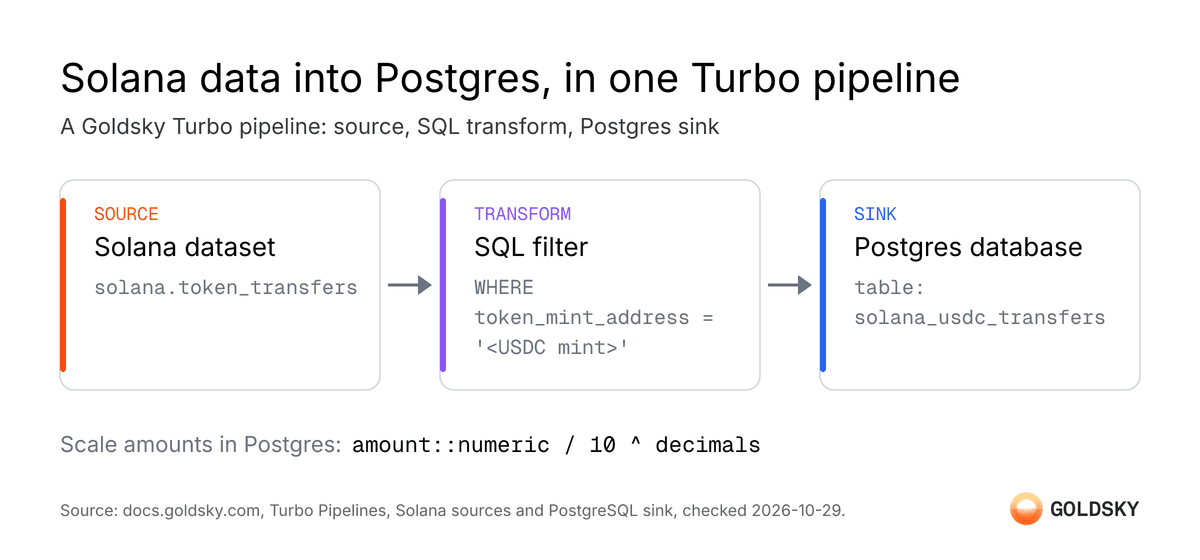
Goldsky Turbo Pipelines can stream a Solana dataset straight into a Postgres table. This post builds one pipeline end to end. The source is a Solana SPL token transfer dataset, the transform is a SQL filter for one token, and the sink is Postgres with upserts. Every field and command below comes from the Turbo Pipelines documentation (opens in a new tab).
Why use Turbo for Solana to Postgres
A team can build this pipeline on its own Solana RPC node or Geyser plugin. Turbo Pipelines replaces that setup with curated datasets, SQL in the stream, and a Postgres sink. Goldsky publishes these performance features on the Turbo Pipelines product page.
- Millisecond processing. Turbo runs on a Rust engine with vectorized execution and inter-batch parallelism. One worker decodes and filters 1,000 Ethereum logs in 3 to 4 ms on average. Data reaches the sink with sub-second latency, typically in the millisecond range.
- Full Solana history with no node to run. Goldsky's 9 curated Solana datasets hold full history from genesis. Goldsky's comparison table lists historical replay for a Geyser-based setup as "none to 20 minutes".
- Fast scan for backfills. Fast scan mode processes only the accounts and programs a pipeline needs. It skips the other slots. With
block_ranges, one pipeline processes several disjoint slot ranges. - Throughput that scales with
resource_size. Backfill throughput scales linearly with pipeline size. Goldsky reports up to 20 times on the self-serve tier in How Goldsky made historical blockchain data backfills 12x faster. - Filtering before the write. The SQL transform runs in the stream, so only the rows for one mint reach Postgres. Goldsky's Solana docs advise applying filters in SQL as early as possible.
- Recovery without duplicate rows. Goldsky's comparison table lists high availability and automatic recovery for Turbo, and neither for a Geyser-based setup. Turbo delivers each row at least once. With
primary_keyset, the Postgres sink upserts, so a replayed row does not add a duplicate.
What you need before you start
- The Turbo CLI extension installed, and a Goldsky account logged in to a project. The Turbo Pipelines quickstart (opens in a new tab) covers both.
- A Postgres database. Goldsky can host one on Scale plans and above, or a pipeline can write to a database you already run.
Step 1: Pick a Solana dataset
Steps 1 and 2 follow the SPL token guide in Solana sources for Turbo Pipelines (opens in a new tab). Goldsky's curated Solana datasets cover blocks, transactions, instructions, and token transfers. They also cover native balances, token balances, and validator rewards, all with full history from genesis.
This example uses solana.token_transfers, which gives one row per SPL token transfer. Solana sources start from a slot number with start_block, not start_at: latest or start_at: earliest as EVM sources do. Leave start_block out to start from the latest slot.
sources:
  token_transfers:
    type: dataset
    dataset_name: solana.token_transfers
    version: 1.0.0
start_block: 312000000The solana.token_transfers schema includes id (the primary key), signature, block_slot, block_timestamp, from_token_account, to_token_account, from_owner, to_owner, token_mint_address, amount (the raw, unscaled integer), transfer_type, and decimals (the mint's decimal count).
Step 2: Filter to one token with a SQL transform
Add a SQL transform to keep only transfers of one SPL token. The example below filters to USDC on Solana by its mint address:
transforms:
  usdc_transfers:
    type: sql
    primary_key: id
    sql: |
      SELECT
        id,
        token_mint_address,
        from_token_account,
        to_token_account,
        amount,
        decimals,
        block_slot,
        block_timestamp,
        signature as transaction_signature,
        _gs_op
      FROM token_transfers
WHERE token_mint_address = 'EPjFWdd5AufqSSqeM2qN1xzybapC8G4wEGGkZwyTDt1v'Scaling amount to token units. amount is the raw integer. Every solana.token_transfers row also carries the mint's decimals, so the scaling needs no lookup. Keep both columns in the sink, and scale in Postgres when you query:
SELECT token_mint_address, amount::numeric / 10 ^ decimals AS amount_ui
FROM solana_usdc_transfers;Postgres numeric keeps the value exact. If you only need display values, solana.token_balances already holds human-scaled balances in amount_before and amount_after. Those columns are Float64, so do not use them for exact accounting.
Step 3: Set up the Postgres sink
This step follows the PostgreSQL sink docs for Turbo Pipelines (opens in a new tab).
Option A: Goldsky-hosted Postgres
On a Scale plan or above, Goldsky can provision and manage the database. Create one from the CLI:
goldsky hosted-sink create --type postgresThis prints a secret name, ID, and type. Use --name to set the secret name, or Goldsky generates one like HOSTED_POSTGRES_. The connection string itself is not printed. Look it up in the web app's Sinks section if needed.
Option B: Bring your own Postgres
Create a role Goldsky can write with:
CREATE ROLE goldsky_writer WITH LOGIN PASSWORD 'your_secure_password';
GRANT CREATE ON DATABASE your_database TO goldsky_writer;
GRANT USAGE, CREATE ON SCHEMA <schemaName> TO goldsky_writer;Then create a Goldsky secret with the connection string:
goldsky secret create MY_POSTGRESPaste a connection string in the form postgres://goldsky_writer:[email protected]:5432/your_database?sslmode=require when prompted.
Sink configuration
Reference the secret name from either option in the sink block:
sinks:
  postgres_usdc:
    type: postgres
    from: usdc_transfers
    schema: public
    table: solana_usdc_transfers
    secret_name: MY_POSTGRES
primary_key: idSetting primary_key: id turns each write into an upsert (INSERT ... ON CONFLICT DO UPDATE). Without it, every write is a plain insert with no primary key constraint. Turbo creates the schema and table automatically on first write, with columns inferred from the upstream data. Goldsky does not change an existing table to add new columns later. A schema change upstream needs a manual migration or a dropped table.
Step 4: Assemble the full pipeline
name: solana-usdc-tracker
resource_size: s

sources:
  token_transfers:
    type: dataset
    dataset_name: solana.token_transfers
    version: 1.0.0
    start_block: 312000000

transforms:
  usdc_transfers:
    type: sql
    primary_key: id
    sql: |
      SELECT
        id,
        token_mint_address,
        from_token_account,
        to_token_account,
        amount,
        decimals,
        block_slot,
        block_timestamp,
        signature as transaction_signature,
        _gs_op
      FROM token_transfers
      WHERE token_mint_address = 'EPjFWdd5AufqSSqeM2qN1xzybapC8G4wEGGkZwyTDt1v'

sinks:
  postgres_usdc:
    type: postgres
    from: usdc_transfers
    schema: public
    table: solana_usdc_transfers
    secret_name: MY_POSTGRES
primary_key: idThis full YAML follows the SPL token guide in the Solana sources docs. The resource_size options are s, m, l, xl, and xxl, as listed in the Mirror to Turbo migration guide (opens in a new tab).
Step 5: Validate, deploy, and watch the data
The commands in this step come from the Turbo CLI reference (opens in a new tab). Validate the YAML before deploying:
goldsky turbo validate solana-usdc-tracker.yamlDeploy it:
goldsky turbo apply solana-usdc-tracker.yamlA successful deploy prints a success line, for example ✓ Pipeline 'solana-usdc-tracker' applied successfully.
Watch data flow through the pipeline live:
goldsky turbo inspect solana-usdc-tracker.yamlOr stream the pipeline's runtime logs:
goldsky turbo logs solana-usdc-tracker.yamlBackfilling a large history
Solana datasets carry full history from genesis, so a pipeline can also backfill a historical range instead of only tracking new transfers. Use block_ranges, a JSON-encoded string of [start, end] slot pairs, to process several disjoint windows in one pipeline:
sources:
  disjoint_ranges:
    type: dataset
    dataset_name: solana.transactions
    version: 1.0.0
block_ranges: "[[300000000, 300000099], [300100000, 300100099]]"Ranges must be non-empty, non-overlapping, and in increasing order, or the pipeline fails at startup. block_ranges takes precedence when a pipeline sets both block_ranges and start_block/end_block.
For a large backfill into Postgres, the PostgreSQL sink docs give two tips. Hold off on indexes until the backfill finishes. Raise batch_size on the sink, starting around 1000 rows per batch.
FAQ
Which Solana datasets does Goldsky offer for Turbo?
Nine: solana.blocks, solana.transactions, solana.transactions_with_instructions, solana.instructions, solana.token_transfers, solana.stablecoin_transfers, solana.native_balances, solana.token_balances, and solana.rewards.
How does a Solana source set its starting position?
With start_block, a slot number. Omit it to start from the latest slot. This differs from EVM sources, which use start_at: latest or start_at: earliest.
Does Turbo create the Postgres table automatically?
Yes, on first write, with columns inferred from the upstream data. Goldsky does not add new columns to an existing table if the upstream schema changes later.
What happens to uint256-sized values written to Postgres?
This question applies to EVM datasets, not the Solana token_transfers dataset used in this post. Solana's amount column is a UInt64, which the Postgres sink stores as NUMERIC.
Can this pipeline also run on Goldsky-hosted Postgres instead of a self-managed database?
Yes. Hosted Postgres is available on Scale plans and above, provisioned from the CLI with goldsky hosted-sink create --type postgres, with no separate secret-creation step.
 Robinhood
 HyperEVM
 Arc
 Solana
 Ethereum
 Polymarket
 Base
 Tempo
 Bitcoin
