Stream onchain data to ClickHouse with a Goldsky Turbo pipeline
A Goldsky Turbo pipeline streams decoded onchain data into ClickHouse, Postgres, Kafka, and other sinks. This guide builds one pipeline for Base USDC transfers into ClickHouse, runs an analytics query on the result, and shows how the same source writes to a second sink.


Account Executive
A Goldsky Turbo pipeline streams onchain data into any sink a team already runs, not only ClickHouse. This guide builds one pipeline for Base USDC transfers. It uses ClickHouse as the worked example, because its merge-based table engine shows how Turbo handles a corrected row. The source is a curated, decoded ERC-20 transfer dataset. The transform is a SQL filter for one token contract. Every YAML field and CLI command below comes from the Turbo Pipelines documentation (opens in a new tab).
Why use Turbo for this
A team can stream Base logs through its own RPC node or a self-hosted Kafka consumer, then write a loader into ClickHouse. Turbo Pipelines replaces that setup with a curated dataset, SQL in the stream, and a sink with no loader code. Goldsky documents these features on the Turbo Pipelines product page:
- Decoded data with no node to run. Goldsky's curated
erc20_transfersdataset gives one row per transfer, with the token address, sender, recipient, and amount already decoded. A team does not parse raw logs. - Millisecond processing. Turbo runs on a Rust engine with vectorized execution and inter-batch parallelism. One worker decodes and filters 1,000 Ethereum logs in 3 to 4 ms on average.
- At-least-once delivery. Goldsky's product page states built-in reliability with automatic retries and at-least-once delivery. A
primary_keyon the ClickHouse sink turns a retried row into a no-op instead of a duplicate row. - Filtering before the write. The SQL transform runs in the stream, so only rows for one token contract reach the sink.
- Automatic table creation. The ClickHouse sink creates the destination table on first write, with columns inferred from the upstream data.
- 150+ supported chains, one pipeline shape. Goldsky's product page lists 150+ supported chains, with Base at full mainnet and testnet coverage and fast scan support, per Supported networks (opens in a new tab).
A team moving from a hand-built indexer to Turbo drops the RPC node, the log decoder, and the loader script. The pipeline is one YAML file and two CLI commands.
ClickHouse is one of many Turbo sinks
ClickHouse is this guide's worked example, not Turbo's only destination. Turbo's supported sinks include PostgreSQL, PostgreSQL aggregation, ClickHouse, MySQL, webhook, Kafka, Amazon S3, data warehouses loaded through S3, SQS, EventBridge, Pub/Sub, and S2. The full list is on the Turbo sinks overview (opens in a new tab). A team that already runs Postgres follows the same source and transform shape below. Goldsky's guide on indexing Solana data into Postgres walks through that sink end to end.
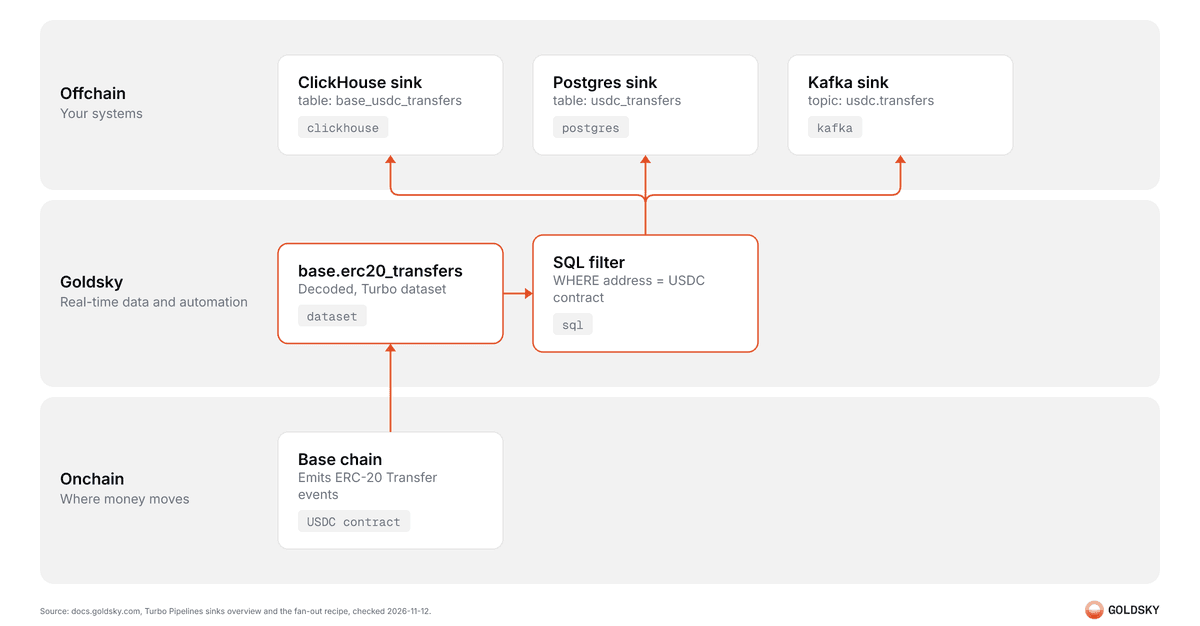
The same source and transform can also write to more than one sink at once, per Goldsky's fan-out pattern (opens in a new tab):
name: base-usdc-fan-out
resource_size: m

sources:
  base_transfers:
    type: dataset
    dataset_name: base.erc20_transfers
    version: 1.2.0
    start_at: latest

transforms:
  usdc_transfers:
    type: sql
    primary_key: id
    sql: |
      SELECT
        id,
        address AS token,
        sender,
        recipient,
        amount,
        block_timestamp,
        transaction_hash,
        _gs_op
      FROM base_transfers
      WHERE address = '0x833589fcd6edb6e08f4c7c32d4f71b54bda02913'

sinks:
  clickhouse_usdc:
    type: clickhouse
    from: usdc_transfers
    table: base_usdc_transfers
    primary_key: id
    secret_name: MY_CLICKHOUSE

  postgres_usdc:
    type: postgres
    from: usdc_transfers
    schema: public
    table: base_usdc_transfers
    primary_key: id
secret_name: MY_POSTGRESSinks run independently, each with its own batching settings, so a sink that fails does not block the others. All sinks share one checkpoint barrier, so a sink that falls behind slows the whole pipeline.
Swapping or adding a sink changes only the sinks block. The source and the transform stay the same.
What you need before you start
- The Turbo CLI extension installed, and a Goldsky account logged in to a project.
- A ClickHouse database reachable from Goldsky, with a user that can create tables.
Step 1: Pick a dataset
Goldsky's curated EVM datasets include erc20_transfers, erc721_transfers, erc1155_transfers, raw_blocks, raw_transactions, raw_logs, and raw_traces, per EVM sources for Turbo Pipelines (opens in a new tab). This guide uses base.erc20_transfers, which gives one row per ERC-20 transfer on Base, already decoded. Its fields are id, address, sender, recipient, amount, transaction_hash, block_hash, block_number, block_timestamp, transaction_index, and log_index, per the curated dataset schema reference (opens in a new tab) and goldsky dataset get base.erc20_transfers. EVM sources start from start_at: latest or start_at: earliest, per the Turbo sources overview (opens in a new tab).
sources:
  base_transfers:
    type: dataset
    dataset_name: base.erc20_transfers
    version: 1.2.0
start_at: lateststart_at: latest means the pipeline streams only new transfers. A team that needs history too adds a backfill, covered below.
Step 2: Filter to one token with a SQL transform
Add a SQL transform to keep only transfers of one ERC-20 token. The example below filters to USDC on Base by its contract address:
transforms:
  usdc_transfers:
    type: sql
    primary_key: id
    sql: |
      SELECT
        id,
        address AS token,
        sender,
        recipient,
        amount,
        block_timestamp,
        transaction_hash,
        _gs_op
      FROM base_transfers
WHERE address = '0x833589fcd6edb6e08f4c7c32d4f71b54bda02913'The filter runs before the write. ClickHouse only stores USDC rows, not every ERC-20 transfer on Base.
Step 3: Set up the ClickHouse sink
Create a ClickHouse secret with goldsky secret create and select the clickHouse type, per the ClickHouse sink docs (opens in a new tab). The secret stores the endpoint URL, username, password, and database name. The sink writes to that database.
goldsky secret create MY_CLICKHOUSEReference the secret in the sink block:
sinks:
  clickhouse_usdc:
    type: clickhouse
    from: usdc_transfers
    table: base_usdc_transfers
    primary_key: id
secret_name: MY_CLICKHOUSEThe sink creates the table on startup with CREATE TABLE IF NOT EXISTS. By default it uses a ReplacingMergeTree(insert_time, is_deleted) engine, ordered by primary_key, with an insert_time column added automatically. Setting append_only_mode: false switches the engine to a plain ReplacingMergeTree(). A repeat write is then an INSERT, and a delete is an ALTER TABLE ... DELETE. Both options come from the ClickHouse sink docs.
The engine choice decides how a corrected or deleted row lands in ClickHouse. The next section covers what the docs state about that, and what they do not.
Step 4: Assemble the full pipeline
name: base-usdc-to-clickhouse
resource_size: s

sources:
  base_transfers:
    type: dataset
    dataset_name: base.erc20_transfers
    version: 1.2.0
    start_at: latest

transforms:
  usdc_transfers:
    type: sql
    primary_key: id
    sql: |
      SELECT
        id,
        address AS token,
        sender,
        recipient,
        amount,
        block_timestamp,
        transaction_hash,
        _gs_op
      FROM base_transfers
      WHERE address = '0x833589fcd6edb6e08f4c7c32d4f71b54bda02913'

sinks:
  clickhouse_usdc:
    type: clickhouse
    from: usdc_transfers
    table: base_usdc_transfers
    primary_key: id
secret_name: MY_CLICKHOUSEStep 5: Validate, deploy, and watch the data
The commands below come from the Turbo CLI reference (opens in a new tab). Validate the YAML before deploying:
goldsky turbo validate base-usdc-to-clickhouse.yamlDeploy it:
goldsky turbo apply base-usdc-to-clickhouse.yamlWatch data flow through the pipeline live:
goldsky turbo inspect base-usdc-to-clickhouse.yamlOr stream the pipeline's runtime logs:
goldsky turbo logs base-usdc-to-clickhouse.yamlvalidate catches a schema or syntax error before any write happens. inspect shows the first rows landing in the table, so a team sees the filter work before it trusts the data.
Step 6: Query the result
ClickHouse deduplicates rows on background merges. A query against the raw table can still see more than one version of a row for a short time. Add FINAL to read only the latest version, per the ClickHouse sink docs:
SELECT
  toDate(block_timestamp) AS day,
  count() AS transfer_count,
  sum(amount) / 1e6 AS volume_usdc
FROM base_usdc_transfers FINAL
GROUP BY day
ORDER BY day DESC
LIMIT 7USDC carries 6 decimals, so dividing the raw amount by 1,000,000 gives the token amount.
One query against the ClickHouse sink's own FINAL modifier gives a daily transfer count and volume, with no separate deduplication step in application code.
The table engine, reorgs, and upserts
Goldsky's ClickHouse sink docs state the following, and nothing more specific about chain reorgs:
| Behavior | What the docs state |
|---|---|
| Engine | ReplacingMergeTree(insert_time, is_deleted) by default, ReplacingMergeTree() when append_only_mode: false |
| Order | ORDER BY the primary_key column or columns |
| Deduplication | Handled by ClickHouse merges, keyed on primary_key |
| Reading the latest row | SELECT ... FROM table FINAL, or the FINAL query setting |
A row marked deleted (_gs_op = 'd') | Marked is_deleted = 1 by default, cleaned up by merges. With append_only_mode: false, issued as ALTER TABLE ... DELETE |
The docs do not name chain reorgs directly. A corrected row reaches the sink as an updated _gs_op write with the same primary_key, and the stated deduplication mechanism is what resolves it. Beyond that general update-and-delete behavior, the Goldsky docs make no reorg-specific claim.
A team should query with FINAL, or wait for a merge, before it treats a ClickHouse row count as final. The default engine favors correctness over raw write speed. Every merge re-examines each primary key.
Backfilling history
A Turbo pipeline can backfill history on the same curated dataset, not just stream new transfers. Fast scan (opens in a new tab) speeds up a historical scan when a filter narrows the rows read. Job mode (opens in a new tab) turns that bounded scan into a pipeline that runs once and exits. The backfill pipeline below is the same source, transform, and sink as above, with job: true and a bounded filter added:
name: base-usdc-backfill
resource_size: s
job: true

sources:
  base_transfers:
    type: dataset
    dataset_name: base.erc20_transfers
    version: 1.2.0
    start_at: earliest
    filter: address = '0x833589fcd6edb6e08f4c7c32d4f71b54bda02913' AND block_number <= 20000000

transforms:
  usdc_transfers:
    type: sql
    primary_key: id
    sql: |
      SELECT
        id,
        address AS token,
        sender,
        recipient,
        amount,
        block_timestamp,
        transaction_hash,
        _gs_op
      FROM base_transfers
      WHERE address = '0x833589fcd6edb6e08f4c7c32d4f71b54bda02913'

sinks:
  clickhouse_usdc:
    type: clickhouse
    from: usdc_transfers
    table: base_usdc_transfers
    primary_key: id
secret_name: MY_CLICKHOUSEA job-mode pipeline auto-deletes 1 hour after it finishes, per the job-mode docs, so a team gets its logs before that window closes.
FAQ
Does the ClickHouse sink create the table automatically?
Yes. It runs CREATE TABLE IF NOT EXISTS on startup, with columns inferred from the upstream transform.
What happens when Goldsky corrects a reorged block already written to ClickHouse?
The docs describe only the general mechanism: a later write with the same primary_key and the ClickHouse merge process resolve it through ReplacingMergeTree deduplication. Goldsky's docs do not state reorg handling beyond that.
How does a team read only the latest version of each row?
Add FINAL to the query, as in SELECT ... FROM base_usdc_transfers FINAL, or set the FINAL query setting in ClickHouse.
How can a team get this pipeline's full history instead of only new transfers?
Pair start_at: earliest with a filter that bounds block_number, and set job: true, as in the backfill example above. The Turbo vs Mirror migration guide covers more on moving an existing pipeline to Turbo.
Which sink should a team pick for a Turbo pipeline?
PostgreSQL and MySQL fit transactional data, updates, and relational queries. PostgreSQL aggregation fits a real-time running total, such as a balance or a count. ClickHouse fits high-volume analytics and time-series data. Webhook fits a real-time notification. Kafka fits downstream processing and event sourcing. A data warehouse, loaded through S3, fits Snowflake, Databricks, or BigQuery. SQS fits a decoupled, event-driven architecture. Pub/Sub fans out to many Google Cloud consumers.
 Robinhood
 HyperEVM
 Arc
 Solana
 Ethereum
 Polymarket
 Base
 Tempo
 Bitcoin
