Show token approvals and value at risk in your app
What it is
Token approval exposure monitoring shows the approvals, or allowances, a wallet has granted (permissions for a contract to move its tokens) and how much value each one puts at risk.
Wallet apps and custody platforms show it because an old approval to a contract that is later exploited can drain a wallet without the user signing anything new.
Goldsky catches each approval, including ones granted before you started, reads the balance behind it and flags the risky ones to your backend; the screen that lists them, the revoke prompt and the decision to revoke stay with your app and your users.
Who it’s for
Self-custody wallet apps, embedded wallet providers and custody platforms that show users what their wallets have signed.
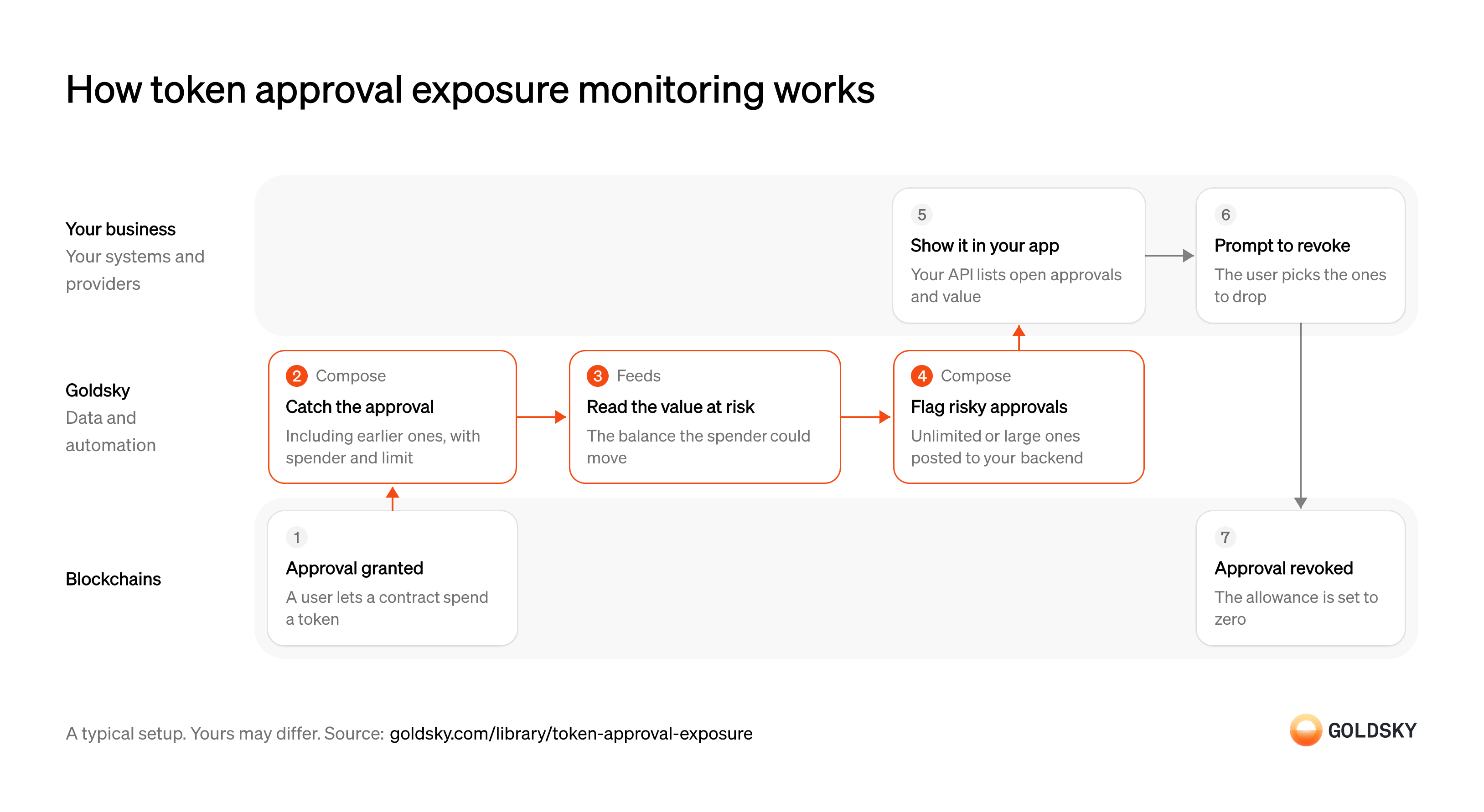
How token approval exposure monitoring works
The diagram follows one approval from the moment a user grants it to the moment they revoke it, with the value at risk read and shown in between. Your setup may differ.
A user grants a token approval
To trade or pay through a contract, a wallet first allows that contract to move a set amount of one token (an approval, or allowance).
The approval is recorded onchain and stays in force until the user changes it, even after the trade is done. Many apps ask for an unlimited amount, so one approval can cover the whole balance.
Catch every approval, past and new
Handled by Goldsky ComposeYou can only show approvals you know about, including the ones granted before you started looking.
The approval event names the owner, the spender (the contract allowed to move tokens) and the limit, and has to be decoded into those fields. Past approvals have to be read in the order they happened, so that a later revoke overrides the approval it cancels.
Compose can trigger a task from a custom
Trigger tasks from onchain events (opens in a new tab)pipelinethat keepsApprovalevents from your users’ wallets, and the task decodes the spender and limit withdecodeEventLog(). Start that pipeline’s source atstart_at: earliestand it replays approvals granted before the task existed, one at a time in block order by default.Read the value at risk
Handled by Goldsky FeedsAn approval matters as much as the tokens it can move, which is the smaller of the limit and the wallet’s balance.
The owner’s current balance of the approved token is read and valued, so the app can show a dollar figure. Balances change with every transfer, so the figure is a reading at one time and needs refreshing when the user looks.
With Goldsky, the task calls the Feeds balances endpoint for the owner’s wallet and takes the approved token’s row, which carries its
Read the balances endpoint reference (opens in a new tab)value_usd.Flag the risky approvals
Handled by Goldsky ComposeMost approvals are routine; users need to see the ones that could cost them most.
Your rule marks an approval risky, for example an unlimited limit, a large value at risk or a spender your team distrusts, and sends it to your backend. Rules that look at one approval at a time fit here; rules about patterns across approvals run in your backend.
The task applies your rule and posts each flagged approval to your backend with
Make auditable calls with fetch (opens in a new tab)ctx.fetch, and the call is recorded on its run.Show open approvals in your app
Users can only act on approvals they can see, with the value each one puts at risk.
Your API returns each wallet’s open approvals, spender and value at risk, with the flagged ones first. Name the spender where you can, because a bare contract address means nothing to most users.
Prompt the user to revoke
Only the wallet owner can withdraw an approval, so the app asks and the user decides.
Your app suggests the approvals to drop and builds the transaction that sets each one to zero, for the user to sign. Revoking an approval a live position depends on can break that position, so show what each spender is used for.
The revocation is recorded onchain
A revoke is itself an approval, set to zero, so the record of exposure closes on the chain.
The new zero approval goes through the same path as any other, so your list marks it closed. Until that transaction is in a block, the old approval still stands.
What you control
- Your team
- Show open approvals in your app
- Prompt the user to revoke
Security and deployment
- SOC 2 Type IIIndependently audited security controls.
- Dedicated infrastructureSingle-tenant options for production workloads.
- Data residencyCloud, on-premises or co-located.
More use cases that enforce transaction policies
Monitor token approval exposure with Goldsky
We’ll map it to your systems and show you what Goldsky runs, so your team builds the product, not the pipelines underneath it.
 Robinhood
 HyperEVM
 Arc
 Solana
 Ethereum
 Polymarket
 Base
 Tempo
 Bitcoin