Contract indexing for data engineers: decoded events, reorgs, and backfills in SQL
The five things a data engineer needs from contract indexing, and how Goldsky Turbo Pipelines does each one: decoded events, reorgs, backfills, source filters, and a warehouse sink.

Software Engineer
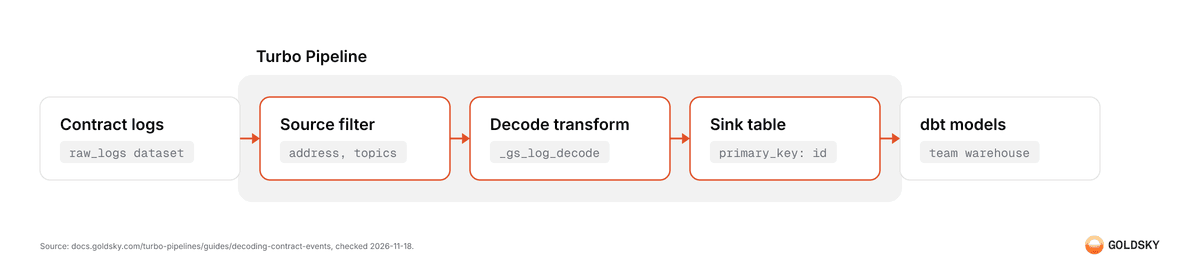
A data engineer needs five things from contract indexing. They are decoded events as typed rows, reorg handling, and backfill with live data in one definition. The last two are filters at the source and a sink in the team's own warehouse. Goldsky Turbo Pipelines does each one with a YAML pipeline and SQL transforms. The engineer runs no indexer and writes no mapping code. Every config in this guide is copied from the Goldsky docs.
1. Decoded events as typed rows
Turbo Pipelines reads raw EVM logs from a raw_logs dataset and decodes them in a SQL transform. The decoding guide (opens in a new tab) uses two functions. _gs_fetch_abi gets the contract ABI from a URL. _gs_log_decode applies that ABI to the topics and data columns of each log.
SELECT
  id,
  _gs_log_decode(
    _gs_fetch_abi('https://gist.githubusercontent.com/jeffling/0320808b7f3cc0e8d9cc6c3b113e8156/raw/99bde70acecd4dc339b5a81aae39954973f5d178/gistfile1.txt', 'raw'),
    topics,
    data
  ) as decoded,
  block_number,
  transaction_hash
FROM my_base_raw_logs
WHERE address = '0xcf205808ed36593aa40a44f10c7f7c2f67d4a4d4'The result is a struct with an event_signature string and an event_params array. A second transform puts them into columns:
SELECT
  id,
  decoded.event_params as event_params,
  decoded.event_signature as event_signature,
  block_number,
  transaction_hash
FROM friendtech_decoded
WHERE decoded IS NOT NULLDecoded parameters come back by position, not by name. The array starts at 1, so decoded.event_params[3] is the third parameter. One decode transform can supply several downstream transforms. Each of them filters on decoded.event_signature for one event type and names its own columns.
A dbt model then selects decoded columns by name. The decode logic stays in one place, the pipeline.
2. Reorg handling
Goldsky checks for a continuous block hash chain when it ingests a block. The data quality page (opens in a new tab) states what occurs when the chain is not valid. Goldsky issues deletes and updates into its dataset and goes backward until the chain is consistent again. All deletes and updates propagate to downstream sinks. A pipeline that writes chain data into a database gets the changes from a reorg or a rollback automatically.
A database sink needs a stable key to apply an update or a delete to the correct row. The list of supported sinks (opens in a new tab) states that primary_key is required for upserts in database sinks, and that the ClickHouse sink always requires it. The decoding examples set primary_key: id on each transform and sink.
The warehouse table does not need a separate job to delete rows from replaced blocks.
3. Backfill and live data in one pipeline
One pipeline definition covers the full history of a contract and its live events. The EVM sources page (opens in a new tab) calls the method fast scan. With start_at: earliest and a filter on the source, the pipeline skips the blocks that do not match during the historical scan. Fast scan speeds up backfills only. At the chain tip, the pipeline processes every block.
For a one-time load, the job mode page (opens in a new tab) puts an upper bound on block_number in the filter:
sources:
  base_usdc_logs:
    type: dataset
    dataset_name: base.raw_logs
    version: 1.0.0
    start_at: earliest
filter: address = '0x833589fcd6edb6e08f4c7c32d4f71b54bda02913' AND block_number <= 20000000With job: true at the top level, the pipeline processes blocks up to and including block 20,000,000 and then exits. On an EVM dataset source, the bound must be in the filter expression. The end_block field is for Solana sources, and an EVM source ignores it.
The same pipeline shape gives two modes: a stream with no end, or a bounded run for one historical load.
4. Filters at the source
An EVM raw_logs source with no filter carries every log on the chain. The filter field supports =, <>, >, <, AND, OR, IN (...), and LIKE. A pipeline can select one address, a list of addresses with IN (...), or one event with topics LIKE '0xEVENT_SIG_HASH%'.
Some address lists change, for example the contracts that a factory creates. For that case, the dynamic tables page (opens in a new tab) describes a lookup table in Postgres. A SQL transform filters on it with dynamic_table_check(). A change to the lookup table applies to the pipeline while it runs, with no redeploy.
The warehouse gets only the logs of the contracts that the team tracks.
5. The sink is the team's own database
Turbo Pipelines writes the decoded rows to a destination that the team owns. The docs list PostgreSQL, ClickHouse, MySQL, Kafka, Amazon S3, webhooks, and more. Snowflake, Databricks, and BigQuery load the data through S3. The worked example below uses Postgres, and it is one sink of many. It comes from the guide to export contract events (opens in a new tab), and it decodes every event of the Bored Ape Yacht Club contract:
name: bored-ape-events
resource_size: s

sources:
  ethereum_raw_logs:
    type: dataset
    dataset_name: ethereum.raw_logs
    version: 1.0.0
    start_at: latest # Process data from the time this pipeline is created

transforms:
  # Decode every BAYC log using the contract ABI fetched from Etherscan
  bayc_decoded:
    type: sql
    primary_key: id
    sql: |
      SELECT
        id,
        address,
        _gs_log_decode(
          _gs_fetch_abi('https://api.etherscan.io/api?module=contract&action=getabi&address=0xbc4ca0eda7647a8ab7c2061c2e118a18a936f13d&apikey=YOUR_KEY', 'etherscan'),
          topics,
          data
        ) as decoded,
        block_number,
        block_timestamp,
        transaction_hash
      FROM ethereum_raw_logs
      WHERE address = '0xbc4ca0eda7647a8ab7c2061c2e118a18a936f13d'

  # Unnest the decoded event name and parameters into flat columns
  bayc_events:
    type: sql
    primary_key: id
    sql: |
      SELECT
        id,
        address,
        decoded.event_signature as event_signature,
        decoded.event_params as event_params,
        block_number,
        block_timestamp,
        transaction_hash
      FROM bayc_decoded
      WHERE decoded IS NOT NULL

sinks:
  bayc_postgres:
    type: postgres
    from: bayc_events
    schema: public
    table: bored_ape_events
    secret_name: BAYC_POSTGRES
primary_key: idThe guide creates the database secret and then runs two commands on the file:
goldsky secret create BAYC_POSTGRES
goldsky turbo validate bored-ape-events.yaml
goldsky turbo apply bored-ape-events.yamlRows then go into public.bored_ape_events, and the guide queries them with SQL:
SELECT event_signature, count(*)
FROM public.bored_ape_events
GROUP BY event_signature
ORDER BY count(*) DESC;A team on ClickHouse uses the same pipeline shape with a ClickHouse sink, as in Stream onchain data to ClickHouse. The dbt models on top do not change with the sink, because the pipeline writes decoded columns and not raw log bytes.
When a subgraph fits better
Turbo Pipelines fit a team that wants rows in a warehouse table. A team that needs a GraphQL API for contract events, with no database of its own, fits a subgraph better. Query smart contract data without writing indexing code covers the no-code subgraph wizard. For a scored comparison of platforms, see Goldsky's page on the best blockchain data pipelines.
FAQ
Does Turbo Pipelines replace a custom indexer?
For the logs of a contract, yes. A pipeline reads the raw_logs dataset, decodes it with _gs_log_decode, and writes typed rows to a database. The team writes no RPC polling code.
Does the warehouse table show a reorg?
Yes. Goldsky issues deletes and updates when a reorg or a rollback occurs, and they propagate to the sink. A database sink applies them with its primary_key.
Can one pipeline backfill history and then stay live?
Yes. Set start_at: earliest with a source filter on the contract address. The pipeline scans the history with fast scan and then continues with new blocks.
What if the list of contracts changes?
Use a dynamic table in Postgres and filter on it with dynamic_table_check(). A new address in the table applies with no redeploy.
How does a data engineer start on Goldsky?
Install the Goldsky CLI, run goldsky login, and copy the Postgres example above. Point secret_name at a database secret, then run goldsky turbo apply. We support 149 chains and 269 networks, and the chains page has a filter for Turbo.
 Robinhood
 HyperEVM
 Arc
 Solana
 Ethereum
 Polymarket
 Base
 Tempo
 Bitcoin
