Mirror blockchain data to Postgres: an EVM worked example with Turbo
An EVM worked example: decode contract events with Turbo Pipelines and write them to Postgres, with upserts, reorgs, uint256 columns, and cost.


Solutions Engineer
Goldsky Turbo Pipelines write decoded onchain events to a Postgres database. You pick a dataset as the source, write a SQL transform that filters and decodes it, and name a Postgres sink. The result is a normal Postgres table that stays current as the chain moves, and your team queries it with SQL.
Turbo Pipelines replaced Mirror, our earlier pipeline product. Our Turbo vs Mirror comparison covers the differences. In this post, "mirror" means a copy of onchain data in your own database.
Our guide to Solana data in Postgres covers Solana. This post covers the EVM case: one contract, one chain, one table.
The worked example
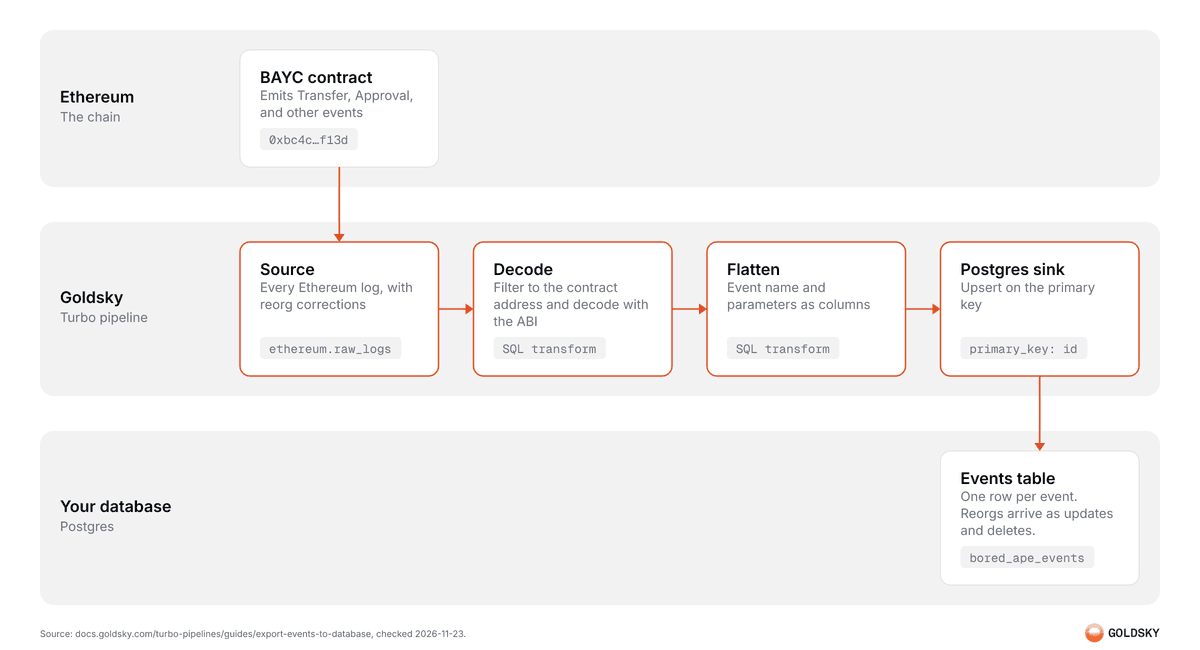
The example exports every event that the Bored Ape Yacht Club (BAYC) contract emits on Ethereum. The source is the ethereum.raw_logs dataset. The first SQL transform filters to the BAYC address and decodes each log with the contract ABI. The second transform puts the event name and its parameters into flat columns. The steps follow our guide to exporting contract events to Postgres (opens in a new tab).
Step 1: choose a database and create a secret
The sink works with two kinds of database. On the Scale plan and above, we can provision a hosted Postgres database for you, and it registers its own secret. You can also connect a database that you already run, such as Neon, Supabase, RDS, or Cloud SQL. For your own database, store the connection string as a Goldsky secret:
goldsky secret create BAYC_POSTGRESThe CLI asks for the connection string:
postgres://username:password@host:port/databaseStep 2: define the pipeline
name: bored-ape-events
resource_size: s

sources:
  ethereum_raw_logs:
    type: dataset
    dataset_name: ethereum.raw_logs
    version: 1.0.0
    start_at: latest # Process data from the time this pipeline is created

transforms:
  # Decode every BAYC log using the contract ABI fetched from Etherscan
  bayc_decoded:
    type: sql
    primary_key: id
    sql: |
      SELECT
        id,
        address,
        _gs_log_decode(
          _gs_fetch_abi('https://api.etherscan.io/api?module=contract&action=getabi&address=0xbc4ca0eda7647a8ab7c2061c2e118a18a936f13d&apikey=YOUR_KEY', 'etherscan'),
          topics,
          data
        ) as decoded,
        block_number,
        block_timestamp,
        transaction_hash
      FROM ethereum_raw_logs
      WHERE address = '0xbc4ca0eda7647a8ab7c2061c2e118a18a936f13d'

  # Unnest the decoded event name and parameters into flat columns
  bayc_events:
    type: sql
    primary_key: id
    sql: |
      SELECT
        id,
        address,
        decoded.event_signature as event_signature,
        decoded.event_params as event_params,
        block_number,
        block_timestamp,
        transaction_hash
      FROM bayc_decoded
      WHERE decoded IS NOT NULL

sinks:
  bayc_postgres:
    type: postgres
    from: bayc_events
    schema: public
    table: bored_ape_events
    secret_name: BAYC_POSTGRES
primary_key: idThe sink creates the schema and the table public.bored_ape_events on the first write. The columns come from the output of the last transform. Our decode contract events guide (opens in a new tab) explains the decode step, and our post on contract indexing for data engineers has more decode examples.
Step 3: validate and deploy
goldsky turbo validate bored-ape-events.yaml
goldsky turbo apply bored-ape-events.yamlStep 4: query the table
SELECT event_signature, count(*)
FROM public.bored_ape_events
GROUP BY event_signature
ORDER BY count(*) DESC;The query returns one row for each event type that the contract emits, with a count.
Upserts: a repeat delivery is not a duplicate row
Turbo delivers each record at least once. A pipeline can stop after a sink writes a batch and before the source commits its read position. After a restart, the source sends those records again. Our delivery guarantees page (opens in a new tab) explains the commit order.
The primary_key: id line in the sink handles the repeat. With a primary key, the Postgres sink (opens in a new tab) writes INSERT ... ON CONFLICT (id) DO UPDATE SET .... A repeated record overwrites its own row with the same values. Without primary_key, each write is a plain INSERT, and the same record can land twice.
The update_where option adds a condition to the update. For example, updated_at: ">" overwrites a row only when the incoming updated_at is newer than the stored value.
Reorgs: the table follows the canonical chain
When we ingest a block, we check that its parent hash matches the block before it. A mismatch means a reorg. We then send deletes and updates into the dataset until the chain is consistent again.
Those deletes and updates go through your pipeline like any other record. A Postgres sink with a primary_key applies them as upserts and deletes, so bored_ape_events matches the canonical chain with no work from you. Kafka, S3, and webhooks are append-only. For those destinations, your consumer receives the correction records and applies them itself.
256-bit integers: uint256 does not fit in bigint
EVM values such as value, balance, totalSupply, and ERC-20 amounts are uint256. A Postgres bigint holds 64 bits. Turbo carries these values through the pipeline as 32-byte values tagged U256 or I256.
The Postgres sink writes them to a NUMERIC(78, 0) column. 78 digits is the smallest precision that holds every U256 and I256 value. The sink sends each value as its full decimal string, so the write does not round and does not lose precision. If a table already exists and its column is not NUMERIC(78, 0) or a wider NUMERIC, the sink fails the write. It does not truncate the value.
Three rules apply when you read these columns:
- In SQL, a cast such as
CAST(value AS NUMERIC) / 1e18works. Keep the arithmetic inNUMERIC, because a floating-point type loses precision. - The Node.js
pglibrary returnsNUMERICas a string. Convert it withBigInt(row.value), not withNumber(row.value). - Do not read the column into a 64-bit integer or a double. The value overflows or loses precision.
A SQL transform can cast a value to a smaller type before the sink when you know that the value fits. ERC-20 amounts scaled by decimals often fit in DECIMAL(38, 18). A value that does not fit raises an error.
Backfill and live data in one pipeline
The example uses start_at: latest, so it processes only new records. With start_at: earliest, the same pipeline processes the history first and then continues with new blocks. No separate backfill job is necessary.
For the history of one contract on a large chain, add a filter to the source. The filter turns on fast scan (opens in a new tab), which skips the blocks that do not match. Fast scan speeds up the backfill only. At the chain tip, the pipeline processes every block.
A backfill that must end runs in job mode (opens in a new tab). Set job: true and put an upper bound on block_number inside the filter. EVM sources do not support the end_block field.
sources:
  base_usdc_logs:
    type: dataset
    dataset_name: base.raw_logs
    version: 1.0.0
    start_at: earliest
filter: address = '0x833589fcd6edb6e08f4c7c32d4f71b54bda02913' AND block_number <= 20000000Job mode works only on chains whose datasets support fast scan. Our supported chains page (opens in a new tab) has a Fast Scan column.
What it costs
We bill pipelines on two meters: worker-hours and records written. The pricing page (opens in a new tab) has both tables.
| Meter | The example pipeline | Scale plan |
|---|---|---|
| Compute | resource_size: s is 1 worker, or 730 worker-hours in an average month | The first 750 worker-hours each month are free. More hours cost $0.10 each. |
| Records written | Each row that the sink creates, updates, or deletes is one write | The first 1 million writes each month are free. The next writes cost $1.00 per 100,000. |
A pipeline of this size that writes 2 million rows in a month costs $10 on Scale. The Starter plan has no monthly allowance, and usage draws from Starter credits. A database that you run has no Goldsky database charge. Hosted Postgres is metered by the hour for CPU and storage.
Limits of the Postgres sink
- No automatic schema migrations. If the table exists, the sink does not run
ALTER TABLE. A new column in the transform fails at insert time until you drop or migrate the table. - A wrong column type for a 256-bit value fails the write. Drop the table and let the sink create it again, or alter the column to
NUMERIC(78, 0). update_whereapplies to upserts only. It has no effect without aprimary_key, or whenon_conflictisnothing.- The database can limit a backfill. Large writes are often limited by network or disk I/O in Postgres. Add indexes after the backfill, and raise
batch_size.1000is a good first value.
Other destinations
The same source and transforms can write to ClickHouse, MySQL, Kafka, S3, SQS, webhooks, and data warehouses. Our list of supported sinks (opens in a new tab) has every destination, and our post on onchain data in ClickHouse has a worked example.
FAQ
Does this guide use Mirror?
No. Turbo Pipelines replaced Mirror. The pipeline in this post is a Turbo pipeline.
Does this work on chains other than Ethereum?
Yes. Change the dataset name, for example base.raw_logs for Base. We support 149 chains and 269 networks, and our chains page shows the products on each chain.
What happens if the pipeline stops in the middle of a write?
The source sends the records again from its last committed position. The primary_key upsert overwrites those rows, so the table has no duplicates.
How do I start?
Install the Turbo CLI extension (opens in a new tab), create a Postgres secret with goldsky secret create, and apply the pipeline in this post with goldsky turbo apply.
 Robinhood
 HyperEVM
 Arc
 Solana
 Ethereum
 Polymarket
 Base
 Tempo
 Bitcoin
