Crypto market surveillance for tokenized securities
What is crypto market surveillance for tokenized securities?
Crypto market surveillance for tokenized securities is trade surveillance run on onchain trading: watching trades in tokenized shares for market abuse such as wash trades, where the same owner sits on both sides.
Venues and exchanges that list tokenized stocks run it because the shares are still securities, and they trade onchain at any hour.
Goldsky decodes every trade, queries your identity service for who owns each wallet, sends the trades your service marks as same-owner to your surveillance tool and keeps every trade in your warehouse; the owner records, the cases and the reports stay with your team.
Who uses crypto market surveillance for tokenized securities?
Tokenized-stock venues and regulated exchanges that list or trade tokenized shares and have to surveil that trading.
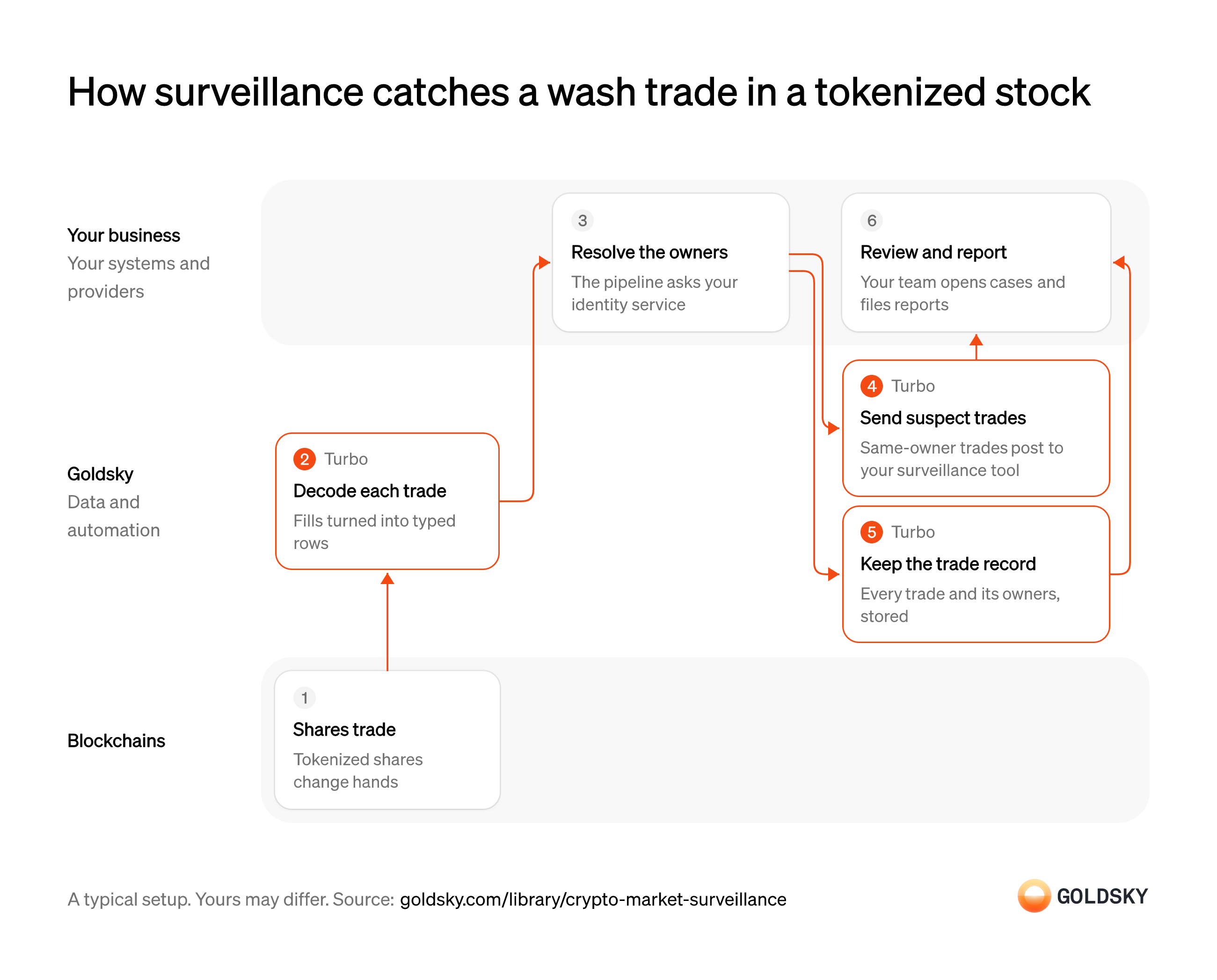
How surveillance catches a wash trade in a tokenized stock
Here one trade in a tokenized share goes from the chain to the case your surveillance team reviews and reports, with each wallet’s owner looked up on the way. Your setup may differ.
Shares trade onchain
Every trade in a tokenized share is a transfer recorded on the chain, at any hour.
Each trade moves shares from one wallet to another, often through a venue’s contract. The wallets are public but their owners aren’t, which is why surveillance needs your own identity records.
Decode each trade
Handled by Goldsky TurboRaw chain data has to become trade records (who sent what to whom, how much and when) before anyone can review it.
Every trade in the tokens you list has to be captured with both wallets, the amount, the time and the transaction, as it happens. A trade missed here never reaches surveillance at all.
Turbo Pipelines can read transfers of your share tokens from a curated transfers dataset, or decode your venue contract’s own events with
Decode contract events in SQL (opens in a new tab)_gs_log_decode(), and turn each one into a typed row.Resolve who owns each wallet
A wash trade is a sale with no change in owner, so each wallet has to be tied to the person or firm behind it.
The pipeline sends each trade to your identity service, which looks up the beneficial owner of the sender and the recipient and says whether they’re the same. Two known investors trading with each other isn’t a wash trade, so the check has to compare owners, not just confirm both wallets are known.
Send suspect trades to your surveillance tool
Handled by Goldsky TurboSurveillance analysts need the trades worth a look, not every trade on the venue.
Trades your identity service marked as same-owner go to the surveillance tool with both owners attached, one request per trade. Delivery can repeat after a network error, so the tool checks each trade’s ID before opening a second case.
With Goldsky, a Turbo Pipelines HTTP handler calls your identity service for each trade and adds the owner fields it returns; a SQL transform then keeps the rows marked
Set up the webhook sink (opens in a new tab)wash_suspect, and a webhook sink posts each one.Keep every trade and its owners
Handled by Goldsky TurboReviewers and examiners may ask about any trade later, including ones that raised no alert.
Every trade is stored with its transaction, time and resolved owners, keyed on the trade’s ID. With the whole record kept, an analyst can look for patterns across days, which a single-trade alert can’t see.
The same pipeline can write every enriched trade to a database table with a
How reorgs reach your tables (opens in a new tab)primary_key, such as ClickHouse, so a reorg correction updates or removes the row instead of leaving a trade that never happened.Review cases and file reports
An alert is a lead; your surveillance team decides whether it’s abuse and what has to be reported.
Analysts open a case for each suspect trade, check it against the stored record and the owner data, and file reports where your rules require them. Patterns that need totals or time windows, such as repeated trades between linked accounts, come from queries your team runs on the warehouse.
Related jobs
Set the benchmark and the tolerance
A fill is only good or bad compared with a price, so your firm decides which price counts and how far a fill can stray before someone looks at it.
During US market hours the usual benchmark is the national best bid and offer (NBBO), the best prices quoted across exchanges. Onchain venues also trade at night and at weekends, when there is no NBBO, so write down what you compare against then and how close each kind of order has to come.
The order fills onchain
Your firm routes the customer’s order to an onchain venue, such as a liquidity pool or an onchain order book, and the trade settles in a block.
On a liquidity pool the price depends on the order’s size and the pool’s state at that moment, so there is no quote to compare with beforehand. The price paid has to be worked out from the amounts that changed hands.
Record each of your fills
Handled by Goldsky TurboThe review covers your customers’ executions, so every fill from your firm’s addresses has to become a record with its price and time.
Each fill needs the security, side, quantity, the price worked out from the two amounts, the venue, the block time and the transaction. A fill missed here is missing from every review after it.
Turbo Pipelines can decode the venue’s trade events with
Decode events with SQL functions (opens in a new tab)_gs_log_decode()and keep only fills involving your firm’s addresses, which sit in a dynamic table you can add to without a redeploy.Add the benchmark price at the moment of the fill
Handled by Goldsky TurboEach fill has to be compared with the price that prevailed when it executed, not when someone checks it.
Your price service looks up the benchmark for that security at the fill’s block time and returns it with the fill. A benchmark taken minutes late makes fills in a fast market look better or worse than they were.
With Goldsky, a Turbo Pipelines HTTP handler sends each batch of fills to your price service, which returns them with the benchmark bid, offer or price added.
Learn about the HTTP handler (opens in a new tab)Flag fills outside your tolerance
Handled by Goldsky TurboReviewers should see the fills that missed the benchmark first, without reading every trade.
Work out how far each fill was from the benchmark in basis points, on the right side for a buy or a sell, and send those past your tolerance to your exceptions queue. Delivery can repeat after a network error, and a reorg (the chain replacing its newest blocks) can undo a fill after it’s flagged, so the queue ignores a fill ID it already has and checks the stored record before anyone acts.
A SQL transform can work out the difference and set a flag with
Set up the webhook sink (opens in a new tab)CASE, and Goldsky’s webhook sink posts each flagged fill to your endpoint, retrying server errors and timeouts.Keep every fill with its benchmark
Handled by Goldsky TurboThe periodic review, and any examiner’s questions, cover all fills, including those that raised no flag.
Store each fill once, keyed on its ID, with the benchmark beside it. A fill the chain later removed has to drop out of the record, or the review measures a trade that never happened.
The same pipeline can write every fill to a warehouse table with a
How reorgs reach your tables (opens in a new tab)primary_key, such as ClickHouse, and Turbo Pipelines applies reorg corrections to the same rows.Tie each fill to the customer’s order
Best execution is judged order by order, and the chain doesn’t record an order’s type, size, time received or any instruction the customer gave.
Your team joins the fills to your order records in the warehouse. A limit order, or a customer’s instruction to use a particular venue, changes what counts as a good fill, so a fill judged without its order can be flagged wrongly or missed.
Run the regular and rigorous review
In the US, FINRA Rule 5310 requires a broker-dealer that doesn’t review each order on its own to review execution quality regularly and rigorously, security by security and by order type.
Your team compares each security’s fills with what other venues offered, on price improvement, speed, the chance of a fill and costs such as network fees, and records its findings and any change to where orders are sent. Totals across a quarter or any other period are queries in your warehouse.
What you control
- Your team
- Resolve who owns each wallet
- Review cases and file reports
Security and deployment
- SOC 2 Type IIIndependently audited security controls.
- Dedicated infrastructureSingle-tenant options for production workloads.
- Data residencyCloud, on-premises or co-located.
More use cases that meet venue rules
Use cases built the same way
- Confirm x402 and agent stablecoin paymentsConfirm stablecoin payments that AI agents make, often per request, and keep each agent within its spending limits.
- Continuous proof of reservesCompare onchain supply with reported reserves on a schedule, then publish the ratio or alert on a gap.
- Daily stablecoin supply by chain for PS-01 reportsKeep the daily per-chain supply, issued, redeemed, issuer-held, frozen and lost figures that feed the weekly OCC PS-01 report.
- Stablecoin redemption spike alertsAlert when redemption requests in a single 24-hour period pass 10% of a brand’s outstanding issuance, the point at which the OCC must be told within 24 hours.
Run market surveillance on tokenized securities with Goldsky
We’ll map it to your systems and show you what Goldsky runs, so your team builds the product, not the pipelines underneath it.
 Robinhood
 HyperEVM
 Arc
 Solana
 Ethereum
 Polymarket
 Base
 Tempo
 Bitcoin