Tokenized securities venue disclosures
What are tokenized securities venue disclosures?
Tokenized securities venue disclosures are the trading notices, volume caps and halts that a venue trading tokenized stocks applies and publishes, kept in step with the exchange where each stock is listed.
Tokenized-stock venues and the regulated exchanges building them run this so that onchain trading stops when the listed stock is halted, stays inside the caps their rules set, and leaves a public record of each notice.
Goldsky writes every trade and each token’s daily volume to your database and runs the task that checks the listing exchange, pauses the venue contract and posts the notice, while the cap check, the limits and the decision to resume trading stay with your team.
You can build it two ways: stream every trade into your database with Turbo Pipelines and act with a Compose task, or index trades in a hosted subgraph that a Compose task reads.
Who publishes tokenized securities venue disclosures?
Tokenized-stock trading venues, alternative trading systems and regulated exchanges that list tokenized shares on a public chain.
How tokenized securities venue disclosures work
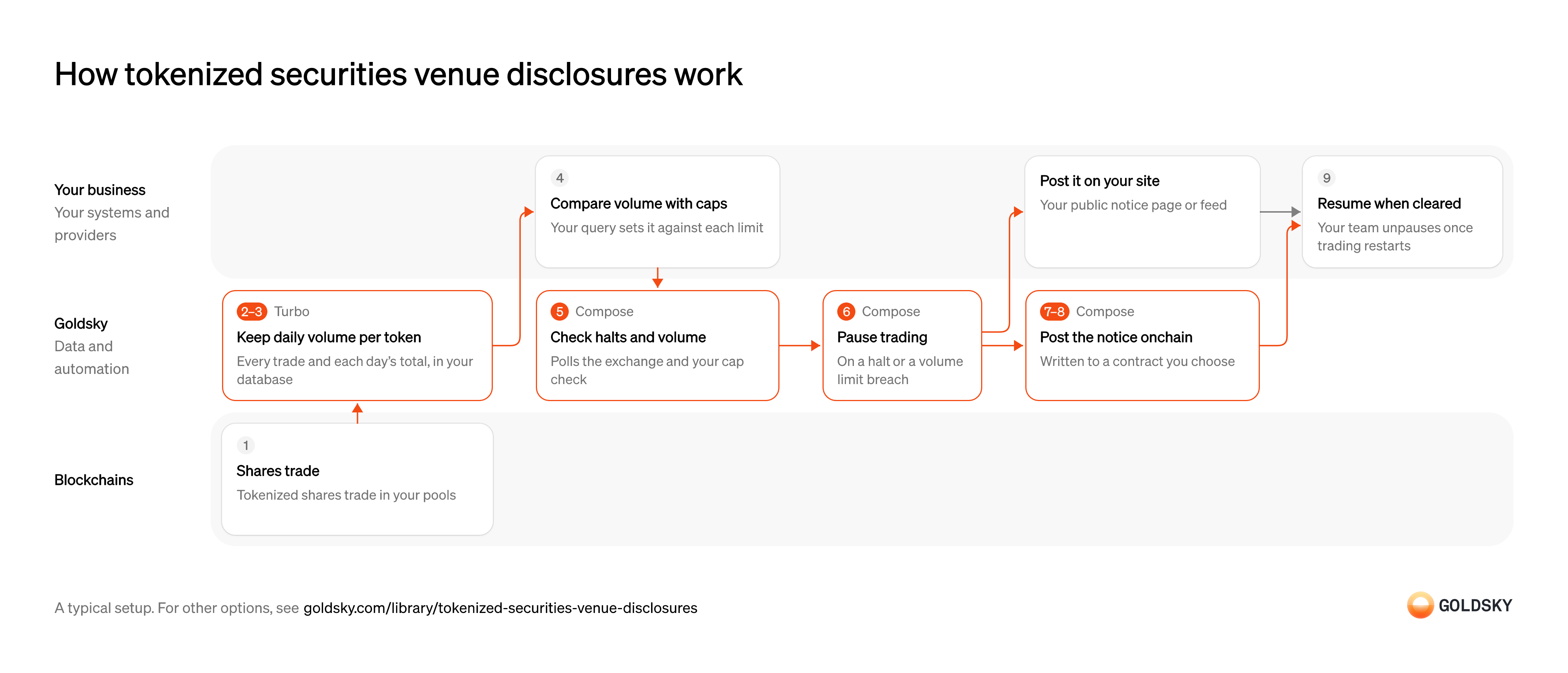
The diagram follows trading in one token from the first trade on your venue to your team resuming it after a halt or a cap breach, and shows who does each step. Your setup may differ.
Ways to run tokenized securities venue disclosures
Every trade from the pipeline lands in your own database with a running volume per token and day beside it; the subgraph keeps a running volume per token through its mappings, hosted by Goldsky.
- Best for
- Continuous trading, with every trade in your own database
- What you run
- Nothing on Goldsky cloud; single-tenant, VPC and on-premises deployments are enterprise options
- What you write
- TypeScript tasks
- How results reach you
- Acts onchain or calls your systems
- Best for
- One chain and moderate volume, with no trade database to run
- What you run
- Nothing; Goldsky runs indexing, storage and the API
- What you write
- A schema and mapping handlers, or a no-code or low-code config for simple contracts
- How results reach you
- You query; changes are pushed
| Usual setupOption 1: Stream trades, act with a task | Option 2: Index trades, act with a task | |
|---|---|---|
| Best for | Continuous trading, with every trade in your own database | One chain and moderate volume, with no trade database to run |
| Products | TurboCompose | SubgraphsCompose |
| What you run | Nothing on Goldsky cloud; single-tenant, VPC and on-premises deployments are enterprise options | Nothing; Goldsky runs indexing, storage and the API |
| What you write | TypeScript tasks | A schema and mapping handlers, or a no-code or low-code config for simple contracts |
| How results reach you | Acts onchain or calls your systems | You query; changes are pushed |
Settle trades on the venue
Tokenized shares change hands in your venue’s pools, and each trade is written to the chain as a transaction.
A trade counts toward a cap once it’s on the chain. For a short time the chain can still replace its newest blocks (a reorg), so a trade seen once isn’t final yet.
Land every trade in your database
Handled by Goldsky TurboCaps and surveillance work from a full record of trades, so each one has to reach your own systems.
Each trade event is decoded into readable columns (token, amount, buyer, seller, block) and written once per trade. If trades are missed or written twice, the volume you check against the cap is wrong in either direction.
With Goldsky, a Turbo Pipelines SQL transform decodes your venue contract’s trade events with its ABI and writes each one to your database on a
Upsert rows into Postgres (opens in a new tab)primary_key, so a repeated delivery overwrites the same row and a reorg correction updates or deletes it.Keep each token’s volume per trading day
Handled by Goldsky TurboA volume cap is measured on each token’s average daily volume, so every day’s volume has to be kept as trades arrive.
Each trade has to count toward the trading day your rules use, which can differ from the calendar day. A trade the chain later replaces (a reorg) has to come back out of the day’s volume, or the cap check counts volume that never settled.
With Goldsky, a Turbo Pipelines SQL step sets the trading day on each trade, and a
Keep running totals in your database (opens in a new tab)postgres_aggregatesink, which writes to a Postgres database, keeps a runningsumof shares per token and day. A trade a reorg removes is taken back out of the total, as long as the SQL step keeps the_gs_opcolumn that marks deletes.Compare each token’s volume with its cap
The cap is a share of the listed stock’s volume, so the venue’s figure means nothing until it’s set against the limit.
Your database adds in affiliated venues’ volume where your rules require it, averages each token’s daily volume over the period they set and divides it by the listed stock’s average daily volume from the market data you load. Keep each result with its inputs, so a breach can be explained.
Check the listing exchange for halts
Handled by Goldsky ComposeWhen the exchange where a stock is listed halts it, a US venue trading a tokenized version under the SEC’s exemption has to stop at the same time.
At a fixed interval, something has to call the exchange’s feed for the stock’s status and read the latest cap check beside it. If a check fails without anyone noticing, the venue keeps trading a halted stock.
Compose runs this as a TypeScript task on a cron trigger. Each
Schedule a task with cron (opens in a new tab)fetchto the exchange’s feed and to the endpoint that serves your cap check is retried by the rules you set and recorded on the run.Pause trading on a halt or a cap breach
Handled by Goldsky ComposeA pause stops new trades in the token until the reason for it has cleared.
The pause is a transaction to your venue contract, signed by a wallet the contract allows to pause it. A pause that’s sent but never confirmed leaves trading open, so it has to be retried until it’s in a block that stays.
Goldsky’s Compose can call your contract’s pause function with
Handle confirmations and reorgs (opens in a new tab)writeContractfrom a wallet you grant the pause role, wait for the number of confirmations you set, and resend the transaction if a reorg drops it.Publish the trading notice
Handled by Goldsky ComposeTraders and the market need to know which token stopped, why and when.
The notice names the token, the reason and the time, and goes to a contract anyone can read, to your public notice page or feed, or to both. A pause with no notice leaves traders guessing whether the venue is down.
The same Compose task can write the notice to a contract you choose with
Call contracts from a task (opens in a new tab)writeContract, so it can be read from the chain. Posting it on your own site stays with your team, or the task can call your site’s API withfetch.Keep a record of every check, pause and notice
Handled by Goldsky ComposeYour compliance team has to be able to show why trading stopped, when, and what was published.
The record ties each pause to the halt or breach that caused it, the transaction that paused the contract and the notice that went out. Kept in separate systems with no shared reference, those pieces have to be matched by hand when someone asks.
Every context call a Compose task makes, including each
How Compose records each call (opens in a new tab)fetchand each transaction, is logged with its inputs and outputs, so you can step through any run from the CLI or the dashboard.Resume trading once it’s cleared
A halt ends when the listing exchange resumes the stock, and a cap clears when a new period starts.
Your team unpauses the contract under the same role and posts a notice that trading has restarted. If a rule unpauses on the first all-clear, a late or wrong status from the exchange’s feed reopens trading too early.
What to know about streaming trades and acting with a task
- Goldsky runs the pipeline and the task; you own the database, the limits and the contract role the task uses.
- Each token’s volume per trading day is kept as trades arrive and corrected when a reorg removes one; the cap rules and the averages behind them are queries you own.
- The task checks on a schedule, so a halt reaches your venue at the next check, not the moment it’s announced.
- Every call the task makes, from the halt check to the pause transaction, is recorded with its inputs and outputs.
Settle trades on the venue
Tokenized shares change hands in your venue’s pools, and each trade is written to the chain as a transaction.
A trade counts toward a cap once it’s on the chain. For a short time the chain can still replace its newest blocks (a reorg), so a trade seen once isn’t final yet.
Index each trade and total volume per token
Handled by Goldsky SubgraphsThe cap check needs each token’s volume for the period, kept current as trades arrive.
Every trade event becomes a record, and each token’s total for the period updates with it. Trades in blocks the chain replaces have to drop out of the total, or the cap check counts volume that never settled.
With Goldsky Subgraphs, your mappings save each trade as an entity, and an aggregation entity with
Use aggregation entities (opens in a new tab)@aggregate(fn: "sum")keeps hourly or daily volume per token in the database instead of in mapping code.Check volume and the listing exchange
Handled by Goldsky ComposeTwo things can stop trading in a token: a halt at the listing exchange, or volume over the cap.
At a fixed interval, the check reads each token’s total and the exchange’s status for the stock, and compares the total with your limit. If a check fails without anyone noticing, the venue keeps trading a halted or capped token.
A Compose task on a cron trigger can query the subgraph’s GraphQL endpoint and the exchange’s feed with
Make recorded HTTP requests (opens in a new tab)fetch, and each request and response is recorded on the run.Pause trading on a halt or a cap breach
Handled by Goldsky ComposeA pause stops new trades in the token until the reason for it has cleared.
The pause is a transaction to your venue contract, signed by a wallet the contract allows to pause it. A pause that’s sent but never confirmed leaves trading open, so it has to be retried until it’s in a block that stays.
Goldsky’s Compose can call your contract’s pause function with
Handle confirmations and reorgs (opens in a new tab)writeContractfrom a wallet you grant the pause role, wait for the number of confirmations you set, and resend the transaction if a reorg drops it.Publish the trading notice
Handled by Goldsky ComposeTraders and the market need to know which token stopped, why and when.
The notice names the token, the reason and the time, and goes to a contract anyone can read, to your public notice page or feed, or to both. A pause with no notice leaves traders guessing whether the venue is down.
The same Compose task can write the notice to a contract you choose with
Call contracts from a task (opens in a new tab)writeContract, so it can be read from the chain. Posting it on your own site stays with your team, or the task can call your site’s API withfetch.Keep a record of every check, pause and notice
Handled by Goldsky ComposeYour compliance team has to be able to show why trading stopped, when, and what was published.
The record ties each pause to the halt or breach that caused it, the transaction that paused the contract and the notice that went out. Kept in separate systems with no shared reference, those pieces have to be matched by hand when someone asks.
Every context call a Compose task makes, including each
How Compose records each call (opens in a new tab)fetchand each transaction, is logged with its inputs and outputs, so you can step through any run from the CLI or the dashboard.Resume trading once it’s cleared
A halt ends when the listing exchange resumes the stock, and a cap clears when a new period starts.
Your team unpauses the contract under the same role and posts a notice that trading has restarted. If a rule unpauses on the first all-clear, a late or wrong status from the exchange’s feed reopens trading too early.
What to know about indexing trades in a hosted subgraph
- Goldsky hosts the index and its endpoint, so there’s no trade database to run, and the totals live with Goldsky.
- The index holds only what your venue’s contracts emit on one chain; the halt status and other offchain data stay with the task.
- Your mappings decide how volume is counted, so changing the rule means deploying a new version and indexing again.
- Indexing and query delay grow as trading picks up, which is why this way suits moderate volume.
What you control
- Your team
- Compare each token’s volume with its cap
- Resume trading once it’s cleared
Security and deployment
- SOC 2 Type IIIndependently audited security controls.
- Dedicated infrastructureSingle-tenant options for production workloads.
- Data residencyCloud, on-premises or co-located.
More use cases that meet venue rules
Use cases built the same way
- Continuous proof of reservesCompare onchain supply with reported reserves on a schedule, then publish the ratio or alert on a gap.
- Keep tokenized stocks backed one to oneCheck token supply on every chain against the shares or fund units held in custody, and alert on any gap.
- Wrapped bitcoin reserve monitoringCheck a wrapped bitcoin token’s supply on every chain against the BTC at its custodian’s reserve addresses, and alert on any gap.
- Onchain interest rate, funding rate and volatility feedsPublish interest rates, funding rates and volatility benchmarks to contracts.
Run halts, volume caps and notices on a tokenized securities venue with Goldsky
We’ll map it to your systems and show you what Goldsky runs, so your team builds the product, not the pipelines underneath it.
 Robinhood
 HyperEVM
 Arc
 Solana
 Ethereum
 Polymarket
 Base
 Tempo
 Bitcoin