Confirm x402 and agent stablecoin payments
What are agentic payments?
Agentic payments are stablecoin payments that AI agents make on their own, often one small payment for each API call under a protocol such as x402.
Agent platforms and the wallet providers behind them need a record of every payment an agent made, and a warning before an agent runs past the budget its owner set.
Goldsky spots each payment from an agent’s wallet, delivers it to your database or backend and keeps each agent’s spend total in your database, while the wallet’s spending policy and the limit alerts stay with you.
Who uses agentic payments?
AI agent platforms, agent wallet providers, payment platforms and stablecoin payment providers that let software agents pay for APIs and services.
How agentic stablecoin payments work
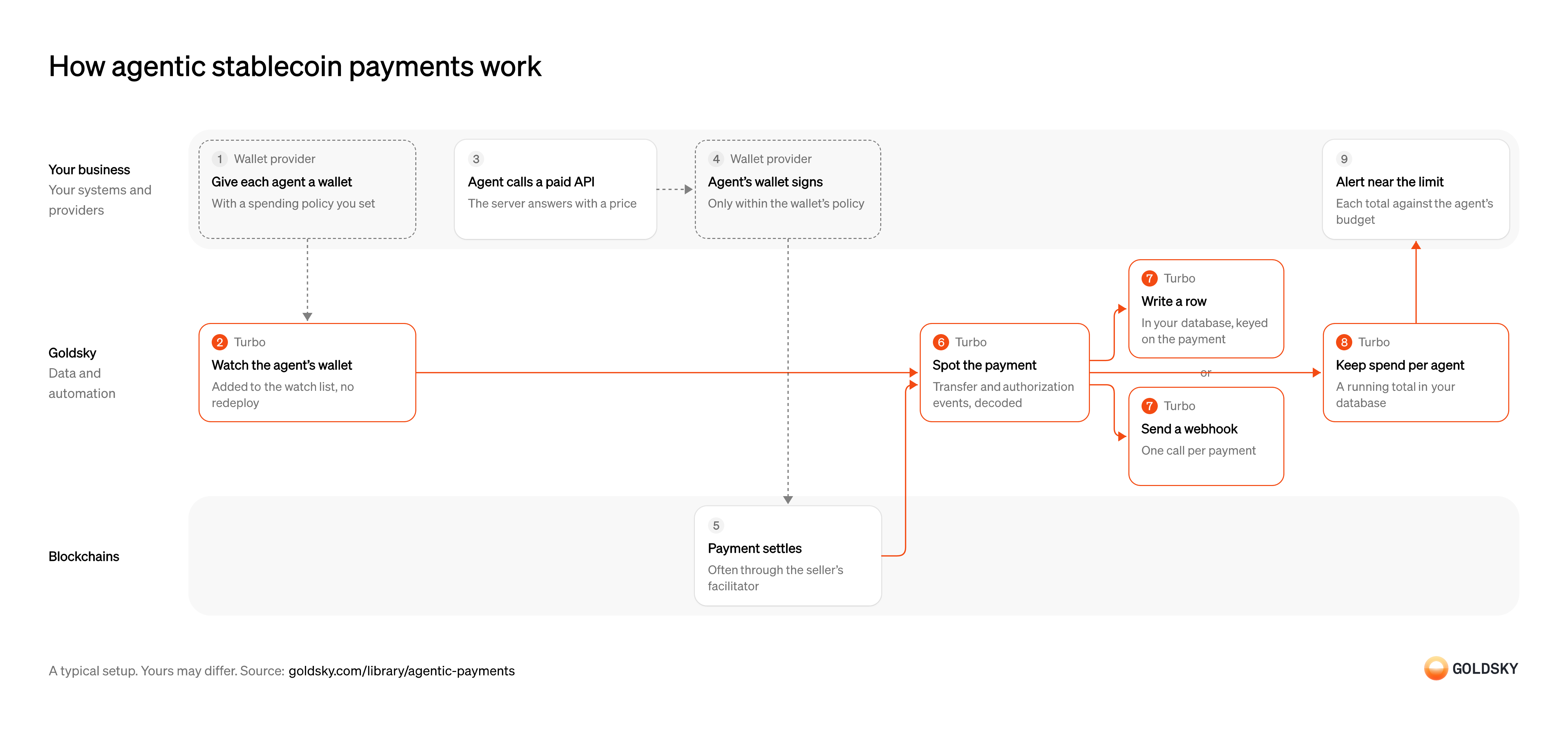
The diagram follows one agent from the wallet it’s given to the alert near its spending limit, and shows who does each step. Your setup may differ.
Give each agent a wallet with a spending policy
An agent pays from its own wallet, and the policy on that wallet is the hard stop on what it can spend.
Your wallet provider creates the wallet and enforces the rules you set, such as a cap per payment or a list of sellers. If an agent shares a wallet with others, nobody can tell which agent spent what.
Watch the agent’s wallet
Handled by Goldsky TurboYou only see payments from wallets you’re watching, so each new agent’s wallet has to go on the list.
The list has to update as soon as a wallet is created, without restarting anything. An agent starts paying the moment it’s deployed, and payments made before its wallet is watched are missing from its total.
With Goldsky, you can keep the agent wallets in a Turbo Pipelines dynamic table, which lives in a Postgres database. Insert a row and the running pipeline picks the wallet up, with no redeploy.
Learn about dynamic tables (opens in a new tab)Agent calls a paid API
Agentic payments usually start when an agent asks for something that costs money and the server responds with a price.
Under a protocol such as x402, the server replies with HTTP
402 Payment Requiredand the amount, and the agent decides whether to pay. Your agent’s instructions decide which prices it accepts.Sign the payment within the wallet’s policy
Paying takes a signature from the agent’s wallet, and the policy decides whether that signature is allowed.
The wallet provider signs only payments that fit the policy and refuses the rest. A policy loose enough to sign anything leaves your spend tracking as the only check, and tracking reports spend after it happens.
Settle the payment on the chain
The payment counts once it’s recorded on the chain, where both sides can check it.
Often the seller’s facilitator, a service that submits signed payments for the seller, puts the payment on the chain. For a short time the newest blocks can still be rewritten, so a payment seen once isn’t final yet.
Spot and decode each payment
Handled by Goldsky TurboYour records need every payment an agent made, in a form your code can read.
Each payment shows up as a token transfer, and a payment made with a signed authorization also leaves an event from the token contract. Both have to be read from the raw log data into named fields (decoded), or payments made through a facilitator can be missed.
Turbo Pipelines can filter token transfers to the agent wallets on the list and decode the token’s events in SQL with
Decode logs with an ABI (opens in a new tab)_gs_log_decode()and the contract’s ABI, so each row carries the payer, amount and transaction.Record each payment
Handled by Goldsky TurboYour spend tracking and your backend need each payment as a database row or a call they can act on.
Delivery can repeat after a network error or a restart, and a reorg can undo a payment you already recorded. Keying each payment on a stable ID lets a repeat overwrite the same row and lets a correction remove it.
You can write each payment to a database table with a
How repeats and reorgs reach you (opens in a new tab)primary_key, where repeats and reorg corrections land on the same row, or sends it to a webhook that receives the corrections and dedupes on the row ID.Keep spend per agent
Handled by Goldsky TurboA limit applies to what an agent has spent in total over the budget period, not to one payment.
Add each payment to its agent’s total for the period you budget for, such as the day or the month. The total has to follow the recorded payments, so a payment undone by a reorg (the chain replacing its newest blocks) comes off it again.
Turbo Pipelines can keep a running sum per key in your database with its
Keep running totals in your database (opens in a new tab)postgres_aggregatesink. Group by agent wallet and a period column set in SQL, keeping the_gs_opcolumn that marks deletes, and each payment is added as it arrives and taken off again if a reorg removes it.Alert near the limit
The agent’s owner wants to know before a budget runs out, not after.
Your code compares each agent’s total with its limit and alerts your team or the owner as it gets close. The wallet’s policy is still the hard stop; the alert is the warning before it.
What you control
- Your team
- Agent calls a paid API
- Alert near the limit
- Your providers
- Wallet provider
Security and deployment
- SOC 2 Type IIIndependently audited security controls.
- Dedicated infrastructureSingle-tenant options for production workloads.
- Data residencyCloud, on-premises or co-located.
More use cases that detect deposits
- Deposit detectionSpot incoming stablecoin transfers to your customers’ wallets and credit them once confirmed.
- Stablecoin wallet top-upsCredit a user’s app balance when a stablecoin transfer to their embedded wallet confirms.
- Stablecoin deposits to business bank accountsDetect stablecoin deposits into business bank and fintech accounts and post them to the account alongside fiat.
- Crypto exchange deposit detectionDetect deposits to each exchange user’s addresses, wait for enough confirmations and credit the user once.
- Accept stablecoin paymentsConfirm stablecoin payments from shoppers and mark the order paid.
- Authorize and capture stablecoin paymentsHold a buyer’s stablecoins in an escrow contract at checkout, capture them to the merchant as orders ship, void what can’t be filled and refund after capture.
- Stablecoin off-rampsDetect the stablecoin a customer sends to cash out, so the provider can pay fiat to their bank account or card.
- Stablecoin subscription paymentsConfirm each scheduled stablecoin charge onchain and mark the subscription paid.
Use cases built the same way
- Crypto wallet monitoringGet an alert when a watched wallet makes a large transfer, crosses a balance limit, wakes after dormancy or pays an unknown counterparty.
- Stablecoin credit lines for card issuersTrack the stablecoin draws and repayments on a card issuer’s credit line so the lender’s book matches the chain.
- Continuous proof of reservesCompare onchain supply with reported reserves on a schedule, then publish the ratio or alert on a gap.
- Stablecoin redemption spike alertsAlert when redemption requests in a single 24-hour period pass 10% of a brand’s outstanding issuance, the point at which the OCC must be told within 24 hours.
Track agentic stablecoin payments with Goldsky
We’ll map it to your systems and show you what Goldsky runs, so your team builds the product, not the pipelines underneath it.
 Robinhood
 HyperEVM
 Arc
 Solana
 Ethereum
 Polymarket
 Base
 Tempo
 Bitcoin