Crypto wallet monitoring
What is crypto wallet monitoring?
Crypto wallet monitoring is watching a set of wallets, your own or other firms’, and alerting the right person when one of them does something that matters: a large transfer, a balance crossing a floor or ceiling, a dormant wallet moving funds again, or a payment to a counterparty you don’t know.
Treasury and operations teams at exchanges, custodians, asset managers and stablecoin issuers watch their own hot, operational and cold wallets this way, along with the client and counterparty wallets they deal with, because a transfer can’t be pulled back once it’s onchain and a cold wallet that suddenly signs one can mean someone is using it without authority.
Goldsky keeps the watch list in a table you can change while the pipeline runs, flags each large transfer or unknown counterparty as it’s seen, sends it to your webhook or Kafka topic and keeps a running balance per wallet; per-wallet limits, checks on wallets gone quiet and the response to each alert stay with your team.
Who uses crypto wallet monitoring?
Crypto exchanges, custody and wallet infrastructure providers, asset managers, stablecoin issuers and the blockchain analytics vendors that build wallet alerts into their products.
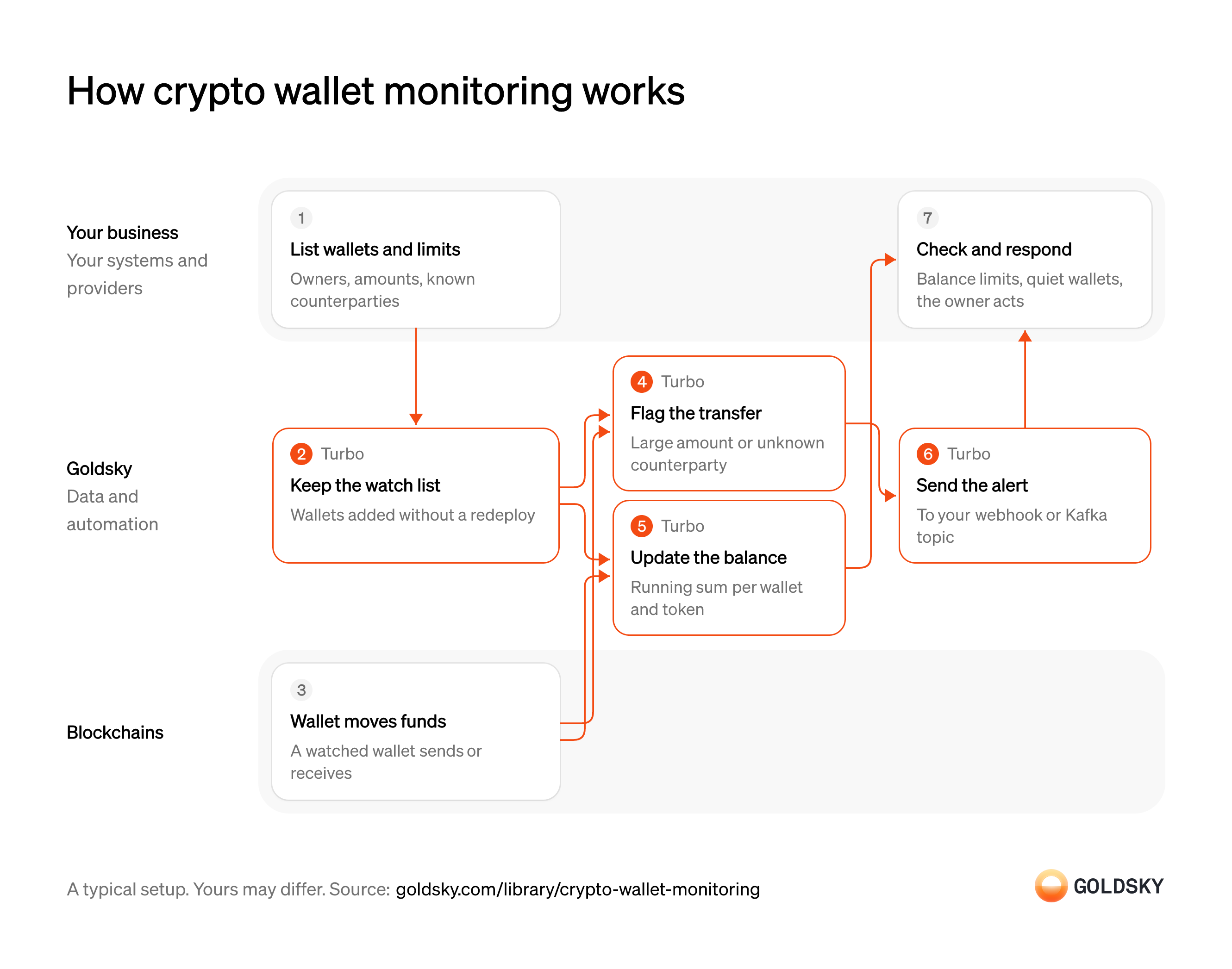
How crypto wallet monitoring works
The diagram follows one transfer from a watched wallet, from the moment the wallet joins your watch list to your team’s response to the alert. Your setup may differ.
List the wallets and what counts as material
An alert only helps if it fires on the wallets you care about, at amounts that matter for each one.
Teams list their own hot, operational and cold wallets, plus the client and counterparty wallets they follow, each with an owner, a large-transfer amount and a balance floor or ceiling. A list of known counterparties (the wallets you expect to pay or be paid by) lets the system flag transfers that go anywhere else.
Keep the watch list live
Handled by Goldsky TurboWallets are added and retired all the time, and a new wallet needs watching from the moment it exists.
The watched wallets and the known counterparties both have to change while monitoring runs. A list that only changes with a software release leaves new wallets unwatched until then and keeps alerting on wallets you’ve retired.
With Goldsky, each list can be a Turbo Pipelines dynamic table, which lives in a Postgres database you or Goldsky host. Insert a wallet and the running pipeline starts matching it, with no redeploy.
Learn about dynamic tables (opens in a new tab)A watched wallet moves funds
Every alert starts with a transfer recorded onchain to or from one of the watched wallets.
The transfer can be in the chain’s native token or any other token, and the watched wallet can be the sender or the receiver. Once it’s in a block it can’t be pulled back, so the alert’s job is to tell the wallet’s owner as soon as it happens.
Flag large transfers and unknown counterparties
Handled by Goldsky TurboMost transfers from a busy wallet are routine, so only the ones that break a rule should reach a person.
Rules about a single transfer can run the moment it’s seen: a watched wallet on either side, an amount above a floor, or a counterparty missing from the known list. Amounts arrive in each token’s own units, so a dollar limit needs a price per token, and rules that compare a transfer with the wallet’s usual activity need its history.
A Turbo Pipelines SQL transform keeps a transfer when
Build a high-value transfer alert (opens in a new tab)dynamic_table_check()finds the sender or recipient on the watch list, and the same filter can add an amount floor orNOT dynamic_table_check()on the known-counterparty list. One floor applies to every wallet in a filter, so a different limit for each wallet is a lookup in your own system.Keep each watched wallet’s balance
Handled by Goldsky TurboBalance floors and ceilings are checked against what the wallet holds now, which one transfer doesn’t tell you.
A balance built from transfers counts only the transfers it has seen, so it starts from the wallet’s balance on the day watching began. It also has to take back a transfer the chain later drops, or it drifts from the balance onchain.
Goldsky’s
Keep running balances in Postgres (opens in a new tab)postgres_aggregatesink for Turbo Pipelines keeps a running sum per wallet and token in a Postgres table, updated by a database trigger on each row it lands, including the deletes a reorg (the chain replacing its newest blocks) sends.Send each alert where your team works
Handled by Goldsky TurboA flagged transfer is only useful once it reaches the person who owns that wallet.
Each alert carries the wallet, direction, token, amount and transaction, so the receiver can route it by owner. Delivery can repeat after an error, so the receiver checks the transfer’s ID first, and an alert is sent when the transfer is seen, before it’s final, so the receiver also handles the rare correction after a reorg.
Turbo Pipelines’ webhook sink can post each alert as its own request with
Set up the webhook sink (opens in a new tab)one_row_per_request: true, retrying failed deliveries. Its Kafka sink publishes the same rows to a topic and marks each insert or delete in thedbz.opheader.Check balances and quiet wallets, then respond
Some rules depend on a running total or on time passing, and the right response depends on whose wallet it is.
Your system compares each balance with its floor and ceiling, and on each alert checks when the wallet last moved, so a cold wallet that wakes after months of silence is escalated. The wallet’s owner then confirms a planned move, rebalances, asks the client or counterparty about it, or opens a security or compliance case.
What you control
- Your team
- List the wallets and what counts as material
- Check balances and quiet wallets, then respond
Security and deployment
- SOC 2 Type IIIndependently audited security controls.
- Dedicated infrastructureSingle-tenant options for production workloads.
- Data residencyCloud, on-premises or co-located.
More use cases that monitor transactions
- Compliance monitoringScreen wallets and transfers, watch for misuse of your assets and feed your AML and surveillance tools.
- Securities surveillanceScreen wallets and transfers, watch for misuse of your assets and feed your AML and surveillance tools.
- Crypto wallet screening and sanctions dataFlag transfers that touch sanctioned or high-risk addresses.
- Secondary-market sanctions sweeps for token issuersScreen every holder and transfer of your stablecoin, not only your direct customers.
- Data for crypto AML transaction monitoringFeed complete transfer data to AML tools with lineage from the chain to the case.
- Unauthorized tokenization monitoringFind tokens that claim to represent your security without your consent.
- Smart contract and wallet monitoringWatch your contracts and wallets for attacks and unexpected changes.
- Blockchain forensics data feedGive investigators full history and traces across chains.
- VASP and counterparty due diligence dataProfile a VASP, issuer or counterparty by its onchain exposure before onboarding it and while the relationship lasts.
- Crypto source of funds and wealth checksTrace where a client’s onchain funds came from to document legitimate wealth at onboarding.
- Token listing due diligence for exchangesCheck a token’s supply, holders, liquidity and risky links before an exchange lists it, and after.
- Crypto scam and money mule detection dataFlag payments to scam-linked wallets and customer accounts that act as money mules.
- Address poisoning detectionFlag the zero-value, dust and fake-token transfers that lookalike addresses plant in a user’s history, and warn before anyone pays one.
- Onchain supervisory monitoring for regulatorsGive examiners one view of licensed firms’ onchain activity to test against what the firms report.
Use cases built the same way
- Confirm x402 and agent stablecoin paymentsConfirm stablecoin payments that AI agents make, often per request, and keep each agent within its spending limits.
- Stablecoin wallet top-upsCredit a user’s app balance when a stablecoin transfer to their embedded wallet confirms.
- Stablecoin deposits to business bank accountsDetect stablecoin deposits into business bank and fintech accounts and post them to the account alongside fiat.
- Crypto exchange deposit detectionDetect deposits to each exchange user’s addresses, wait for enough confirmations and credit the user once.
Monitor crypto wallets with Goldsky
We’ll map it to your systems and show you what Goldsky runs, so your team builds the product, not the pipelines underneath it.
 Robinhood
 HyperEVM
 Arc
 Solana
 Ethereum
 Polymarket
 Base
 Tempo
 Bitcoin