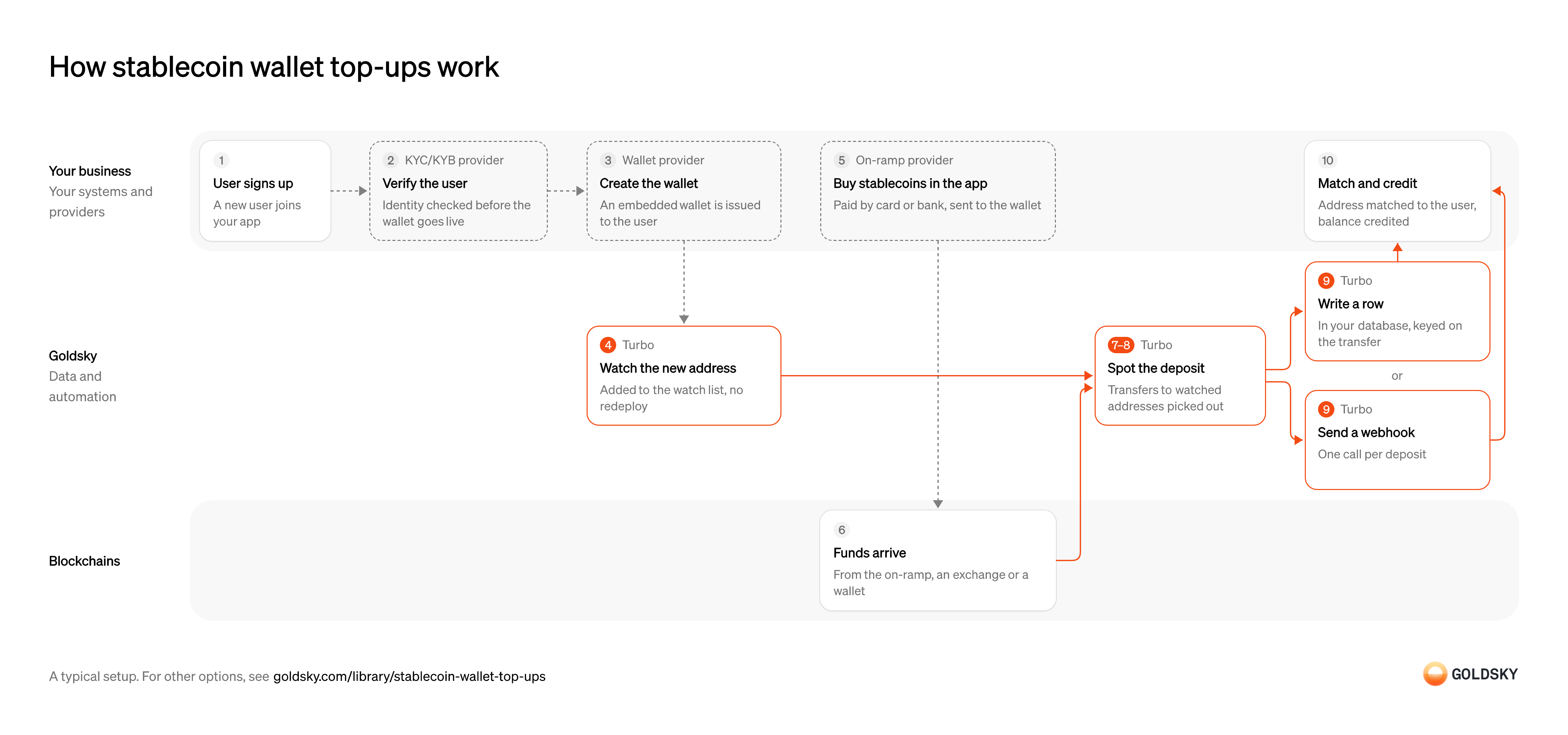
Stablecoin wallet top-ups
What are stablecoin wallet top-ups?
Stablecoin wallet top-ups are deposits a user sends from an exchange or another wallet to the wallet inside your app, which you then credit to their balance.
Wallet apps and neobanks run them because a deposit that shows late, or twice, becomes a support ticket and a break in the ledger.
Goldsky can watch every user’s address and deliver each deposit to your backend, while the accounts, the ledger and the decision to credit stay with your team.
You can build wallet top-ups three ways: stream deposits into your own database with Turbo Pipelines, call the Feeds transfers API for each wallet from your app, or have Feeds sync transfers into your database.
Who offers stablecoin wallet top-ups?
Wallet apps, neobanks, consumer payment apps and wallet infrastructure providers that let users fund an account from a wallet they already hold.
How stablecoin wallet top-ups work
The diagram follows one deposit from a user signing up to the money being credited to their balance. Your setup may differ.
Ways to detect stablecoin wallet top-ups
The pipeline and the synced feed push each deposit into your database as it arrives, with the pipeline’s columns and filters yours to choose; the transfers API returns a wallet’s deposits only when your app calls it.
- Best for
- Many changing wallets, each deposit pushed to your backend
- Products
- Turbo
- What you run
- The destination: your database, queue or bucket, or a Postgres database Goldsky hosts
- What you write
- Pipeline YAML and SQL; TypeScript transforms when needed
- Where your data lives
- In your own database or systems
- How results reach you
- Pushed to you
- Best for
- A few wallets, checked from your app when needed
- Products
- Feeds
- What you run
- Nothing; you call an endpoint and keep what you need
- What you write
- REST requests
- Where your data lives
- Hosted by Goldsky
- How results reach you
- Returned when you call
- Best for
- Deposits in your database, with no pipeline to define
- Products
- Feeds
- What you run
- The destination database or endpoint
- What you write
- Nothing to get the rows; your own SQL to use them
- Where your data lives
- In your own database or systems
- How results reach you
- Pushed to you
| Usual setupOption 1: Stream to your database | Option 2: Transfers API | Option 3: Synced transfers feed | |
|---|---|---|---|
| Best for | Many changing wallets, each deposit pushed to your backend | A few wallets, checked from your app when needed | Deposits in your database, with no pipeline to define |
| Products | Turbo | Feeds | Feeds |
| What you run | The destination: your database, queue or bucket, or a Postgres database Goldsky hosts | Nothing; you call an endpoint and keep what you need | The destination database or endpoint |
| What you write | Pipeline YAML and SQL; TypeScript transforms when needed | REST requests | Nothing to get the rows; your own SQL to use them |
| Where your data lives | In your own database or systems | Hosted by Goldsky | In your own database or systems |
| How results reach you | Pushed to you | Returned when you call | Pushed to you |
Open the user’s account
Every deposit has to be credited to someone, so the account comes first.
Your app creates the customer record that deposits will be credited to. Without a stable account ID, a deposit has nowhere to go and support ends up matching it by hand.
Verify the user’s identity
Apps that hold customer money usually have to know who the customer is before the wallet goes live.
Your identity verification provider checks the user against your onboarding policy. If the wallet goes live before the check finishes, funds can arrive from someone you haven’t approved, and you have to decide what to do with them.
Create the user’s wallet
Each user gets their own deposit address (the wallet’s account number on the chain), so money sent to it can be credited to them.
Your wallet provider creates an embedded wallet, one built into your app, and holds the keys under your policy. The address it returns is what you watch for deposits, so it has to reach your systems as soon as it exists.
Add the wallet to your watch list
Handled by Goldsky TurboYou only spot deposits to addresses you’re watching, so every new wallet has to go on the list.
The list has to update as soon as a wallet is created, without restarting anything. A gap between creating the wallet and watching it means the user’s first deposit can be missed.
With Goldsky, you can keep the watch list in a Turbo Pipelines dynamic table, which lives in a Postgres database. Add a row and the running pipeline starts matching that address, with no redeploy.
Learn about dynamic tables (opens in a new tab)Let the user buy stablecoins in your app
Many new users have money in a bank account or on a card, not stablecoins, so the app needs a way to turn one into the other.
Your on-ramp provider takes the card or bank payment, runs its own identity and fraud checks, and sends the stablecoins to the user’s wallet address. Pass the address in from your systems rather than asking the user to paste it, because a mistyped address sends the money to a wallet nobody can credit.
Receive the stablecoin transfer
The stablecoins arrive from the on-ramp, an exchange or another wallet.
The transfer is recorded in a block on the chain. For a short time the newest blocks can still be rewritten, so a transfer seen once isn’t final yet.
Spot every deposit to a watched address
Handled by Goldsky TurboYour app needs to know that money arrived, without anyone checking each wallet.
Every incoming transfer to a watched address has to be caught and recorded with the address, token, amount and transaction. Checking wallets one at a time gets slower as you add users, and anything missed comes back as a support ticket.
In Turbo Pipelines, a SQL transform can keep only transfers whose recipient is on the watch list, using
Filter transfers with dynamic tables (opens in a new tab)dynamic_table_check(), and write each match with its transaction hash and block.Roll back deposits undone by a reorg
Handled by Goldsky TurboSometimes the chain replaces its most recent blocks (a reorg), and a deposit you saw can disappear or move.
Your records have to follow the chain when that happens, removing or updating the deposit. If they don’t, you credit money the user never received, or credit the same deposit twice.
Goldsky’s Turbo Pipelines passes reorg corrections through as deletes and updates, and a database sink with a
How reorgs reach your sinks (opens in a new tab)primary_keyapplies them to the same rows. If you deliver to a webhook instead, your endpoint receives the corrections and applies them.Deliver the deposit to your backend
Handled by Goldsky TurboYour ledger and your app need the deposit in a form they can act on: a database row or an alert.
Delivery can repeat after a network error or a restart, so each deposit needs a stable ID that your system checks before crediting. Without that check, a repeated delivery credits the user twice.
You can have one Turbo Pipelines pipeline write each deposit to a database table keyed on the transfer
Set up the webhook sink (opens in a new tab)idand send a webhook for it at the same time. With that key, a repeated delivery overwrites the same row, and your webhook endpoint checks the sameidbefore crediting.Match the deposit and credit the balance
The top-up is done when the user sees the money in your app and can spend it.
Your system looks up which user owns the receiving address, then your ledger posts the deposit once, against that account, and the app shows the new balance. A balance that changes without a matching ledger entry turns into a reconciliation break at month end.
What to know about streaming deposits into your database
- Goldsky runs the pipeline; you own the database it writes to and the code that credits balances.
- Deposits are pushed to you as they arrive, so nothing in your app polls for them.
- The pipeline’s SQL decides what each row holds, so the table’s columns are yours to choose.
- Tables with a primary key take reorg corrections as updates and deletes; a webhook endpoint receives the corrections and has to apply them and ignore repeats.
Open the user’s account
Every deposit has to be credited to someone, so the account comes first.
Your app creates the customer record that deposits will be credited to. Without a stable account ID, a deposit has nowhere to go and support ends up matching it by hand.
Verify the user’s identity
Apps that hold customer money usually have to know who the customer is before the wallet goes live.
Your identity verification provider checks the user against your onboarding policy. If the wallet goes live before the check finishes, funds can arrive from someone you haven’t approved, and you have to decide what to do with them.
Create the user’s wallet
Each user gets their own deposit address (the wallet’s account number on the chain), so money sent to it can be credited to them.
Your wallet provider creates an embedded wallet, one built into your app, and holds the keys under your policy. The address it returns is what you watch for deposits, so it has to reach your systems as soon as it exists.
Store the wallet against the account
To ask about a wallet later, your app needs to know which address belongs to which user.
Keep each user’s address, chain and account ID together in your own records. If that link is missing, a transfer you find can’t be credited to anyone.
Let the user buy stablecoins in your app
Many new users have money in a bank account or on a card, not stablecoins, so the app needs a way to turn one into the other.
Your on-ramp provider takes the card or bank payment, runs its own identity and fraud checks, and sends the stablecoins to the user’s wallet address. Pass the address in from your systems rather than asking the user to paste it, because a mistyped address sends the money to a wallet nobody can credit.
Receive the stablecoin transfer
The stablecoins arrive from the on-ramp, an exchange or another wallet.
The transfer is recorded in a block on the chain. For a short time the newest blocks can still be rewritten, so a transfer seen once isn’t final yet.
Look up the wallet’s incoming transfers
Handled by Goldsky FeedsYour app checks for new money by asking for the wallet’s recent incoming transfers.
The lookup has to cover every token you accept, including ones with no market price, for the window since you last checked. Asking too rarely makes top-ups feel slow, and leaving tokens out means some deposits never show.
Feeds returns a wallet’s native and ERC-20 transfers from its transfers endpoint, newest first, with the USD value at transfer time. Ask with
Read the transfers endpoint reference (opens in a new tab)direction=inandinclude_unknown_price=trueso deposits in less common tokens aren’t left out.Wait until each deposit is final
A transfer you saw can still be undone by a reorg, when the chain replaces its most recent blocks.
Hold each deposit until enough blocks sit on top of it, by a rule you set for each chain, and check it again before crediting. A deposit credited too early can disappear from the chain while it stays on the user’s balance.
Match the deposit to the account
A transfer only becomes a top-up once you know whose balance it belongs to.
Tie each transfer to one account by address, chain and token, and record what you’ve credited so the same transfer isn’t counted twice. Two identical transfers in one transaction are both real, so the duplicate check can’t rely on amount and address alone.
Match the deposit and credit the balance
The top-up is done when the user sees the money in your app and can spend it.
Your system looks up which user owns the receiving address, then your ledger posts the deposit once, against that account, and the app shows the new balance. A balance that changes without a matching ledger entry turns into a reconciliation break at month end.
What to know about using a wallet transfers API
- Your app pulls, so a deposit shows up only when you ask, and how fresh balances are depends on how often you call.
- Waiting out reorgs is your job: a transfer undone by a reorg stops appearing in responses, with no flag to tell you.
- Transfers come back without their own ID, so your code decides how to tell a repeat from a second, identical transfer.
- The response shape is fixed; storing and reshaping it is your code.
Open the user’s account
Every deposit has to be credited to someone, so the account comes first.
Your app creates the customer record that deposits will be credited to. Without a stable account ID, a deposit has nowhere to go and support ends up matching it by hand.
Verify the user’s identity
Apps that hold customer money usually have to know who the customer is before the wallet goes live.
Your identity verification provider checks the user against your onboarding policy. If the wallet goes live before the check finishes, funds can arrive from someone you haven’t approved, and you have to decide what to do with them.
Create the user’s wallet
Each user gets their own deposit address (the wallet’s account number on the chain), so money sent to it can be credited to them.
Your wallet provider creates an embedded wallet, one built into your app, and holds the keys under your policy. The address it returns is what you watch for deposits, so it has to reach your systems as soon as it exists.
Store the wallet against the account
To ask about a wallet later, your app needs to know which address belongs to which user.
Keep each user’s address, chain and account ID together in your own records. If that link is missing, a transfer you find can’t be credited to anyone.
Let the user buy stablecoins in your app
Many new users have money in a bank account or on a card, not stablecoins, so the app needs a way to turn one into the other.
Your on-ramp provider takes the card or bank payment, runs its own identity and fraud checks, and sends the stablecoins to the user’s wallet address. Pass the address in from your systems rather than asking the user to paste it, because a mistyped address sends the money to a wallet nobody can credit.
Receive the stablecoin transfer
The stablecoins arrive from the on-ramp, an exchange or another wallet.
The transfer is recorded in a block on the chain. For a short time the newest blocks can still be rewritten, so a transfer seen once isn’t final yet.
Sync new transfers into your database
Handled by Goldsky FeedsDeposits reach your systems without your app asking, so the user sees them sooner.
Each new transfer has to arrive as a row or a webhook call with enough detail to match it: recipient, token, amount and transaction. A sync that falls behind delays every top-up queued after it.
With Goldsky, you can have Feeds sync the transfers feed to a database or webhook you own, so new rows reach you as they arrive and your app never polls the API.
Sync Feeds to your database (opens in a new tab)Wait until each deposit is final
A transfer you saw can still be undone by a reorg, when the chain replaces its most recent blocks.
Hold each deposit until enough blocks sit on top of it, by a rule you set for each chain, and check it again before crediting. A deposit credited too early can disappear from the chain while it stays on the user’s balance.
Match the deposit to the account
A transfer only becomes a top-up once you know whose balance it belongs to.
Tie each transfer to one account by address, chain and token, and record what you’ve credited so the same transfer isn’t counted twice. Two identical transfers in one transaction are both real, so the duplicate check can’t rely on amount and address alone.
Match the deposit and credit the balance
The top-up is done when the user sees the money in your app and can spend it.
Your system looks up which user owns the receiving address, then your ledger posts the deposit once, against that account, and the app shows the new balance. A balance that changes without a matching ledger entry turns into a reconciliation break at month end.
What to know about syncing a transfers feed
- New transfers are pushed to you as they arrive, so nothing in your app polls for them.
- Rows arrive in the Feeds schema, so your ledger code reads Feeds’ columns as they are.
- Matching each transfer to an account, and deciding when it’s final enough to credit, stay in your code.
- Goldsky runs the sync; you own the destination database or endpoint and keep it reachable.
Related jobs
Start the order with the user’s wallet address
The provider delivers the crypto to whatever address your app gives it, so the order and the wallet have to be tied together from the start.
Your app opens the purchase with the user’s wallet address and keeps the provider’s order ID beside the user. Some providers echo back a reference you set on every status message, which saves a lookup when the messages arrive.
Take the payment and check the buyer
The user pays in fiat, by card or bank transfer, and the provider has to know who is buying before it sends crypto.
The provider runs identity and sanctions checks and collects the payment; some act as merchant of record and carry fraud and disputes. Its webhooks report the order moving through states such as paid, completed or failed, and a completed message may carry the transaction hash only where one is available.
Watch the user’s wallet
Handled by Goldsky TurboThe status message says the order finished; the transfer on the chain shows the crypto actually arrived.
The wallet has to be on the watch list before the provider sends, so add it when the order opens, or when the user’s wallet is created. A wallet missing from the list leaves a completed order with no delivery to match.
With Goldsky, the watch list can be a Turbo Pipelines dynamic table, which lives in a Postgres database. Insert the address and the running pipeline starts matching it, with no redeploy.
Learn about dynamic tables (opens in a new tab)Receive the purchased crypto
The provider fills the order by sending crypto from its own wallet to the user’s address.
The transfer is recorded in a block on the chain. For a short time the newest blocks can still be replaced, so a delivery seen once isn’t final yet.
Send each delivery to your endpoint
Handled by Goldsky TurboYour backend needs the transfer itself, with its hash, to close the order.
Every incoming transfer to a watched wallet is caught with the token, amount, sender and transaction hash. Delivery can repeat after a network error, and a reorg (the chain replacing its newest blocks) can undo a transfer after it was sent to you, so the receiver ignores repeats and applies corrections.
Goldsky’s Turbo Pipelines keeps only transfers whose
Set up the webhook sink (opens in a new tab)recipientis on the watch list, usingdynamic_table_check(), and its webhook sink posts each one to your endpoint. Delivery is at least once and retries server errors and timeouts, so dedupe on the rowid.Match the delivery to the order and credit it once
The status message and the transfer arrive separately, and the user should see one credit.
Match on the transaction hash when the provider sent one, and otherwise on wallet, token and amount within the order’s window; credit once the transfer is final by your rule. A completed order with no transfer, or a transfer with no open order, goes to someone to review.
What you control
- Your team
- Open the user’s account
- Match the deposit and credit the balance
- Your providers
- KYC/KYB provider
- Wallet provider
- On-ramp provider
Security and deployment
- SOC 2 Type IIIndependently audited security controls.
- Dedicated infrastructureSingle-tenant options for production workloads.
- Data residencyCloud, on-premises or co-located.
More use cases that detect deposits
- Deposit detectionSpot incoming stablecoin transfers to your customers’ wallets and credit them once confirmed.
- Stablecoin deposits to business bank accountsDetect stablecoin deposits into business bank and fintech accounts and post them to the account alongside fiat.
- Crypto exchange deposit detectionDetect deposits to each exchange user’s addresses, wait for enough confirmations and credit the user once.
- Accept stablecoin paymentsConfirm stablecoin payments from shoppers and mark the order paid.
- Authorize and capture stablecoin paymentsHold a buyer’s stablecoins in an escrow contract at checkout, capture them to the merchant as orders ship, void what can’t be filled and refund after capture.
- Stablecoin off-rampsDetect the stablecoin a customer sends to cash out, so the provider can pay fiat to their bank account or card.
- Confirm x402 and agent stablecoin paymentsConfirm stablecoin payments that AI agents make, often per request, and keep each agent within its spending limits.
- Stablecoin subscription paymentsConfirm each scheduled stablecoin charge onchain and mark the subscription paid.
Use cases built the same way
- Stablecoin card programsDetect stablecoin top-ups to the wallets that back a card program so spend limits update.
- Stablecoin settlement for card networksSettle card-network obligations with issuers and acquirers in stablecoins across chains.
- Stablecoin dollar accountsOffer dollar accounts held in stablecoins, with balances and history kept in step with the chain.
- Intercompany settlement in stablecoinsSettle what group entities owe each other in stablecoins, and land each transfer beside the intercompany ledger.
Run stablecoin wallet top-ups with Goldsky
We’ll map it to your systems and show you what Goldsky runs, so your team builds the product, not the pipelines underneath it.
 Robinhood
 HyperEVM
 Arc
 Solana
 Ethereum
 Polymarket
 Base
 Tempo
 Bitcoin