Stablecoin card programs
What it is
Stablecoin card programs back each card with a wallet that holds stablecoins, so the card can spend what the cardholder has loaded into it.
Card issuers, processors and their sponsor banks need to see each top-up as soon as it lands, because a cardholder who just loaded money and is declined at the till stops trusting the card.
Goldsky can watch every backing wallet, read its balance when a top-up lands and tell your card system, while issuing, authorization and the spend limit stay with you.
You can track card-backing wallets three ways: stream each top-up and the new balance to your card system with Turbo Pipelines, call the Feeds transfers and balances APIs for each wallet, or have Feeds sync transfers into your database.
Who it’s for
Card issuers and processors, sponsor banks and stablecoin platforms that run cards backed by a cardholder’s stablecoin wallet.
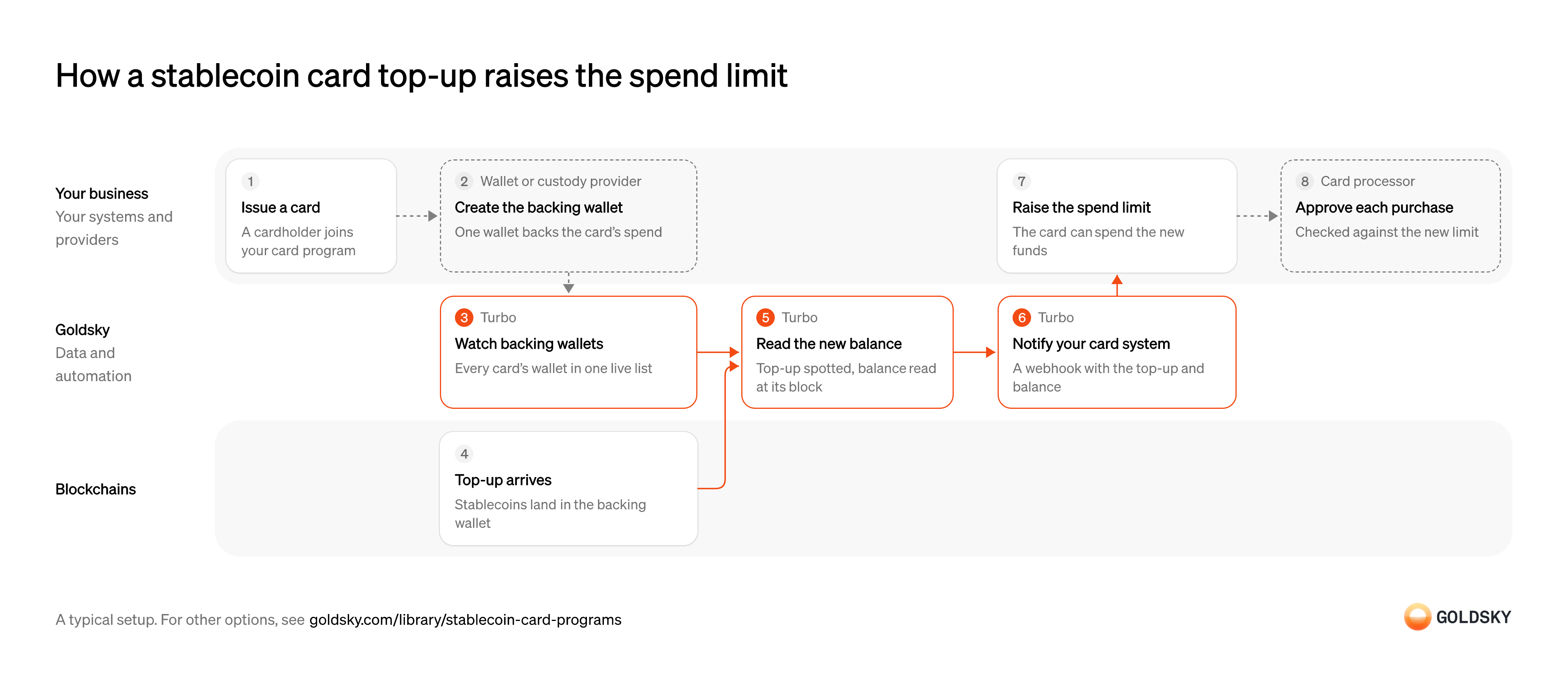
How a stablecoin card top-up raises the spend limit
Follow one top-up here, from issuing the card to raising its spend limit. Your setup may differ.
Ways to detect top-ups to card-backing wallets
Only the pipeline pushes each top-up to your card system with the wallet’s new balance; the APIs return transfers and balances when your card system calls them, and the synced feed lands transfers in your database for your code to total.
- Best for
- Many cards, each top-up pushed to your card system
- Products
- Turbo
- What you run
- The destination: your database, queue or bucket, or a Postgres database Goldsky hosts
- What you write
- Pipeline YAML and SQL; TypeScript transforms when needed
- Where your data lives
- In your own database or systems
- How results reach you
- Pushed to you
- Best for
- A small program, wallets checked when needed
- Products
- Feeds
- What you run
- Nothing; you call an endpoint and keep what you need
- What you write
- REST requests
- Where your data lives
- Hosted by Goldsky
- How results reach you
- Returned when you call
- Best for
- Top-ups in your database, with no pipeline to define
- Products
- Feeds
- What you run
- The destination database or endpoint
- What you write
- Nothing to get the rows; your own SQL to use them
- Where your data lives
- In your own database or systems
- How results reach you
- Pushed to you
| Usual setupOption 1: Stream to your card system | Option 2: Transfers and balances APIs | Option 3: Synced transfers feed | |
|---|---|---|---|
| Best for | Many cards, each top-up pushed to your card system | A small program, wallets checked when needed | Top-ups in your database, with no pipeline to define |
| Products | Turbo | Feeds | Feeds |
| What you run | The destination: your database, queue or bucket, or a Postgres database Goldsky hosts | Nothing; you call an endpoint and keep what you need | The destination database or endpoint |
| What you write | Pipeline YAML and SQL; TypeScript transforms when needed | REST requests | Nothing to get the rows; your own SQL to use them |
| Where your data lives | In your own database or systems | Hosted by Goldsky | In your own database or systems |
| How results reach you | Pushed to you | Returned when you call | Pushed to you |
Issue the card
A cardholder joins the program and gets a card that will spend from stablecoins they load.
Your card program creates the cardholder record and the card, with a spend limit that starts at what’s been funded. The card ID is what every later top-up and limit change hangs off, so it has to exist before any money arrives.
Create the wallet that backs the card
The card spends what sits in one wallet, so each card needs a wallet of its own (or a known share of one).
Your wallet provider creates the backing wallet and holds its keys under your policy, and you record which card the address belongs to. If that link is missing, a top-up lands in a wallet nobody can tie to a card, and the cardholder’s limit never moves.
Watch every backing wallet
Handled by Goldsky TurboYou only see top-ups to wallets you’re watching, so each new card’s wallet joins the list when it’s created.
The list has to grow as cards are issued and shrink as they’re closed, while everything keeps running. A wallet left off the list takes top-ups the card never hears about.
With Goldsky, every backing wallet can sit in one Turbo Pipelines dynamic table, which lives in a Postgres database. A new row is matched by the running pipeline with no redeploy.
Learn about dynamic tables (opens in a new tab)Receive the top-up
The cardholder loads the card by sending stablecoins to its backing wallet.
The transfer is recorded in a block on the chain. For a short time the newest blocks can still be replaced, so a top-up seen once isn’t final yet.
Spot the top-up and read the new balance
Handled by Goldsky TurboThe card system needs both the top-up and what the wallet now holds, because the limit follows the balance.
Each transfer into a backing wallet has to be caught, and the wallet’s balance read as of that transfer’s block. A balance read from a different moment can include a spend or a second top-up the card system hasn’t seen yet.
In Turbo Pipelines,
Track balances for a set of addresses (opens in a new tab)dynamic_table_check()filters transfers to your backing wallets, and the pipeline can read each wallet’s balance at the transfer’s block. For stablecoins and other tokens, the balance comes from the balances dataset Goldsky maintains for each chain.Notify your card system
Handled by Goldsky TurboThe card system has to hear about the top-up to change anything, ideally without asking.
Each top-up reaches your card system with the wallet, the amount and the new balance. A notification can arrive twice after a retry, so the card system checks a stable ID before it changes a limit.
The Turbo Pipelines webhook sink posts each top-up to your card system, retries until it gets a
Set up the webhook sink (opens in a new tab)2xxresponse, and passes reorg corrections to the same endpoint for your code to apply.Raise the card’s spend limit
The top-up is done when the cardholder can spend the new money at a till.
Your card system looks up the card that owns the wallet and sets its available spend from the new balance, once, for that top-up. A limit raised for a top-up the chain later undoes lets the cardholder spend money that isn’t there.
Approve purchases against the new limit
When the cardholder pays, the card network asks for a yes or no within seconds, and the answer depends on the limit you just raised.
Your card processor receives the authorization request from the network and either checks the available balance itself or calls your system for the decision, then answers the network. A slow answer is a decline, so the limit it reads has to sit in your own systems, not be fetched from the chain at that moment.
What to know about streaming card top-ups
- Top-ups are pushed as they land, so your card system never polls the chain.
- The webhook fires when a top-up is detected, before it’s final; your card system decides how much to make spendable straight away.
- A top-up undone by a reorg reaches your endpoint as a correction record, which your card system applies to the limit.
- Goldsky runs the pipeline; you own the endpoint, the spend rules and the authorization decision.
Issue the card
A cardholder joins the program and gets a card that will spend from stablecoins they load.
Your card program creates the cardholder record and the card, with a spend limit that starts at what’s been funded. The card ID is what every later top-up and limit change hangs off, so it has to exist before any money arrives.
Create the wallet that backs the card
The card spends what sits in one wallet, so each card needs a wallet of its own (or a known share of one).
Your wallet provider creates the backing wallet and holds its keys under your policy, and you record which card the address belongs to. If that link is missing, a top-up lands in a wallet nobody can tie to a card, and the cardholder’s limit never moves.
Receive the top-up
The cardholder loads the card by sending stablecoins to its backing wallet.
The transfer is recorded in a block on the chain. For a short time the newest blocks can still be replaced, so a top-up seen once isn’t final yet.
Look up new top-ups to the wallet
Handled by Goldsky FeedsYour card system learns about a top-up by asking for the wallet’s recent incoming transfers.
The lookup has to cover the window since you last checked and every token the program accepts. Ask too rarely and a cardholder who just loaded money is declined.
The Feeds transfers endpoint returns a wallet’s incoming transfers when you ask with
Read the transfers endpoint reference (opens in a new tab)direction=in, newest first, with the token’s details on each row.Read the wallet’s current balance
Handled by Goldsky FeedsThe spend limit follows what the wallet holds, which can differ from the sum of top-ups once the card has spent.
Read the balance after the top-up and use it to set the available spend. A balance read before the top-up lands leaves the limit where it was.
With Goldsky, the Feeds balances endpoint returns the latest balance of each token in the wallet, with the block of its most recent change, so you can tell whether it already includes the top-up.
Read the balances endpoint reference (opens in a new tab)Wait until the top-up is final
A top-up you saw can still be undone by a reorg, when the chain replaces its newest blocks.
Hold back all or part of the new spend until enough blocks sit on top of the top-up, by a rule you set for each chain. The API gives no signal when a transfer is reversed; the transfer stops appearing in its responses.
Raise the card’s spend limit
The top-up is done when the cardholder can spend the new money at a till.
Your card system looks up the card that owns the wallet and sets its available spend from the new balance, once, for that top-up. A limit raised for a top-up the chain later undoes lets the cardholder spend money that isn’t there.
Approve purchases against the new limit
When the cardholder pays, the card network asks for a yes or no within seconds, and the answer depends on the limit you just raised.
Your card processor receives the authorization request from the network and either checks the available balance itself or calls your system for the decision, then answers the network. A slow answer is a decline, so the limit it reads has to sit in your own systems, not be fetched from the chain at that moment.
What to know about checking card wallets with APIs
- Your card system pulls, so a top-up shows up only when you ask.
- The balances endpoint returns the latest balance only, not the balance at a past block.
- A top-up undone by a reorg stops appearing in responses with no flag, so waiting for finality is your code’s job.
- Transfers come back without their own ID, so your code decides how to tell a repeat from a second, identical top-up.
Issue the card
A cardholder joins the program and gets a card that will spend from stablecoins they load.
Your card program creates the cardholder record and the card, with a spend limit that starts at what’s been funded. The card ID is what every later top-up and limit change hangs off, so it has to exist before any money arrives.
Create the wallet that backs the card
The card spends what sits in one wallet, so each card needs a wallet of its own (or a known share of one).
Your wallet provider creates the backing wallet and holds its keys under your policy, and you record which card the address belongs to. If that link is missing, a top-up lands in a wallet nobody can tie to a card, and the cardholder’s limit never moves.
Receive the top-up
The cardholder loads the card by sending stablecoins to its backing wallet.
The transfer is recorded in a block on the chain. For a short time the newest blocks can still be replaced, so a top-up seen once isn’t final yet.
Sync new transfers into your database
Handled by Goldsky FeedsTop-ups reach your card system without it asking, so the limit can move sooner.
Each new transfer has to arrive as a row or a webhook call with the recipient, token, amount and transaction. A sync that falls behind delays every top-up queued after it.
Feeds can sync the transfers feed to a Postgres or MySQL database, ClickHouse or a webhook you own, so new rows reach you as they land.
Sync Feeds to your database (opens in a new tab)Match the top-up to the card
A transfer only funds a card once you know which card’s wallet received it.
Join each transfer to a card on the receiving address, keep only your backing wallets, and record which transfers you’ve applied so none counts twice. Then work out the wallet’s new balance from the top-ups and spends you’ve recorded.
Raise the card’s spend limit
The top-up is done when the cardholder can spend the new money at a till.
Your card system looks up the card that owns the wallet and sets its available spend from the new balance, once, for that top-up. A limit raised for a top-up the chain later undoes lets the cardholder spend money that isn’t there.
Approve purchases against the new limit
When the cardholder pays, the card network asks for a yes or no within seconds, and the answer depends on the limit you just raised.
Your card processor receives the authorization request from the network and either checks the available balance itself or calls your system for the decision, then answers the network. A slow answer is a decline, so the limit it reads has to sit in your own systems, not be fetched from the chain at that moment.
What to know about syncing a transfers feed for cards
- New transfers are pushed to you as they arrive, so nothing in your card system polls for them.
- Rows arrive in the Feeds schema, so your code reads Feeds’ columns as they are.
- Picking out your backing wallets, working out the new balance and deciding when a top-up is final stay in your code.
- Goldsky runs the sync; you own the destination and keep it reachable.
Related jobs
Approve a spending limit
The card spends from the cardholder’s own wallet, so the cardholder first allows it to, up to a limit.
The cardholder signs an approval, a token allowance, that lets your program’s spender address move up to the limit from their wallet. The funds stay in the wallet until they’re spent, and the cardholder can revoke the approval at any time.
Track each wallet’s spending limit
Handled by Goldsky TurboAuthorization needs to know how much each wallet has allowed the card to spend.
Every approval to your spender address is kept with the wallet, token and new limit, and the latest one replaces the last. A revoked approval your records miss lets authorization approve spend it can’t collect.
With Goldsky, a Turbo Pipelines pipeline can decode the token’s
Decode contract events (opens in a new tab)Approvalevents with_gs_log_decode, keep those whose spender is your program’s address and write the latest limit for each wallet to your database.Approve or decline the card payment
When the card is used, the network asks your program to approve or decline within seconds.
Your authorization service approves only what both the wallet’s remaining limit and its token balance cover. A wallet emptied after the approval was set leaves a limit with nothing behind it.
Collect the spend from the wallet
Approved spend is paid by moving stablecoins from the cardholder’s wallet to your settlement wallet.
Your settlement service moves the amount under the cardholder’s approval. A wallet emptied between authorization and collection leaves the program paying for the purchase itself.
Match each debit to the card ledger
Handled by Goldsky TurboEach onchain debit has to tie to the card transaction it paid for.
Every transfer from a cardholder’s wallet to your settlement wallet is recorded with its amount and transaction, then matched to the settled card transaction in your database. A debit with no card transaction behind it is a break to investigate.
Turbo Pipelines can keep transfers into your settlement wallet whose
Learn about dynamic tables (opens in a new tab)senderis a linked cardholder wallet, listed in a dynamic table, and write each one beside your card ledger, where you run the match.
What you control
- Your team
- Issue the card
- Raise the card’s spend limit
- Your providers
- Wallet or custody provider
- Card processor
Security and deployment
- SOC 2 Type IIIndependently audited security controls.
- Dedicated infrastructureSingle-tenant options for production workloads.
- Data residencyCloud, on-premises or co-located.
More use cases that run stablecoin accounts and cards
- Stablecoin dollar accountsOffer dollar accounts held in stablecoins, with balances and history kept in step with the chain.
- Stablecoin card program operationsWatch card-backing wallets and read balances at authorization time for stablecoin-linked cards.
- Rewards on stablecoin balancesCalculate and pay rewards on customers’ stablecoin balances.
- Stablecoin credit lines for card issuersTrack the stablecoin draws and repayments on a card issuer’s credit line so the lender’s book matches the chain.
Use cases built the same way
- Stablecoin wallet top-upsCredit a user’s app balance when a stablecoin transfer to their embedded wallet confirms.
- Accept stablecoin paymentsConfirm stablecoin payments from shoppers and mark the order paid.
- Improve blockchain webhook reliabilityKeep onchain event notifications arriving at your backend, with retries, reorg corrections and a backup feed.
- Stablecoin deposits to business bank accountsDetect stablecoin deposits into business bank and fintech accounts and post them to the account alongside fiat.
Fund stablecoin-backed cards with Goldsky
We’ll map it to your systems and show you what Goldsky runs, so your team builds the product, not the pipelines underneath it.
 Robinhood
 HyperEVM
 Arc
 Solana
 Ethereum
 Polymarket
 Base
 Tempo
 Bitcoin