Stablecoin dollar accounts
What are stablecoin dollar accounts?
Stablecoin dollar accounts are customer accounts whose dollars are held as stablecoins in a wallet behind the account, often called stablecoin or USDC accounts.
Neobanks, payment companies and fintechs that run their own ledger offer them to customers who want to hold and move dollars across borders, and the balance and history in the app have to match the chain at all times.
Remittance companies are moving the same way: Remitly’s 2025 annual report describes “giving customers the option to receive, hold, or spend funds using stablecoin-based payment methods.” Goldsky watches every account wallet and writes each movement and the balance after it to your database; identity checks, the wallet keys, bank funding and what the customer sees stay with you and your providers.
You can run stablecoin dollar accounts two ways: stream every movement and balance into your database with Turbo Pipelines, or read each account from the Feeds balances and transfers APIs when your app needs it.
Who offers stablecoin dollar accounts?
Neobanks, consumer finance apps, payment companies and fintechs with their own ledger that offer accounts held in stablecoins.
How stablecoin dollar accounts work
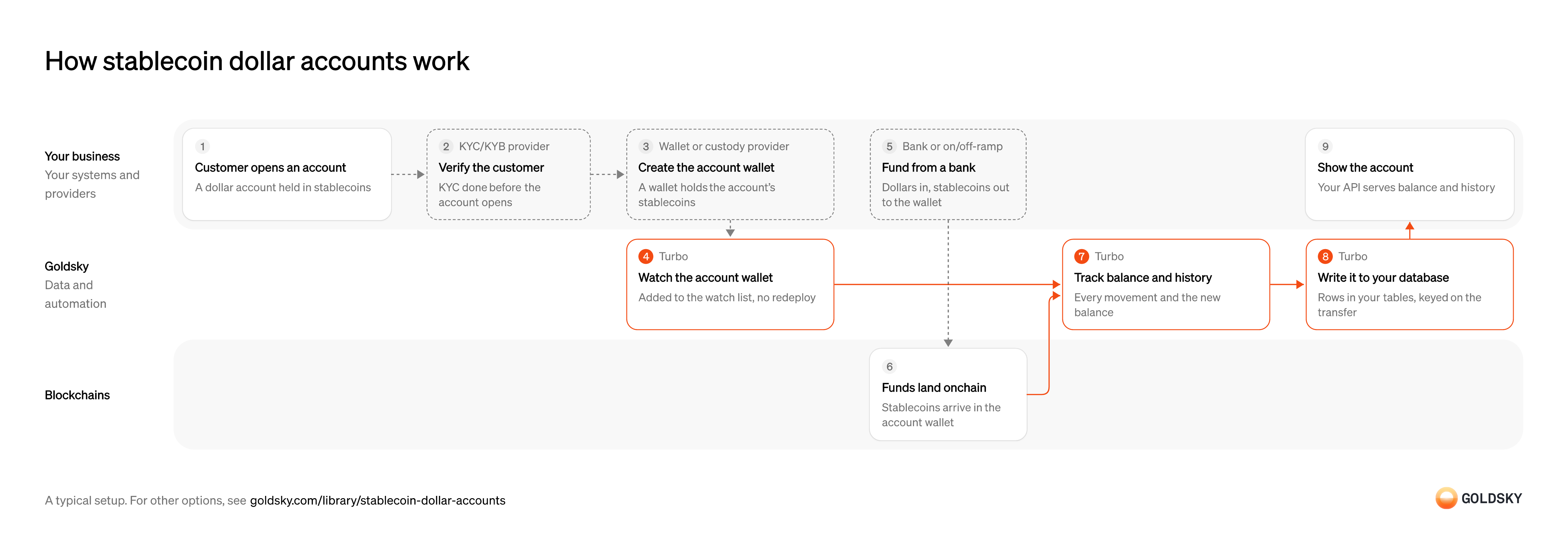
The diagram follows one account from the customer opening it to your app showing its balance and history. Your setup may differ.
Ways to run stablecoin dollar accounts
With the pipeline, each movement lands in your database as it happens; the APIs return balances and transfers when your app calls them, and nothing is stored on your side unless you store it.
- Best for
- Many accounts, balances beside your ledger
- Products
- Turbo
- What you run
- The destination: your database, queue or bucket, or a Postgres database Goldsky hosts
- What you write
- Pipeline YAML and SQL; TypeScript transforms when needed
- Where your data lives
- In your own database or systems
- How results reach you
- Pushed to you
- Best for
- Accounts read when a customer looks
- Products
- Feeds
- What you run
- Nothing; you call an endpoint and keep what you need
- What you write
- REST requests
- Where your data lives
- Hosted by Goldsky
- How results reach you
- Returned when you call
| Usual setupOption 1: Stream to your database | Option 2: Balances and transfers APIs | |
|---|---|---|
| Best for | Many accounts, balances beside your ledger | Accounts read when a customer looks |
| Products | Turbo | Feeds |
| What you run | The destination: your database, queue or bucket, or a Postgres database Goldsky hosts | Nothing; you call an endpoint and keep what you need |
| What you write | Pipeline YAML and SQL; TypeScript transforms when needed | REST requests |
| Where your data lives | In your own database or systems | Hosted by Goldsky |
| How results reach you | Pushed to you | Returned when you call |
Open the customer’s account
Every balance and movement belongs to an account, so the account comes first.
Your app creates the account record that the wallet, its balance and its history will hang from. Without a stable account ID, a transfer you find can’t be shown to anyone.
Verify the customer
Firms that hold customer money have to know who the customer is before the account opens.
Your identity verification provider checks the customer against your onboarding policy. If the account opens first, money can arrive from someone you haven’t approved.
Create the account wallet
The customer’s dollars sit as stablecoins in a wallet, and that wallet’s address is the account on the chain.
Your custody provider creates the wallet and holds its keys under your policy. Its address has to reach your systems as soon as it exists, or the first deposit can arrive before anything is watching for it.
Watch the account wallet
Handled by Goldsky TurboYou only see movements for wallets you’re watching, so each new account wallet goes on the list.
The list has to update as soon as the wallet exists, without restarting anything. A gap between creating the wallet and watching it means the first deposit can be missed.
Keep the list in a Turbo Pipelines dynamic table, which lives in a Postgres database: insert the address and the running pipeline starts matching it, with no redeploy.
Learn about dynamic tables (opens in a new tab)Fund the account from a bank
Most customers start with dollars in a bank account, which have to become stablecoins in the account wallet.
Your banking or on-ramp partner takes the dollars and sends the same amount in stablecoins to the account wallet. Keep its funding reference, because it’s how a missing deposit is traced.
Receive the stablecoins
The deposit is real once the stablecoins are recorded in a block on the chain.
For a short time the newest blocks can still be replaced, so a deposit seen once isn’t final yet.
Track every movement and the new balance
Handled by Goldsky TurboThe account shows both what moved and what’s left, and the two have to agree with the chain.
Catch every transfer in or out of a watched wallet, with the balance just after it. Adding up transfers drifts when one is missed; reading the balance at the transfer’s block doesn’t.
With Goldsky, the pipeline keeps transfers where either side is a watched wallet and calls the token’s
Read balances with SQL functions (opens in a new tab)balanceOfat that block with_gs_eth_call, so each row carries the movement and the balance after it.Write each movement to your database
Handled by Goldsky TurboYour app and ledger read the account from your own tables.
Each row is keyed on the transfer, so a repeated delivery overwrites it instead of adding a second movement. When a reorg undoes a transfer, its row has to be corrected or removed.
Database sinks with a
How reorgs reach your database (opens in a new tab)primary_keywrite each row as an upsert, and Turbo Pipelines sends reorg corrections to the same rows as updates and deletes.Show the account
The customer sees their balance and history in your app.
Your API reads the balance and history from your tables and the ledger, and shows a movement as pending until it’s final by your rule. A balance that changes without a ledger entry turns into a break at month end.
What to know about streaming account activity
- Goldsky runs the pipeline; the database, the ledger and the API your app calls are yours.
- Movements are pushed as they happen, so your app reads its own tables at your database’s speed.
- The pipeline’s SQL decides what each row holds, so the columns are yours to choose.
- Tables keyed on the transfer take reorg corrections as updates and deletes.
Open the customer’s account
Every balance and movement belongs to an account, so the account comes first.
Your app creates the account record that the wallet, its balance and its history will hang from. Without a stable account ID, a transfer you find can’t be shown to anyone.
Verify the customer
Firms that hold customer money have to know who the customer is before the account opens.
Your identity verification provider checks the customer against your onboarding policy. If the account opens first, money can arrive from someone you haven’t approved.
Create the account wallet
The customer’s dollars sit as stablecoins in a wallet, and that wallet’s address is the account on the chain.
Your custody provider creates the wallet and holds its keys under your policy. Its address has to reach your systems as soon as it exists, or the first deposit can arrive before anything is watching for it.
Store the wallet against the account
To ask about an account later, your app needs to know which wallet belongs to it.
Keep each account’s wallet address and chain together in your own records. Without that link, a balance you read can’t be shown to anyone.
Fund the account from a bank
Most customers start with dollars in a bank account, which have to become stablecoins in the account wallet.
Your banking or on-ramp partner takes the dollars and sends the same amount in stablecoins to the account wallet. Keep its funding reference, because it’s how a missing deposit is traced.
Receive the stablecoins
The deposit is real once the stablecoins are recorded in a block on the chain.
For a short time the newest blocks can still be replaced, so a deposit seen once isn’t final yet.
Read the account’s balance
Handled by Goldsky FeedsThe account’s headline figure is what the wallet holds now.
Ask for every token the account can hold, including ones without a market price, or some balances never show. The answer is the latest balance, so reading it again later can return a different figure.
The Feeds balances endpoint returns the wallet’s latest token balances across the chains you ask for, with USD values and a total. Set
Read the balances endpoint reference (opens in a new tab)include_unknown_price=trueso tokens without a price aren’t left out.Read the account’s history
Handled by Goldsky FeedsCustomers check their history to see where money came from and went.
Ask for the wallet’s transfers since your last read, in and out. A transfer undone by a reorg disappears from the next answer, so keep anything not yet final marked as pending.
Goldsky’s Feeds transfers endpoint returns the wallet’s transfers newest first, with the counterparty and the USD value at transfer time.
Read the transfers endpoint reference (opens in a new tab)Show the account
The customer sees their balance and history in your app.
Your API combines the balance, the history and your ledger, and shows unconfirmed movements as pending. If the ledger and the balance disagree, the ledger entry is what gets investigated.
What to know about reading accounts from APIs
- Your app pulls, one request per wallet, so the account is as fresh as your last call.
- A transfer undone by a reorg stops appearing in responses, with no flag, so holding movements until they’re final is your code.
- Transfers come back without their own ID, so your code decides how to tell a repeat from a second identical transfer.
- The balance is the latest one; past balances are rebuilt from the transfer history.
What you control
- Your team
- Open the customer’s account
- Show the account
- Your providers
- KYC/KYB provider
- Wallet or custody provider
- Bank or on/off-ramp
Security and deployment
- SOC 2 Type IIIndependently audited security controls.
- Dedicated infrastructureSingle-tenant options for production workloads.
- Data residencyCloud, on-premises or co-located.
More use cases that run stablecoin accounts and cards
- Stablecoin card programsDetect stablecoin top-ups to the wallets that back a card program so spend limits update.
- Stablecoin card program operationsWatch card-backing wallets and read balances at authorization time for stablecoin-linked cards.
- Rewards on stablecoin balancesCalculate and pay rewards on customers’ stablecoin balances.
- Stablecoin credit lines for card issuersTrack the stablecoin draws and repayments on a card issuer’s credit line so the lender’s book matches the chain.
Use cases built the same way
- Stablecoin wallet top-upsCredit a user’s app balance when a stablecoin transfer to their embedded wallet confirms.
- Address poisoning detectionFlag the zero-value, dust and fake-token transfers that lookalike addresses plant in a user’s history, and warn before anyone pays one.
- Embedded wallet balances and historyShow balances and history for wallets embedded in a fintech app.
- Stablecoin deposits to business bank accountsDetect stablecoin deposits into business bank and fintech accounts and post them to the account alongside fiat.
Run stablecoin dollar accounts with Goldsky
We’ll map it to your systems and show you what Goldsky runs, so your team builds the product, not the pipelines underneath it.
 Robinhood
 HyperEVM
 Arc
 Solana
 Ethereum
 Polymarket
 Base
 Tempo
 Bitcoin