Stablecoin card program operations
What are stablecoin card program operations?
Stablecoin card program operations are the day-to-day running of cards backed by stablecoins in a wallet: checking the balance when a card is used, releasing funds to settle the spend and topping wallets up before they run dry.
Card issuer processors, stablecoin card issuers and their sponsor banks run them, because an authorization approved against a stale balance is a loss and one declined in error is a lost customer.
Goldsky keeps every backing wallet’s balance current in your database and flags wallets that run low; the authorization decision, the signing keys and the top-ups stay with you.
You can run a stablecoin card program three ways: stream every backing wallet’s balance into your database with Turbo Pipelines, read balances from the Feeds API at authorization, or read them from the chain over Edge RPC.
Who runs stablecoin card program operations?
Card issuer processors, stablecoin card issuers and the sponsor banks behind card programs funded from stablecoin wallets.
How stablecoin card program operations work
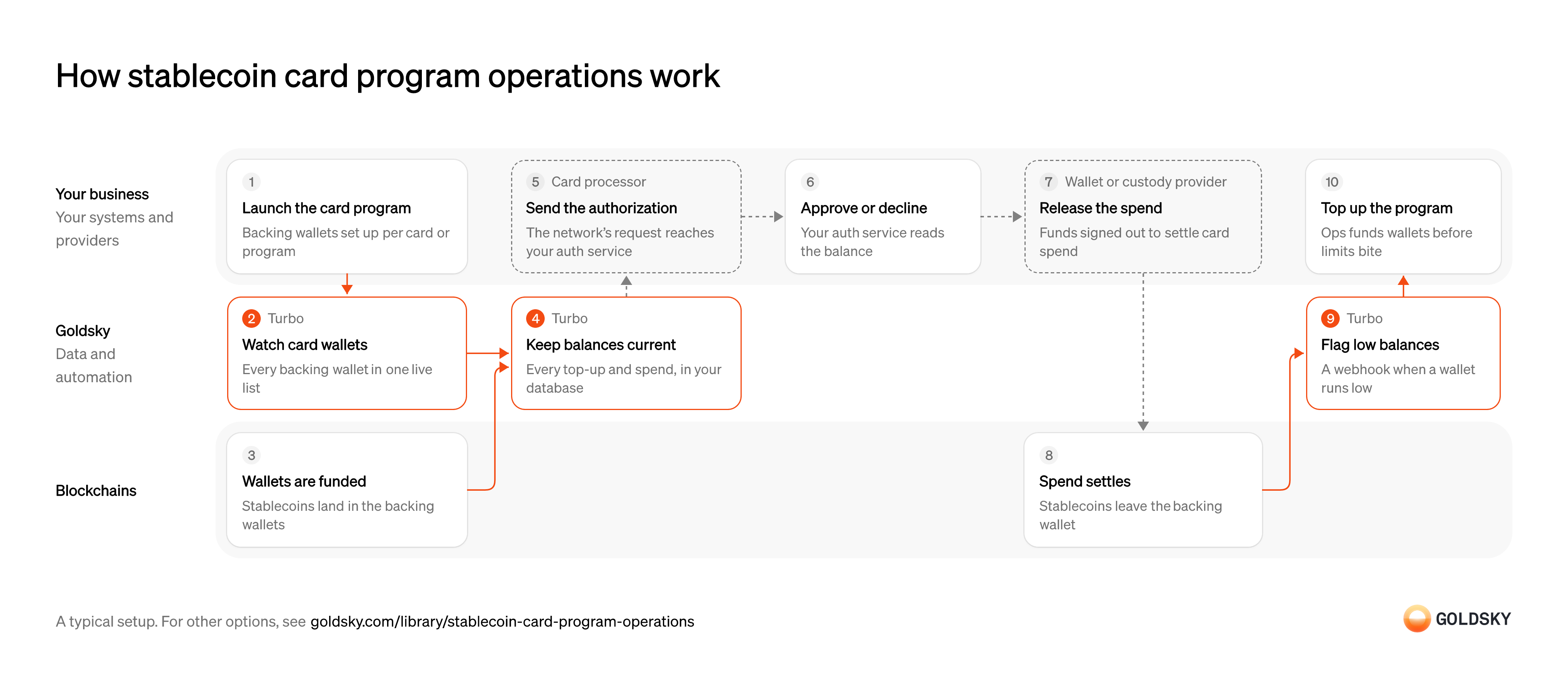
The diagram follows a card program from setting up its backing wallets to operations topping them up when they run low. Your setup may differ.
Ways to run a stablecoin card program
Your authorization service reads the balance from your own database with the pipeline, or makes a call during the authorization with the API or an RPC read, which goes to the newest block.
- Best for
- Many wallets, balances read from your database
- Products
- Turbo
- What you run
- The destination: your database, queue or bucket, or a Postgres database Goldsky hosts
- What you write
- Pipeline YAML and SQL; TypeScript transforms when needed
- Where your data lives
- In your own database or systems
- How results reach you
- Pushed to you
- Best for
- Fewer wallets, read at authorization
- Products
- Feeds
- What you run
- Nothing; you call an endpoint and keep what you need
- What you write
- REST requests
- Where your data lives
- Hosted by Goldsky
- How results reach you
- Returned when you call
- Best for
- Balance at the newest block, read at authorization
- Products
- Edge
- What you run
- Your own client code
- What you write
- JSON-RPC calls, and the decoding of what comes back
- Where your data lives
- Read from the chain
- How results reach you
- Returned when you call
| Usual setupOption 1: Stream to your database | Option 2: Balances API | Option 3: RPC balance reads | |
|---|---|---|---|
| Best for | Many wallets, balances read from your database | Fewer wallets, read at authorization | Balance at the newest block, read at authorization |
| Products | Turbo | Feeds | Edge |
| What you run | The destination: your database, queue or bucket, or a Postgres database Goldsky hosts | Nothing; you call an endpoint and keep what you need | Your own client code |
| What you write | Pipeline YAML and SQL; TypeScript transforms when needed | REST requests | JSON-RPC calls, and the decoding of what comes back |
| Where your data lives | In your own database or systems | Hosted by Goldsky | Read from the chain |
| How results reach you | Pushed to you | Returned when you call | Returned when you call |
Set up the backing wallets
Each card or program spends from a wallet of stablecoins, so the wallets come before the first card.
Your team creates a backing wallet for each card or program and records which cards draw on it. A card with no recorded wallet can’t be checked at authorization. Record which firm holds each role in the program as well: the program manager runs the program, a sponsor bank that is a member of the card network issues the cards, and an issuer-processor connects them to the network, though some program managers are network members themselves. A decline, a dispute or a settlement break goes to a different one of them.
Watch every backing wallet
Handled by Goldsky TurboYou only see top-ups and spend for wallets you watch, and programs add wallets as they add cards.
All backing wallets sit in one list that changes without restarting anything. A wallet missing from the list has a balance nobody is reading.
With Goldsky, the list is a Turbo Pipelines dynamic table, which lives in a Postgres database, so inserting a wallet starts tracking it with no redeploy.
Learn about dynamic tables (opens in a new tab)Fund the backing wallets
A card can only spend what its backing wallet holds.
Cardholders or your treasury send stablecoins to the backing wallets. Each top-up is recorded in a block that can still be replaced for a short time after it lands.
Keep each balance current
Handled by Goldsky TurboAuthorization needs the wallet’s balance before the card is used, not after.
Every top-up and spend for a watched wallet updates its balance, read from the chain at that transfer’s block so it doesn’t drift. A balance kept by adding up transfers goes wrong the first time one is missed.
The pipeline can call the token’s
Read balances with SQL functions (opens in a new tab)balanceOfwith_gs_eth_callat each transfer’s block and write one row per wallet, replaced on each change.Receive the authorization request
Every card purchase starts as a request from the network that your program has to answer within seconds.
Your card processor takes the request from the network, runs its own checks and passes it to your authorization service with the amount and merchant. A program that can’t answer in time has the purchase declined, or decided under fallback rules it didn’t write.
Approve or decline the card payment
When a card is used, the network asks your program to approve or decline within its response window.
Your authorization service reads the backing balance from your own database and approves only what the wallet can cover, after any spend already held. Approving against a stale balance can leave the program paying for spend the wallet can’t cover.
Release funds to settle the spend
Approved spend is paid from the backing wallet when the card network settles.
Your custody provider signs the transfer out of the backing wallet under your policy. Each transfer has to match settled spend, or the wallet and the card ledger drift apart.
Settle the spend on the chain
The stablecoins leave the backing wallet, and its balance falls.
Until the transfer is deep enough in the chain, a reorg can still undo it, so the balance after it isn’t final straight away.
Flag low balances
Handled by Goldsky TurboOperations needs to know a wallet is running low before cards start being declined.
The check compares each new balance with the floor you set, so it fires on the transfer that took the wallet below it. Delivery can repeat, so the receiving side has to ignore an alert it already handled.
In Turbo Pipelines, a SQL filter can keep balance rows below your floor and send them to a webhook sink alongside the database sink.
Set up the webhook sink (opens in a new tab)Top up the program
A wallet that runs dry starts declining cards that should have worked.
Operations funds low wallets by the rules your program sets, planning against expected spend as well as the alert, because funds take time to arrive. A wallet topped up only after it hits zero declines cards in the meantime.
What to know about streaming backing balances
- Goldsky runs the pipeline; the database, the authorization service and the top-up process are yours.
- Balances are pushed as they change, so authorization reads a row and makes no outside call.
- The low-balance alert is a filtered row sent to a webhook, sent at least once, so your endpoint ignores repeats.
- Tables keyed on the wallet take reorg corrections in place.
Set up the backing wallets
Each card or program spends from a wallet of stablecoins, so the wallets come before the first card.
Your team creates a backing wallet for each card or program and records which cards draw on it. A card with no recorded wallet can’t be checked at authorization. Record which firm holds each role in the program as well: the program manager runs the program, a sponsor bank that is a member of the card network issues the cards, and an issuer-processor connects them to the network, though some program managers are network members themselves. A decline, a dispute or a settlement break goes to a different one of them.
Fund the backing wallets
A card can only spend what its backing wallet holds.
Cardholders or your treasury send stablecoins to the backing wallets. Each top-up is recorded in a block that can still be replaced for a short time after it lands.
Read the backing balance at authorization
Handled by Goldsky FeedsAuthorization needs to know what the backing wallet holds when the card is used.
The read has to cover the token the card spends and return inside your authorization window. If it fails or runs slow, your program needs a rule for whether to approve or decline.
Goldsky’s Feeds balances endpoint returns the wallet’s latest token balances across the chains you ask for, each with the block of its last change.
Read the balances endpoint reference (opens in a new tab)Receive the authorization request
Every card purchase starts as a request from the network that your program has to answer within seconds.
Your card processor takes the request from the network, runs its own checks and passes it to your authorization service with the amount and merchant. A program that can’t answer in time has the purchase declined, or decided under fallback rules it didn’t write.
Approve or decline the card payment
When a card is used, the network asks your program to approve or decline within its response window.
Your authorization service reads the backing balance from the response and approves only what the wallet can cover, after any spend already held. Approving against a stale balance can leave the program paying for spend the wallet can’t cover.
Release funds to settle the spend
Approved spend is paid from the backing wallet when the card network settles.
Your custody provider signs the transfer out of the backing wallet under your policy. Each transfer has to match settled spend, or the wallet and the card ledger drift apart.
Settle the spend on the chain
The stablecoins leave the backing wallet, and its balance falls.
Until the transfer is deep enough in the chain, a reorg can still undo it, so the balance after it isn’t final straight away.
Review top-ups and spend
Handled by Goldsky FeedsOperations and disputes need each wallet’s history, not only its balance.
Read the wallet’s transfers in and out and tie each spend to settled card activity. A spend with no card record behind it is a break to investigate.
The Feeds transfers endpoint returns the wallet’s transfers newest first, with
Read the transfers endpoint reference (opens in a new tab)directionand the USD value at transfer time.Check for low balances
Operations needs to know a wallet is running low before cards start being declined.
A scheduled job reads each backing wallet and compares it with your floor. How often it runs decides how late a low balance can be noticed.
Top up the program
A wallet that runs dry starts declining cards that should have worked.
Operations funds low wallets by the rules your program sets, planning against expected spend as well as the alert, because funds take time to arrive. A wallet topped up only after it hits zero declines cards in the meantime.
What to know about reading backing balances from an API
- Every authorization makes a request, so the API sits in your authorization path.
- The balance is the latest one recorded, and a recent spend undone by a reorg disappears without a flag.
- Low-balance alerts are your code: a scheduled job that reads each wallet and compares it with your floor.
- There’s no pipeline or database to run, and nothing is stored unless you store it.
Set up the backing wallets
Each card or program spends from a wallet of stablecoins, so the wallets come before the first card.
Your team creates a backing wallet for each card or program and records which cards draw on it. A card with no recorded wallet can’t be checked at authorization. Record which firm holds each role in the program as well: the program manager runs the program, a sponsor bank that is a member of the card network issues the cards, and an issuer-processor connects them to the network, though some program managers are network members themselves. A decline, a dispute or a settlement break goes to a different one of them.
Fund the backing wallets
A card can only spend what its backing wallet holds.
Cardholders or your treasury send stablecoins to the backing wallets. Each top-up is recorded in a block that can still be replaced for a short time after it lands.
Read the backing balance at the newest block
Handled by Goldsky EdgeAuthorization needs what the backing wallet holds at the moment the card is used.
Call the token’s balance function for the backing wallet at the newest block. If the read fails, your program needs a rule for whether to approve or decline.
Edge RPC answers
Read the eth_call reference (opens in a new tab)eth_callforbalanceOf(address)atlatestor any block you pass, and fails over between providers behind one endpoint.Receive the authorization request
Every card purchase starts as a request from the network that your program has to answer within seconds.
Your card processor takes the request from the network, runs its own checks and passes it to your authorization service with the amount and merchant. A program that can’t answer in time has the purchase declined, or decided under fallback rules it didn’t write.
Approve or decline the card payment
When a card is used, the network asks your program to approve or decline within its response window.
Your authorization service reads the backing balance from the chain and approves only what the wallet can cover, after any spend already held. Approving against a stale balance can leave the program paying for spend the wallet can’t cover.
Release funds to settle the spend
Approved spend is paid from the backing wallet when the card network settles.
Your custody provider signs the transfer out of the backing wallet under your policy. Each transfer has to match settled spend, or the wallet and the card ledger drift apart.
Settle the spend on the chain
The stablecoins leave the backing wallet, and its balance falls.
Until the transfer is deep enough in the chain, a reorg can still undo it, so the balance after it isn’t final straight away.
Check for low balances
Operations needs to know a wallet is running low before cards start being declined.
A scheduled job reads each backing wallet and compares it with your floor. How often it runs decides how late a low balance can be noticed.
Top up the program
A wallet that runs dry starts declining cards that should have worked.
Operations funds low wallets by the rules your program sets, planning against expected spend as well as the alert, because funds take time to arrive. A wallet topped up only after it hits zero declines cards in the meantime.
What to know about reading backing balances over RPC
- You get the balance and nothing else; history, top-ups and alerts need another source or your own code.
- A balance read at the newest block can still change if a reorg replaces that block.
- The endpoint fails over between providers, so one provider going down doesn’t stop authorizations.
- Every authorization is an RPC call, so request volume grows with card use.
What you control
- Your team
- Set up the backing wallets
- Approve or decline the card payment
- Top up the program
- Your providers
- Card processor
- Wallet or custody provider
Security and deployment
- SOC 2 Type IIIndependently audited security controls.
- Dedicated infrastructureSingle-tenant options for production workloads.
- Data residencyCloud, on-premises or co-located.
More use cases that run stablecoin accounts and cards
- Stablecoin card programsDetect stablecoin top-ups to the wallets that back a card program so spend limits update.
- Stablecoin dollar accountsOffer dollar accounts held in stablecoins, with balances and history kept in step with the chain.
- Rewards on stablecoin balancesCalculate and pay rewards on customers’ stablecoin balances.
- Stablecoin credit lines for card issuersTrack the stablecoin draws and repayments on a card issuer’s credit line so the lender’s book matches the chain.
Use cases built the same way
- Embedded wallet balances and historyShow balances and history for wallets embedded in a fintech app.
- Stablecoin treasury management across chainsSee stablecoin cash across every wallet and chain in one place.
- Gas wallet monitoringKeep gas wallets funded on every chain and alert before one runs dry.
- Tokenized collateral and USDC as marginTrack tokenized funds and USDC posted as margin, value them and alert on shortfalls.
Run a stablecoin card program with Goldsky
We’ll map it to your systems and show you what Goldsky runs, so your team builds the product, not the pipelines underneath it.
 Robinhood
 HyperEVM
 Arc
 Solana
 Ethereum
 Polymarket
 Base
 Tempo
 Bitcoin