Gas wallet monitoring
What is gas wallet monitoring?
Gas wallet monitoring is the job of watching the wallets that pay network fees (gas) and refilling each one before it runs out; teams also call these network-fee wallets.
Banks, stablecoin issuers and payment platforms that send transactions of their own keep a gas wallet on every chain they use, and an empty one stops payouts, mints or settlements on that chain until someone notices and refills it.
Goldsky can watch every gas wallet’s balance, warn when one falls below the floor you set and run the top-up, while your custody provider’s policy decides whether each refill is signed.
You can monitor and top up gas wallets two ways: stream balances with Turbo Pipelines and start a Compose top-up when one drops below its floor, or run a scheduled Compose task that reads balances from Feeds.
Who uses gas wallet monitoring?
Sponsor banks, crypto-native banks and stablecoin payment rails that send their own transactions on several chains; an app that pays its users’ fees through a paymaster tracks that cost as sponsored gas spend instead.
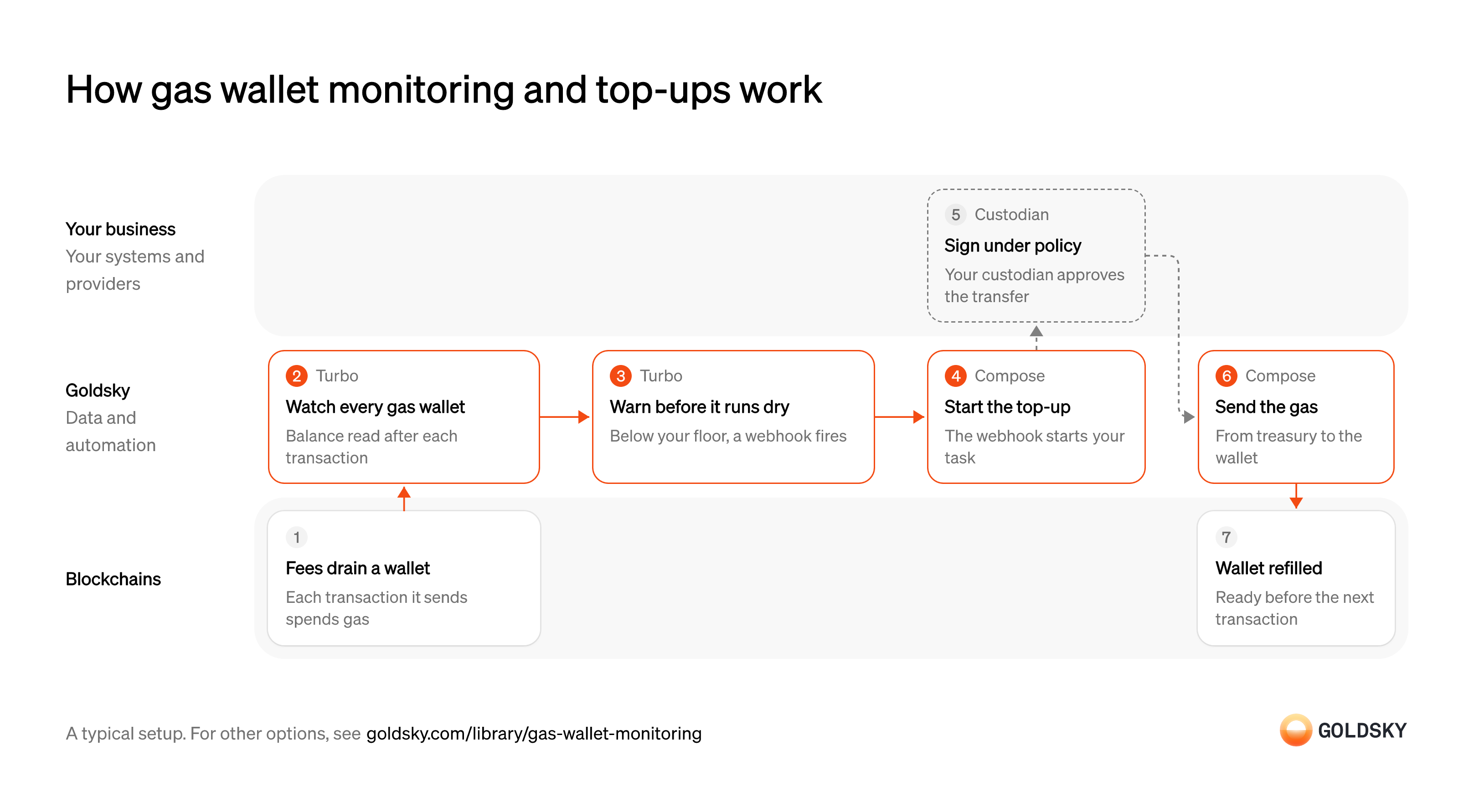
How gas wallet monitoring and top-ups work
The diagram follows one gas wallet from the fees that drain it to the top-up that refills it, and shows who does each step. Your setup may differ.
Ways to monitor and top up gas wallets
The pipeline reads a wallet’s balance whenever transfers touch it and warns the moment it crosses its floor; the scheduled task checks every wallet on a timer, with no pipeline or database to run.
- Best for
- Many gas wallets, warned the moment one runs low
- What you run
- The destination: your database, queue or bucket, or a Postgres database Goldsky hosts
- What you write
- Pipeline YAML and SQL; TypeScript transforms when needed
- Where your data lives
- In your own database or systems
- How results reach you
- Pushed to you
- Best for
- A few dozen wallets, checked on a timer
- What you run
- Nothing on Goldsky cloud; single-tenant, VPC and on-premises deployments are enterprise options
- What you write
- TypeScript tasks
- Where your data lives
- Hosted by Goldsky
- How results reach you
- Acts onchain or calls your systems
| Usual setupOption 1: Stream balances | Option 2: Scheduled task | |
|---|---|---|
| Best for | Many gas wallets, warned the moment one runs low | A few dozen wallets, checked on a timer |
| Products | TurboCompose | ComposeFeeds |
| What you run | The destination: your database, queue or bucket, or a Postgres database Goldsky hosts | Nothing on Goldsky cloud; single-tenant, VPC and on-premises deployments are enterprise options |
| What you write | Pipeline YAML and SQL; TypeScript transforms when needed | TypeScript tasks |
| Where your data lives | In your own database or systems | Hosted by Goldsky |
| How results reach you | Pushed to you | Acts onchain or calls your systems |
Spend gas on every transaction
Every transaction a wallet sends pays a network fee (gas) in the chain’s native token, so a wallet that sends often slowly empties.
Payouts, mints and settlements all pay their fee from the wallet that sends them. When that wallet can’t cover the fee, the transaction isn’t sent and everything queued behind it waits.
Watch every gas wallet’s balance
Handled by Goldsky TurboYou can only refill a wallet in time if you know its balance as it changes.
Keep the list of gas wallets in one place and read each one’s balance from the chain, not by adding up transfers, so fees and other changes are counted. Gas paid on a transaction that moves no value lowers the balance without a transfer, so add a periodic recheck for wallets that mostly send contract calls.
With Goldsky, a Turbo Pipelines dynamic table holds the gas wallet addresses, and the pipeline calls
Read native balances in SQL (opens in a new tab)_gs_evm_get_balancesto read each watched wallet’s exact balance from an RPC node whenever a native transfer touches it. Rows land in your database keyed onaddress, one current balance per wallet.Warn when a wallet drops below its floor
Handled by Goldsky TurboA floor gives you time to refill before the wallet can’t pay its next fee.
Set the floor from how much gas the wallet spends between checks, with room to spare, and send the warning to something that acts on it. A warning that only reaches a channel nobody watches at night is a stalled payout by morning.
In the same pipeline, a SQL transform can keep only balances below the floor written into its
Set up the webhook sink (opens in a new tab)WHEREclause and send them to a webhook sink, one row per request. Delivery is at least once, so the receiver treats a repeat as the same warning.Start the top-up
Handled by Goldsky ComposeThe warning only helps if it turns into a refill without someone starting it by hand.
The top-up starts from the warning, re-reads the balance and decides how much to send. Two warnings for the same wallet must not send two refills, so the top-up checks what it has already sent.
Goldsky Compose can expose the top-up task at an HTTP trigger with token authentication, and the webhook sink calls it with the low-balance row. The task can read the wallet’s balance again with
Start a task from an HTTP trigger (opens in a new tab)getBalancebefore it sends anything.Approve the top-up under your policy
Moving funds out of treasury takes a signature, and most firms keep treasury keys with a custody provider whose rules say what can be approved.
Set the rules before the first top-up: which wallets may receive gas, the most each refill can send and who approves anything larger. Your signing endpoint enforces them by reading the recipient and amount from each refill’s call data; a refill path with no limits is a way to drain treasury, one small transfer at a time.
Send gas from treasury
Handled by Goldsky ComposeThe refill is a transfer of the chain’s native token from your treasury wallet to the gas wallet.
The transfer has to be sent, wait for confirmations and be resent if a reorg drops it, without paying the same wallet twice. A refill sent from a hot key in application settings bypasses your custody policy.
Compose can send the transfer through a webhook wallet, which sends the signing endpoint you host a UserOperation (the transaction format smart-account wallets use) to sign, plus a one-time EIP-7702 authorization the first time it sends on a chain, and submits it once signed. Every call the task makes is logged, so each refill can be traced back to the warning that started it.
Learn about webhook wallets (opens in a new tab)Confirm the wallet is refilled
The top-up is done when the gas lands in the wallet and the next transaction can pay its fee.
Check the new balance once the transfer has enough blocks on top of it. A refill that was dropped or undone leaves the wallet as empty as before, and the floor check has to catch it again.
What to know about streaming gas wallet balances
- Goldsky runs the pipeline and the top-up task; you own the database, the floors and the signing policy.
- The pipeline reads a balance when a native-token transfer touches the wallet, so gas spent on transactions that move no value shows up at the next transfer.
- The floor check looks at one row at a time, so a rule such as “no top-up in the last day” belongs in the task.
- The webhook fires when the low balance is seen, before the block is final, so the task checks the balance again before sending.
Spend gas on every transaction
Every transaction a wallet sends pays a network fee (gas) in the chain’s native token, so a wallet that sends often slowly empties.
Payouts, mints and settlements all pay their fee from the wallet that sends them. When that wallet can’t cover the fee, the transaction isn’t sent and everything queued behind it waits.
Check balances on a schedule
Handled by Goldsky ComposeA regular check catches a wallet running low before its next transaction fails.
Pick an interval shorter than the time your busiest wallet takes to spend its margin above the floor. A check that runs too rarely finds wallets already empty.
Goldsky Compose runs the task on a cron trigger, with a five- or six-field expression that sets how often it checks.
Schedule a task with cron (opens in a new tab)Read each gas wallet’s balance
Handled by Goldsky FeedsThe check compares each wallet’s current native-token balance with its floor.
Read every gas wallet on every chain it uses, including the native token, which pays the fee. A lookup that leaves a chain out never warns about that chain’s wallet.
The task can call the Feeds balances endpoint for each wallet and get its latest native and ERC-20 balances across chains in one response.
Read the balances endpoint reference (opens in a new tab)Decide which wallets need gas
Handled by Goldsky ComposeOnly wallets below their floor get a refill, and only once.
Compare each balance with its floor and work out the amount that brings it back to target. Record each decision, so a retry of the same run doesn’t send a second refill.
With Goldsky, the comparison is code in the Compose task, and the task’s logger records each wallet it checked and what it decided, searchable from the run.
How Compose logs each run (opens in a new tab)Approve the top-up under your policy
Moving funds out of treasury takes a signature, and most firms keep treasury keys with a custody provider whose rules say what can be approved.
Set the rules before the first top-up: which wallets may receive gas, the most each refill can send and who approves anything larger. Your signing endpoint enforces them by reading the recipient and amount from each refill’s call data; a refill path with no limits is a way to drain treasury, one small transfer at a time.
Send gas from treasury
Handled by Goldsky ComposeThe refill is a transfer of the chain’s native token from your treasury wallet to the gas wallet.
Each transfer waits for confirmations and is resent if a reorg drops it. If the task restarts halfway, wallets it already refilled must not be paid again.
Compose sends each transfer through a webhook wallet, which has your signing endpoint sign it as a UserOperation (the transaction format smart-account wallets use), plus a one-time EIP-7702 authorization on a new chain. A context call that already finished returns its saved result on a retry, so a restarted run doesn’t send the same refill twice.
Learn about webhook wallets (opens in a new tab)Confirm the wallet is refilled
The top-up is done when the gas lands in the wallet and the next transaction can pay its fee.
Check the new balance once the transfer has enough blocks on top of it. A refill that was dropped or undone leaves the wallet as empty as before, and the floor check has to catch it again.
What to know about topping up gas wallets on a schedule
- The task pulls on a timer, so a wallet that drains faster than the schedule can run dry between checks.
- There’s no pipeline or database to run; the code is one TypeScript task.
- Balances come from the wallet API, so wallets on chains it doesn’t cover need another route.
- Rules about time, such as “no more than one refill an hour”, sit in the task code next to the check.
What you control
- Your providers
- Custodian
Security and deployment
- SOC 2 Type IIIndependently audited security controls.
- Dedicated infrastructureSingle-tenant options for production workloads.
- Data residencyCloud, on-premises or co-located.
More use cases that manage treasury
- Stablecoin treasury management across chainsSee stablecoin cash across every wallet and chain in one place.
- Idle stablecoin cash sweepsMove idle stablecoin balances into tokenized money funds when they pass a threshold.
- Sponsored gas spendTotal the gas you pay for your users per user, paymaster and day, watch the paymaster’s deposit and check the provider’s bill.
- Intercompany settlement in stablecoinsSettle what group entities owe each other in stablecoins, and land each transfer beside the intercompany ledger.
Use cases built the same way
- Authorize and capture stablecoin paymentsHold a buyer’s stablecoins in an escrow contract at checkout, capture them to the merchant as orders ship, void what can’t be filled and refund after capture.
- Stablecoin card program operationsWatch card-backing wallets and read balances at authorization time for stablecoin-linked cards.
- Tokenized collateral and USDC as marginTrack tokenized funds and USDC posted as margin, value them and alert on shortfalls.
Monitor and top up gas wallets with Goldsky
We’ll map it to your systems and show you what Goldsky runs, so your team builds the product, not the pipelines underneath it.
 Robinhood
 HyperEVM
 Arc
 Solana
 Ethereum
 Polymarket
 Base
 Tempo
 Bitcoin