Authorize and capture stablecoin payments
What is authorize and capture?
Authorize and capture is the two-step way card payments work, applied to stablecoins: at checkout the buyer’s stablecoins are locked in an escrow smart contract, then captured to the merchant as the order ships, in one capture or several.
Anything not captured goes back to the buyer, and captured funds can still be refunded.
That makes it different from programmable escrow, where an agreed condition, such as confirmed delivery, releases the funds.
Payment providers, checkout platforms and merchants that take stablecoins use this programmable payment because orders can change or be canceled between checkout and shipping: the merchant ships knowing the funds are set aside, and the buyer pays only for what ships.
With Goldsky, you can have a payment operator service, usually your payment provider, call the escrow contract while Turbo Pipelines keeps your ledger in step, or run your own operator from a Compose task wallet.
Who uses authorize and capture?
Payment service providers, checkout and commerce platforms, and online merchants that take stablecoins and want card-style holds, partial captures and refunds; spotting a direct transfer to a pay address is accepting stablecoin payments instead.
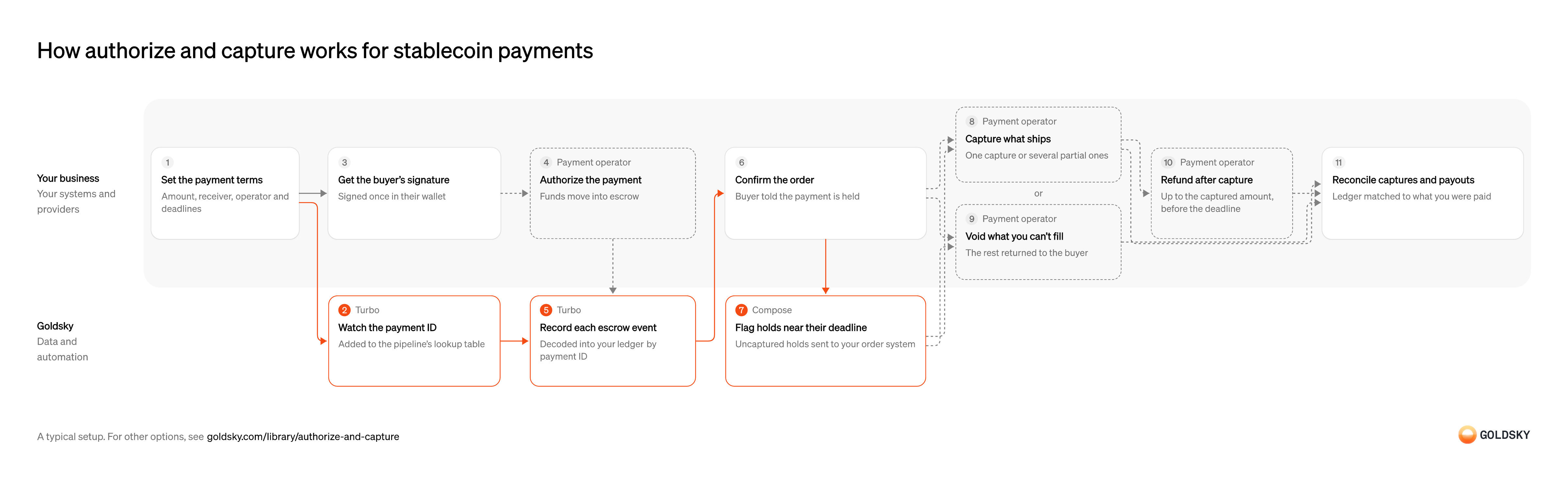
How authorize and capture works for stablecoin payments
The diagram follows one order from setting the payment terms at checkout to capturing, voiding or refunding the funds, and shows who does each step. Your setup may differ.
Ways to authorize and capture stablecoin payments
With an operator service, your provider’s address calls the escrow contract and you ask it through its API; with your own operator, a task wallet you control makes every call, started directly by your checkout and order system.
- Best for
- Merchants whose payment provider already runs the operator
- Who calls the escrow contract
- Your provider’s operator service
- Who pays the network fees
- The operator service, under your provider’s terms
- How you capture, void or refund
- A call to your provider’s API
- What you run
- The destination: your database, queue or bucket, or a Postgres database Goldsky hosts
- What you write
- Pipeline YAML and SQL; TypeScript transforms when needed
- Where your data lives
- In your own database or systems
- How results reach you
- Pushed to you
- Best for
- Payment providers and platforms that run checkout for merchants
- Who calls the escrow contract
- A task wallet you control
- Who pays the network fees
- Goldsky sponsors them and bills you
- How you capture, void or refund
- An HTTP call that starts your task
- What you run
- Nothing on Goldsky cloud; single-tenant, VPC and on-premises deployments are enterprise options
- What you write
- TypeScript tasks
- Where your data lives
- Hosted by Goldsky
- How results reach you
- Acts onchain or calls your systems
| Usual setupOption 1: Payment operator service | Option 2: Your own operator | |
|---|---|---|
| Best for | Merchants whose payment provider already runs the operator | Payment providers and platforms that run checkout for merchants |
| Products | TurboCompose | ComposeTurbo |
| Who calls the escrow contract | Your provider’s operator service | A task wallet you control |
| Who pays the network fees | The operator service, under your provider’s terms | Goldsky sponsors them and bills you |
| How you capture, void or refund | A call to your provider’s API | An HTTP call that starts your task |
| What you run | The destination: your database, queue or bucket, or a Postgres database Goldsky hosts | Nothing on Goldsky cloud; single-tenant, VPC and on-premises deployments are enterprise options |
| What you write | Pipeline YAML and SQL; TypeScript transforms when needed | TypeScript tasks |
| Where your data lives | In your own database or systems | Hosted by Goldsky |
| How results reach you | Pushed to you | Acts onchain or calls your systems |
Set the payment terms
The buyer approves one set of terms, and nobody can change them after they sign.
Your checkout, through your provider, sets your receiving address, the stablecoin, the maximum amount, the operator’s address, a deadline to capture, a later one for refunds and the fee range. A capture deadline shorter than your slowest shipping time leaves some orders uncapturable by the time they ship.
Watch the payment ID
Handled by Goldsky TurboMany merchants share one escrow contract, so your pipeline should keep only your own payments.
Each payment is known by an ID, a hash the escrow contract computes from its terms, and every event the contract records for that payment carries it. Add the ID to your watch list before the buyer signs, or the authorization can land before anything is looking for it.
With Goldsky, your checkout adds each payment ID to a Turbo Pipelines dynamic table, a lookup table in a Postgres database, and the running pipeline filters on it from its next batch, with no redeploy.
Learn about dynamic tables (opens in a new tab)Get the buyer’s signature
The buyer approves the payment once, in their own wallet, without paying network fees.
Your checkout asks the buyer’s wallet to sign the terms, for USDC for example as a signed transfer authorization (ERC-3009) that lets the operator move exactly that amount into escrow. A signature works only once and only until its own expiry, so a buyer who waits too long has to sign again.
Authorize the payment
Authorizing moves the buyer’s funds into escrow, where they’re set aside for you but not yet yours.
The operator submits the signed terms to the escrow contract, which pulls the amount from the buyer’s wallet and records it as available to capture; for goods delivered at once, the same terms can be charged in one step that authorizes and captures together. Tell the buyer the payment went through once the authorization is onchain, not when they sign.
Record each escrow event
Handled by Goldsky TurboYour ledger has to know, for every payment, how much is authorized, captured and still refundable.
Every authorization, capture, void, reclaim and refund the contract records for your payments is written to your database against the payment ID, and your ledger works out what’s left to capture and to refund from those rows. If a reorg (the chain replacing its newest blocks) drops an event, its row has to go too, or the ledger shows money that isn’t held.
Goldsky’s Turbo Pipelines decodes the escrow contract’s events from the chain’s raw logs with
Decode contract events (opens in a new tab)_gs_log_decodeand the contract’s ABI, keeps those whose payment ID is in your dynamic table, and writes them to a table keyed on a primary key, so a reorg’s deletes and updates correct the rows in place.Confirm the order
The buyer needs to know they’ve paid, and your warehouse needs to know it can pick the order.
Your order system joins the authorization row to the order by payment ID, checks the amount and marks the order authorized. Wait until enough blocks sit on top of the authorization that a reorg is unlikely to undo it before you ship anything you can’t recall.
Flag holds near their deadline
Handled by Goldsky ComposeA hold left uncaptured past its deadline can’t be captured, and the buyer can take the money back.
On a schedule, list every payment that still has funds to capture and a capture deadline coming up, and send each one to the team or system that ships or cancels the order. Checking only when an order changes misses the orders nobody touches.
A Compose task on a cron trigger can call your ledger’s API with
Run a task on a schedule (opens in a new tab)fetchfor holds whose capture deadline is close, and post each one to your order system, so it captures what has shipped and voids the rest in time.Capture what ships
Capturing is what pays you, and you can capture in parts as each shipment goes out.
When a shipment goes out, your order system asks the operator to capture its amount; the contract pays it to your receiving address, less any fee within the agreed range, and never lets total captures exceed the amount authorized. Every capture has to happen before the capture deadline, so a split order needs its last shipment out in time.
Void what you can’t fill
If an order is canceled or stock runs out, the buyer should get the held funds back at once.
Ask the operator to void the payment, and the contract returns everything still held to the buyer and allows no further captures. A void always returns the whole remainder, so to cancel part of an order, capture what ships first and then void the rest.
Refund after capture
A buyer who returns goods after you’ve captured is owed money back from you, not from escrow.
Ask the operator to refund up to the amount captured, before the refund deadline in the payment’s terms; after that, captured payments are final. The refund money has to come from somewhere, such as the operator’s balance or yours, so agree with your provider who funds refunds and how they’re charged back to you.
Reconcile captures and payouts
What reaches each merchant should match what your ledger says was captured, less fees and refunds.
Each day, compare the captures, fees and refunds in your ledger with what the merchant received, in stablecoins or converted and paid to their bank account, and look into any gap. A gap usually means an event the ledger missed, a fee nobody expected or a payout still on its way.
What to know about using a payment operator service
- Your provider’s operator address is written into the terms each buyer signs, so only it can capture, void or refund those payments, and moving to another operator applies only to new payments.
- The escrow contract stops the operator from changing the amount, receiver or deadlines the buyer signed, and lets the buyer take back funds left uncaptured past the capture deadline.
- Your ledger is built from the contract’s own events, so you can check your provider’s reports against the chain rather than rely on them alone.
- Fees, deadlines and who funds refunds come from your provider’s terms, and are fixed in each payment when the buyer signs.
Onboard each merchant
You’re paying funds out to a business, so you need to know who it is and where its money goes.
Verify the business and record the receiving address and fee terms it agreed to before any payment names it as receiver. A receiving address you didn’t check is where a fraudulent merchant collects.
Set the payment terms
The buyer approves one set of terms, and nobody can change them after they sign.
Your checkout sets the merchant’s receiving address, the stablecoin, the maximum amount, your task wallet’s address as operator, a deadline to capture, a later one for refunds and the fee range. A capture deadline shorter than the merchant’s slowest shipping time leaves some orders uncapturable by the time they ship.
Watch the payment ID
Handled by Goldsky TurboMany merchants share one escrow contract, so your pipeline should keep only your own payments.
Each payment is known by an ID, a hash the escrow contract computes from its terms, and every event the contract records for that payment carries it. Add the ID to your watch list before the buyer signs, or the authorization can land before anything is looking for it.
With Goldsky, your checkout adds each payment ID to a Turbo Pipelines dynamic table, a lookup table in a Postgres database, and the running pipeline filters on it from its next batch, with no redeploy.
Learn about dynamic tables (opens in a new tab)Get the buyer’s signature
The buyer approves the payment once, in their own wallet, without paying network fees.
Your checkout asks the buyer’s wallet to sign the terms, for USDC for example as a signed transfer authorization (ERC-3009) that lets the operator move exactly that amount into escrow. A signature works only once and only until its own expiry, so a buyer who waits too long has to sign again.
Authorize the payment
Handled by Goldsky ComposeAuthorizing moves the buyer’s funds into escrow, where they’re set aside for the merchant but not yet paid.
Your operator submits the signed terms to the escrow contract, which pulls the amount from the buyer’s wallet and records it as available to capture. Keep the terms with the payment ID, because every later capture, void or refund has to pass them again.
Your checkout starts a Goldsky Compose task with an authenticated HTTP call; the task calls the escrow contract’s
Send from a task wallet (opens in a new tab)authorizefunction from the smart wallet named as operator, with gas sponsored, waits for the confirmations you set and saves the payment’s terms in a collection keyed on its ID.Record each escrow event
Handled by Goldsky TurboYour ledger has to know, for every payment, how much is authorized, captured and still refundable.
Every authorization, capture, void, reclaim and refund the contract records for your payments is written to your database against the payment ID, and your ledger works out what’s left to capture and to refund from those rows. If a reorg (the chain replacing its newest blocks) drops an event, its row has to go too, or the ledger shows money that isn’t held.
Goldsky’s Turbo Pipelines decodes the escrow contract’s events from the chain’s raw logs with
Decode contract events (opens in a new tab)_gs_log_decodeand the contract’s ABI, keeps those whose payment ID is in your dynamic table, and writes them to a table keyed on a primary key, so a reorg’s deletes and updates correct the rows in place.Confirm the order
The buyer needs to know they’ve paid, and your warehouse needs to know it can pick the order.
Your order system joins the authorization row to the order by payment ID, checks the amount and marks the order authorized. Wait until enough blocks sit on top of the authorization that a reorg is unlikely to undo it before you ship anything you can’t recall.
Flag holds near their deadline
Handled by Goldsky ComposeA hold left uncaptured past its deadline can’t be captured, and the buyer can take the money back.
On a schedule, list every payment that still has funds to capture and a capture deadline coming up, and send each one to the team or system that ships or cancels the order. Checking only when an order changes misses the orders nobody touches.
A Compose task on a cron trigger can find the payments in its collection whose capture deadline is close, read what’s left to capture from the escrow contract with
Run a task on a schedule (opens in a new tab)readContract, and post each one to your order system withfetch.Capture what ships
Handled by Goldsky ComposeCapturing is what pays the merchant, in parts as each shipment goes out if needed.
When a shipment goes out, the order system asks for that amount to be captured; the contract pays it to the merchant’s receiving address, less any fee within the agreed range, and never lets total captures exceed the amount authorized. Every capture has to happen before the capture deadline, so a split order needs its last shipment out in time.
With Goldsky, your order system starts a Compose capture task over HTTP with the payment ID and amount; the task loads the terms from its collection, calls
Handle reorgs on sent calls (opens in a new tab)capturefrom the operator wallet, waits for the confirmations you set and, with thereplaybehavior, resends the call if a reorg drops it.Void what you can’t fill
Handled by Goldsky ComposeIf an order is canceled or stock runs out, the buyer should get the held funds back at once.
The void returns everything still held to the buyer and allows no further captures. It always returns the whole remainder, so to cancel part of an order, capture what ships first and then void the rest.
The void task calls
Call a contract from a task (opens in a new tab)voidwith the payment’s saved terms through a typed class Compose generates from the escrow contract’s ABI, and a retried run returns the first call’s result instead of sending it again.Refund after capture
Handled by Goldsky ComposeA buyer who returns goods after capture is owed money back from the merchant’s side, not from escrow.
Refund up to the amount captured, before the refund deadline in the payment’s terms; after that, captured payments are final. The money comes from a source named on each refund, such as the operator’s own balance, which then has to hold enough of the stablecoin and let the escrow’s refund module draw on it.
Goldsky Compose runs the refund as another HTTP-started task that calls
See how task calls are logged (opens in a new tab)refundfrom the operator wallet with the amount and your refund source, and every call it makes is logged on the run with its inputs and result.Reconcile captures and payouts
What reaches each merchant should match what your ledger says was captured, less fees and refunds.
Each day, compare the captures, fees and refunds in your ledger with what the merchant received, in stablecoins or converted and paid to their bank account, and look into any gap. A gap usually means an event the ledger missed, a fee nobody expected or a payout still on its way.
What to know about running your own payment operator
- The task wallet’s address is written into every payment’s terms, so changing wallets applies only to new payments; open ones stay with the old address until they’re captured, voided or expire.
- Every capture, void and refund call passes the payment’s full terms again, so your tasks keep them, keyed on the payment ID, from the moment of authorization.
- If your tasks are down past a capture deadline, the sale is lost: the buyer can reclaim the funds and your operator can no longer capture them.
- You pay the network fees for every call your operator makes; Compose sponsors them and adds them to your Goldsky bill.
What you control
- Your team
- Set the payment terms
- Get the buyer’s signature
- Confirm the order
- Reconcile captures and payouts
- Your providers
- Payment operator
Questions and answers
What is the difference between authorize and capture?
Authorizing a payment sets the buyer’s funds aside for the merchant without paying them out, and capturing it moves the money to the merchant. With stablecoins, authorization moves the buyer’s tokens into an escrow smart contract, and each capture moves some of them from the contract to the merchant, as many times as the order needs, up to the authorized amount. Whatever is never captured goes back to the buyer.
What happens if an authorization isn’t captured?
If an authorization isn’t captured before its deadline, the merchant can no longer capture it and the buyer can take the funds back from the escrow contract. The deadline is part of the payment terms the buyer signs, so it can’t be extended afterward. To keep the sale, capture what has shipped before then, or void the hold so the buyer gets the money back without having to act.
How is authorize and capture different from escrow?
Authorize and capture holds the buyer’s stablecoins in an escrow contract too, but the merchant decides when the money moves: it captures each payment as orders ship, before a fixed deadline, and voids or refunds what it can’t fill. In programmable escrow, an agreed condition releases the funds, such as confirmed delivery or an approved milestone, often with an inspector or arbitrator involved, and the hold lasts as long as the deal does.
Security and deployment
- SOC 2 Type IIIndependently audited security controls.
- Dedicated infrastructureSingle-tenant options for production workloads.
- Data residencyCloud, on-premises or co-located.
More use cases that detect deposits
- Deposit detectionSpot incoming stablecoin transfers to your customers’ wallets and credit them once confirmed.
- Stablecoin wallet top-upsCredit a user’s app balance when a stablecoin transfer to their embedded wallet confirms.
- Stablecoin deposits to business bank accountsDetect stablecoin deposits into business bank and fintech accounts and post them to the account alongside fiat.
- Crypto exchange deposit detectionDetect deposits to each exchange user’s addresses, wait for enough confirmations and credit the user once.
- Accept stablecoin paymentsConfirm stablecoin payments from shoppers and mark the order paid.
- Stablecoin off-rampsDetect the stablecoin a customer sends to cash out, so the provider can pay fiat to their bank account or card.
- Confirm x402 and agent stablecoin paymentsConfirm stablecoin payments that AI agents make, often per request, and keep each agent within its spending limits.
- Stablecoin subscription paymentsConfirm each scheduled stablecoin charge onchain and mark the subscription paid.
Use cases built the same way
- Programmable escrow for B2B stablecoin paymentsHold a buyer’s stablecoin payment until delivery, a milestone or a deadline, then release it to the seller or refund the buyer.
- Cross-chain transfer trackingSee every cross-chain stablecoin transfer as settled, in flight or stalled, and catch the stuck ones.
- Stablecoin payouts for marketplaces and creatorsPay sellers, gig workers and creators in stablecoins from a marketplace balance.
- Stablecoin payroll and contractor payoutsPay contractors and staff in stablecoins and confirm each payout settled.
Authorize and capture stablecoin payments with Goldsky
We’ll map it to your systems and show you what Goldsky runs, so your team builds the product, not the pipelines underneath it.
 Robinhood
 HyperEVM
 Arc
 Solana
 Ethereum
 Polymarket
 Base
 Tempo
 Bitcoin