Accept stablecoin payments
What it is
Accepting stablecoin payments, also called merchant pay-ins, means taking a shopper’s stablecoin transfer at checkout, matching it to the order and marking the order paid.
Payment providers and merchants that take stablecoins run it because an order can’t be released until someone knows the right amount arrived for it.
Goldsky can watch your checkout addresses, read any payment reference carried on the transfer and send each payment to your order system, while the checkout, the matching rules and the decision to release the order stay with you.
On Base, Optimism and Unichain, Goldsky Edge RPC can also read flashblocks, blocks pre-confirmed before they’re final on L1, so checkout sees a payment sooner.
You can confirm stablecoin payments two ways: stream every payment to your endpoint with Turbo Pipelines, or call the Feeds transfers API for each order’s address from your checkout.
Who it’s for
Payment service providers, checkout and payment gateways, and online merchants that take stablecoins alongside cards; paying merchants their proceeds in stablecoins is stablecoin merchant settlement instead.
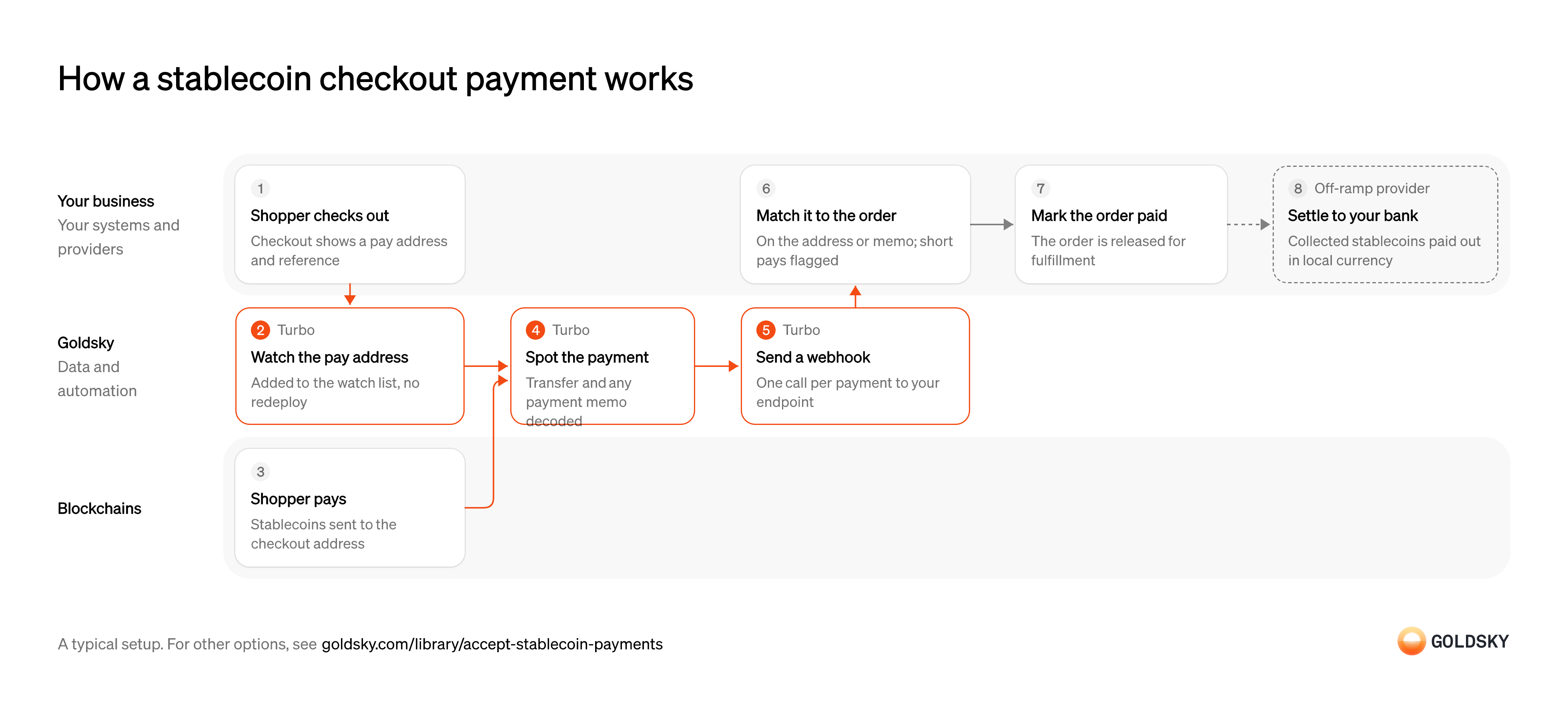
How a stablecoin checkout payment works
The chart traces one payment from checkout to the order being marked paid, with the owner of each step on its card. Your setup may differ.
Ways to confirm stablecoin payments at checkout
Streaming pushes each payment to you as it lands, with any reference from the transfer’s memo; the transfers API returns an address’s transfers when your checkout calls it, without memos.
- Best for
- Many orders, matched on the address or a memo reference
- Products
- Turbo
- What you run
- The destination: your database, queue or bucket, or a Postgres database Goldsky hosts
- What you write
- Pipeline YAML and SQL; TypeScript transforms when needed
- Where your data lives
- In your own database or systems
- How results reach you
- Pushed to you
- Best for
- A few orders at a time, each with its own address
- Products
- Feeds
- What you run
- Nothing; you call an endpoint and keep what you need
- What you write
- REST requests
- Where your data lives
- Hosted by Goldsky
- How results reach you
- Returned when you call
| Usual setupOption 1: Stream to your endpoint | Option 2: Transfers API | |
|---|---|---|
| Best for | Many orders, matched on the address or a memo reference | A few orders at a time, each with its own address |
| Products | Turbo | Feeds |
| What you run | The destination: your database, queue or bucket, or a Postgres database Goldsky hosts | Nothing; you call an endpoint and keep what you need |
| What you write | Pipeline YAML and SQL; TypeScript transforms when needed | REST requests |
| Where your data lives | In your own database or systems | Hosted by Goldsky |
| How results reach you | Pushed to you | Returned when you call |
Show the pay address at checkout
The shopper needs to know where to send the money and how much, and you need a way to tell their payment apart from everyone else’s.
Your checkout shows an address, the amount and the token, and either gives the order an address of its own or asks the payer to add a reference. With one shared address and no reference, two shoppers paying the same amount look identical.
Watch the pay address
Handled by Goldsky TurboYou only spot payments to addresses you’re watching, so each new checkout address goes on the list the moment it’s shown.
The list has to update as orders open and expire, without restarting anything. An address shown before it’s watched can take a payment nobody sees.
With Goldsky, you can keep checkout addresses in a Turbo Pipelines dynamic table, which lives in a Postgres database, and add each one as the order opens. The running pipeline picks up the change with no redeploy.
Learn about dynamic tables (opens in a new tab)Receive the shopper’s payment
The shopper pays by sending stablecoins from their own wallet or an exchange.
The transfer lands in a block on the chain, sometimes for the wrong amount or after the checkout has expired. For a short time the newest blocks can still be replaced, so a payment seen once isn’t final yet.
Spot the payment and read its reference
Handled by Goldsky TurboYour order system needs the amount, the sender and any reference the payer added, all together.
Every transfer to a watched address has to be caught with its token, amount and transaction, plus the memo when the token carries one. Reading the memo separately from the transfer leaves you two records to join before you can match the order.
Turbo Pipelines can decode a token’s
Decode payment memos (opens in a new tab)TransferWithMemoevent inside the pipeline, so the memo arrives in the same row as the transfer. For tokens without memos,dynamic_table_check()filters transfers to your checkout addresses.Send the payment to your order system
Handled by Goldsky TurboYour checkout needs to hear about the payment as soon as it lands, without asking.
Each payment is posted to your endpoint as it’s detected, which is before it’s final. Delivery can repeat after a timeout, and a payment undone by a reorg (the chain replacing its newest blocks) arrives later as a correction, so the endpoint must ignore repeats and apply corrections.
Goldsky’s webhook sink posts one request per payment with
Set up the webhook sink (opens in a new tab)one_row_per_request, retries failed deliveries, and includes the transferidso your endpoint can skip a payment it has already seen.Match the payment to the order
A payment only settles an order once you know which order it’s for and that it covers the amount.
Your system joins the payment to the order on the address or the memo reference, then checks the amount. Short payments, overpayments and unmatched payments each need a decision (refund, ask for the balance, or accept), and a refund is a new transfer back to the shopper that has to be recorded against the original payment.
Mark the order paid
The shopper is waiting on the order, and fulfillment waits on the payment.
Your order system marks the order paid and releases it for fulfillment once the payment is matched and you consider it final. Releasing on a payment the chain later undoes ships goods that were never paid for.
Settle the takings to your bank account
Most merchants pay their costs in local currency, so the stablecoins a checkout collects are usually converted and paid out to the business bank account.
Your off-ramp provider converts what the checkout collected and pays it into your bank account. Reconcile each bank payout against the payments it covers, or fees and conversion rates disappear into one lump sum nobody can explain.
What to know about streaming checkout payments
- Payments are pushed to you as they land, so your checkout never polls for them.
- Memo references can be read only on tokens that carry a memo, such as TIP-20; on other tokens, give each order its own address.
- Your endpoint can receive the same payment twice and receives corrections after a reorg, so it checks the transfer’s
idand applies corrections itself. - Goldsky runs the pipeline; you own the endpoint, the matching and the decision to release the order.
Show the pay address at checkout
The shopper needs to know where to send the money and how much, and you need a way to tell their payment apart from everyone else’s.
Your checkout shows an address, the amount and the token, and either gives the order an address of its own or asks the payer to add a reference. With one shared address and no reference, two shoppers paying the same amount look identical.
Record which address belongs to which order
To ask about an address later, your checkout needs to know which order it was shown for.
Store each order’s address, chain, token and amount due together. An address reused across orders makes every later payment to it ambiguous.
Receive the shopper’s payment
The shopper pays by sending stablecoins from their own wallet or an exchange.
The transfer lands in a block on the chain, sometimes for the wrong amount or after the checkout has expired. For a short time the newest blocks can still be replaced, so a payment seen once isn’t final yet.
Look up the address’s incoming transfers
Handled by Goldsky FeedsYour checkout learns about the payment by asking for the address’s recent incoming transfers.
The lookup has to cover the window since the order opened and every token you accept. Asking too rarely makes the shopper wait at checkout, and filtering out tokens you didn’t expect hides payments sent in the wrong one.
Feeds returns an address’s native and ERC-20 transfers from its transfers endpoint, newest first. Ask with
Read the transfers endpoint reference (opens in a new tab)direction=in, afromtime at the order’s opening andinclude_unknown_price=trueso no payment is left out.Wait until the payment is final
A payment you saw can still be undone by a reorg, when the chain replaces its newest blocks.
Hold the payment until enough blocks sit on top of it, by a rule you set for each chain, and check it again before releasing the order. The API gives no signal when a transfer is reversed; the transfer stops appearing in its responses.
Match the payment to the order
A payment settles an order only once you know it covers the amount due.
Tie the transfer to the order by its address, then compare the amount with what was due. Record each transfer you’ve applied so a later lookup doesn’t count it again, and flag short payments and overpayments for someone to resolve.
Mark the order paid
The shopper is waiting on the order, and fulfillment waits on the payment.
Your order system marks the order paid and releases it for fulfillment once the payment is matched and you consider it final. Releasing on a payment the chain later undoes ships goods that were never paid for.
Settle the takings to your bank account
Most merchants pay their costs in local currency, so the stablecoins a checkout collects are usually converted and paid out to the business bank account.
Your off-ramp provider converts what the checkout collected and pays it into your bank account. Reconcile each bank payout against the payments it covers, or fees and conversion rates disappear into one lump sum nobody can explain.
What to know about checking payments with a transfers API
- Your checkout pulls, so a payment shows up only when you ask.
- The API returns no memos, so payments can’t be matched on a reference; the order’s own address does that job.
- A payment undone by a reorg stops appearing in responses, so waiting for finality is your code’s job.
- Transfers come back without their own ID, so your code decides how to tell a repeat from a second, identical payment.
Related jobs
Take the payment into escrow
Holding the payment in a contract means the business doesn’t receive funds it may have to refuse.
The payer approves the contract to spend the stablecoins and asks it to take the payment; the contract pulls the funds in, records the payment as pending and emits an event. The release and refund functions accept calls only from one address fixed when the contract is deployed.
Start the check when the payment lands
Handled by Goldsky ComposeThe screening should run as soon as the payment is in escrow, without anyone watching the contract.
Each pending payment needs exactly one decision. Acting on a payment a reorg (the chain replacing its newest blocks) later removes would release or refund money that was never there.
With Goldsky, a Compose task runs on the escrow contract’s event through an onchain trigger. The trigger’s
Trigger a task on an event (opens in a new tab)confirmationssetting holds each event until its block is as deep as you choose; it needsparallel_processing: true, which runs payments side by side rather than in block order.Screen the payer’s wallet
The business needs to know whether the money comes from a wallet linked to risk before it accepts it.
Your screening provider returns a risk score for the sending wallet, with the rules it triggered. If the provider doesn’t answer, the check retries, and a payment still pending after the retries is caught by the scheduled check below.
Release or refund the payment, and record why
Handled by Goldsky ComposeA payment passes or fails your threshold, and either way someone may ask later why.
A score under your threshold releases the funds to the business wallet; a score at or above it returns them to the payer. Each decision is stored with the score, the triggered rules and both transaction hashes, keyed to the payment.
The Compose task calls the provider with
Send transactions from a wallet (opens in a new tab)fetch, then calls the contract’s approve or reject function from the wallet the contract trusts, with gas sponsored, and writes an audit record to a collection keyed on the payment ID.Flag payments stuck in escrow
Handled by Goldsky ComposeA missed event or a failed call can leave money in escrow that nobody notices.
On a schedule, every payment still pending is listed and reported to the team that resolves them. Checking each payment only when it arrives misses the ones that stall afterwards.
A second Compose task on a cron trigger reads the contract for payments still pending and reports any it finds.
Run a task on a schedule (opens in a new tab)Mark the order paid or tell the payer
The payer is waiting on the order, and the outcome decides what happens next.
Your order system marks the order paid when the release lands, or tells the payer the payment was returned and offers another way to pay. Keep the audit record with the order, so its history from payment to decision can be traced.
Watch the wallets you refund from
Handled by Goldsky TurboYour ledger should learn about every refund from the chain, including refunds someone sent by hand.
List every wallet that sends refunds, on each chain you pay out on, and update the list when a wallet is added or replaced. A refund sent from a wallet nobody listed never reaches the ledger, so its payment still looks fully paid.
With Goldsky, you can keep your refund wallets in a Turbo Pipelines dynamic table, a lookup table in a Postgres database, and filter stablecoin transfers on their
Learn about dynamic tables (opens in a new tab)senderwithdynamic_table_check(). The running pipeline picks up a wallet you add with no redeploy.Decide what’s owed back
A stablecoin payment can’t be reversed or charged back, so money goes back to the buyer only when you send it.
Check the original payment and any refunds already sent against it, then set the amount: all of it, part of it for a partial return, or the excess on an overpayment. Refunds against one payment must never add up to more than it brought in, and a payment still held in escrow, as in authorize and capture, is voided or refunded through the escrow contract instead.
Get a refund address from the buyer
The address a payment came from isn’t always the buyer’s own, so sending the refund back to it can strand the money.
A payment from an exchange account usually leaves from the exchange’s shared wallet, and a refund sent there isn’t credited to the buyer until they give the exchange the refund’s transaction hash, so ask for an address on the same chain and token and have the buyer confirm it. Some escrow designs record this address when the buyer pays, so any refund, including one an arbiter orders in a dispute, can only go there.
Send the refund
A refund is a new payment, so it’s approved, signed and sent like any other payout.
Your custody provider sends the amount from a refund wallet under your approval policy, in the token the buyer paid with, to the address they confirmed. Where the token carries a memo and your provider can set one, put the original order’s reference in it, so the refund points back to its payment onchain.
Record the refund as it leaves
Handled by Goldsky TurboYour ledger should show the refund from the chain itself, not from someone’s note that it was sent.
Each transfer out of a refund wallet is written to your database with its token, amount, recipient and transaction hash, keyed so a repeated delivery updates the same row. If a reorg (the chain replacing its newest blocks) drops the transfer, its row has to go too, or the ledger shows a refund the buyer never received.
Goldsky’s Turbo Pipelines writes the filtered transfers to a table in your database with
See how reorg corrections apply (opens in a new tab)primary_keyset to the transfer’sid, so a repeat overwrites its row and a reorg’s deletes and updates correct the table in place.Tie the refund to the original payment
For every payment, finance needs to see what came in, what went back and what’s left.
Your ledger joins each refund row to the refund you approved, on the memo reference where there is one or on the recipient address and amount, and stores the refund’s transaction hash against the original payment. A partial refund leaves the rest as revenue, and a transfer out that matches no approved refund goes to someone to investigate.
Flag refunds that never went out
Handled by Goldsky ComposeA refund approved but never sent, or stuck with a provider, leaves the buyer waiting and your books wrong.
On a schedule, list every approved refund that still has no matching transfer after the time you allow, and send each one to the team that handles refunds. Checking only when a refund goes out misses the ones that never leave.
A Compose task on a cron trigger can call your ledger’s API with
Run a task on a schedule (opens in a new tab)fetchfor approved refunds still missing a transaction hash, and post each one to your support or operations tool.Tell the buyer and close the refund
The buyer can’t see your ledger, so they need proof the money went back.
Send the buyer the amount, the address and the transaction hash, which they can check on a block explorer or give to their exchange to have the refund credited. Mark the order refunded in full or in part, and include refunds in the daily check of what each wallet sent against what your ledger expects.
What you control
- Your team
- Show the pay address at checkout
- Match the payment to the order
- Mark the order paid
- Your providers
- Off-ramp provider
Questions and answers
How can I accept stablecoin payments?
Show the shopper an address to pay at checkout, watch it for an incoming stablecoin transfer, match the transfer to the order and mark the order paid. Most teams give each order its own address, or ask the payer to add a reference, so the match doesn’t rest on the amount alone. Short or late payments go to someone to review, and the order waits until the chain can no longer undo the payment.
How does a business accept stablecoin payments?
A business accepts stablecoin payments through a payment provider that offers stablecoin checkout, or by running its own receiving addresses and watching them for transfers. Either way, someone ties each transfer to an invoice or order, decides what counts as paid, and converts the stablecoins into bank dollars if the business needs them. A business running its own addresses also needs a custody provider to hold the keys under an approval policy.
Security and deployment
- SOC 2 Type IIIndependently audited security controls.
- Dedicated infrastructureSingle-tenant options for production workloads.
- Data residencyCloud, on-premises or co-located.
More use cases that detect deposits
- Deposit detectionSpot incoming stablecoin transfers to your customers’ wallets and credit them once confirmed.
- Stablecoin wallet top-upsCredit a user’s app balance when a stablecoin transfer to their embedded wallet confirms.
- Stablecoin deposits to business bank accountsDetect stablecoin deposits into business bank and fintech accounts and post them to the account alongside fiat.
- Crypto exchange deposit detectionDetect deposits to each exchange user’s addresses, wait for enough confirmations and credit the user once.
- Authorize and capture stablecoin paymentsHold a buyer’s stablecoins in an escrow contract at checkout, capture them to the merchant as orders ship, void what can’t be filled and refund after capture.
- Stablecoin off-rampsDetect the stablecoin a customer sends to cash out, so the provider can pay fiat to their bank account or card.
- Confirm x402 and agent stablecoin paymentsConfirm stablecoin payments that AI agents make, often per request, and keep each agent within its spending limits.
- Stablecoin subscription paymentsConfirm each scheduled stablecoin charge onchain and mark the subscription paid.
Use cases built the same way
- Stablecoin card programsDetect stablecoin top-ups to the wallets that back a card program so spend limits update.
- Stablecoin settlement for card networksSettle card-network obligations with issuers and acquirers in stablecoins across chains.
- Post onchain transfers to your ledgerPost each confirmed onchain transfer to the fintech’s own ledger, corrected for reorgs.
- Improve blockchain webhook reliabilityKeep onchain event notifications arriving at your backend, with retries, reorg corrections and a backup feed.
Accept stablecoin payments with Goldsky
We’ll map it to your systems and show you what Goldsky runs, so your team builds the product, not the pipelines underneath it.
 Robinhood
 HyperEVM
 Arc
 Solana
 Ethereum
 Polymarket
 Base
 Tempo
 Bitcoin