Post onchain transfers to your ledger
What it is
Posting onchain transfers to a fintech ledger is the job of catching every stablecoin transfer in or out of a customer’s wallet and booking it once against that customer’s account.
Fintechs and banking-as-a-service platforms that run their own ledger need it so balances in the app match the chain, which means handling transfers delivered twice and reorgs, when the chain replaces its newest blocks and a transfer can vanish.
Goldsky can watch every customer address and deliver each transfer, and each correction, to your systems; matching and posting stay in your ledger.
You can post onchain transfers to your ledger two ways: stream every transfer for your customer wallets to your queue with Turbo Pipelines, or have Feeds sync transfers into your database.
Who it’s for
Fintechs, neobanks and banking-as-a-service platforms that keep their own ledger and give each customer a stablecoin wallet.
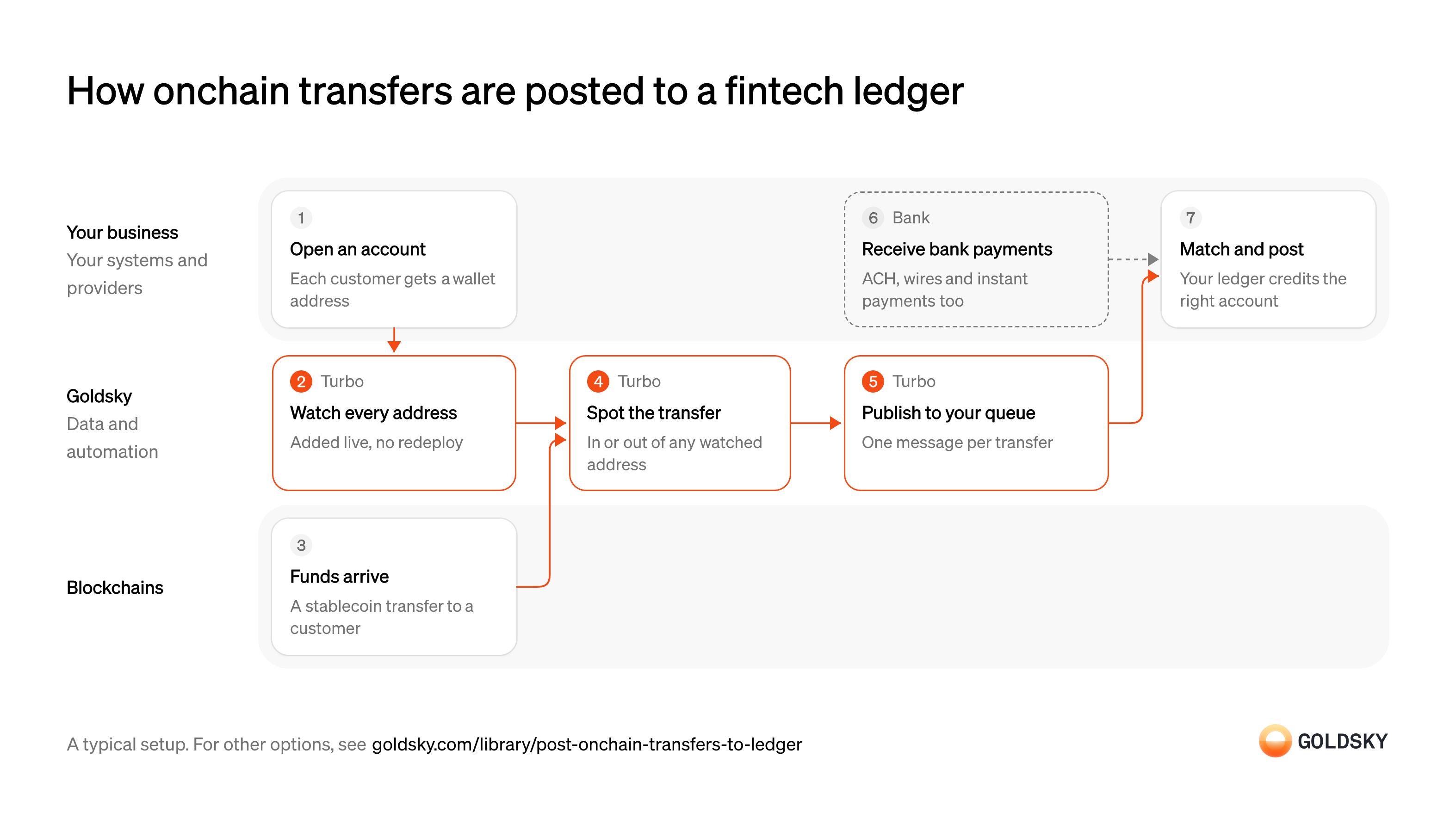
How onchain transfers are posted to a fintech ledger
The diagram follows one transfer from the moment you open the customer’s account to the entry your ledger posts, and shows who does each step. Your setup may differ.
Ways to post onchain transfers to a fintech ledger
Your pipeline follows the addresses on your watch list and sends each reorg correction as its own message on your queue; the synced feed puts ready-made transfer rows in your database with no pipeline to define.
- Best for
- Many customer wallets, posted from your own queue
- Products
- Turbo
- What you run
- The destination: your database, queue or bucket, or a Postgres database Goldsky hosts
- What you write
- Pipeline YAML and SQL; TypeScript transforms when needed
- Best for
- Transfer rows in your database, no pipeline to run
- Products
- Feeds
- What you run
- The destination database or endpoint
- What you write
- Nothing to get the rows; your own SQL to use them
| Usual setupOption 1: Stream to your queue | Option 2: Synced transfers feed | |
|---|---|---|
| Best for | Many customer wallets, posted from your own queue | Transfer rows in your database, no pipeline to run |
| Products | Turbo | Feeds |
| What you run | The destination: your database, queue or bucket, or a Postgres database Goldsky hosts | The destination database or endpoint |
| What you write | Pipeline YAML and SQL; TypeScript transforms when needed | Nothing to get the rows; your own SQL to use them |
Open the account and its wallet
Every transfer has to be booked against a customer, so each wallet address belongs to one account from the start.
Your app creates the account and gives it a wallet address, through your wallet or custody provider. Record the address, chain and account ID together; a transfer to an address with no account behind it can’t be posted anywhere.
Watch every customer address
Handled by Goldsky TurboYou only catch transfers for addresses you’re watching, so each new account’s address goes on the list.
The list has to take a new address the moment the account opens, without a restart. A gap between opening an account and watching it means the customer’s first transfer is missed.
With Goldsky, the watch list is a Turbo Pipelines dynamic table, which lives in a Postgres database; insert an address and the running pipeline starts matching it, with no redeploy.
Learn about dynamic tables (opens in a new tab)Move funds in or out of the wallet
Customers receive stablecoins from outside and send them out again, and each movement changes what your ledger owes them.
Each transfer is recorded in a block. For a short time the newest blocks can still be replaced (a reorg), so a transfer seen once can still disappear or move to another block.
Spot every transfer in or out of a watched address
Handled by Goldsky TurboBoth directions change the customer’s balance, so both have to reach the ledger.
Catch each transfer where a watched address is the sender or the recipient, with token, amount, transaction and a stable ID. Missing outgoing transfers leaves the ledger showing money the customer already sent.
A Turbo Pipelines SQL transform keeps transfers where
Filter transfers against a watch list (opens in a new tab)dynamic_table_check()matches the sender or the recipient, and carries each transfer’sidthrough.Publish each transfer to your queue
Handled by Goldsky TurboYour ledger consumes events from a queue, so each transfer becomes one message it can process.
Key each message on the transfer’s ID, so a repeat can be recognized and per-transfer order kept. When a reorg removes a transfer, the correction has to reach the same consumer.
Goldsky’s Kafka sink publishes each row to your topic in JSON or Avro, keyed on the
Set up the Kafka sink (opens in a new tab)primary_keyyou set, and reorg corrections arrive on the same topic for your consumer to apply.Take bank payments into the same ledger
Fintech accounts that hold stablecoins usually move dollars over bank rails too, and the customer sees one balance.
Your bank or payments platform reports each ACH, wire or instant payment with the account it belongs to. Post both kinds of movement to the same account, with a field for the rail, so one customer’s history reads as one list.
Match the transfer and post it to the ledger
The job is done when the customer’s ledger balance reflects the transfer, once.
Look up the account that owns the address, check the transfer’s ID against what you’ve already posted and book the entry. Deliveries can repeat, so posting without that check books the same transfer twice; post reversals for transfers a reorg removes.
What to know about streaming transfers to your queue
- Delivery is at least once, so your consumer skips a transfer ID it has already posted.
- Reorg corrections arrive as messages, and your consumer applies them as reversals.
- You choose the message’s columns in the pipeline’s SQL.
- Goldsky runs the pipeline; you run the topic, the consumer and the ledger.
Open the account and its wallet
Every transfer has to be booked against a customer, so each wallet address belongs to one account from the start.
Your app creates the account and gives it a wallet address, through your wallet or custody provider. Record the address, chain and account ID together; a transfer to an address with no account behind it can’t be posted anywhere.
Move funds in or out of the wallet
Customers receive stablecoins from outside and send them out again, and each movement changes what your ledger owes them.
Each transfer is recorded in a block. For a short time the newest blocks can still be replaced (a reorg), so a transfer seen once can still disappear or move to another block.
Sync new transfers into your database
Handled by Goldsky FeedsTransfers reach your systems without your app calling, so posting starts sooner.
Each transfer has to arrive with sender, recipient, token, amount and transaction. A sync that falls behind delays every posting queued after it.
Feeds can sync the transfers feed to a Postgres, MySQL or ClickHouse database you own, or to a webhook, as new rows land.
Sync Feeds to your database (opens in a new tab)Wait until each transfer is final
A transfer you saw can still be undone by a reorg.
Hold each row until enough blocks sit on top of it, by a rule you set per chain, and confirm it’s still there before posting. A posting made too early leaves a balance the chain no longer backs.
Take bank payments into the same ledger
Fintech accounts that hold stablecoins usually move dollars over bank rails too, and the customer sees one balance.
Your bank or payments platform reports each ACH, wire or instant payment with the account it belongs to. Post both kinds of movement to the same account, with a field for the rail, so one customer’s history reads as one list.
Match the transfer and post it to the ledger
The job is done when the customer’s ledger balance reflects the transfer, once.
Look up the account that owns the address, check the transfer’s ID against what you’ve already posted and book the entry. Deliveries can repeat, so posting without that check books the same transfer twice; post reversals for transfers a reorg removes.
What to know about syncing a transfers feed
- Rows arrive in the Feeds schema, so your posting code reads those columns as they are.
- Matching transfers to accounts, and waiting until each one is final, stay in your code.
- Goldsky runs the sync; you own the destination and keep it reachable.
What you control
- Your team
- Open the account and its wallet
- Match the transfer and post it to the ledger
- Your providers
- Bank
Security and deployment
- SOC 2 Type IIIndependently audited security controls.
- Dedicated infrastructureSingle-tenant options for production workloads.
- Data residencyCloud, on-premises or co-located.
More use cases that reconcile to your ledger
- Crypto reconciliationMatch onchain transfers, mints and burns to your ledger, core or reserves, and flag exceptions.
- Stablecoin invoice matchingMatch incoming stablecoin payments to invoices or customers and flag the ones that don’t match.
- Tokenized deposit tie-out to the core ledgerTie tokenized-deposit balances onchain to the bank’s core ledger each day.
- Stablecoin mint and burn tie-out to reservesMatch each mint and burn to a reserve movement for the monthly examination.
- Reconcile tokenized and book-entry positionsCheck that tokenized positions match the book-entry or custodial records they mirror.
- Onchain data for crypto accountingSend priced onchain activity to a crypto subledger so finance can close the books.
- Crypto client asset segregationShow which wallets and balances belong to the firm and which to clients, at any date.
Use cases built the same way
- Stablecoin deposits to business bank accountsDetect stablecoin deposits into business bank and fintech accounts and post them to the account alongside fiat.
- Crypto exchange deposit detectionDetect deposits to each exchange user’s addresses, wait for enough confirmations and credit the user once.
- Stablecoin settlement for card networksSettle card-network obligations with issuers and acquirers in stablecoins across chains.
- Stablecoin wallet top-upsCredit a user’s app balance when a stablecoin transfer to their embedded wallet confirms.
Post onchain transfers to a fintech ledger with Goldsky
We’ll map it to your systems and show you what Goldsky runs, so your team builds the product, not the pipelines underneath it.
 Robinhood
 HyperEVM
 Arc
 Solana
 Ethereum
 Polymarket
 Base
 Tempo
 Bitcoin