Stablecoin invoice matching
What is stablecoin invoice matching?
Stablecoin invoice matching is the job of tying each incoming stablecoin payment to the invoice or customer it pays, also called crypto cash application or payment attribution.
Payment service providers, fintechs that keep their own ledger and stablecoin payment rails run it so receivables close when the money lands, and so a payment nobody can place gets looked at the same day.
Goldsky can read each payment, and its memo where the token carries one, and land it in your database next to your invoices; the match itself is a join your team writes and owns.
You can match stablecoin payments to invoices two ways: stream every payment, memo included, into your database with Turbo Pipelines, or pull each receiving wallet’s transfers from the Feeds transfers API.
Who uses stablecoin invoice matching?
Payment service providers, B2B payment platforms and fintechs that keep their own ledger and invoice customers in stablecoins.
How stablecoin invoice matching works
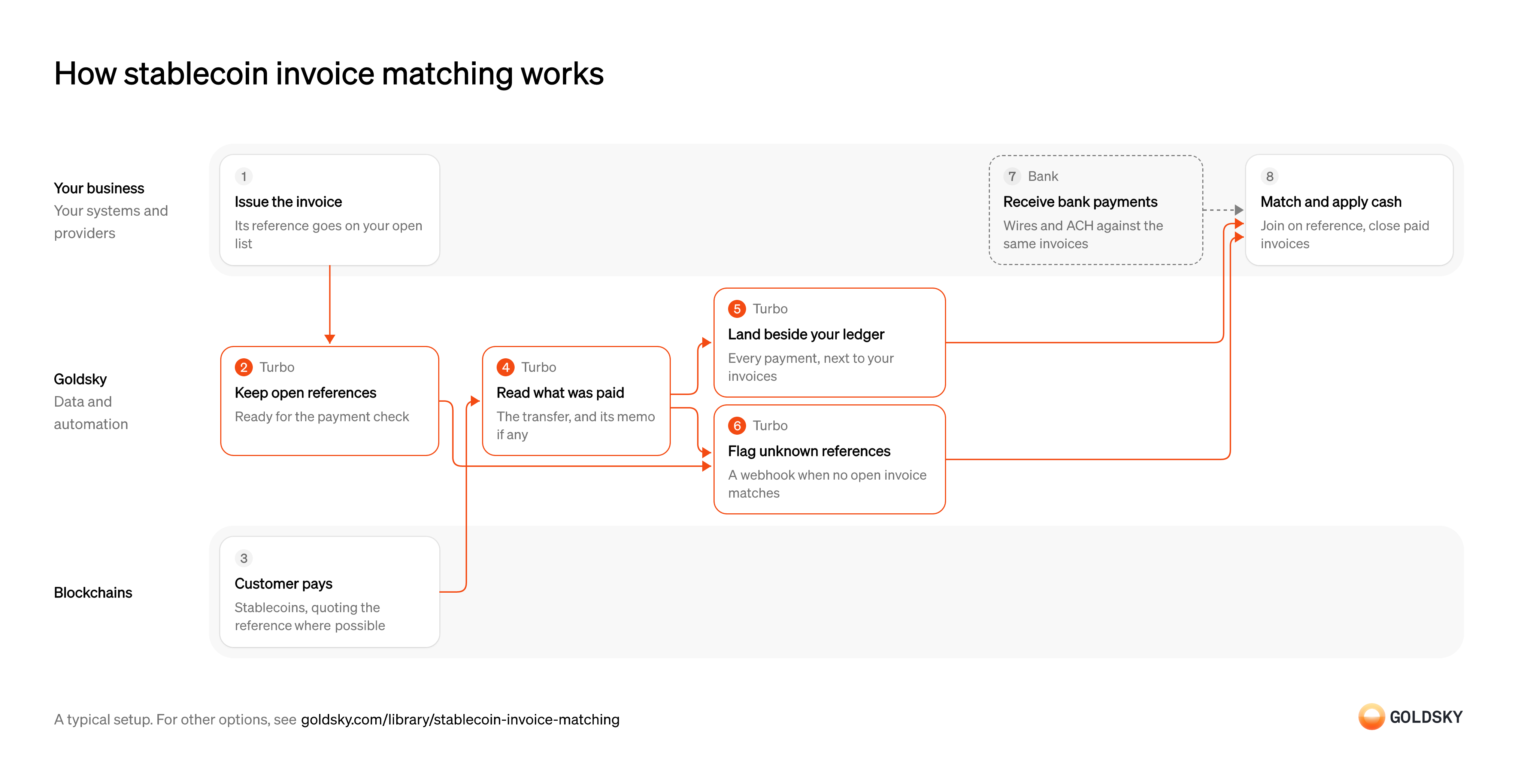
The diagram follows one invoice from the moment you issue it to the cash applied against it, and shows who does each step. Your setup may differ.
Ways to match stablecoin payments to invoices
Streaming pushes each payment beside your invoices with its memo and can flag unknown references as they arrive; the transfers API returns incoming transfers when your app calls it, without memos.
- Best for
- Many payments, matched on a reference in your own database
- Products
- Turbo
- What you run
- The destination: your database, queue or bucket, or a Postgres database Goldsky hosts
- What you write
- Pipeline YAML and SQL; TypeScript transforms when needed
- Where your data lives
- In your own database or systems
- How results reach you
- Pushed to you
- Best for
- A few receiving wallets, checked from your app
- Products
- Feeds
- What you run
- Nothing; you call an endpoint and keep what you need
- What you write
- REST requests
- Where your data lives
- Hosted by Goldsky
- How results reach you
- Returned when you call
| Usual setupOption 1: Stream to your database | Option 2: Transfers API | |
|---|---|---|
| Best for | Many payments, matched on a reference in your own database | A few receiving wallets, checked from your app |
| Products | Turbo | Feeds |
| What you run | The destination: your database, queue or bucket, or a Postgres database Goldsky hosts | Nothing; you call an endpoint and keep what you need |
| What you write | Pipeline YAML and SQL; TypeScript transforms when needed | REST requests |
| Where your data lives | In your own database or systems | Hosted by Goldsky |
| How results reach you | Pushed to you | Returned when you call |
Issue the invoice with a payment reference
A payment can only be applied to an invoice if something on the payment points back to it.
Give each invoice a reference the payer can include, or a receiving address used for that invoice alone, and keep the reference on your list of open invoices. Without one, matching falls back to amount and date, and two invoices for the same amount can’t be told apart.
Keep the open references where the payment check can see them
Handled by Goldsky TurboTo flag a payment nobody expected, you need the current list of references you are expecting.
Add a reference when an invoice opens and remove it when it’s paid or canceled. A stale list either flags good payments or lets unknown ones through.
Goldsky’s Turbo Pipelines can hold the open references in a dynamic table, a Postgres table your invoicing system inserts into and deletes from while the pipeline runs.
Learn about dynamic tables (opens in a new tab)Receive the customer’s payment
The customer pays in stablecoins from their own wallet or an exchange.
Some tokens let the payer attach a memo carrying your reference; many don’t, and some payers leave it out. A payment can also arrive short, early or split in two, so matching has to expect more than one payment per invoice.
Read what was paid, and the reference with it
Handled by Goldsky TurboMatching needs the payer, the amount, the token and, where there is one, the memo.
Decode every payment to your receiving addresses with its transaction hash, so each row can be traced to the chain. A memo left encoded as raw bytes can’t be compared with the reference on your invoice.
In Turbo Pipelines,
Decode event logs in SQL (opens in a new tab)_gs_log_decodedecodes each transfer event with the token’s ABI, so a memo field such as the one onTransferWithMemolands as its own column.Land every payment beside your invoices
Handled by Goldsky TurboMatching is a join, and a join is easiest when payments and invoices sit in the same database.
Write each payment as a row keyed on a stable ID, so a repeat delivery overwrites the same row. A reorg can remove a payment you already wrote, and the table has to follow the chain.
With Goldsky, the pipeline writes each payment to a database table with a
How reorgs reach your sinks (opens in a new tab)primary_key, so repeats overwrite the same row and reorg corrections update or delete it.Flag payments with an unknown reference
Handled by Goldsky TurboA payment that matches no open invoice needs a person, and the sooner they hear, the easier the payer is to reach.
Send the payment to your operations queue the moment it arrives with a reference you weren’t expecting. Rules about something missing, such as an invoice still unpaid past its due date, run on a schedule against your database.
A SQL transform can keep payments where
Set up the webhook sink (opens in a new tab)dynamic_table_check()finds no open reference and send them to a webhook sink. The webhook fires when the payment is seen, so your receiver also applies any correction that follows.Take bank payments against the same invoices
Most customers still pay invoices by bank transfer, so open invoices are settled from two places.
Your bank reports each incoming wire or ACH payment with the payer’s reference. Close an invoice from whichever rail paid it, and check both before chasing a customer, or someone who paid by wire gets a reminder.
Match payments and apply cash
Cash application is the accounting step: the invoice closes and the receivable comes off the books.
Join each payment to its open invoice on the reference, or on address and amount where there’s no reference, then mark the invoice paid, short-paid or overpaid. Anything left over goes to someone who can contact the payer, before it ages into an unexplained balance.
What to know about streaming payments into your database
- The match is a SQL join you write and run on your data, so short payments and split payments follow your rules.
- Memos exist only where the token carries one; other payments are matched on address and amount.
- Database rows are corrected after a reorg; the webhook for unmatched payments receives corrections that your receiver applies.
- Goldsky runs the pipeline; you own the database, the open-invoice list and the matching SQL.
Issue the invoice with a payment reference
A payment can only be applied to an invoice if something on the payment points back to it.
Give each invoice a reference the payer can include, or a receiving address used for that invoice alone, and keep the reference on your list of open invoices. Without one, matching falls back to amount and date, and two invoices for the same amount can’t be told apart.
Receive the customer’s payment
The customer pays in stablecoins from their own wallet or an exchange.
Some tokens let the payer attach a memo carrying your reference; many don’t, and some payers leave it out. A payment can also arrive short, early or split in two, so matching has to expect more than one payment per invoice.
Look up each receiving wallet’s incoming transfers
Handled by Goldsky FeedsYour app checks for payments by requesting each receiving wallet’s recent incoming transfers.
Request every token you accept, for the window since your last check. Transfers have no ID, and one transaction can contain two identical transfers, so your record of applied payments can’t rely on amount and address alone.
Feeds returns a wallet’s native and ERC-20 transfers from its transfers endpoint, newest first, with
Read the transfers endpoint reference (opens in a new tab)direction=infor receipts and the USD value at transfer time on each row.Wait until each payment is final
A payment you saw can still be undone by a reorg, when the chain replaces its newest blocks.
Hold each payment until enough blocks sit on top of it, by a rule you set per chain, and check it again before applying it. An invoice closed on a payment that later vanishes reopens as a break.
Flag payments that match no invoice
A payment nobody can place needs a person to contact the payer.
Your code sends any final payment with no matching address or amount to your operations queue. A short payment matches its invoice but leaves a balance, which is a different case from an unknown payment.
Take bank payments against the same invoices
Most customers still pay invoices by bank transfer, so open invoices are settled from two places.
Your bank reports each incoming wire or ACH payment with the payer’s reference. Close an invoice from whichever rail paid it, and check both before chasing a customer, or someone who paid by wire gets a reminder.
Match payments and apply cash
Cash application is the accounting step: the invoice closes and the receivable comes off the books.
Join each payment to its open invoice on the reference, or on address and amount where there’s no reference, then mark the invoice paid, short-paid or overpaid. Anything left over goes to someone who can contact the payer, before it ages into an unexplained balance.
What to know about matching invoices with a transfers API
- The API has no memos, so the reference has to be the address or the amount.
- Your app pulls, so a payment shows up when you call, and flagging unknown payments is code you write.
- A transfer undone by a reorg stops appearing in responses with no flag; wait for finality before applying cash.
- The API values each transfer when you request it, so store the USD value when you apply the payment.
What you control
- Your team
- Issue the invoice with a payment reference
- Match payments and apply cash
- Your providers
- Bank
Security and deployment
- SOC 2 Type IIIndependently audited security controls.
- Dedicated infrastructureSingle-tenant options for production workloads.
- Data residencyCloud, on-premises or co-located.
More use cases that reconcile to your ledger
- Crypto reconciliationMatch onchain transfers, mints and burns to your ledger, core or reserves, and flag exceptions.
- Post onchain transfers to your ledgerPost each confirmed onchain transfer to the fintech’s own ledger, corrected for reorgs.
- Tokenized deposit tie-out to the core ledgerTie tokenized-deposit balances onchain to the bank’s core ledger each day.
- Stablecoin mint and burn tie-out to reservesMatch each mint and burn to a reserve movement for the monthly examination.
- Reconcile tokenized and book-entry positionsCheck that tokenized positions match the book-entry or custodial records they mirror.
- Onchain data for crypto accountingSend priced onchain activity to a crypto subledger so finance can close the books.
- Crypto client asset segregationShow which wallets and balances belong to the firm and which to clients, at any date.
Use cases built the same way
- Stablecoin wallet top-upsCredit a user’s app balance when a stablecoin transfer to their embedded wallet confirms.
- Accept stablecoin paymentsConfirm stablecoin payments from shoppers and mark the order paid.
- Authorize and capture stablecoin paymentsHold a buyer’s stablecoins in an escrow contract at checkout, capture them to the merchant as orders ship, void what can’t be filled and refund after capture.
- Confirm x402 and agent stablecoin paymentsConfirm stablecoin payments that AI agents make, often per request, and keep each agent within its spending limits.
Match stablecoin payments to invoices with Goldsky
We’ll map it to your systems and show you what Goldsky runs, so your team builds the product, not the pipelines underneath it.
 Robinhood
 HyperEVM
 Arc
 Solana
 Ethereum
 Polymarket
 Base
 Tempo
 Bitcoin