Onchain data for crypto accounting
What is onchain data for crypto accounting?
Onchain data for crypto accounting is the history of every transfer in and out of the wallets a firm accounts for, each with its USD value at the time it happened, loaded into a crypto subledger.
Fintechs, stablecoin issuers and payment rails need it so finance can book each movement and close the month without rebuilding wallet history by hand.
Goldsky can load each wallet’s history, keep new transfers coming and supply USD values at transfer time; your team joins them, posts the entries and closes the books.
You can feed a crypto accounting subledger three ways: stream every wallet transfer into your warehouse with Turbo Pipelines and add USD values from Feeds, pull transfers with their USD values from the Feeds transfers API, or have Feeds sync those transfers into your database.
Who uses onchain data for crypto accounting?
Fintechs that keep their own ledger, stablecoin issuers and payment rails whose finance teams close the books on wallet activity.
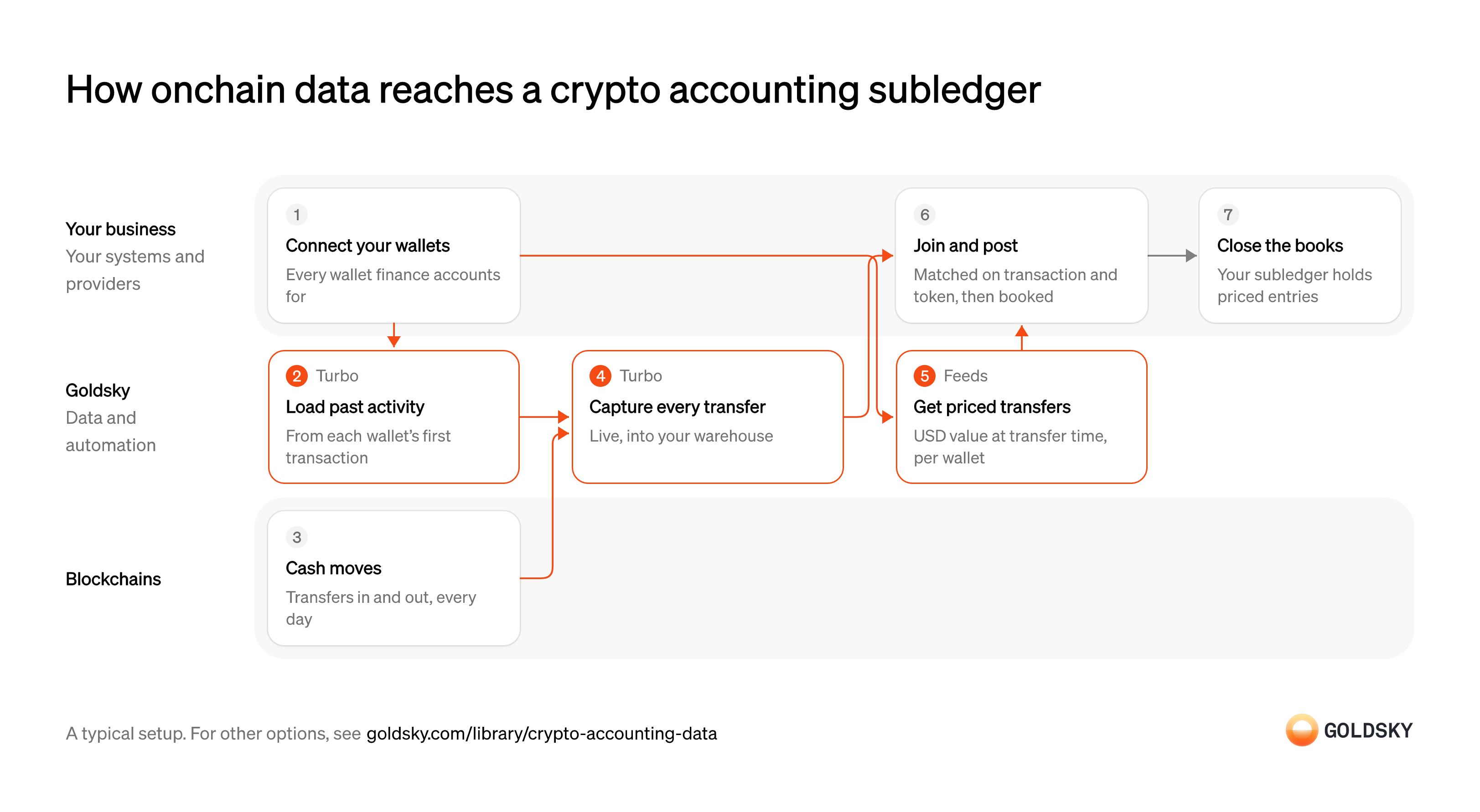
How onchain data reaches a crypto accounting subledger
The diagram follows wallet activity from the moment you connect a wallet to the close of the books, and shows who does each step. Your setup may differ.
Ways to feed onchain data to a crypto subledger
Only the pipeline leaves the USD values to you, joined from Feeds onto transfer rows in columns you choose; the transfers API and the synced feed bring each transfer with its USD value already on the row.
- Best for
- Many wallets, full history in your warehouse
- What you run
- The destination: your database, queue or bucket, or a Postgres database Goldsky hosts
- What you write
- Pipeline YAML and SQL; TypeScript transforms when needed
- Where your data lives
- In your own database or systems
- How results reach you
- Pushed to you
- Best for
- A few wallets, pulled before each close
- Products
- Feeds
- What you run
- Nothing; you call an endpoint and keep what you need
- What you write
- REST requests
- Where your data lives
- Hosted by Goldsky
- How results reach you
- Returned when you call
- Best for
- Valued transfers kept in your database, no pipeline
- Products
- Feeds
- What you run
- The destination database or endpoint
- What you write
- Nothing to get the rows; your own SQL to use them
- Where your data lives
- In your own database or systems
- How results reach you
- Pushed to you
| Usual setupOption 1: Stream to your warehouse | Option 2: Transfers API | Option 3: Synced transfers feed | |
|---|---|---|---|
| Best for | Many wallets, full history in your warehouse | A few wallets, pulled before each close | Valued transfers kept in your database, no pipeline |
| Products | TurboFeeds | Feeds | Feeds |
| What you run | The destination: your database, queue or bucket, or a Postgres database Goldsky hosts | Nothing; you call an endpoint and keep what you need | The destination database or endpoint |
| What you write | Pipeline YAML and SQL; TypeScript transforms when needed | REST requests | Nothing to get the rows; your own SQL to use them |
| Where your data lives | In your own database or systems | Hosted by Goldsky | In your own database or systems |
| How results reach you | Pushed to you | Returned when you call | Pushed to you |
List every wallet finance accounts for
The books can only be as complete as the list of wallets behind them.
Keep one register of the firm’s wallets with chain, owner and the ledger account each one maps to. A wallet missing from it means its transfers never reach the subledger, and the gap shows up as an unexplained balance at audit.
Load each wallet’s past activity
Handled by Goldsky TurboOpening balances depend on everything that happened before you started, so history comes first.
Load every transfer from each wallet’s first transaction to today. A history that starts late gives wrong opening balances, and every later period inherits the error.
Goldsky’s Turbo Pipelines can backfill the history once in job mode, filtered to your wallets, and exit when it reaches the end of the range.
Run a one-time backfill job (opens in a new tab)Move funds through the wallets
Every transfer in or out of a firm wallet is an accounting event.
Stablecoins and other tokens arrive from customers and leave for payouts, fees and treasury moves. Each one needs an entry, including small ones such as network fees.
Capture every new transfer
Handled by Goldsky TurboAfter the backfill, new transfers keep arriving and each needs an entry.
Write each new transfer to the warehouse as it happens, with chain, transaction, token, amount and direction. Rows corrected after a reorg have to be updated in place, or the subledger books transfers that no longer exist.
A streaming pipeline writes new transfers to your warehouse; sinks keyed on a
How reorgs reach your sinks (opens in a new tab)primary_keyapply reorg corrections to the same rows, and append-only sinks such as S3 receive correction records to apply.Get USD values at transfer time
Handled by Goldsky FeedsAccounting books each movement at its value when it happened, not today’s price.
Fetch each wallet’s transfers with their USD value, and store the value when you post. Prices for old transfers can be filled in later, so a value read twice may differ.
The Feeds transfers endpoint returns each wallet’s transfers with
Read the transfers endpoint reference (opens in a new tab)price_usdandamount_usdat transfer time. Addinclude_unknown_price=trueso tokens without a price still come back.Join prices to transfers and post entries
An entry needs both the movement and its value in your reporting currency at the time it happened.
Each transfer is priced at the token’s price just before its block, so every transfer of one token in a transaction has the same price. Join that price to your transfer rows by chain, transaction and token, then post the entry to the right ledger account. A transfer with no USD value needs one from your own pricing policy before it’s booked.
Close the books
At period end, finance confirms the subledger agrees with the wallets and rolls it into the general ledger.
Compare each wallet’s booked balance with its balance on the chain at the period end, explain any difference and post the summary entries. A difference left unexplained is carried into the next period and gets harder to trace.
What to know about streaming transfers to your warehouse
- Prices come from a separate call per wallet, so joining them to transfer rows is your step, by chain, transaction and token.
- Transfers of the same token in one transaction share a price, so identical transfers don’t need telling apart for the join.
- The pipeline’s SQL decides the columns, so the rows can match your subledger’s import format.
- Goldsky runs the pipeline; you own the warehouse, the join and the postings.
List every wallet finance accounts for
The books can only be as complete as the list of wallets behind them.
Keep one register of the firm’s wallets with chain, owner and the ledger account each one maps to. A wallet missing from it means its transfers never reach the subledger, and the gap shows up as an unexplained balance at audit.
Move funds through the wallets
Every transfer in or out of a firm wallet is an accounting event.
Stablecoins and other tokens arrive from customers and leave for payouts, fees and treasury moves. Each one needs an entry, including small ones such as network fees.
Pull each wallet’s transfers with USD values
Handled by Goldsky FeedsEach entry needs the movement and its USD value at the time.
Request every transfer in the period, both directions, including tokens without a price. Transfers have no ID, so your record of what’s posted can’t rely on amount and address alone.
Feeds returns each wallet’s native and ERC-20 transfers with
Read the transfers endpoint reference (opens in a new tab)price_usdandamount_usd, filtered byfromandtotimes for the period you’re closing.Post entries to the subledger
Each transfer, with its USD value, becomes an entry against the wallet’s ledger account.
Book each transfer once, at the value you stored when you pulled it, and give tokens with no USD value one from your own policy. An entry posted without that check can be posted twice on the next pull.
Close the books
At period end, finance confirms the subledger agrees with the wallets and rolls it into the general ledger.
Compare each wallet’s booked balance with its balance on the chain at the period end, explain any difference and post the summary entries. A difference left unexplained is carried into the next period and gets harder to trace.
What to know about pulling transfers from an API
- Each row already carries its USD value, so there’s no price join.
- The API values each transfer when you request it, so store the value you post.
- Native and ERC-20 transfers only; other assets need another source.
- A transfer undone by a reorg stops appearing with no flag, so pull after transfers are final.
List every wallet finance accounts for
The books can only be as complete as the list of wallets behind them.
Keep one register of the firm’s wallets with chain, owner and the ledger account each one maps to. A wallet missing from it means its transfers never reach the subledger, and the gap shows up as an unexplained balance at audit.
Move funds through the wallets
Every transfer in or out of a firm wallet is an accounting event.
Stablecoins and other tokens arrive from customers and leave for payouts, fees and treasury moves. Each one needs an entry, including small ones such as network fees.
Sync transfers and USD values into your database
Handled by Goldsky FeedsTransfers with their USD values land where your subledger can read them, without anyone pulling.
Each row needs wallet, token, amount, direction, transaction and value. A sync that falls behind delays the close.
With Goldsky, Feeds can sync the transfers feed to a Postgres, MySQL or ClickHouse database you own as new rows land.
Sync Feeds to your database (opens in a new tab)Post entries to the subledger
Each transfer, with its USD value, becomes an entry against the wallet’s ledger account.
Post each row once it’s final, at the value on the row, and keep that value with the entry. Give tokens with no USD value one from your own policy before they’re booked.
Close the books
At period end, finance confirms the subledger agrees with the wallets and rolls it into the general ledger.
Compare each wallet’s booked balance with its balance on the chain at the period end, explain any difference and post the summary entries. A difference left unexplained is carried into the next period and gets harder to trace.
What to know about syncing a transfers feed
- Rows arrive in the Feeds schema, so the subledger import reads those columns.
- New transfers are pushed as they land, so nothing polls for them.
- Waiting for finality and posting each transfer once stay in your code.
- Goldsky runs the sync; you own the destination.
What you control
- Your team
- List every wallet finance accounts for
- Join prices to transfers and post entries
- Close the books
Security and deployment
- SOC 2 Type IIIndependently audited security controls.
- Dedicated infrastructureSingle-tenant options for production workloads.
- Data residencyCloud, on-premises or co-located.
More use cases that reconcile to your ledger
- Crypto reconciliationMatch onchain transfers, mints and burns to your ledger, core or reserves, and flag exceptions.
- Stablecoin invoice matchingMatch incoming stablecoin payments to invoices or customers and flag the ones that don’t match.
- Post onchain transfers to your ledgerPost each confirmed onchain transfer to the fintech’s own ledger, corrected for reorgs.
- Tokenized deposit tie-out to the core ledgerTie tokenized-deposit balances onchain to the bank’s core ledger each day.
- Stablecoin mint and burn tie-out to reservesMatch each mint and burn to a reserve movement for the monthly examination.
- Reconcile tokenized and book-entry positionsCheck that tokenized positions match the book-entry or custodial records they mirror.
- Crypto client asset segregationShow which wallets and balances belong to the firm and which to clients, at any date.
Use cases built the same way
- Form 1099-DA data for brokersSupply the transfer history and USD values behind each customer’s Form 1099-DA.
- DAC8 and CARF reporting dataSupply the valued transfer history behind each user’s yearly DAC8 or CARF report.
- Digital asset audit evidenceGive auditors each wallet’s balance at the year-end cut-off block and the year’s transfers.
- Data for crypto AML transaction monitoringFeed complete transfer data to AML tools with lineage from the chain to the case.
Feed a crypto accounting subledger with Goldsky
We’ll map it to your systems and show you what Goldsky runs, so your team builds the product, not the pipelines underneath it.
 Robinhood
 HyperEVM
 Arc
 Solana
 Ethereum
 Polymarket
 Base
 Tempo
 Bitcoin