DAC8 and CARF reporting data
What is DAC8 and CARF reporting data?
DAC8 and CARF reporting data is the transaction history behind each user’s yearly crypto-asset report: acquisitions, disposals and transfers in and out, each valued when it happened and totaled by asset and transaction type.
Under DAC8, crypto-asset service providers in the EU collect this data from January 1, 2026 and send the first reports between January 1 and September 30, 2027; DAC8 is based on the OECD’s Crypto-Asset Reporting Framework (CARF), which 46 jurisdictions have committed to start exchanging by 2027, with more following in 2028 and 2029.
Goldsky can load each customer wallet’s full history, keep it current and supply USD values at transfer time; your reporting engine converts and totals the figures and your team files the reports.
You can build DAC8 and CARF reporting data three ways: stream every user transfer into your warehouse with Turbo Pipelines and add USD values from Feeds, export each user wallet’s transfers with USD values from the Feeds transfers API, or have Feeds sync those transfers into your database.
Who needs DAC8 and CARF reporting data?
Crypto exchanges and EU banks authorised under MiCA that report their users’ crypto-asset transactions to tax authorities.
How DAC8 and CARF reporting data is built
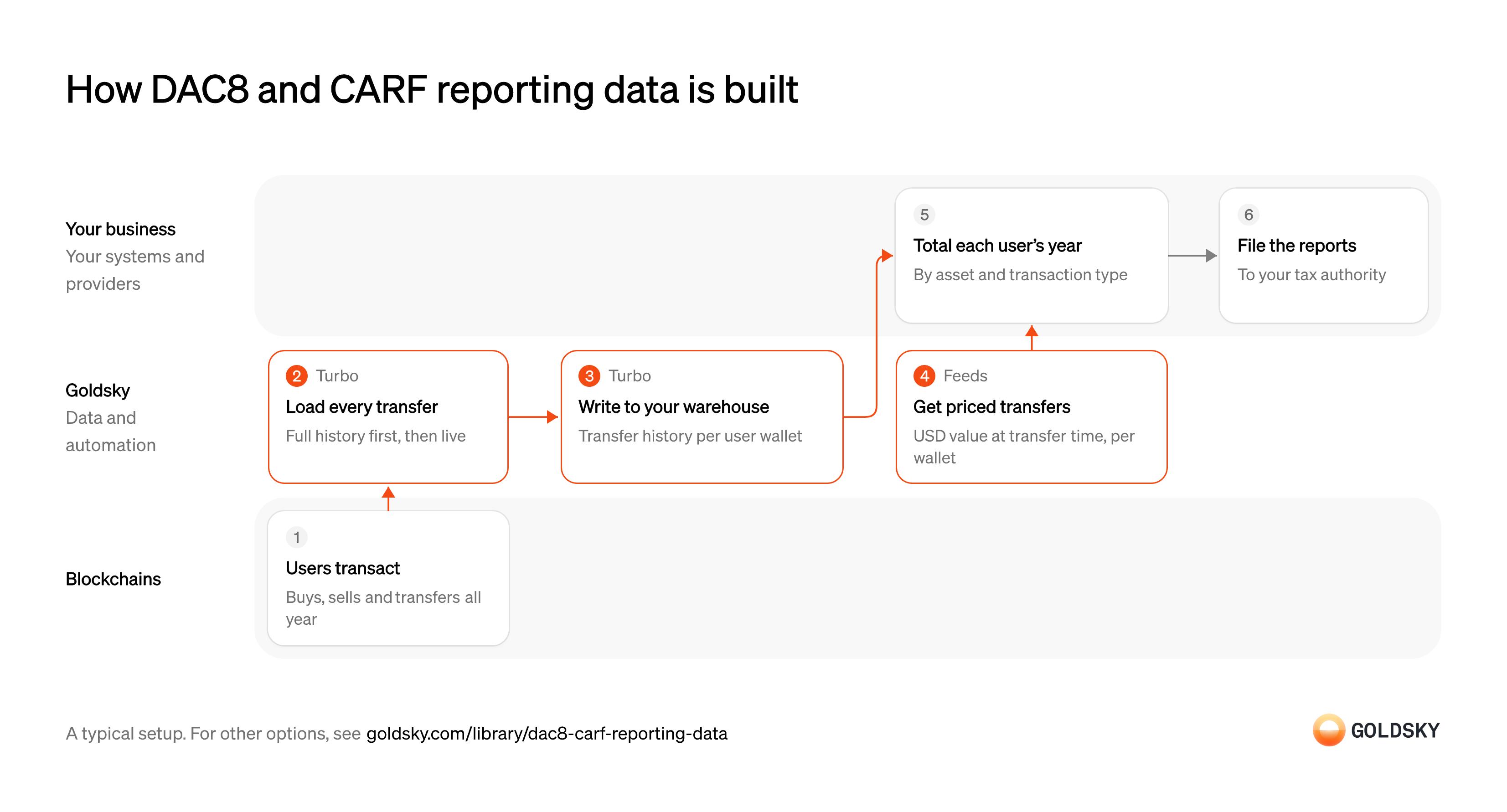
The diagram follows a year of user activity from the transactions on the chain to the reports you file, and shows who does each step. Your setup may differ.
Ways to build DAC8 and CARF reporting data
Full history sits in your warehouse with the pipeline, and your reporting engine joins USD values from Feeds; the transfers API exports a wallet’s history with values on each call, and the synced feed keeps those rows current in your database.
- Best for
- Every user wallet, full history in your warehouse
- What you run
- The destination: your database, queue or bucket, or a Postgres database Goldsky hosts
- What you write
- Pipeline YAML and SQL; TypeScript transforms when needed
- Where your data lives
- In your own database or systems
- How results reach you
- Pushed to you
- Best for
- One export per user wallet
- Products
- Feeds
- What you run
- Nothing; you call an endpoint and keep what you need
- What you write
- REST requests
- Where your data lives
- Hosted by Goldsky
- How results reach you
- Returned when you call
- Best for
- Every user wallet, kept current
- Products
- Feeds
- What you run
- The destination database or endpoint
- What you write
- Nothing to get the rows; your own SQL to use them
- Where your data lives
- In your own database or systems
- How results reach you
- Pushed to you
| Usual setupOption 1: Stream to your warehouse | Option 2: Transfers API | Option 3: Synced transfers feed | |
|---|---|---|---|
| Best for | Every user wallet, full history in your warehouse | One export per user wallet | Every user wallet, kept current |
| Products | TurboFeeds | Feeds | Feeds |
| What you run | The destination: your database, queue or bucket, or a Postgres database Goldsky hosts | Nothing; you call an endpoint and keep what you need | The destination database or endpoint |
| What you write | Pipeline YAML and SQL; TypeScript transforms when needed | REST requests | Nothing to get the rows; your own SQL to use them |
| Where your data lives | In your own database or systems | Hosted by Goldsky | In your own database or systems |
| How results reach you | Pushed to you | Returned when you call | Pushed to you |
Let users transact through the year
Every acquisition, disposal and transfer a user makes goes into their yearly report.
Users buy and sell through your platform and move tokens in and out of their wallets. DAC8 counts exchanges between crypto-assets and transfers out to wallets as well as trades against fiat, so every movement needs a record.
Load every transfer, past and new
Handled by Goldsky TurboA year’s totals need every transfer in that year, and the record of where each asset came from helps sort transfers by type.
Backfill each user wallet’s history, then keep adding new transfers. A wallet added late, or a gap of a few days, leaves transactions out of a user’s totals.
Goldsky’s Turbo Pipelines backfills the history once in job mode, filtered to your users’ wallets, then a streaming pipeline keeps new transfers coming.
Run a one-time backfill job (opens in a new tab)Write transfer history to your warehouse
Handled by Goldsky TurboThe reporting engine reads one place that holds every user’s transfers.
Store each transfer with user wallet, chain, token, amount, direction, time and transaction. Rows a reorg removes have to come out, or a user’s totals include a transfer that never settled.
The pipeline can write Parquet files to S3-compatible storage, partitioned by columns such as date, for your warehouse to query; append-only files receive reorg corrections as records to apply.
Write transfers to S3 as Parquet (opens in a new tab)Get USD values at transfer time
Handled by Goldsky FeedsDAC8 values each transaction at the time it happened.
Fetch each wallet’s transfers with their USD values and keep the value you used, because a price read later can differ.
Feeds returns each wallet’s transfers with
Read the transfers endpoint reference (opens in a new tab)price_usdandamount_usdat transfer time from its transfers endpoint, with major stablecoins valued at1.0.Total each user’s year by asset and transaction type
A DAC8 report gives yearly totals per crypto-asset, not a line per trade.
Your reporting engine sorts each user’s transactions into the report’s types, such as acquisitions and disposals against fiat, exchanges between crypto-assets, transfers in and out, and transfers to wallets not known to belong to a provider, and totals value, units and count for each. Values are taken at the time of each transaction and reported in one currency, so convert the USD values the way your policy says and apply it the same way every time.
File the reports
Reporting providers send each user’s totals to their tax authority, which exchanges them with the user’s country of residence.
Under DAC8, the first reports, covering 2026, are due between January 1 and September 30, 2027; check each member state’s own deadline and format. Keep the transfer history and totals behind every report, because corrections and questions arrive months after filing.
What to know about streaming DAC8 data to your warehouse
- Prices come from a separate call per wallet, so your reporting engine joins them to transfers by chain, transaction and token.
- Feeds values transfers in USD; converting to the reporting currency is your policy.
- Sorting transactions into report types and totaling them stay in your reporting engine.
- Goldsky runs the pipeline; you own the warehouse and the calculations.
Let users transact through the year
Every acquisition, disposal and transfer a user makes goes into their yearly report.
Users buy and sell through your platform and move tokens in and out of their wallets. DAC8 counts exchanges between crypto-assets and transfers out to wallets as well as trades against fiat, so every movement needs a record.
Export each user wallet’s transfers with USD values
Handled by Goldsky FeedsThe reporting engine needs every transfer for the year with its value at the time.
Page through each wallet’s transfers for the reporting year, both directions, including tokens without a price. Transfers have no ID, so keep identical transfers in one transaction as separate rows.
With Goldsky, the Feeds transfers endpoint returns a wallet’s native and ERC-20 transfers with
Read the transfers endpoint reference (opens in a new tab)amount_usdat transfer time, filtered byfromandtodates.Store the export
The totals in a report have to be traceable to the data behind them.
Save each wallet’s export with the values you used, since a later request can return different prices. A report you can’t rebuild is hard to correct.
Total each user’s year by asset and transaction type
A DAC8 report gives yearly totals per crypto-asset, not a line per trade.
Your reporting engine sorts each user’s transactions into the report’s types, such as acquisitions and disposals against fiat, exchanges between crypto-assets, transfers in and out, and transfers to wallets not known to belong to a provider, and totals value, units and count for each. Values are taken at the time of each transaction and reported in one currency, so convert the USD values the way your policy says and apply it the same way every time.
File the reports
Reporting providers send each user’s totals to their tax authority, which exchanges them with the user’s country of residence.
Under DAC8, the first reports, covering 2026, are due between January 1 and September 30, 2027; check each member state’s own deadline and format. Keep the transfer history and totals behind every report, because corrections and questions arrive months after filing.
What to know about exporting DAC8 data from an API
- Native and ERC-20 transfers only; other crypto-assets need another source.
- The API values each transfer when you request it, so keep the export you filed from.
- Converting to the reporting currency and totaling are done on your side.
- Your code pages through each wallet’s history; there’s nothing to run between exports.
Let users transact through the year
Every acquisition, disposal and transfer a user makes goes into their yearly report.
Users buy and sell through your platform and move tokens in and out of their wallets. DAC8 counts exchanges between crypto-assets and transfers out to wallets as well as trades against fiat, so every movement needs a record.
Sync transfers and USD values into your database
Handled by Goldsky FeedsEach user’s transfers, with their USD values, build up in one place through the year.
Each row needs wallet, token, amount, direction, time, transaction and value. A wallet missing from the sync means a user’s report is missing transactions.
Feeds can sync the transfers feed to a Postgres, MySQL or ClickHouse database you own as new rows land.
Sync Feeds to your database (opens in a new tab)Total each user’s year by asset and transaction type
A DAC8 report gives yearly totals per crypto-asset, not a line per trade.
Your reporting engine sorts each user’s transactions into the report’s types, such as acquisitions and disposals against fiat, exchanges between crypto-assets, transfers in and out, and transfers to wallets not known to belong to a provider, and totals value, units and count for each. Values are taken at the time of each transaction and reported in one currency, so convert the USD values the way your policy says and apply it the same way every time.
File the reports
Reporting providers send each user’s totals to their tax authority, which exchanges them with the user’s country of residence.
Under DAC8, the first reports, covering 2026, are due between January 1 and September 30, 2027; check each member state’s own deadline and format. Keep the transfer history and totals behind every report, because corrections and questions arrive months after filing.
What to know about syncing DAC8 data
- Rows arrive in the Feeds schema, so the reporting engine reads those columns.
- Data stays current through the year, so year-end isn’t one large export.
- Totals, currency conversion, and dropping transfers that never became final stay on your side.
- Goldsky runs the sync; you own the destination.
What you control
- Your team
- Total each user’s year by asset and transaction type
- File the reports
Questions and answers
What does a DAC8 report contain?
For each user and each type of crypto-asset, a DAC8 report gives totals for the year: the amount paid or received and the units and number of transactions for acquisitions and disposals against fiat currency, and the fair market value, units and number of transactions for exchanges between crypto-assets, retail payments, and transfers in and out. It also totals transfers to wallet addresses not known to belong to a service provider or financial institution. Values are taken at the time of each transaction.
When are the first DAC8 reports due?
Reporting crypto-asset service providers collect data on their EU-resident users from January 1, 2026. The first reports, covering 2026, are due between January 1 and September 30, 2027, and the European Commission tells providers to check each member state’s own deadlines and formats.
What is CARF?
CARF, the OECD’s Crypto-Asset Reporting Framework, is a standard under which crypto-asset service providers report their users’ transactions to their tax authority, which exchanges the data with the tax authority of each user’s country of residence. DAC8 brings the same rules into EU law. Other countries apply CARF through their own rules: Brazil, for example, collects the data through DeCripto, a monthly declaration from crypto-asset service providers serving Brazil, including those based abroad, from July 2026.
Security and deployment
- SOC 2 Type IIIndependently audited security controls.
- Dedicated infrastructureSingle-tenant options for production workloads.
- Data residencyCloud, on-premises or co-located.
More use cases that report on onchain activity
- Form 1099-DA data for brokersSupply the transfer history and USD values behind each customer’s Form 1099-DA.
- Onchain data for finance and BI reportingLoad onchain activity into the warehouse so finance and BI teams can report on it.
- DeFi accounting for positions and vaultsBook accrued rewards, vault shares and lending positions across DeFi protocols at period end.
- Crypto fair-value pricing from DEX tradesFeed DEX trade prices into principal-market fair-value marks and the VWAPs used to check them.
- Digital asset audit evidenceGive auditors each wallet’s balance at the year-end cut-off block and the year’s transfers.
Use cases built the same way
- Onchain data for crypto accountingSend priced onchain activity to a crypto subledger so finance can close the books.
- Stablecoin transaction volume and market share by chainMeasure real stablecoin or tokenized-asset volume by chain, with inorganic flows stripped out.
- Grant and incentive impact trackingMeasure what grants and incentive programs did to users, volume and TVL, per grantee.
- Stablecoin market data for analytics: market cap, supply and activityTrack stablecoin supply and market cap by token, chain and issuer, with holders, active addresses, transfer counts and velocity over time.
Build DAC8 and CARF reporting data with Goldsky
We’ll map it to your systems and show you what Goldsky runs, so your team builds the product, not the pipelines underneath it.
 Robinhood
 HyperEVM
 Arc
 Solana
 Ethereum
 Polymarket
 Base
 Tempo
 Bitcoin