Onchain data for finance and BI reporting
What is onchain data for finance and BI reporting?
Onchain data for finance and BI reporting is the full history of your contracts’ activity, decoded into readable columns and kept current in your data warehouse.
Fintechs, consumer apps and data providers need it so finance and BI teams can report on onchain activity with the same tools and joins they use for the rest of the business.
Goldsky can backfill that history, decode every event and keep writing new ones to your warehouse; your team builds the totals, reports and dashboards.
Who uses onchain data for finance and BI reporting?
Fintechs that keep their own ledger, consumer finance apps and data analytics providers whose finance and BI teams report on onchain activity.
How onchain data reaches finance and BI reports
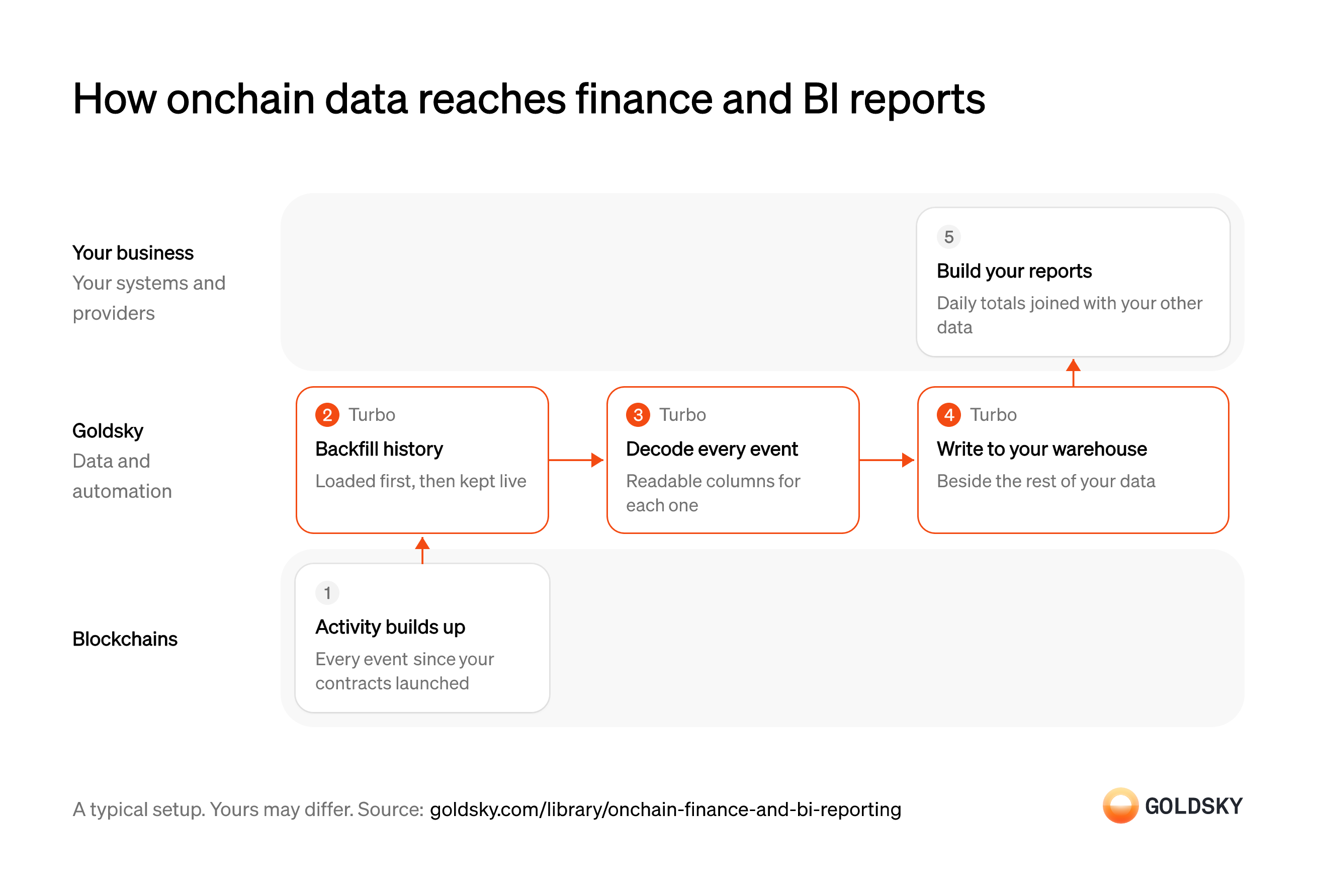
The diagram follows your contracts’ activity from the first event on the chain to the reports your team builds, and shows who does each step. Your setup may differ.
Let activity build up on the chain
Every event your contracts have emitted since launch is part of the history finance reports on.
Contracts emit events for each transfer, mint, deposit or trade. The chain keeps them in raw encoded form, which reports can’t read until they’re decoded.
Backfill the history
Handled by Goldsky TurboYear-to-date and launch-to-date figures need every past event as well as new ones.
Load every event from each contract’s deployment block, then keep the data current. A backfill that starts late leaves the earliest periods short with no sign they’re incomplete.
With Goldsky, a Turbo Pipelines job filtered to your contract addresses backfills history from the data lake and exits when done, and a streaming pipeline carries on from there.
Run a one-time backfill job (opens in a new tab)Decode every event into columns
Handled by Goldsky TurboAnalysts need named fields such as sender, amount and token, not encoded bytes.
Decode each event with the contract’s ABI and keep the transaction hash and block with every row, so any number in a report can be traced to the chain. An event left undecoded drops out of every report built on the table.
Turbo Pipelines decodes events in SQL with
Decode custom contract events (opens in a new tab)_gs_log_decode, using an ABI you supply or one fetched from a block explorer.Write decoded events to your warehouse
Handled by Goldsky TurboFinance and BI work where the rest of the company’s data already sits.
Land the rows in a form your warehouse reads, partitioned so queries for one day or chain stay fast. Rows a reorg removes have to come out, or totals include activity that never settled.
Goldsky’s S3 sink writes Parquet files with optional Hive partitioning, which warehouse engines such as Athena, Spark and Trino read directly; append-only files receive reorg corrections as records your load applies.
Write events to S3 as Parquet (opens in a new tab)Build your reports
The reports finance and BI need are totals and trends, joined with the company’s other data.
Daily volumes, balances and per-customer figures are queries in your warehouse, joined with your own customer and product tables. Keep the definitions in one place, so the same metric doesn’t come out differently in two dashboards.
What you control
- Your team
- Build your reports
Security and deployment
- SOC 2 Type IIIndependently audited security controls.
- Dedicated infrastructureSingle-tenant options for production workloads.
- Data residencyCloud, on-premises or co-located.
More use cases that report on onchain activity
- Form 1099-DA data for brokersSupply the transfer history and USD values behind each customer’s Form 1099-DA.
- DAC8 and CARF reporting dataSupply the valued transfer history behind each user’s yearly DAC8 or CARF report.
- DeFi accounting for positions and vaultsBook accrued rewards, vault shares and lending positions across DeFi protocols at period end.
- Crypto fair-value pricing from DEX tradesFeed DEX trade prices into principal-market fair-value marks and the VWAPs used to check them.
- Digital asset audit evidenceGive auditors each wallet’s balance at the year-end cut-off block and the year’s transfers.
Use cases built the same way
- NCUA stablecoin reporting dataReport supply, mint and burn, and holder figures for a stablecoin issued by a credit union subsidiary under the NCUA’s proposed rules.
- Power a blockchain data productFeed a resold data product with multi-chain data and fast backfills.
- Onchain data for index and benchmark calculationsSupply the onchain fundamentals an index or benchmark provider calculates from.
- DAO delegate dashboards and voting power analyticsTrack voting power, delegators and votes per delegate for a token-governed DAO.
Report on onchain activity in your warehouse with Goldsky
We’ll map it to your systems and show you what Goldsky runs, so your team builds the product, not the pipelines underneath it.
 Robinhood
 HyperEVM
 Arc
 Solana
 Ethereum
 Polymarket
 Base
 Tempo
 Bitcoin