Form 1099-DA data for brokers
What is Form 1099-DA data?
Form 1099-DA data is the transfer history behind each customer’s form: every transfer in and out of their wallets, with its USD value at the time, from which proceeds and cost basis are worked out.
Exchanges, consumer apps and wealth platforms that act as brokers file Form 1099-DA with the IRS for their customers’ digital asset sales, and a gap in a customer’s history shows up as a wrong number on their form.
Goldsky can load each customer wallet’s full history, keep it current and supply USD values at transfer time; your tax engine calculates cost basis and your team issues the forms.
You can build Form 1099-DA data three ways: stream every customer transfer into your warehouse with Turbo Pipelines and add USD values from Feeds, export each customer wallet’s transfers with USD values from the Feeds transfers API, or have Feeds sync those transfers into your database.
Who needs Form 1099-DA data?
Crypto exchanges, consumer finance apps, wealth platforms, crypto payment processors and crypto kiosk operators that report their customers’ digital asset sales to the IRS, and the accounting firms that work with them.
How Form 1099-DA data is built
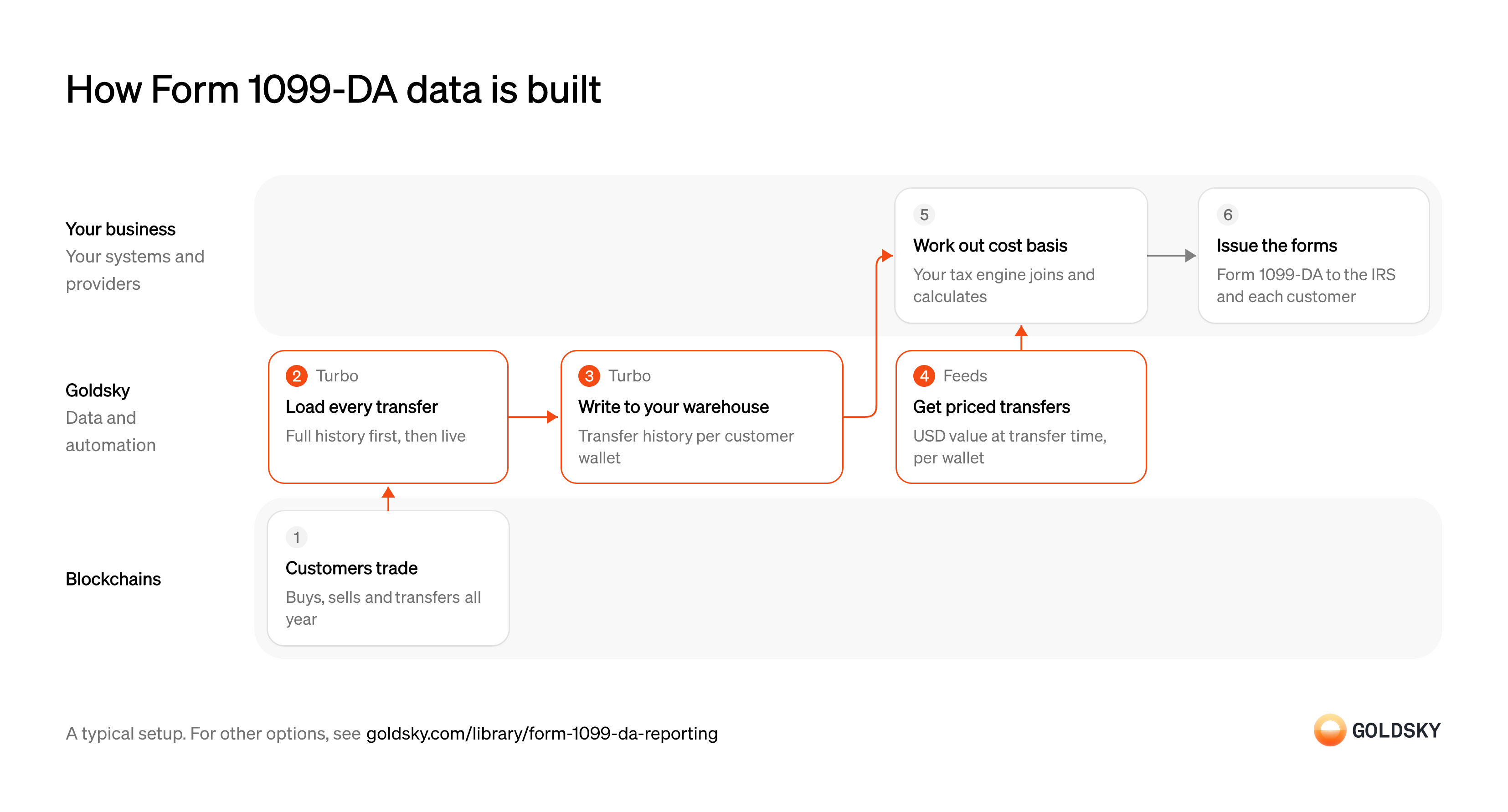
The diagram follows a year of customer activity from the trades on the chain to the forms you issue, and shows who does each step. Your setup may differ.
Ways to build Form 1099-DA data
Full history sits in your warehouse with the pipeline, and your tax engine joins USD values from Feeds; the transfers API exports a wallet’s history with values on each call, and the synced feed keeps those rows current in your database.
- Best for
- Every customer wallet, full history in your warehouse
- What you run
- The destination: your database, queue or bucket, or a Postgres database Goldsky hosts
- What you write
- Pipeline YAML and SQL; TypeScript transforms when needed
- Where your data lives
- In your own database or systems
- How results reach you
- Pushed to you
- Best for
- One export per customer wallet
- Products
- Feeds
- What you run
- Nothing; you call an endpoint and keep what you need
- What you write
- REST requests
- Where your data lives
- Hosted by Goldsky
- How results reach you
- Returned when you call
- Best for
- Every customer wallet, kept current
- Products
- Feeds
- What you run
- The destination database or endpoint
- What you write
- Nothing to get the rows; your own SQL to use them
- Where your data lives
- In your own database or systems
- How results reach you
- Pushed to you
| Usual setupOption 1: Stream to your warehouse | Option 2: Transfers API | Option 3: Synced transfers feed | |
|---|---|---|---|
| Best for | Every customer wallet, full history in your warehouse | One export per customer wallet | Every customer wallet, kept current |
| Products | TurboFeeds | Feeds | Feeds |
| What you run | The destination: your database, queue or bucket, or a Postgres database Goldsky hosts | Nothing; you call an endpoint and keep what you need | The destination database or endpoint |
| What you write | Pipeline YAML and SQL; TypeScript transforms when needed | REST requests | Nothing to get the rows; your own SQL to use them |
| Where your data lives | In your own database or systems | Hosted by Goldsky | In your own database or systems |
| How results reach you | Pushed to you | Returned when you call | Pushed to you |
Record customer activity through the year
Every buy, sell and transfer a customer makes can change what they owe in tax.
Customers trade through your platform and move tokens in and out of their wallets. A transfer in from outside brings an asset whose cost you may not know, so record how many units arrived and when, which Form 1099-DA asks for when that asset is later sold.
Load every transfer, past and new
Handled by Goldsky TurboCost basis depends on the first purchase, so the history has to reach back to each wallet’s first transfer and keep going.
Backfill each customer wallet’s full history, then keep adding new transfers. A history that starts late leaves early purchases out and basis unknown, which is also why coins transferred in from another wallet or exchange often show a blank cost basis on Form 1099-DA.
Goldsky’s Turbo Pipelines backfills the history once in job mode, filtered to your customers’ wallets, then a streaming pipeline keeps new transfers coming.
Run a one-time backfill job (opens in a new tab)Write transfer history to your warehouse
Handled by Goldsky TurboThe tax engine reads one place that holds every customer’s transfers.
Store each transfer with customer wallet, chain, token, amount, direction, time and transaction. Rows a reorg removes have to come out, or a customer is taxed on a transfer that never settled.
The pipeline can write Parquet files to S3-compatible storage, partitioned by columns such as date, for your warehouse to query; append-only files receive reorg corrections as records to apply.
Write transfers to S3 as Parquet (opens in a new tab)Get USD values at transfer time
Handled by Goldsky FeedsProceeds and basis are measured in dollars at the time of each transfer.
Fetch each wallet’s transfers with their USD values and keep the value you used, because a price read later can differ.
Feeds returns each wallet’s transfers with
Read the transfers endpoint reference (opens in a new tab)price_usdandamount_usdat transfer time from its transfers endpoint, with major stablecoins valued at1.0.Work out cost basis and gains
Tax is owed on the gain, which is what a customer received from a sale less what they paid for the asset.
Your tax engine matches each sale to the purchases it came from, under the lot method you report with, and calculates proceeds, basis and gain. A missing purchase in a customer’s history leaves basis unknown and the form wrong.
Issue the tax forms
Brokers file their customers’ results with the IRS and send each customer a copy.
Each customer’s sales go on Form 1099-DA. Keep the transfer history and calculations behind every form, because corrections and customer questions arrive months after filing.
What to know about streaming tax data to your warehouse
- Prices come from a separate call per wallet, so the tax engine joins them to transfers by chain, transaction and token.
- The pipeline covers every transfer you filter for, so history doesn’t depend on a per-wallet API.
- Cost basis, lot methods and the forms stay in your tax engine.
- Goldsky runs the pipeline; you own the warehouse and the calculations.
Record customer activity through the year
Every buy, sell and transfer a customer makes can change what they owe in tax.
Customers trade through your platform and move tokens in and out of their wallets. A transfer in from outside brings an asset whose cost you may not know, so record how many units arrived and when, which Form 1099-DA asks for when that asset is later sold.
Export each customer wallet’s transfers with USD values
Handled by Goldsky FeedsThe tax engine needs every transfer for the year with its USD value.
Page through each wallet’s full history for the tax year, both directions, including tokens without a price. Transfers have no ID, so keep identical transfers in one transaction as separate rows.
With Goldsky, the Feeds transfers endpoint returns a wallet’s native and ERC-20 transfers with
Read the transfers endpoint reference (opens in a new tab)amount_usdat transfer time, filtered byfromandtodates.Store the export
The numbers on a form have to be traceable to the data behind them.
Save each wallet’s export with the values you used, since a later request can return different prices. A form you can’t rebuild is hard to correct.
Work out cost basis and gains
Tax is owed on the gain, which is what a customer received from a sale less what they paid for the asset.
Your tax engine matches each sale to the purchases it came from, under the lot method you report with, and calculates proceeds, basis and gain. A missing purchase in a customer’s history leaves basis unknown and the form wrong.
Issue the tax forms
Brokers file their customers’ results with the IRS and send each customer a copy.
Each customer’s sales go on Form 1099-DA. Keep the transfer history and calculations behind every form, because corrections and customer questions arrive months after filing.
What to know about exporting tax data from an API
- Native and ERC-20 transfers only; NFTs and DeFi positions need another source.
- The API values each transfer when you request it, so keep the export you filed from.
- Cost basis is calculated on your side.
- Your code pages through each wallet’s history; there’s nothing to run between exports.
Record customer activity through the year
Every buy, sell and transfer a customer makes can change what they owe in tax.
Customers trade through your platform and move tokens in and out of their wallets. A transfer in from outside brings an asset whose cost you may not know, so record how many units arrived and when, which Form 1099-DA asks for when that asset is later sold.
Sync transfers and USD values into your database
Handled by Goldsky FeedsEach customer’s transfers, with their USD values, build up in one place through the year.
Each row needs wallet, token, amount, direction, time, transaction and value. A wallet missing from the sync means a customer’s form is missing transfers.
Feeds can sync the transfers feed to a Postgres, MySQL or ClickHouse database you own as new rows land.
Sync Feeds to your database (opens in a new tab)Work out cost basis and gains
Tax is owed on the gain, which is what a customer received from a sale less what they paid for the asset.
Your tax engine matches each sale to the purchases it came from, under the lot method you report with, and calculates proceeds, basis and gain. A missing purchase in a customer’s history leaves basis unknown and the form wrong.
Issue the tax forms
Brokers file their customers’ results with the IRS and send each customer a copy.
Each customer’s sales go on Form 1099-DA. Keep the transfer history and calculations behind every form, because corrections and customer questions arrive months after filing.
What to know about syncing tax data
- Rows arrive in the Feeds schema, so the tax engine reads those columns.
- Data stays current through the year, so year-end isn’t one large export.
- Cost basis, and dropping transfers that never became final, stay on your side.
- Goldsky runs the sync; you own the destination.
What you control
- Your team
- Work out cost basis and gains
- Issue the tax forms
Questions and answers
What is Form 1099-DA?
Form 1099-DA is the IRS form a broker files to report its customers’ sales and exchanges of digital assets. A copy goes to the customer. For sales after 2025 it carries gross proceeds for every digital asset, and cost basis for assets that count as covered securities, so the broker needs each customer’s full transfer history and the value of each transfer when it happened.
What is Form 1099-DA used for?
Form 1099-DA tells the IRS and the customer what the customer received from selling or exchanging digital assets through a broker. The customer uses it when reporting gains and losses on their tax return. For sales after 2025 it shows gross proceeds, and cost basis where the asset is a covered security.
Who has to file Form 1099-DA?
A U.S. digital asset broker files Form 1099-DA for the sales of digital assets it carries out for customers. Brokers include platforms that stand ready to sell digital assets for others and digital asset middlemen, such as owners and operators of crypto kiosks and processors of digital asset payments. A payment processor doesn’t have to report a customer’s payment sales if they total $600 or less for the year.
Why is cost basis missing on Form 1099-DA?
Brokers have to report cost basis only for covered securities: digital assets acquired after 2025 in an account the broker held in custody and kept there until the sale. Assets bought before 2026, or transferred in from another wallet or broker, are noncovered, so reporting their basis is voluntary and the broker may leave it off. For assets transferred into a custodial account, the form reports how many units came in and, if they arrived on one date, the transfer-in date.
Security and deployment
- SOC 2 Type IIIndependently audited security controls.
- Dedicated infrastructureSingle-tenant options for production workloads.
- Data residencyCloud, on-premises or co-located.
More use cases that report on onchain activity
- DAC8 and CARF reporting dataSupply the valued transfer history behind each user’s yearly DAC8 or CARF report.
- Onchain data for finance and BI reportingLoad onchain activity into the warehouse so finance and BI teams can report on it.
- DeFi accounting for positions and vaultsBook accrued rewards, vault shares and lending positions across DeFi protocols at period end.
- Crypto fair-value pricing from DEX tradesFeed DEX trade prices into principal-market fair-value marks and the VWAPs used to check them.
- Digital asset audit evidenceGive auditors each wallet’s balance at the year-end cut-off block and the year’s transfers.
Use cases built the same way
- Onchain data for crypto accountingSend priced onchain activity to a crypto subledger so finance can close the books.
- Data for crypto AML transaction monitoringFeed complete transfer data to AML tools with lineage from the chain to the case.
- Crypto custody statementsProduce custody statements from onchain balances at a statement date.
- Stablecoin transaction volume and market share by chainMeasure real stablecoin or tokenized-asset volume by chain, with inorganic flows stripped out.
Build Form 1099-DA data with Goldsky
We’ll map it to your systems and show you what Goldsky runs, so your team builds the product, not the pipelines underneath it.
 Robinhood
 HyperEVM
 Arc
 Solana
 Ethereum
 Polymarket
 Base
 Tempo
 Bitcoin