Crypto custody statements
What are crypto custody statements?
Crypto custody statements are the periodic reports a custodian sends each client listing the digital assets held for them at a statement date and the transactions in the period, also called digital asset custody reporting.
Custodian banks issue them to clients and auditors who rely on the figures, so every balance has to be the one that stood at the cutoff, not today’s, and has to tie back to what moved.
Goldsky keeps every transfer in and out of your client wallets in your warehouse, turns the statement time into a block on each chain and reads every balance at it, while the wallet list, the prices and the statements stay with you.
You can build it two ways: keep each client wallet’s transfer history in your warehouse with Turbo Pipelines and read balances at the statement block, or read balances at the statement block alone with Feeds and Edge RPC.
Who sends crypto custody statements?
Custodian banks, trust companies, exchanges and wallet infrastructure providers that hold digital assets for institutional and private clients, and for public holders such as a state’s bitcoin reserve.
How crypto custody statements are produced
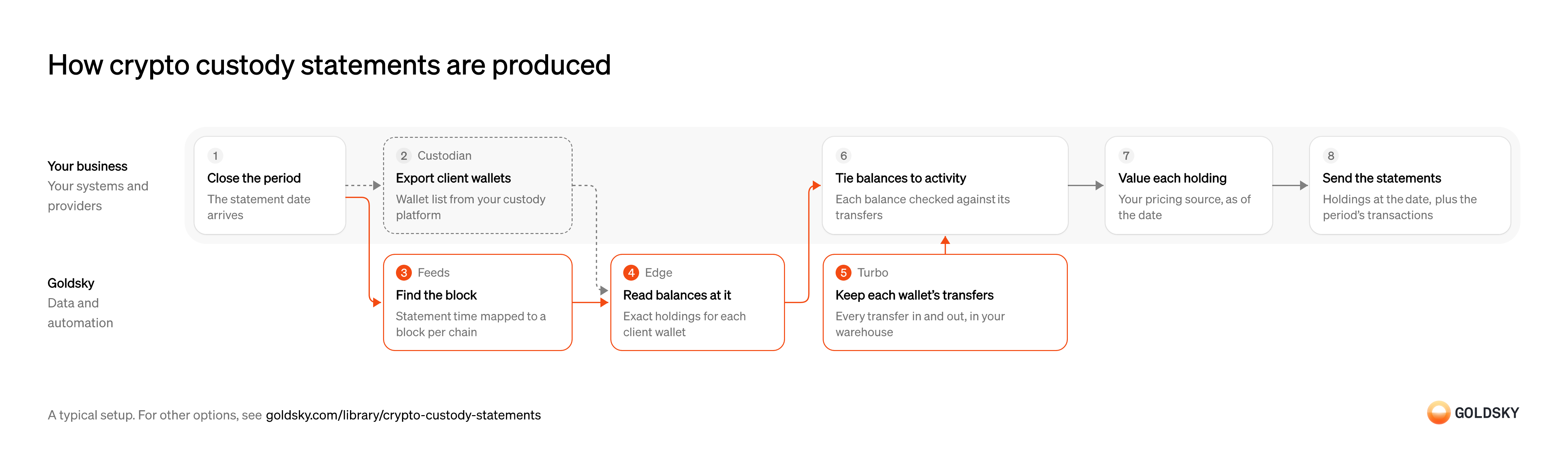
The diagram follows one statement period from closing the period to sending clients their holdings as of the date, and shows who does each step. Your setup may differ.
Ways to produce crypto custody statements
Both read each balance at the statement block, but only the pipeline also keeps every transfer between statements, so you can list the period’s activity and tie each closing balance back to it.
- Best for
- Statements with activity, tied back to every transfer
- What you run
- The destination: your database, queue or bucket, or a Postgres database Goldsky hosts
- What you write
- Pipeline YAML and SQL; TypeScript transforms when needed
- Where your data lives
- In your own database or systems
- How results reach you
- Pushed to you
- Best for
- Known custody wallets, once per statement period
- What you run
- Your own client code
- What you write
- JSON-RPC calls, and the decoding of what comes back
- Where your data lives
- Read from the chain
- How results reach you
- Returned when you call
| Usual setupOption 1: History plus reads at a date | Option 2: Reads at a date | |
|---|---|---|
| Best for | Statements with activity, tied back to every transfer | Known custody wallets, once per statement period |
| Products | TurboFeedsEdge | FeedsEdge |
| What you run | The destination: your database, queue or bucket, or a Postgres database Goldsky hosts | Your own client code |
| What you write | Pipeline YAML and SQL; TypeScript transforms when needed | JSON-RPC calls, and the decoding of what comes back |
| Where your data lives | In your own database or systems | Read from the chain |
| How results reach you | Pushed to you | Returned when you call |
Set the statement date and time
A custody statement shows what each client held at one moment, so everyone has to agree on that moment first.
Your operations team fixes the cutoff, including its time zone, for every chain the statement covers. A statement taken at midnight in one zone and read as midnight in another shows holdings from the wrong hours.
Export the client wallets from custody
The statement covers every address you hold for each client, and the custody platform is the record of which those are.
Export each client’s addresses and chains as of the statement date. A wallet opened or closed during the period and left out of the export is missing from the client’s statement, with nothing on the page to say so.
Find the block at the statement time on each chain
Handled by Goldsky FeedsChains count time in blocks, so the statement time has to become a block number before you can read anything at it.
Each chain needs the last block at or before the cutoff, found separately because chains produce blocks at different rates. Using the first block after the cutoff includes transfers that happened after the statement date.
The Feeds Blocks endpoint returns the newest block at or before a time when you pass
Turn a timestamp into a block (opens in a new tab)timestamp_ltewithsort=number_descandlimit=1, one request per chain.Read each balance at that block
Handled by Goldsky EdgeThe statement has to show what each wallet held at the cutoff, even when it’s produced days later.
Every token balance is read as it stood at the chosen block, not as it stands today. Reading current balances for a past date moves every transfer since the cutoff onto the statement.
With Goldsky, you can send
Read contract state at a block (opens in a new tab)eth_callto Edge RPC with the token’sbalanceOfcall and the statement block asblockNumber, so each read returns the balance at that block. Native balances come frometh_getBalanceat the same block.Keep each client wallet’s transfer history
Handled by Goldsky TurboA statement often lists what moved in the period, and the history is how a closing balance is explained.
Every transfer in and out of every client wallet has to be in your warehouse, from before the first statement to now. Gaps in the history leave balances you can read but can’t account for.
With Goldsky, a Turbo Pipelines pipeline can match transfers against a dynamic table of client addresses and write them to a warehouse sink such as ClickHouse, keyed on each transfer’s
Choose a warehouse sink (opens in a new tab)id.Tie each balance to the transfer history
A balance that matches the sum of its transfers is one you can explain to a client or an auditor.
For each wallet, your warehouse compares the sum of transfers up to the statement block with the balance read at it; a gap means a missing transfer, the wrong block or a token that changes balances without transfers. Airdrops and token migrations that reach client wallets show up here too, and your custody terms decide whether they go on the statement.
Value each holding as of the statement date
Clients and auditors expect a value next to each holding, taken at the same moment as the balance.
Your pricing source, the one your valuation policy names, supplies each asset’s price at the cutoff. A price from today, or from the last time the token moved, gives a value that doesn’t match the date printed on the statement.
Issue the statements
Each client receives a record of what you held for them, which they and their auditors rely on.
Store each statement with the block numbers, balances and prices it was built from before sending it. When a client questions a figure months later, you can show where it came from without rebuilding it.
What to know about keeping a transfer history for statements
- The pipeline runs all the time, so the history is there when the period closes.
- The balance read at the block and the sum of transfers up to it should agree; a gap is a break to explain before statements go out.
- Valuing holdings at the date stays with your pricing source.
- Goldsky runs the pipeline; you own the warehouse and the statements.
Set the statement date and time
A custody statement shows what each client held at one moment, so everyone has to agree on that moment first.
Your operations team fixes the cutoff, including its time zone, for every chain the statement covers. A statement taken at midnight in one zone and read as midnight in another shows holdings from the wrong hours.
Export the client wallets from custody
The statement covers every address you hold for each client, and the custody platform is the record of which those are.
Export each client’s addresses and chains as of the statement date. A wallet opened or closed during the period and left out of the export is missing from the client’s statement, with nothing on the page to say so.
Find the block at the statement time on each chain
Handled by Goldsky FeedsChains count time in blocks, so the statement time has to become a block number before you can read anything at it.
Each chain needs the last block at or before the cutoff, found separately because chains produce blocks at different rates. Using the first block after the cutoff includes transfers that happened after the statement date.
The Feeds Blocks endpoint returns the newest block at or before a time when you pass
Turn a timestamp into a block (opens in a new tab)timestamp_ltewithsort=number_descandlimit=1, one request per chain.Read each balance at that block
Handled by Goldsky EdgeThe statement has to show what each wallet held at the cutoff, even when it’s produced days later.
Every token balance is read as it stood at the chosen block, not as it stands today. Reading current balances for a past date moves every transfer since the cutoff onto the statement.
Edge RPC answers
Read contract state at a block (opens in a new tab)eth_callat any block you name, so abalanceOfcall with the statement block returns each token balance as it stood then;eth_getBalancedoes the same for the native token.Value each holding as of the statement date
Clients and auditors expect a value next to each holding, taken at the same moment as the balance.
Your pricing source, the one your valuation policy names, supplies each asset’s price at the cutoff. A price from today, or from the last time the token moved, gives a value that doesn’t match the date printed on the statement.
Issue the statements
Each client receives a record of what you held for them, which they and their auditors rely on.
Store each statement with the block numbers, balances and prices it was built from before sending it. When a client questions a figure months later, you can show where it came from without rebuilding it.
What to know about reading balances at a date
- Nothing runs between statements; each one is a batch of lookups and reads.
- You get closing holdings, not the transfers that led to them.
- Every token contract you hold is read on its own, so the token list has to be complete.
- Valuing holdings at the date stays with your pricing source.
What you control
- Your team
- Set the statement date and time
- Tie each balance to the transfer history
- Value each holding as of the statement date
- Issue the statements
- Your providers
- Custodian
Security and deployment
- SOC 2 Type IIIndependently audited security controls.
- Dedicated infrastructureSingle-tenant options for production workloads.
- Data residencyCloud, on-premises or co-located.
More use cases that show balances and history
- Wallet balances and historyShow customers their balances and transaction history across wallets and chains.
- Crypto portfolio and statement dataShow customers their holdings and history across chains in an app or statement.
- Embedded wallet balances and historyShow balances and history for wallets embedded in a fintech app.
- Token vesting and unlock trackingIndex vesting contracts so platforms, custodians and funds can show each grant, what has vested, what was claimed and the next unlock.
Use cases built the same way
- Digital asset audit evidenceGive auditors each wallet’s balance at the year-end cut-off block and the year’s transfers.
- Crypto fund NAV calculation from onchain holdingsValue a fund’s wallet and vault positions at the cut-off so the administrator can compute and report NAV.
- Stablecoin disbursements for public-sector programsTrack government benefit or grant payments made in stablecoins, from issue to spend.
- Daily stablecoin supply by chain for PS-01 reportsKeep the daily per-chain supply, issued, redeemed, issuer-held, frozen and lost figures that feed the weekly OCC PS-01 report.
Produce crypto custody statements with Goldsky
We’ll map it to your systems and show you what Goldsky runs, so your team builds the product, not the pipelines underneath it.
 Robinhood
 HyperEVM
 Arc
 Solana
 Ethereum
 Polymarket
 Base
 Tempo
 Bitcoin