Crypto portfolio and statement data
What is crypto portfolio and statement data?
Crypto portfolio and statement data is the record of what a customer holds across all their wallets and chains, and every transfer that got them there, shown on a portfolio screen or a periodic statement.
Wallet apps and wealth platforms need it to match the chain, because a missing token or an out-of-date balance is the first thing a customer notices.
Goldsky loads each wallet’s history and keeps balances and transfers current in your database or behind an API, while valuing holdings, adding up periods and issuing statements stay with you.
You can build it three ways: stream each customer’s wallets into your own database with Turbo Pipelines, call the Feeds balances and transfers API from your app, or have Feeds sync those rows into your database.
Who uses crypto portfolio and statement data?
Self-custody wallet apps, neobanks with a crypto tab and wealth platforms that show clients their onchain holdings next to their other accounts.
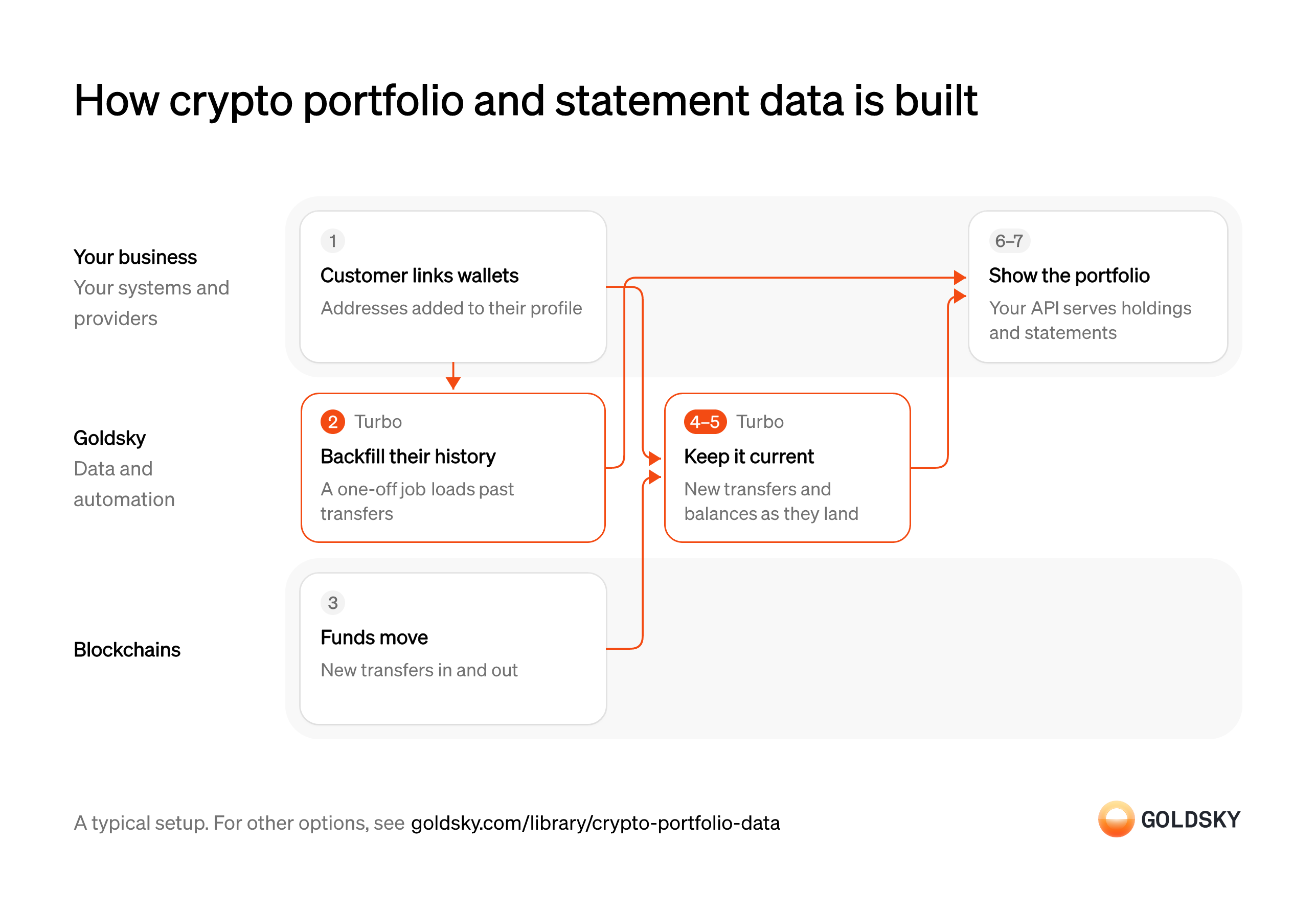
How crypto portfolio and statement data is built
The diagram follows one customer from linking their wallets to seeing their holdings and history in your app, and shows who does each step. Your setup may differ.
Ways to get crypto portfolio and statement data
The pipeline and the synced feeds keep every wallet’s data in your database, with the pipeline’s SQL yours to shape; the API keeps nothing on your side and returns one wallet per request.
- Best for
- Many customer wallets, kept in your own database
- Products
- Turbo
- What you run
- The destination: your database, queue or bucket, or a Postgres database Goldsky hosts
- What you write
- Pipeline YAML and SQL; TypeScript transforms when needed
- Where your data lives
- In your own database or systems
- How results reach you
- Pushed to you
- Best for
- Portfolio screens with no pipeline, one wallet per call
- Products
- Feeds
- What you run
- Nothing; you call an endpoint and keep what you need
- What you write
- REST requests
- Where your data lives
- Hosted by Goldsky
- How results reach you
- Returned when you call
- Best for
- Local SQL reads, with no pipeline to define
- Products
- Feeds
- What you run
- The destination database or endpoint
- What you write
- Nothing to get the rows; your own SQL to use them
- Where your data lives
- In your own database or systems
- How results reach you
- Pushed to you
| Usual setupOption 1: Stream to your database | Option 2: Balances and transfers API | Option 3: Synced feeds | |
|---|---|---|---|
| Best for | Many customer wallets, kept in your own database | Portfolio screens with no pipeline, one wallet per call | Local SQL reads, with no pipeline to define |
| Products | Turbo | Feeds | Feeds |
| What you run | The destination: your database, queue or bucket, or a Postgres database Goldsky hosts | Nothing; you call an endpoint and keep what you need | The destination database or endpoint |
| What you write | Pipeline YAML and SQL; TypeScript transforms when needed | REST requests | Nothing to get the rows; your own SQL to use them |
| Where your data lives | In your own database or systems | Hosted by Goldsky | In your own database or systems |
| How results reach you | Pushed to you | Returned when you call | Pushed to you |
Link the customer’s wallets to their profile
A portfolio covers every wallet a customer owns, so you first need to know which addresses are theirs.
The customer adds each address, or your app connects it, and you store the address, its chain and the customer ID together. An address saved without its owner shows up as holdings nobody can see, and one saved against the wrong customer shows one person’s money to another.
Load each wallet’s past transfers
Handled by Goldsky TurboA new customer expects to see their whole history on day one, including everything before they linked the wallet.
Every past transfer in and out of the wallet has to be loaded once, from the wallet’s first activity up to now. A load that starts too late leaves early holdings unexplained, and the statement’s opening balance won’t match the chain.
With Goldsky, you can run a Turbo Pipelines job (
Run a one-time backfill job (opens in a new tab)job: true) over a bounded block range, filtered to the customer’s addresses, that writes past transfers to your database and exits once the range is done.Record new transfers on the chain
Holdings change whenever money moves in or out of a wallet, and the chain is where that’s recorded.
Each transfer lands in a block on its chain. For a short time the newest blocks can be replaced (a reorg), so a transfer seen once can still disappear or move to another block.
Keep transfers and balances current
Handled by Goldsky TurboHoldings on the screen have to change when the chain does, without anyone refreshing them.
Each new transfer touching a linked wallet is recorded, and that wallet’s balance is read again at the transfer’s block. Re-reading every wallet on every block costs more as customers grow, while most wallets haven’t moved.
A long-running pipeline in Turbo Pipelines can keep only transfers that touch a linked address, using
Track balances for a set of addresses (opens in a new tab)dynamic_table_check(), then read the new balance at that block with_gs_evm_get_balancesfor native tokens or_gs_eth_callwithbalanceOffor other tokens.Correct rows the chain rewrites
Handled by Goldsky TurboWhen the chain replaces its newest blocks (a reorg), a transfer you recorded can disappear or move.
Your tables have to follow the chain when that happens. If they don’t, a customer sees a transfer that never settled, or a balance that counts it twice.
Goldsky’s Turbo Pipelines passes reorg corrections through as deletes and updates, and a database sink with a
How reorgs reach your sinks (opens in a new tab)primary_keyapplies them to the same rows.Value the holdings and build the statement
Customers read a portfolio in money, and a statement adds up a period: what they held at the start and end, and what moved in between.
Your system sums holdings per customer across wallets and chains, applies the prices your policy names and works out each period’s totals in your database. Prices and totals change after the fact, so store the figures a statement was issued with instead of recalculating them when the customer opens it again.
Show the portfolio in your app
The customer sees their holdings and history on a screen you control, behind your own login.
Your API reads the stored holdings and transfers for the signed-in customer and nothing else. Screens that read the chain for every page view get slower as customers add wallets, and they show a different answer from the statement.
What to know about streaming portfolio data
- Goldsky runs the pipeline; you own the database, the totals and the API your app calls.
- History is loaded once per wallet, then kept current, so screens never wait on a chain lookup.
- Tables keyed on a primary key take reorg corrections as updates and deletes.
- Totals per customer need your record of which wallets are theirs, and period totals need prices at a date, so both are queries in your database.
Link the customer’s wallets to their profile
A portfolio covers every wallet a customer owns, so you first need to know which addresses are theirs.
The customer adds each address, or your app connects it, and you store the address, its chain and the customer ID together. An address saved without its owner shows up as holdings nobody can see, and one saved against the wrong customer shows one person’s money to another.
Record new transfers on the chain
Holdings change whenever money moves in or out of a wallet, and the chain is where that’s recorded.
Each transfer lands in a block on its chain. For a short time the newest blocks can be replaced (a reorg), so a transfer seen once can still disappear or move to another block.
Fetch current holdings for the portfolio screen
Handled by Goldsky FeedsThe portfolio screen opens on what the customer holds now, usually with a total at the top.
The lookup has to cover every chain and token the customer holds, including tokens with no market price. Tokens left out make the total look smaller than it is, and the customer sees money missing.
Feeds returns a wallet’s native and ERC-20 balances across chains from its Balances endpoint, each with a USD value and a
Read the balances endpoint reference (opens in a new tab)total_value_usdfor the wallet. Addinclude_unknown_price=trueso tokens without a price still appear.Fetch the activity list for the period
Handled by Goldsky FeedsThe activity list and the statement show every transfer in and out, with what it was worth then.
The lookup covers the period the screen or statement shows, in both directions. Without a value at the time of each transfer, the statement can’t show what the customer gained or spent.
Your app can call the Feeds Transfers endpoint for one wallet with
Read the transfers endpoint reference (opens in a new tab)fromandtoset to the statement period, and each row comes back withamount_usdat the time of the transfer.Value the holdings and build the statement
Customers read a portfolio in money, and a statement adds up a period: what they held at the start and end, and what moved in between.
Your system sums holdings per customer across wallets and chains, applies the prices your policy names and works out each period’s totals in your database. Prices and totals change after the fact, so store the figures a statement was issued with instead of recalculating them when the customer opens it again.
Show the portfolio in your app
The customer sees their holdings and history on a screen you control, behind your own login.
Your API reads the stored holdings and transfers for the signed-in customer and nothing else. Screens that read the chain for every page view get slower as customers add wallets, and they show a different answer from the statement.
What to know about using a balances and transfers API
- Your app pulls, so the screen is as fresh as the last call.
- Balances are current only; holdings at a past date are rebuilt from the transfer history.
- Dollar values are worked out at request time, so store the figures a statement was issued with.
- A transfer undone by a reorg stops appearing in responses, with no flag to tell you.
Link the customer’s wallets to their profile
A portfolio covers every wallet a customer owns, so you first need to know which addresses are theirs.
The customer adds each address, or your app connects it, and you store the address, its chain and the customer ID together. An address saved without its owner shows up as holdings nobody can see, and one saved against the wrong customer shows one person’s money to another.
Record new transfers on the chain
Holdings change whenever money moves in or out of a wallet, and the chain is where that’s recorded.
Each transfer lands in a block on its chain. For a short time the newest blocks can be replaced (a reorg), so a transfer seen once can still disappear or move to another block.
Sync balances and transfers into your database
Handled by Goldsky FeedsYour screens read from your own tables, so the chain data has to arrive there on its own.
New balance and transfer rows have to reach your database as they land, with enough detail to tie each to a wallet. A sync that falls behind shows customers yesterday’s holdings.
Feeds data sync pushes rows from any feed, including Balances and Transfers, to a database you own or a webhook as they land.
Sync Feeds to your database (opens in a new tab)Group the rows by customer
Feed rows are keyed by wallet, and a portfolio is a customer’s view across all of theirs.
Join the synced rows to your wallet table by address and chain. A wallet that changes owner, or is shared by two profiles, needs a rule here, or its holdings show up twice.
Value the holdings and build the statement
Customers read a portfolio in money, and a statement adds up a period: what they held at the start and end, and what moved in between.
Your system sums holdings per customer across wallets and chains, applies the prices your policy names and works out each period’s totals in your database. Prices and totals change after the fact, so store the figures a statement was issued with instead of recalculating them when the customer opens it again.
Show the portfolio in your app
The customer sees their holdings and history on a screen you control, behind your own login.
Your API reads the stored holdings and transfers for the signed-in customer and nothing else. Screens that read the chain for every page view get slower as customers add wallets, and they show a different answer from the statement.
What to know about syncing balance and transfer feeds
- Rows are pushed to you as they land, so nothing in your app polls.
- Rows arrive in the feeds’ own schema, so your queries read those columns as they are.
- Goldsky runs the sync; you own the destination and keep it reachable.
- Grouping rows by customer and adding up periods stay in your database.
Related jobs
An unknown token lands in a user’s wallet
Anyone can send any token to any wallet, so users receive tokens they never asked for.
Spam tokens often arrive in bulk sends to many wallets, with names or links that point to scam sites. The token appears in the wallet’s balance unless your app decides to hide it.
Stream token transfers into your database
Handled by Goldsky TurboYou can only label a token once you know it reached a user’s wallet, and from whom.
Every token transfer, with token, sender, recipient, amount and transaction, has to land in your database as it happens, keyed so a repeated delivery overwrites the same row. A gap in the stream means a spam token can show before you’ve seen it.
Turbo Pipelines can stream a chain’s decoded
Stream ERC-20 transfers (opens in a new tab)erc20_transfersdataset to your database, keyed on each transfer’sid, so corrections from a reorg update the same rows.Classify each token
Someone has to decide which tokens count as spam, and wallets do it with a list of known spam tokens.
Each token that reaches a user is matched against the list and marked spam, legitimate or unknown. Let users report a token as spam and correct a wrong label, because a real token marked as spam hides money from its owner.
Hide spam from balances and history
The point is that users never see the spam next to their real balance.
Your balance and history service leaves spam tokens out of totals, lists and payment screens, and can keep them behind a “hidden tokens” view. Totals that still count a hidden token show users a balance they can’t find.
What you control
- Your team
- Link the customer’s wallets to their profile
- Value the holdings and build the statement
- Show the portfolio in your app
Security and deployment
- SOC 2 Type IIIndependently audited security controls.
- Dedicated infrastructureSingle-tenant options for production workloads.
- Data residencyCloud, on-premises or co-located.
More use cases that show balances and history
- Wallet balances and historyShow customers their balances and transaction history across wallets and chains.
- Embedded wallet balances and historyShow balances and history for wallets embedded in a fintech app.
- Crypto custody statementsProduce custody statements from onchain balances at a statement date.
- Token vesting and unlock trackingIndex vesting contracts so platforms, custodians and funds can show each grant, what has vested, what was claimed and the next unlock.
Build crypto portfolio and statement data with Goldsky
We’ll map it to your systems and show you what Goldsky runs, so your team builds the product, not the pipelines underneath it.
 Robinhood
 HyperEVM
 Arc
 Solana
 Ethereum
 Polymarket
 Base
 Tempo
 Bitcoin