Stablecoin disbursements for public-sector programs
What are stablecoin disbursements for public-sector programs?
Stablecoin disbursements for public-sector programs are benefit, aid or grant payments that a government or agency sends in stablecoins, tracked from the program wallet to where recipients spend the money from their own wallets.
The payment providers and banks that run these programs have to show auditors who was paid, how much, and what happened to the funds afterwards.
Goldsky follows each payment and onward transfer from the wallets you list into your warehouse, while enrolling and verifying recipients, signing the payments and the program reports stay with you.
Who runs stablecoin disbursements for public-sector programs?
Payment service providers, stablecoin payment platforms and banks that pay out benefits, aid or grants for government programs.
How public-sector stablecoin disbursements work
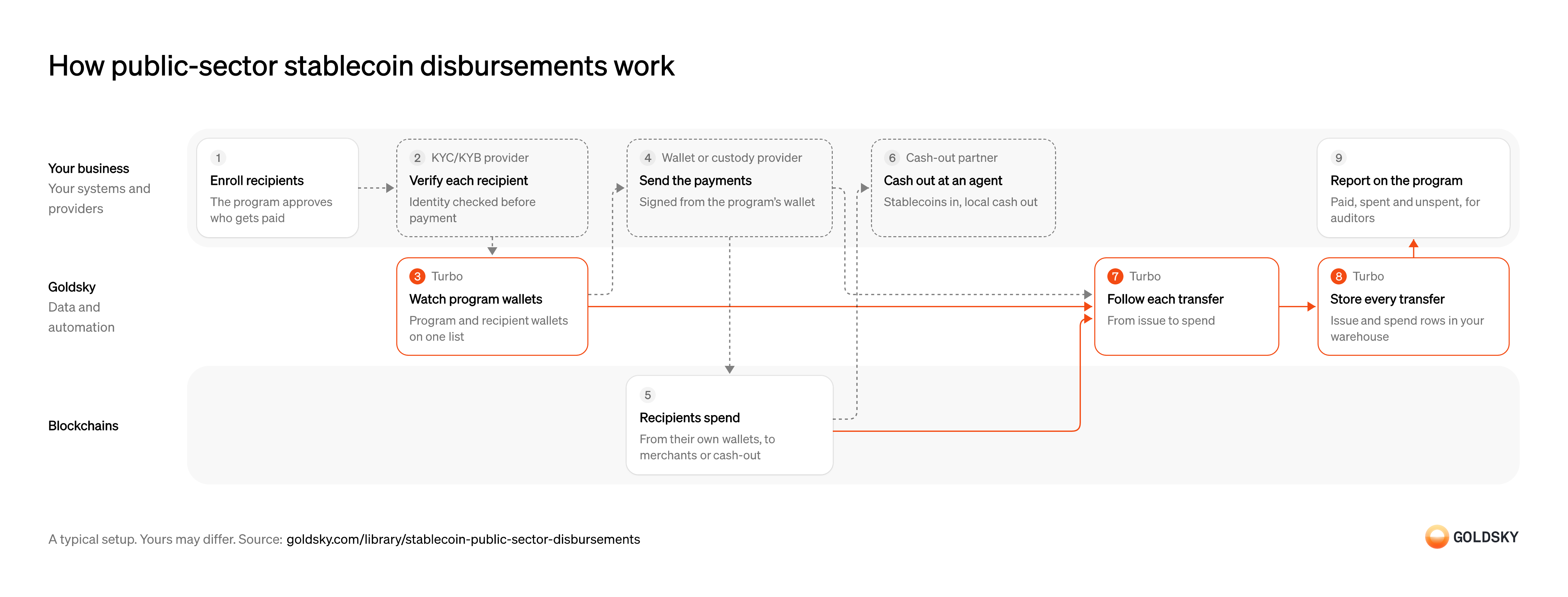
The diagram follows one program payment from recipient enrollment to the report your auditors read, and shows who does each step. Your setup may differ.
Enroll recipients
A program pays only the people it approved, so the list of recipients comes first.
The program decides who qualifies and how much each person gets, and records each recipient’s wallet. A payment to a wallet that isn’t on the register can’t be explained in the program report.
Verify each recipient
Public money has to reach the person it was meant for, so identity is checked before any payment.
Your identity verification provider checks each recipient against the program’s rules. A wallet enrolled before the check finishes can receive funds the program can’t yet account for.
Watch program and recipient wallets
Handled by Goldsky TurboYou can follow only the money that moves through wallets you’re watching.
The program wallet and every enrolled recipient’s wallet go on one list, updated as people join or leave. A wallet added late leaves a gap in its history from the first payment.
The watched wallets can sit in a Turbo Pipelines dynamic table, a Postgres table that the running pipeline reads as rows change, so enrolling a recipient needs no redeploy.
Learn about dynamic tables (opens in a new tab)Send the payments
Each payment moves money from the program wallet, so it’s signed under the program’s approval rules.
Your custody provider signs each payment from the program wallet, with limits and approvers set before the run starts. A payment list that changes after approval pays people on terms nobody signed off.
Recipients spend the funds
Programs usually report where the money went after it arrived, as well as the payment itself.
Where recipients hold their own wallets on the chain, spending at merchants or cashing out shows up as onward transfers. Custodial or closed-loop wallets keep spending off the chain, so that part of the trail has to come from the wallet provider. Where a local partner pays recipients in local currency instead, the onchain trail ends at the partner’s wallet.
Let recipients cash out
Many recipients need cash or money in a bank account, not stablecoins, to pay for daily needs.
A cash-out partner takes the stablecoins from the recipient’s wallet and pays local currency at an agent location or into a bank account, after checking the recipient’s ID. The onchain trail ends at the partner’s wallet, so the record of the cash leg comes from the partner.
Follow each transfer from issue to spend
Handled by Goldsky TurboThe report covers both the payment and what happened next, so both directions have to be caught.
Every transfer into or out of a watched wallet is kept with sender, recipient, token, amount and transaction. Watching only incoming transfers shows what was paid and nothing about what was spent.
A Turbo Pipelines SQL transform can check both
Filter with dynamic_table_check (opens in a new tab)senderandrecipientagainst the list withdynamic_table_check(), so payments out of the program wallet and spending from recipient wallets land in the same stream.Store every transfer in your warehouse
Handled by Goldsky TurboAuditors and program staff read from one record that keeps every transfer.
Each transfer has to be stored once, even when delivery repeats, and corrected if a reorg undoes it. Duplicate rows inflate the amount paid, and rows left behind after a reorg show payments that never happened.
Goldsky can write the stream to a warehouse such as ClickHouse, where a table keyed on the transfer
Write to ClickHouse (opens in a new tab)idcollapses repeats and takes reorg corrections. File loads to object storage receive the correction records instead, for your loader to apply.Report on the program
The program has to show how much was paid, how much was spent and how much is still unspent.
Your warehouse totals the transfers by recipient and period and joins them to the enrollment register. Payments to wallets outside the register, and recipients with no payment, are the lines auditors ask about.
Related jobs
Confirm eligibility and register wallets
Aid goes only to people the agency has confirmed as eligible.
Your team confirms each recipient and records the wallet they installed on their phone. A payment to a wallet missing from the register can’t be accounted for to donors.
Watch the program and recipient wallets
Handled by Goldsky TurboYou can follow only the money that moves through wallets you watch.
The program wallet and every registered recipient’s wallet go on one list, updated as people are enrolled. A wallet added late leaves a gap from its first payment.
The watched wallets can sit in a Turbo Pipelines dynamic table, a Postgres table the running pipeline reads as rows change, so enrolling a recipient needs no redeploy.
Learn about dynamic tables (opens in a new tab)Send the assistance in bulk
Aid usually goes to many people at once, from one program wallet.
A bulk disbursement tool sends each recipient’s amount from the program wallet and reports which payments went through. Approve the list before the batch starts, because a payment can’t be recalled once it lands.
Let recipients cash out
Many recipients need cash for rent, food and heating, not stablecoins.
Recipients can keep the stablecoins in their wallet or withdraw cash at a partner’s agent location, in dollars, euros or local currency. The onchain trail ends at the partner’s wallet, so the record of the cash leg comes from the partner.
Record every transfer for donor reporting
Handled by Goldsky TurboDonors ask where each payment went, so payments out and recipients’ onward transfers both have to be kept.
Each transfer into or out of a watched wallet is stored once with sender, recipient, asset, amount and transaction, even when delivery repeats. Duplicate rows inflate the amount paid in the report.
On Stellar, a Turbo Pipelines pipeline can read the
Stream Stellar transfers (opens in a new tab)transfersdataset, keep transfers whosesenderorrecipientis a watched wallet and write them to your warehouse, keyed on the transferid.Report to donors
The program has to show how much was paid, to whom, and how much was cashed out or is still held.
Your warehouse totals the transfers by recipient and period and joins them to the register and the partner’s cash-out records. Payments to wallets outside the register, and registered people with no payment, are the lines auditors ask about.
What you control
- Your team
- Enroll recipients
- Report on the program
- Your providers
- KYC/KYB provider
- Wallet or custody provider
- Cash-out partner
Security and deployment
- SOC 2 Type IIIndependently audited security controls.
- Dedicated infrastructureSingle-tenant options for production workloads.
- Data residencyCloud, on-premises or co-located.
More use cases that automate payouts
- Stablecoin payroll and contractor payoutsPay contractors and staff in stablecoins and confirm each payout settled.
- Stablecoin payouts for marketplaces and creatorsPay sellers, gig workers and creators in stablecoins from a marketplace balance.
- Payout prefunding in USDCPrefund a payout network in USDC and track the balance so payouts never stall.
- Token distributions to holders and creditorsPay one asset out to thousands of holders, creditors or employees and prove each delivery.
- Airdrop eligibility lists and sybil filteringScore every address up to a snapshot block, remove sybil clusters and publish the list people claim against.
- Stablecoin merchant settlementPay each merchant’s settlement in stablecoins to the wallet and network it chose, on any day, and record the transaction against the settlement.
- Programmable escrow for B2B stablecoin paymentsHold a buyer’s stablecoin payment until delivery, a milestone or a deadline, then release it to the seller or refund the buyer.
Use cases built the same way
- Grant and incentive impact trackingMeasure what grants and incentive programs did to users, volume and TVL, per grantee.
- Daily stablecoin supply by chain for PS-01 reportsKeep the daily per-chain supply, issued, redeemed, issuer-held, frozen and lost figures that feed the weekly OCC PS-01 report.
- CFTC digital collateral reporting dataReport totals of BTC, ETH and USDC held as margin, per asset and account class, each week during an FCM’s first three months under the CFTC pilot.
- DAC8 and CARF reporting dataSupply the valued transfer history behind each user’s yearly DAC8 or CARF report.
Track public-sector stablecoin disbursements with Goldsky
We’ll map it to your systems and show you what Goldsky runs, so your team builds the product, not the pipelines underneath it.
 Robinhood
 HyperEVM
 Arc
 Solana
 Ethereum
 Polymarket
 Base
 Tempo
 Bitcoin