CFTC digital collateral reporting data
What is CFTC digital collateral reporting data?
CFTC digital collateral reporting data is the weekly total of digital assets a futures commission merchant (FCM) holds as customer margin, such as BTC, ETH and USDC, broken down by asset and by account class.
Under the CFTC’s digital collateral pilot, an FCM reports those totals each week for its first three months under the relief, so its regulatory reporting team needs a balance history for every segregated wallet that ties back to the chain.
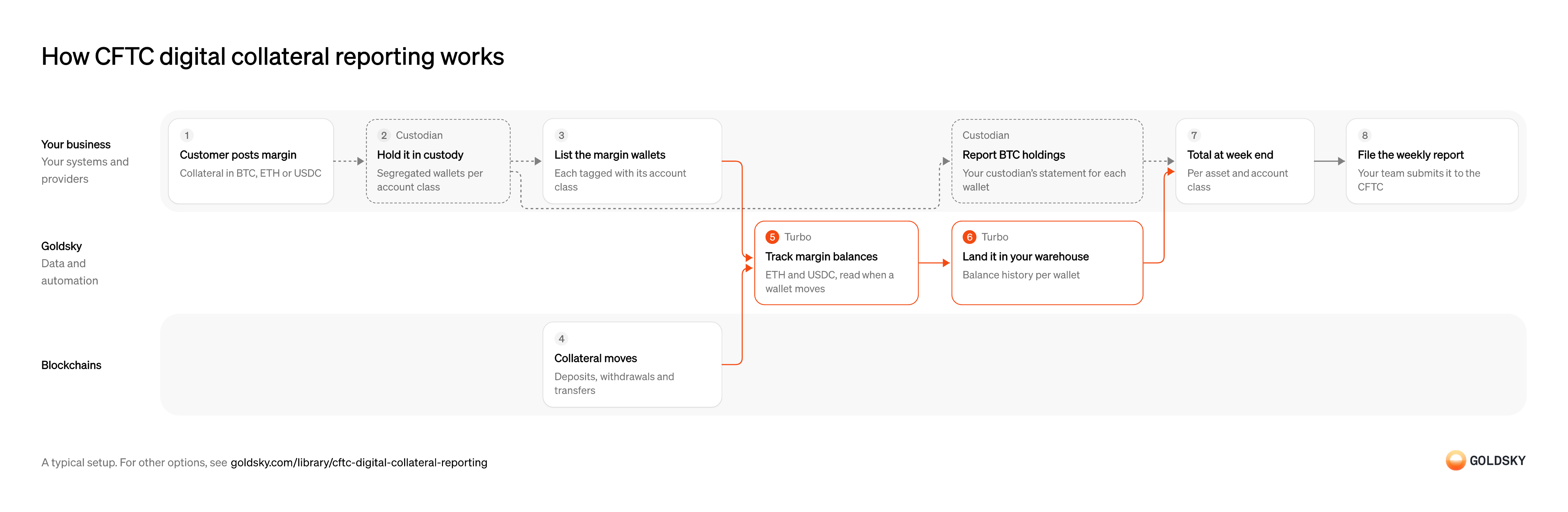
Goldsky reads each listed wallet’s ETH and USDC balance whenever it moves and lands the history in your warehouse; your team adds BTC from your custodian’s statements, totals it all at week end and files the report.
You can gather CFTC digital collateral data two ways: stream each margin wallet’s balance history into your warehouse with Turbo Pipelines, or read balances at the reporting date with the Feeds Blocks API and Edge RPC.
Who needs CFTC digital collateral reporting data?
Futures commission merchants and prime brokers that accept digital assets as customer margin.
How CFTC digital collateral reporting works
The diagram follows customer margin from the moment it’s posted to the weekly report your team files, and shows who does each step. Your setup may differ.
Ways to gather CFTC digital collateral reporting data
Streaming keeps a balance for every movement of each margin wallet, so questions about midweek have answers; reading at the reporting date runs only when you report and needs no pipeline.
- Best for
- Many margin wallets, with a balance history for each
- Products
- Turbo
- What you run
- The destination: your database, queue or bucket, or a Postgres database Goldsky hosts
- What you write
- Pipeline YAML and SQL; TypeScript transforms when needed
- Where your data lives
- In your own database or systems
- How results reach you
- Pushed to you
- Best for
- A known list of wallets, read at each reporting date
- What you run
- Your own client code
- What you write
- JSON-RPC calls, and the decoding of what comes back
- Where your data lives
- Read from the chain
- How results reach you
- Returned when you call
| Usual setupOption 1: Stream balances | Option 2: Read balances at a date | |
|---|---|---|
| Best for | Many margin wallets, with a balance history for each | A known list of wallets, read at each reporting date |
| Products | Turbo | FeedsEdge |
| What you run | The destination: your database, queue or bucket, or a Postgres database Goldsky hosts | Your own client code |
| What you write | Pipeline YAML and SQL; TypeScript transforms when needed | JSON-RPC calls, and the decoding of what comes back |
| Where your data lives | In your own database or systems | Read from the chain |
| How results reach you | Pushed to you | Returned when you call |
Take the customer’s margin
Customers post digital assets as margin for their futures positions, and you hold them on the customer’s behalf.
Each deposit is booked against the customer and the account class it belongs to. Margin booked to the wrong class ends up in the wrong line of the report.
Hold it in segregated custody
Customer margin has to be kept apart from the firm’s own assets, usually in wallets set aside for each account class.
Your custodian holds the assets in separate wallets for each class under your instructions. A wallet that mixes classes can’t be reported by class without extra records.
List the margin wallets
You only report what you watch, so every margin wallet needs to be on one list with its class.
Keep each wallet’s address, chain, asset and account class together, and add new wallets the day they’re opened. A wallet missing from the list drops out of the totals.
Let collateral move
Deposits, withdrawals and transfers change what each wallet holds through the week.
Each movement is recorded in a block. For a short time the newest blocks can still be replaced, so a balance read right away can change.
Track each wallet’s balance
Handled by Goldsky TurboThe report needs what each wallet held at a point in time, and reading the balance whenever it changes gives you that history.
Each time a listed wallet sends or receives, its balance is read at that block and stored. A balance read later can include movements that came after.
With Goldsky, the wallet list lives in a Turbo Pipelines dynamic table, and the pipeline reads balances at each movement’s block with
Track balances for a set of addresses (opens in a new tab)_gs_evm_get_balancesfor ETH, or_gs_eth_callwithbalanceOffor tokens such as USDC.Land the history in your warehouse
Handled by Goldsky TurboTotals are worked out from a dated balance history your team controls.
Each balance row carries the wallet, chain, asset, block and time. Corrections after a reorg arrive as rows of their own, and the warehouse applies them.
The pipeline can write balance rows as Parquet files to an S3-compatible bucket for your warehouse, partitioned by date.
Write rows to S3 as Parquet (opens in a new tab)Total at week end
The report gives one total per asset and account class as of the reporting date.
Your team takes each wallet’s latest balance at or before the cutoff and sums them by asset and account class, then adds BTC from its own source. A wallet that didn’t move that week still counts, at its last known balance.
File the weekly report
The figures are your firm’s report to the CFTC, so the people who answer for it check them first.
Your regulatory reporting team checks the totals against custodian statements and your books, then submits them. Onchain data supports the figures; it doesn’t make the report complete or correct on its own.
What to know about streaming margin wallet balances
- Balances are read on EVM chains, which covers ETH and USDC; plan another source for BTC.
- Weekly totals by asset and account class are queries in your warehouse.
- A wallet you add to the list is watched by the running pipeline without a redeploy.
- Reorg corrections arrive as records your warehouse applies.
Take the customer’s margin
Customers post digital assets as margin for their futures positions, and you hold them on the customer’s behalf.
Each deposit is booked against the customer and the account class it belongs to. Margin booked to the wrong class ends up in the wrong line of the report.
Hold it in segregated custody
Customer margin has to be kept apart from the firm’s own assets, usually in wallets set aside for each account class.
Your custodian holds the assets in separate wallets for each class under your instructions. A wallet that mixes classes can’t be reported by class without extra records.
List the margin wallets
You only report what you watch, so every margin wallet needs to be on one list with its class.
Keep each wallet’s address, chain, asset and account class together, and add new wallets the day they’re opened. A wallet missing from the list drops out of the totals.
Let collateral move
Deposits, withdrawals and transfers change what each wallet holds through the week.
Each movement is recorded in a block. For a short time the newest blocks can still be replaced, so a balance read right away can change.
Find the block at the cutoff
Handled by Goldsky FeedsChains count in blocks, not dates, so the reporting time has to become a block number on each chain.
Use the last block at or before the cutoff on each chain. A block after the cutoff includes movements that belong to next week.
The Goldsky Blocks feed returns the newest block at or before a given time on each chain when you sort by
Look up a block by time (opens in a new tab)number_descand request one row.Read each wallet’s balance at that block
Handled by Goldsky EdgeThe balance at the cutoff block is what the wallet held at the reporting time.
ETH and token balances such as USDC are read at the same block for every wallet. Reading at the chain’s newest block instead mixes in later movements.
Edge RPC runs
Read contract state at a block (opens in a new tab)eth_callagainst any past block, so your job can callbalanceOffor each wallet at the cutoff, andeth_getBalancereads ETH at the same block.Total by asset and account class
The report gives one total per asset and account class.
Your job sums the balances by asset and class, adds BTC from its own source, and stores the result with the block numbers it used. Keeping the blocks lets anyone rerun the reads and get the same figures.
File the weekly report
The figures are your firm’s report to the CFTC, so the people who answer for it check them first.
Your regulatory reporting team checks the totals against custodian statements and your books, then submits them. Onchain data supports the figures; it doesn’t make the report complete or correct on its own.
What to know about reading balances at the reporting date
- Your job makes the calls and the totals; Goldsky serves the block lookup and the balance reads.
- This covers ETH and USDC on EVM chains; BTC margin needs another source.
- You get balances at the date only, so a question about midweek movements needs another read.
- Reading at a block that’s already final means no reorg corrections to apply.
What you control
- Your team
- Take the customer’s margin
- List the margin wallets
- Total at week end
- File the weekly report
- Your providers
- Custodian
Security and deployment
- SOC 2 Type IIIndependently audited security controls.
- Dedicated infrastructureSingle-tenant options for production workloads.
- Data residencyCloud, on-premises or co-located.
More use cases that report to regulators
- GENIUS Act stablecoin reporting dataFile the weekly OCC PS-01 report from daily per-chain supply, freeze and holder data.
- Stablecoin holder concentration reportingList every wallet holding over 2% of supply and the top 20 redemption wallets each day, for the weekly PS-01 report.
- MiCA stablecoin reporting dataReport holder counts, issuance and volumes each quarter for asset-referenced tokens above €100M in issue, and for EMTs in non-EU currencies.
- NCUA stablecoin reporting dataReport supply, mint and burn, and holder figures for a stablecoin issued by a credit union subsidiary under the NCUA’s proposed rules.
- Basel cryptoasset disclosure dataRead a bank’s cryptoasset holdings at the period-end block so it can classify them and complete its Basel disclosure tables.
Use cases built the same way
- Daily stablecoin supply by chain for PS-01 reportsKeep the daily per-chain supply, issued, redeemed, issuer-held, frozen and lost figures that feed the weekly OCC PS-01 report.
- Stablecoin disbursements for public-sector programsTrack government benefit or grant payments made in stablecoins, from issue to spend.
- Month-end stablecoin supply for reserve reportsProduce the month-end supply across all chains that the monthly reserve report and its examination need.
- Sponsored gas spendTotal the gas you pay for your users per user, paymaster and day, watch the paymaster’s deposit and check the provider’s bill.
Gather CFTC digital collateral reporting data with Goldsky
We’ll map it to your systems and show you what Goldsky runs, so your team builds the product, not the pipelines underneath it.
 Robinhood
 HyperEVM
 Arc
 Solana
 Ethereum
 Polymarket
 Base
 Tempo
 Bitcoin