Sponsored gas spend
What is sponsored gas spend?
Sponsored gas spend is what an app pays in network fees (gas) so its users can transact without holding the chain’s own token, paid on EVM chains through a paymaster contract; teams also call it gas sponsorship or gasless transactions.
Wallet apps, consumer fintechs and stablecoin payment platforms track it per user, per paymaster and per month, because it’s a cost of serving each user, a paymaster whose deposit runs dry stops paying, and the provider’s bill has to agree with the chain.
Goldsky can decode every sponsored operation from the chain into your database, keep running totals and read the paymaster’s deposit after each one; the budget per user, the rate you book gas at and the check against the bill stay with your team.
Who tracks sponsored gas spend?
Wallet apps, neobanks, consumer fintech apps and stablecoin payment platforms that pay their users’ network fees through a paymaster or an embedded-wallet provider.
How sponsored gas spend is tracked
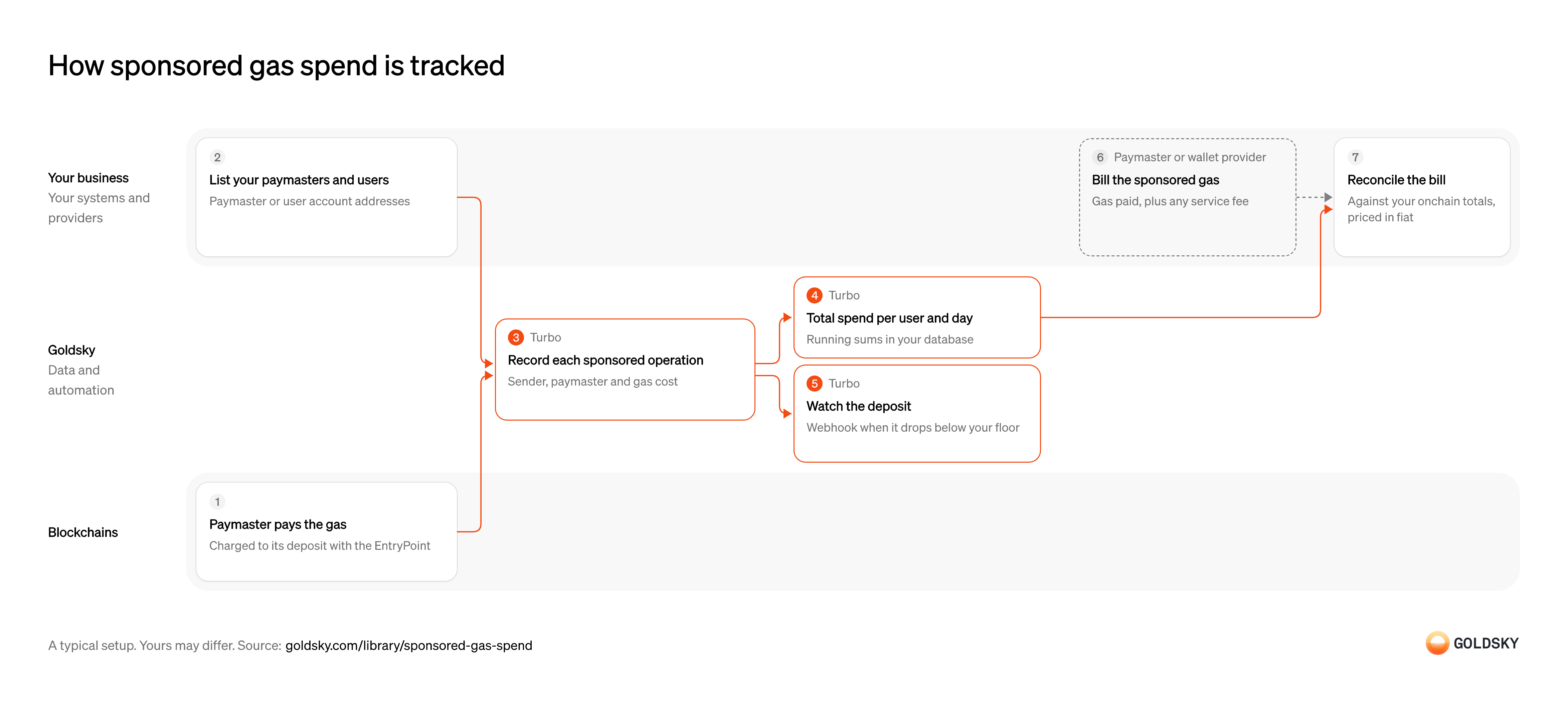
The diagram follows one sponsored operation from the gas its paymaster pays to the line on the provider’s bill it’s checked against, and shows who does each step. Your setup may differ.
Pay the gas for a user’s operation
When you sponsor a user, a paymaster contract pays their network fee (gas) so they don’t have to hold the chain’s own token.
Under ERC-4337, the user’s action goes to the chain as a user operation, and the shared EntryPoint contract runs it only if the paymaster has enough deposited with it to pay. After the operation runs, the EntryPoint charges its actual cost to that deposit, and an operation that reverts still pays for the gas it used.
List the paymasters and accounts that are yours
The chain records sponsored operations from every app, so you need the addresses that make one yours.
If you run the paymaster, its address is enough. If a provider runs it, the same paymaster can pay for other apps too, so list your users’ smart account addresses and count only operations they send. Each EntryPoint version has its own contract address, so note every one your paymasters use.
Record every sponsored operation
Handled by Goldsky TurboEach operation’s
UserOperationEventsays what was paid, so it’s the record every total is built from.The event names the
sender, thepaymaster, whether the operation succeeded,actualGasCost(what was charged, in the chain’s native token) andactualGasUsed. Keep the failed operations too, because the paymaster paid for them, and keep one row per operation so a total can be rebuilt from the rows.With Goldsky, a Turbo Pipelines pipeline reads the chain’s
Decode contract events (opens in a new tab)raw_logs, keeps logs from your EntryPoint addresses, decodesUserOperationEventwith_gs_log_decodeand writes one row per operation to your database. Your paymaster or account addresses sit in a dynamic table checked withdynamic_table_check, so adding one doesn’t need a redeploy.Total spend per user, paymaster and day
Handled by Goldsky TurboFinance reads gas as a cost per user and per period, not as one row per operation.
Group the cost by paymaster, by user account and by day in the time zone you close your books in, and count the operations next to it. A total that still includes an operation a reorg (the chain replacing its newest blocks) removed overstates the cost.
Goldsky’s
Keep running totals in Postgres (opens in a new tab)postgres_aggregatesink can keep a runningsumofactualGasCostand acountof operations per key in a Postgres table, with the day set by the pipeline’s SQL, and takes a rolled-back operation’s cost back off the sum when that SQL keeps the_gs_opcolumn. Delivery is at least once, so recompute a month from the per-operation rows before you close it.Watch the deposit that pays for it
Handled by Goldsky TurboA paymaster whose deposit can’t cover an operation stops sponsoring, and your users’ transactions don’t go through.
If you run the paymaster, read its deposit with the EntryPoint after operations, set a floor from how fast it’s spent and top it up before it gets there. If a provider runs the paymaster, the deposit is theirs, and what you watch is the prepaid credit or spending limit in your account with them.
In the same pipeline,
Read contract state at a block (opens in a new tab)_gs_eth_callcan call the EntryPoint’sbalanceOf(address)(uint256)for your paymaster at each operation’s block, and a SQL filter sends rows below your floor to a webhook sink. The webhook fires when the low deposit is seen, before the block is final, so whatever it starts rereads the deposit first.Bill the sponsored gas
A provider that runs the paymaster pays the gas first and charges it back to you.
Providers bill it in fiat, by card charge, from prepaid credit or on a monthly invoice, often as the gas they paid plus a service fee. The bill covers the provider’s period and prices, which may not match the day boundaries and rates in your books.
Reconcile the bill against your totals
The bill is what you pay and the onchain totals are what was spent, so the two should agree once the fee is added.
Price each day’s native-token total at the rate you book gas at, add the provider’s fee and compare by day or by month. A gap points to an account missing from your list, a pricing difference or charges you can’t match to an operation.
What you control
- Your team
- List the paymasters and accounts that are yours
- Reconcile the bill against your totals
- Your providers
- Paymaster or wallet provider
Security and deployment
- SOC 2 Type IIIndependently audited security controls.
- Dedicated infrastructureSingle-tenant options for production workloads.
- Data residencyCloud, on-premises or co-located.
More use cases that manage treasury
- Stablecoin treasury management across chainsSee stablecoin cash across every wallet and chain in one place.
- Idle stablecoin cash sweepsMove idle stablecoin balances into tokenized money funds when they pass a threshold.
- Gas wallet monitoringKeep gas wallets funded on every chain and alert before one runs dry.
- Intercompany settlement in stablecoinsSettle what group entities owe each other in stablecoins, and land each transfer beside the intercompany ledger.
Use cases built the same way
- Authorize and capture stablecoin paymentsHold a buyer’s stablecoins in an escrow contract at checkout, capture them to the merchant as orders ship, void what can’t be filled and refund after capture.
- Daily stablecoin supply by chain for PS-01 reportsKeep the daily per-chain supply, issued, redeemed, issuer-held, frozen and lost figures that feed the weekly OCC PS-01 report.
- Stablecoin distributor revenue shareAttribute holdings, mints and burns to each distributor across wallets and chains.
- Stablecoin freezes and seizuresRecord every freeze, seizure and burn on a lawful order, with the balance it affected.
Track sponsored gas spend with Goldsky
We’ll map it to your systems and show you what Goldsky runs, so your team builds the product, not the pipelines underneath it.
 Robinhood
 HyperEVM
 Arc
 Solana
 Ethereum
 Polymarket
 Base
 Tempo
 Bitcoin