Stablecoin freezes and seizures
What are stablecoin freezes and seizures?
Stablecoin freezes and seizures are the actions an issuer takes on its own token to lock a wallet’s balance, or to move or burn it, usually on a court order or a sanctions listing.
Compliance teams have to show, for each one, which order it carried out, which wallet it hit and how much it locked, and frozen funds also change how much of the supply can be redeemed.
Goldsky decodes every freeze, seizure and burn with the wallet’s balance at that block and sends it to your database and your alert endpoint, while the decision to freeze and the key that does it stay with you.
You can record stablecoin freezes and seizures two ways: stream them into your own database with Turbo Pipelines, or index them in a hosted subgraph you query by holder.
Who uses stablecoin freezes and seizures?
Stablecoin issuers, banks that issue their own branded coins, and the issuance platforms that run tokens for them.
How stablecoin freezes and seizures are recorded
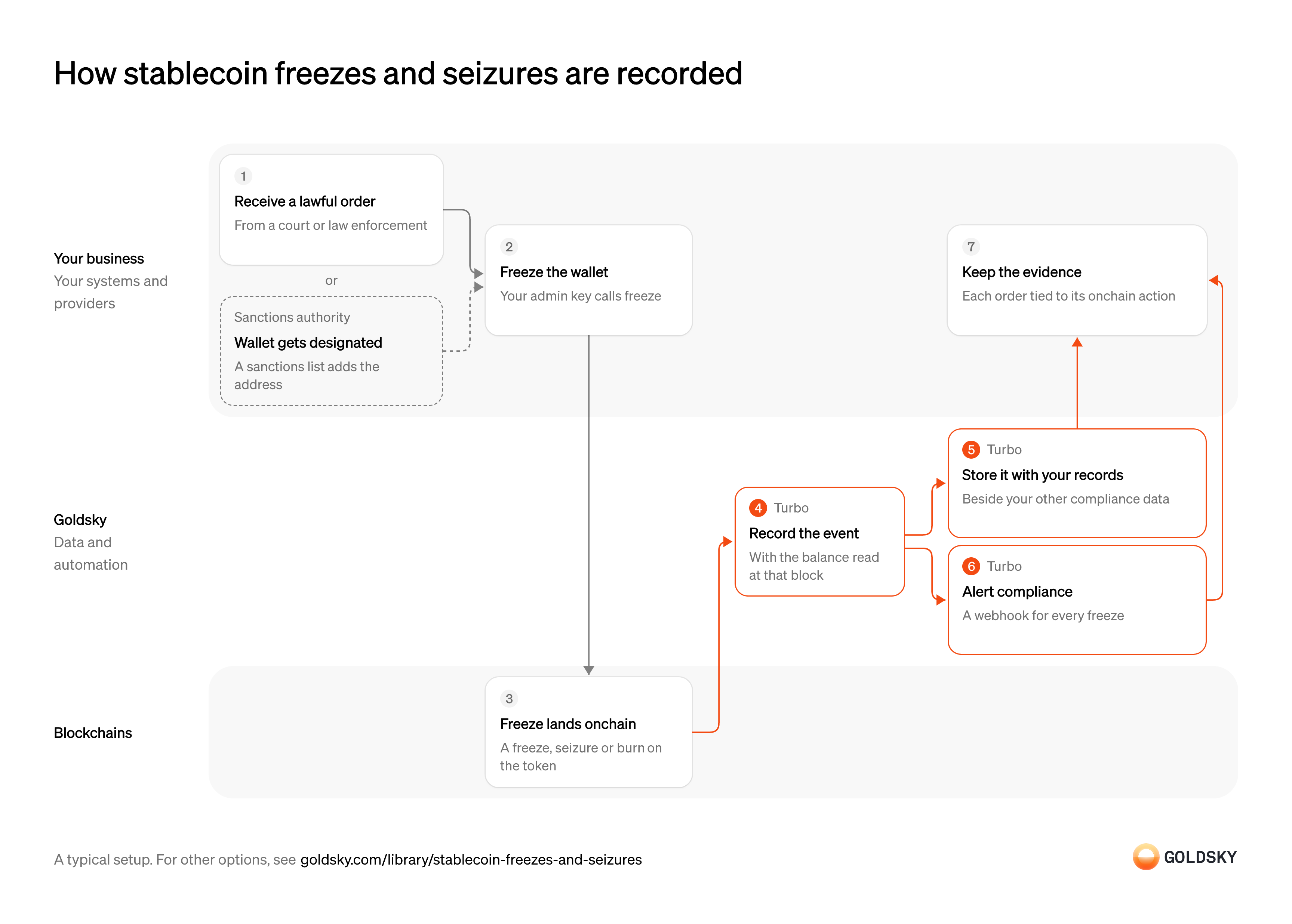
The diagram follows one freeze from the lawful order or sanctions listing behind it to the evidence your compliance team keeps, and shows who does each step. Your setup may differ.
Ways to record stablecoin freezes and seizures
Your own database holds the pipeline’s records and can cover every chain your token runs on; a subgraph keeps them behind a hosted GraphQL API, one chain per subgraph, with mapping code you write.
- Best for
- Every chain your token runs on, kept beside compliance records
- Products
- Turbo
- What you run
- The destination: your database, queue or bucket, or a Postgres database Goldsky hosts
- What you write
- Pipeline YAML and SQL; TypeScript transforms when needed
- Where your data lives
- In your own database or systems
- How results reach you
- Pushed to you
- Best for
- One EVM token deployment, queried by holder through an API
- Products
- Subgraphs
- What you run
- Nothing; Goldsky runs indexing, storage and the API
- What you write
- A schema and mapping handlers, or a no-code or low-code config for simple contracts
- Where your data lives
- Hosted by Goldsky
- How results reach you
- You query; changes are pushed
| Usual setupOption 1: Stream to your database | Option 2: Hosted subgraph | |
|---|---|---|
| Best for | Every chain your token runs on, kept beside compliance records | One EVM token deployment, queried by holder through an API |
| Products | Turbo | Subgraphs |
| What you run | The destination: your database, queue or bucket, or a Postgres database Goldsky hosts | Nothing; Goldsky runs indexing, storage and the API |
| What you write | Pipeline YAML and SQL; TypeScript transforms when needed | A schema and mapping handlers, or a no-code or low-code config for simple contracts |
| Where your data lives | In your own database or systems | Hosted by Goldsky |
| How results reach you | Pushed to you | You query; changes are pushed |
Receive the order or listing
A freeze acts on someone’s funds, so it starts with an authority telling you to act: a court or law enforcement order, or a sanctions listing that names the wallet.
Your legal team checks that the order is valid and names the right address and token, and your sanctions list provider tells you when a wallet holding your token is designated. Acting on an order that names the wrong wallet freezes an innocent holder’s money.
Freeze the wallet
Freezing stops the wallet from sending or receiving your token, so the funds stay put while the case is settled.
Someone holding your token’s admin role calls the freeze, seizure or burn function under your internal approval rules. If one person can do this with no second approval, a single mistake or a stolen key can freeze the wrong holder.
Confirm the action on the chain
The freeze takes effect once it’s in a block, and the token records it as an event anyone can read.
The event names the wallet and, for a seizure or burn, the amount moved. Until enough blocks sit on top of it, a reorg (the chain replacing its newest blocks) can still undo it.
Record the event with the balance it hit
Handled by Goldsky TurboThe event says what happened, and the balance says how much was affected, which is what reports and the holder will ask about.
Each event is decoded into readable fields and paired with the wallet’s balance at that exact block. A balance read later can include transfers from after the freeze and misstate what was locked.
With Goldsky, a Turbo Pipelines transform decodes each freeze, seizure and burn with
See the decode and call functions (opens in a new tab)_gs_log_decodeand your token’s ABI, then calls_gs_eth_callwithbalanceOfat the event’s block to record the balance it locked.Store it with your compliance records
Handled by Goldsky TurboInvestigators and examiners will ask for the history, so it belongs with your other compliance data.
Each event needs a stable ID, so a repeat delivery replaces its row instead of adding a second one. Without it, a retry double-counts frozen funds.
Turbo Pipelines writes each event to a table in your database keyed on its ID, so a repeat delivery or a reorg correction updates the row already there.
How retries and reorgs reach tables (opens in a new tab)Alert your compliance team
Handled by Goldsky TurboThe team handling the case wants to know when a freeze lands, not at the next report.
Each event goes to the endpoint your case system already watches. Because the alert arrives when the event is first seen, the receiver has to accept correction records and ignore repeats.
A webhook sink can post each freeze as its own request with
Set up a webhook sink (opens in a new tab)one_row_per_request, retrying until your endpoint acknowledges it.Tie each action to its order
Evidence of a freeze is the order and the onchain action together, so anyone can see why it happened and that it did.
Your team links each event’s transaction hash to the case or order reference in your records. An event with no order, or an order with no event, is a gap an examiner will ask you to explain.
What to know about streaming freeze events into your database
- Goldsky runs the pipeline; you own the database, the alert endpoint and every decision to freeze.
- The pipeline decodes events with your token’s ABI (its published interface), so a custom freeze function needs its event in that ABI.
- Tables keyed on a primary key take reorg corrections as updates and deletes; the alert endpoint receives correction records and has to apply them itself.
- Alerts are sent when an event is first seen, before it’s final.
Receive the order or listing
A freeze acts on someone’s funds, so it starts with an authority telling you to act: a court or law enforcement order, or a sanctions listing that names the wallet.
Your legal team checks that the order is valid and names the right address and token, and your sanctions list provider tells you when a wallet holding your token is designated. Acting on an order that names the wrong wallet freezes an innocent holder’s money.
Freeze the wallet
Freezing stops the wallet from sending or receiving your token, so the funds stay put while the case is settled.
Someone holding your token’s admin role calls the freeze, seizure or burn function under your internal approval rules. If one person can do this with no second approval, a single mistake or a stolen key can freeze the wrong holder.
Confirm the action on the chain
The freeze takes effect once it’s in a block, and the token records it as an event anyone can read.
The event names the wallet and, for a seizure or burn, the amount moved. Until enough blocks sit on top of it, a reorg (the chain replacing its newest blocks) can still undo it.
Index each freeze, seizure and burn
Handled by Goldsky SubgraphsEach action needs a record with the wallet, the amount and the block, so the history can be searched later.
The index decodes each event and reads the wallet’s balance at that block where the event doesn’t carry it. A record built from a later balance misstates what was frozen.
A Goldsky subgraph’s mapping saves a record for each event as it’s indexed, and can read the wallet’s balance from the token contract at that block while it handles the event.
Learn how subgraphs index events (opens in a new tab)Look up the history by holder
Handled by Goldsky SubgraphsInvestigators usually start from a wallet and want everything that happened to it.
The records have to be searchable by wallet, token and date. If they can only be listed in order, answering one holder’s question means scanning the whole history.
The subgraph serves its records through a GraphQL API, so your case tools can query every freeze on one address in a single query.
Learn about hosted subgraphs (opens in a new tab)Alert your compliance team
Handled by Goldsky SubgraphsThe team handling the case wants to know when a freeze lands, not at the next report.
The alert has to reach the endpoint your case system watches and carry enough to open a case. A rollback after a reorg sends a second change for the same record, which the receiver applies instead of opening a new case.
Subgraph webhooks post each new or changed record to your endpoint, with the block range that tells a real update apart from a rollback.
How subgraph webhooks report changes (opens in a new tab)Tie each action to its order
Evidence of a freeze is the order and the onchain action together, so anyone can see why it happened and that it did.
Your team links each event’s transaction hash to the case or order reference in your records. An event with no order, or an order with no event, is a gap an examiner will ask you to explain.
What to know about indexing freeze events with a subgraph
- One subgraph indexes one chain, so a token on several chains needs a subgraph for each and a step of yours to combine them.
- The records sit behind the subgraph’s GraphQL API; copying them into your own systems is your step.
- You write the mapping code that turns each event into a record, so custom freeze logic is yours to handle.
- Webhooks report every change to a record, including rollbacks after a reorg, and your receiver has to apply them.
Related jobs
Classify frozen, time-locked and lost balances
Supply reports count tokens holders can’t redeem for now apart from tokens nobody will ever redeem, so each class needs its own rule.
Tokens in frozen or blocked wallets and in issuer time-locks are temporarily nonredeemable; tokens that are irretrievably lost or inaccessible are permanently nonredeemable, and only your written policy should move a wallet into that class. A wallet classed by habit rather than by policy is hard to defend when an examiner asks.
Watch every frozen and lost wallet
Handled by Goldsky TurboThe totals are the balances of a changing set of wallets, so the set has to be current.
A wallet joins the set the moment it’s frozen or classed as lost, and stays on it so its history is kept. A wallet frozen today but added next week leaves a week of reports short.
Goldsky can keep the set in a Turbo Pipelines dynamic table, which lives in a Postgres database. Your team inserts each wallet as it’s frozen or classed as lost, and the running pipeline picks it up with no redeploy.
Watch wallets with dynamic tables (opens in a new tab)Record each change to a watched wallet
Handled by Goldsky TurboA frozen balance changes when funds are seized or burned, and a lost wallet can keep receiving tokens, so a balance read once goes stale.
Every freeze, unfreeze, seizure, burn and transfer touching a listed wallet becomes a row with the wallet’s balance at that block. An unfreeze matters as much as a freeze, because it moves the balance back into ordinary supply.
A Turbo Pipelines transform decodes the token’s events with
Read balances at a block (opens in a new tab)_gs_log_decode, keeps those wheredynamic_table_check()matches the wallet, and readsbalanceOfat the event’s block with_gs_eth_call.Land the rows in your warehouse
Handled by Goldsky TurboThe daily totals are built with SQL, and examiners can ask how any figure was reached.
Each row carries chain, block, time, transaction and class. A reorg (the chain replacing its newest blocks) can undo a recorded event, so the totals query applies corrections before it adds up.
Goldsky’s Turbo Pipelines can write the rows to S3 as Parquet files, partitioned by date and chain with
Write Parquet files to S3 (opens in a new tab)partition_columns; reorg corrections arrive in the same stream, marked by the_gs_opcolumn.Total each class at the day’s close
The report asks for each class at the end of every day, chain by chain.
For each chain, take every listed wallet’s last balance before the close and add them up by class, counting a frozen wallet only while its freeze is in force. Fix the close time and time zone in writing, because a total cut at a different hour won’t match the rest of the supply figures.
Report them as nonredeemable supply
Frozen and lost tokens are still outstanding, so supply reports such as the OCC’s weekly PS-01 show them on separate lines instead of removing them from supply.
Report the temporarily and permanently nonredeemable totals beside outstanding supply for each chain and day, and keep the query and wallet list behind each figure. A wallet that changes class, such as one whose freeze ends, changes the next day’s figure, not days already filed.
What you control
- Your team
- Receive the order or listing
- Freeze the wallet
- Tie each action to its order
Security and deployment
- SOC 2 Type IIIndependently audited security controls.
- Dedicated infrastructureSingle-tenant options for production workloads.
- Data residencyCloud, on-premises or co-located.
More use cases that enforce freezes and blocklists
- Token allowlist membership trackingFollow which wallets may hold or receive a bank-issued token as the allowlist changes.
- ERC-3643 eligibility and allowlist trackingTrack ERC-3643 identity and eligibility changes so only approved holders can receive a security token.
- Stablecoin admin action logRecord every mint, burn, freeze, clawback and role change with its time and signer for risk and audit review.
Use cases built the same way
- Sponsored gas spendTotal the gas you pay for your users per user, paymaster and day, watch the paymaster’s deposit and check the provider’s bill.
- DeFi lending risk monitoringWatch collateral, liquidity and bad debt in lending markets and vaults, and cut caps before losses land.
- Authorize and capture stablecoin paymentsHold a buyer’s stablecoins in an escrow contract at checkout, capture them to the merchant as orders ship, void what can’t be filled and refund after capture.
- Cross-chain transfer trackingSee every cross-chain stablecoin transfer as settled, in flight or stalled, and catch the stuck ones.
Record stablecoin freezes and seizures with Goldsky
We’ll map it to your systems and show you what Goldsky runs, so your team builds the product, not the pipelines underneath it.
 Robinhood
 HyperEVM
 Arc
 Solana
 Ethereum
 Polymarket
 Base
 Tempo
 Bitcoin