Token allowlist membership tracking
What is token allowlist membership tracking?
Token allowlist membership tracking is keeping a current, dated list of the wallets allowed to hold or receive a permissioned token, such as a bank’s deposit token or stablecoin.
A bank adds a wallet only after its owner passes the bank’s business checks, so operations, compliance and every app that moves the token need the same answer to who is on the list today and who was on it on a past date.
Goldsky decodes each add and removal the token records, whether a contract event or a Solana thaw or freeze, and writes the full history to your database, while the checks and the admin key that changes the list stay with your bank.
You can track token allowlist membership two ways: stream every change into your own database with Turbo Pipelines, or keep the list in a hosted subgraph your apps query.
Who uses token allowlist membership tracking?
Banks issuing tokens in the EU, sponsor banks, and the platforms that issue permissioned tokens for banks.
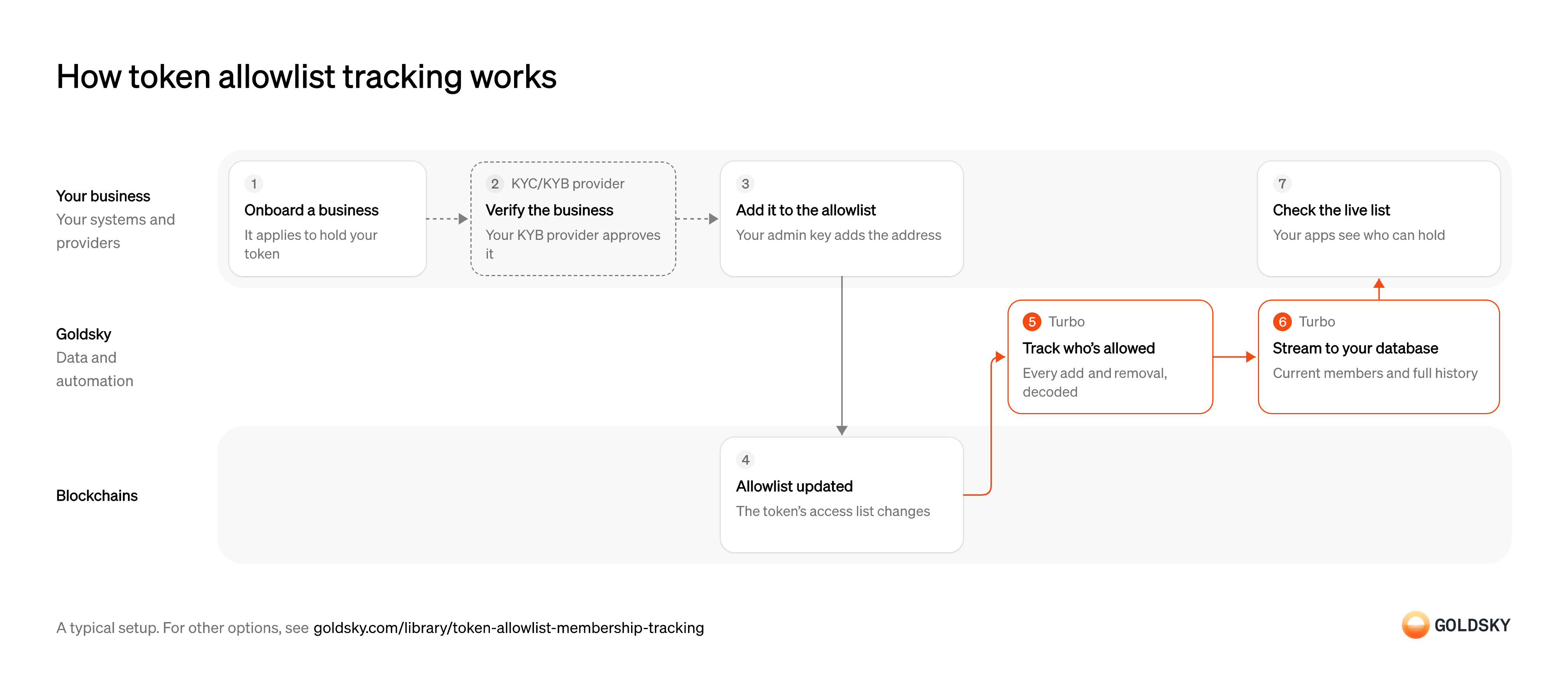
How token allowlist tracking works
The diagram follows one business from its application to hold your token to the moment your apps see it on the live list, and shows who does each step. Your setup may differ.
Ways to track token allowlist membership
With the pipeline, your database holds the current list and its full history; with a subgraph, a hosted GraphQL API serves the list, including how it stood at past blocks, one chain per subgraph.
- Best for
- A live list your own systems read, with its full history
- Products
- Turbo
- What you run
- The destination: your database, queue or bucket, or a Postgres database Goldsky hosts
- What you write
- Pipeline YAML and SQL; TypeScript transforms when needed
- Where your data lives
- In your own database or systems
- How results reach you
- Pushed to you
- Best for
- One EVM token deployment, checked through a hosted API
- Products
- Subgraphs
- What you run
- Nothing; Goldsky runs indexing, storage and the API
- What you write
- A schema and mapping handlers, or a no-code or low-code config for simple contracts
- Where your data lives
- Hosted by Goldsky
- How results reach you
- You query; changes are pushed
| Usual setupOption 1: Stream to your database | Option 2: Hosted subgraph | |
|---|---|---|
| Best for | A live list your own systems read, with its full history | One EVM token deployment, checked through a hosted API |
| Products | Turbo | Subgraphs |
| What you run | The destination: your database, queue or bucket, or a Postgres database Goldsky hosts | Nothing; Goldsky runs indexing, storage and the API |
| What you write | Pipeline YAML and SQL; TypeScript transforms when needed | A schema and mapping handlers, or a no-code or low-code config for simple contracts |
| Where your data lives | In your own database or systems | Hosted by Goldsky |
| How results reach you | Pushed to you | You query; changes are pushed |
Take the business’s application
A bank-issued token is only for approved customers, so each one starts by applying to hold it.
Your onboarding team collects the business’s details and the wallet addresses it wants to use. A wallet that isn’t tied to an applicant now can’t be traced back to its owner later.
Verify the business
Before a wallet can hold your token, you have to know who owns it and that they pass your checks.
Your KYB provider checks the business and its owners against your onboarding policy. If the wallet goes on the list before the check finishes, a business you haven’t approved can receive the token.
Add the wallet to the allowlist
The token enforces the list itself, so an approval only takes effect once the wallet is added onchain.
Someone holding the token’s admin role sends the transaction that adds the address, under your approval rules. The same role removes wallets when a customer leaves or fails a later check.
Confirm the change on the chain
Once the change is in a block, the token lets that wallet hold and receive it, and records an event saying so.
The event names the wallet and whether it was added or removed. Until enough blocks sit on top of it, a reorg (the chain replacing its newest blocks) can still undo the change.
Decode every add and removal
Handled by Goldsky TurboEach event is a line in the history of who could hold the token, and when.
Every allowlist change on the token is decoded into the wallet or token account, the change and the block, from the token’s first block on. A missed removal leaves a wallet on your list after the token stopped accepting it.
With Goldsky, a Turbo Pipelines transform decodes your token’s logs with
See the decode functions (opens in a new tab)_gs_log_decodeand keeps only its allowlist events, from past blocks through to new ones. On a Solana Token-2022 token whose new accounts start frozen, an add is a thaw of the holder’s token account and a removal is a freeze, and a transform picks those instructions out of thesolana.instructionsdataset by program, mint and instruction data.Keep the current list and its history
Handled by Goldsky TurboYour apps need today’s list, and your compliance team needs to show who was on it on any past date.
Each wallet’s latest status replaces its old one, while every change is also kept with its block and time. With only the current list, you can’t say who was allowed on a past date.
Turbo Pipelines can send the same decoded events to two tables: one keyed on the wallet, so each change replaces its status, and one keyed on the event, so every change stays on record.
Learn about pipeline sinks (opens in a new tab)Check the live list from your apps
Any app that sends the token or onboards a customer needs the same answer to who’s allowed.
Your apps read the list from your database instead of each keeping its own copy. Separate copies drift apart, and one of them goes on showing a removed customer as allowed.
What to know about streaming allowlist changes into your database
- Goldsky runs the pipeline; you own the database and decide who goes on the list.
- The pipeline reads what the token records onchain: events on EVM chains, thaw and freeze instructions on Solana. A list kept only off the chain can’t be tracked this way.
- Rows keyed on a primary key take reorg corrections as updates and deletes, so the current list stays in step with the chain.
Take the business’s application
A bank-issued token is only for approved customers, so each one starts by applying to hold it.
Your onboarding team collects the business’s details and the wallet addresses it wants to use. A wallet that isn’t tied to an applicant now can’t be traced back to its owner later.
Verify the business
Before a wallet can hold your token, you have to know who owns it and that they pass your checks.
Your KYB provider checks the business and its owners against your onboarding policy. If the wallet goes on the list before the check finishes, a business you haven’t approved can receive the token.
Add the wallet to the allowlist
The token enforces the list itself, so an approval only takes effect once the wallet is added onchain.
Someone holding the token’s admin role sends the transaction that adds the address, under your approval rules. The same role removes wallets when a customer leaves or fails a later check.
Confirm the change on the chain
Once the change is in a block, the token lets that wallet hold and receive it, and records an event saying so.
The event names the wallet and whether it was added or removed. Until enough blocks sit on top of it, a reorg (the chain replacing its newest blocks) can still undo the change.
Index every add and removal
Handled by Goldsky SubgraphsEach event changes who may hold the token, so each one has to update that wallet’s record.
Every allowlist event is decoded and applied to the wallet it names, from the token’s first block on. A missed removal leaves a wallet listed after the token stopped accepting it.
A Goldsky subgraph’s mapping updates one record per wallet on each allowlist event, so the record always holds that wallet’s latest status.
Learn how subgraphs index events (opens in a new tab)Serve the live list to your apps
Handled by Goldsky SubgraphsEvery app that moves the token needs the same, current answer to who’s allowed.
Apps query one wallet’s status, or the whole list, from one place. If each app keeps its own copy, the copies drift apart.
The subgraph’s GraphQL API returns who’s on the list now, and because the subgraph keeps every version of a record, a query can also return the list as it stood at an earlier block.
Learn about hosted subgraphs (opens in a new tab)Tell your systems about each change
Handled by Goldsky SubgraphsSome systems, such as a payments screen, need to hear about a removal straight away.
Each change goes to an endpoint that updates those systems. A rollback after a reorg arrives as another change, and the receiver applies it instead of treating it as a new add or removal.
Subgraph webhooks post each changed record to your endpoint, with the block range that marks a rollback.
How subgraph webhooks report changes (opens in a new tab)
What to know about tracking an allowlist with a subgraph
- One subgraph covers one chain, so a token on several chains needs one for each.
- The list sits behind the subgraph’s GraphQL API, and your apps query it there.
- Subgraphs keep every version of a record with the blocks it was valid for, so past membership can be looked up.
- Webhooks include rollbacks after a reorg, which your receiver has to apply.
What you control
- Your team
- Take the business’s application
- Add the wallet to the allowlist
- Check the live list from your apps
- Your providers
- KYC/KYB provider
Security and deployment
- SOC 2 Type IIIndependently audited security controls.
- Dedicated infrastructureSingle-tenant options for production workloads.
- Data residencyCloud, on-premises or co-located.
More use cases that enforce freezes and blocklists
- Stablecoin freezes and seizuresRecord every freeze, seizure and burn on a lawful order, with the balance it affected.
- ERC-3643 eligibility and allowlist trackingTrack ERC-3643 identity and eligibility changes so only approved holders can receive a security token.
- Stablecoin admin action logRecord every mint, burn, freeze, clawback and role change with its time and signer for risk and audit review.
Track token allowlist membership with Goldsky
We’ll map it to your systems and show you what Goldsky runs, so your team builds the product, not the pipelines underneath it.
 Robinhood
 HyperEVM
 Arc
 Solana
 Ethereum
 Polymarket
 Base
 Tempo
 Bitcoin