Stablecoin admin action log
What is a stablecoin admin action log?
A stablecoin admin action log is a record of every privileged action taken on a token contract: each mint, burn, freeze, clawback and change to who holds an admin role, with when it happened and which address signed it.
Issuers and the platforms that run tokens for them keep one because risk teams and auditors ask who could move or block funds, and who did.
Goldsky decodes each action from the contract’s events into your warehouse and can flag role changes as they happen, while your team keeps the keys, the approval policy and the review.
You can keep the log two ways: stream decoded admin events into your own warehouse with Turbo Pipelines, or index them in a subgraph that Goldsky hosts, with a webhook on each new action.
Who keeps a stablecoin admin action log?
Stablecoin issuers, issuance platforms that run branded tokens for their clients, and tokenization platforms that manage permissioned tokens.
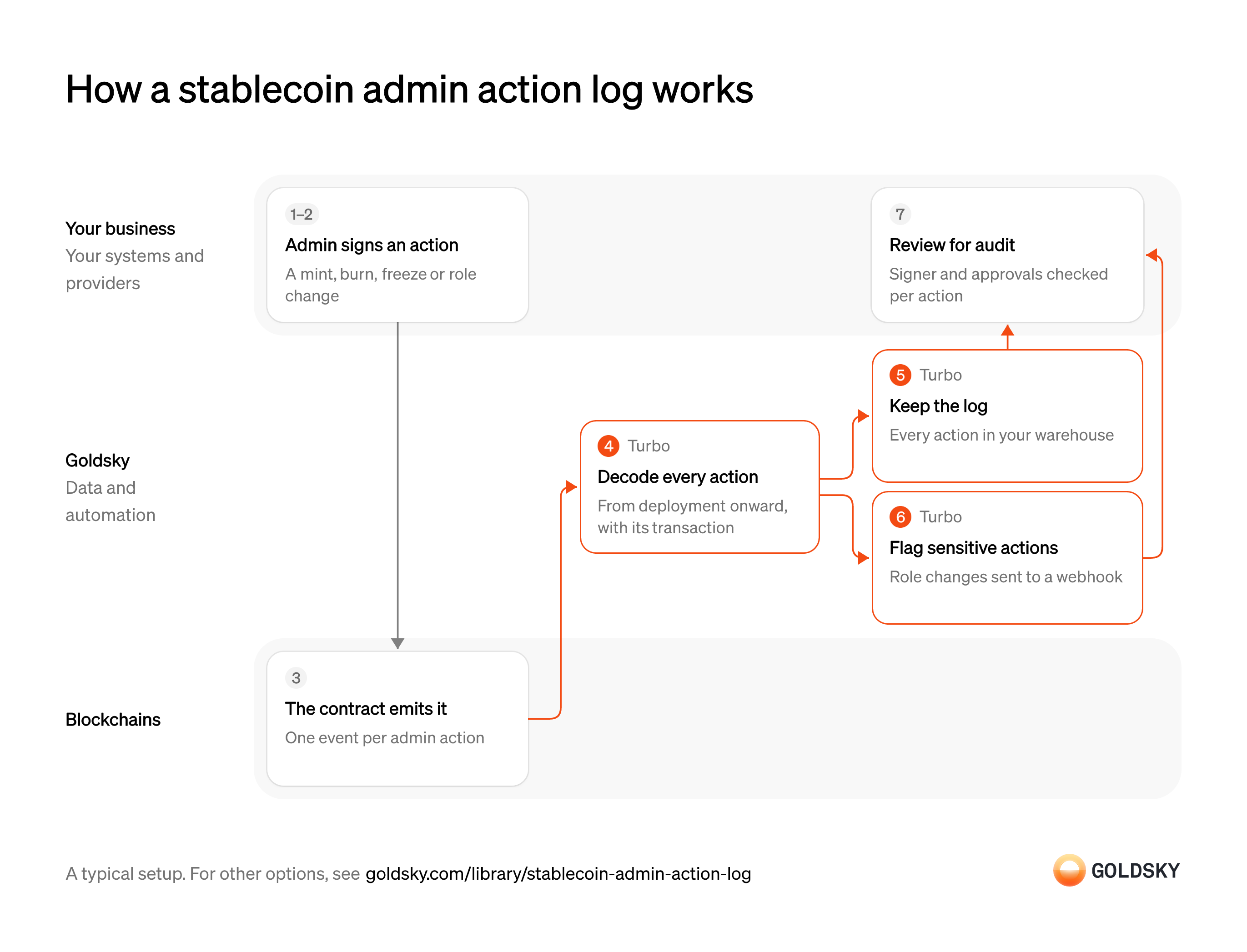
How a stablecoin admin action log works
The diagram follows one admin action from the signature that authorizes it to the audit review of the log, and shows who does each step. Your setup may differ.
Ways to keep a stablecoin admin action log
A pipeline writes every admin action into a warehouse you own, next to your other risk data; the subgraph keeps the log in a hosted index you query and pushes each new action to your endpoint.
- Best for
- Tokens on several chains, with the log beside your risk data
- Products
- Turbo
- What you run
- The destination: your database, queue or bucket, or a Postgres database Goldsky hosts
- What you write
- Pipeline YAML and SQL; TypeScript transforms when needed
- Where your data lives
- In your own database or systems
- How results reach you
- Pushed to you
- Best for
- One token on one chain, queried when needed
- Products
- Subgraphs
- What you run
- Nothing; Goldsky runs indexing, storage and the API
- What you write
- A schema and mapping handlers, or a no-code or low-code config for simple contracts
- Where your data lives
- Hosted by Goldsky
- How results reach you
- You query; changes are pushed
| Usual setupOption 1: Stream to your warehouse | Option 2: Hosted subgraph | |
|---|---|---|
| Best for | Tokens on several chains, with the log beside your risk data | One token on one chain, queried when needed |
| Products | Turbo | Subgraphs |
| What you run | The destination: your database, queue or bucket, or a Postgres database Goldsky hosts | Nothing; Goldsky runs indexing, storage and the API |
| What you write | Pipeline YAML and SQL; TypeScript transforms when needed | A schema and mapping handlers, or a no-code or low-code config for simple contracts |
| Where your data lives | In your own database or systems | Hosted by Goldsky |
| How results reach you | Pushed to you | You query; changes are pushed |
Decide who holds each admin role
The log is only useful if you know who was allowed to take each action, so the roles come first.
Write down which addresses can mint, burn, freeze, claw back or change roles, and which approvals each action needs. Without that list, a reviewer reading the log can see what happened but can’t tell whether it should have.
Sign the admin action
Every mint, freeze or role change starts with someone holding an admin key approving it.
The action is signed under your approval policy, often by a multisig (a wallet that needs several approvers). If admin keys sit outside any policy, the log will record actions nobody signed off on.
Record the action on the chain
The token contract announces each admin action as an event, which is the evidence the log is built from.
Each action emits one event with its block and transaction, and for a short time the newest blocks can still be replaced, so an action seen once isn’t final until enough blocks sit on top of it. On Tempo, a token’s transfer policy lives in the separate TIP-403 policy registry: the token emits
TransferPolicyUpdatewhen its admin switches policy, and the registry emitsWhitelistUpdatedorBlacklistUpdatedwhen a policy’s admin changes its list, so both contracts belong in the log.Decode every action since deployment
Handled by Goldsky TurboEvents arrive encoded, and the log has to start from the token’s first day to show every action ever taken.
Each event is turned into a named action with its parameters, block, time and transaction. The signer comes from the event itself where the contract records it, or from the transaction; a log that starts mid-life leaves early mints and role grants unexplained.
With Goldsky, a Turbo Pipelines source can start at the contract’s first block with
Decode logs with an ABI (opens in a new tab)start_at: earliestand a filter on its address, and_gs_log_decodeturns each raw log into a named event using the contract’s ABI.Keep the log in your warehouse
Handled by Goldsky TurboAuditors ask for the full history long after the actions happened, so it has to sit somewhere your team controls.
Write every action as one row, keyed so that a retried write replaces the row instead of adding a second one. A log with duplicates or gaps raises more questions than it answers.
The pipeline writes each action to a database or warehouse sink with
How delivery and reorgs work (opens in a new tab)primary_keyset to the event’sid, so a replayed write is applied as an upsert and a reorg correction updates or removes the same row.Flag sensitive actions as they happen
Handled by Goldsky TurboSome actions, such as granting a new admin role, need a person to look at them the same day.
Pick the action types that need attention and send each one to the risk team as soon as it appears. The alert fires when the action is seen, before it’s final, so the receiving system has to handle a later correction.
A second SQL transform in the same Turbo pipeline can keep only role grants and revocations and send them to a webhook sink, which retries until your endpoint returns a
Send rows to a webhook (opens in a new tab)2xx.Review each action for audit
Risk and audit teams have to confirm that every action was taken by an authorized signer with the approvals it needed.
Check each logged action against your list of admin addresses and your approval records, and explain any that don’t match. Where admin roles sit behind a multisig, the token’s events name the multisig, not each approver: owners usually sign off the chain and one transaction carries their signatures, so the approvers come from the multisig’s own records.
What to know about streaming admin actions to a warehouse
- Goldsky runs the pipeline; you own the warehouse, its schema and who can read the log.
- History from the contract’s deployment is backfilled first, then new actions arrive as they’re made.
- Tables with a primary key take reorg corrections as updates and deletes; a webhook endpoint receives correction records and has to apply them itself.
- An alert is a filtered row about one event, so a rule about something that didn’t happen, such as a missing approval, runs in your own systems.
Decide who holds each admin role
The log is only useful if you know who was allowed to take each action, so the roles come first.
Write down which addresses can mint, burn, freeze, claw back or change roles, and which approvals each action needs. Without that list, a reviewer reading the log can see what happened but can’t tell whether it should have.
Sign the admin action
Every mint, freeze or role change starts with someone holding an admin key approving it.
The action is signed under your approval policy, often by a multisig (a wallet that needs several approvers). If admin keys sit outside any policy, the log will record actions nobody signed off on.
Record the action on the chain
The token contract announces each admin action as an event, which is the evidence the log is built from.
Each action emits one event with its block and transaction, and for a short time the newest blocks can still be replaced, so an action seen once isn’t final until enough blocks sit on top of it. On Tempo, a token’s transfer policy lives in the separate TIP-403 policy registry: the token emits
TransferPolicyUpdatewhen its admin switches policy, and the registry emitsWhitelistUpdatedorBlacklistUpdatedwhen a policy’s admin changes its list, so both contracts belong in the log.Index every admin action
Handled by Goldsky SubgraphsEach event has to become a record your team can look up by action, address or date.
Index the contract from its first block so the record covers every action ever taken, each with its block, time and transaction. An index that starts later leaves early mints and role grants out of the history.
Goldsky’s no-code subgraph wizard takes the token contract’s address, fetches its ABI and generates a subgraph with a record type for each event, served from a hosted GraphQL endpoint.
Create a no-code subgraph (opens in a new tab)Push each new action to your backend
Handled by Goldsky SubgraphsYour team should hear about a new admin action without having to query for it.
Each new record is sent to an endpoint you run, which stores it and decides who to notify. If the chain replaces the block an action was in, the endpoint has to remove or correct what it stored.
Subgraph webhooks post every record change to your URL as an
Learn about subgraph webhooks (opens in a new tab)INSERT,UPDATEorDELETE, and each version carries ablock_range, which lets your endpoint tell a reorg rollback from a real change.Flag sensitive actions for the risk team
Role changes and large mints need a person to look at them the same day.
Your endpoint picks out the action types that need attention and routes them to the risk team. Keeping that rule in your own code means you can change it without touching the index.
Review each action for audit
Risk and audit teams have to confirm that every action was taken by an authorized signer with the approvals it needed.
Check each logged action against your list of admin addresses and your approval records, and explain any that don’t match. Where admin roles sit behind a multisig, the token’s events name the multisig, not each approver: owners usually sign off the chain and one transaction carries their signatures, so the approvers come from the multisig’s own records.
What to know about logging admin actions in a subgraph
- Goldsky runs indexing, storage and the API; you query the log rather than keep your own copy of it.
- Each subgraph indexes one chain, so a token on several chains needs a subgraph for each.
- Webhooks send an insert, update or delete for each record change with no guaranteed order between them, so your endpoint has to reconcile by record ID and version.
- The index holds only chain data, so approvals and review notes stay in your own systems.
What you control
- Your team
- Decide who holds each admin role
- Sign the admin action
- Review each action for audit
Security and deployment
- SOC 2 Type IIIndependently audited security controls.
- Dedicated infrastructureSingle-tenant options for production workloads.
- Data residencyCloud, on-premises or co-located.
More use cases that enforce freezes and blocklists
- Stablecoin freezes and seizuresRecord every freeze, seizure and burn on a lawful order, with the balance it affected.
- Token allowlist membership trackingFollow which wallets may hold or receive a bank-issued token as the allowlist changes.
- ERC-3643 eligibility and allowlist trackingTrack ERC-3643 identity and eligibility changes so only approved holders can receive a security token.
Use cases built the same way
- Unauthorized tokenization monitoringFind tokens that claim to represent your security without your consent.
- NCUA stablecoin reporting dataReport supply, mint and burn, and holder figures for a stablecoin issued by a credit union subsidiary under the NCUA’s proposed rules.
- Onchain data for finance and BI reportingLoad onchain activity into the warehouse so finance and BI teams can report on it.
- Crypto market surveillance for tokenized securitiesWatch trading in tokenized securities for manipulation and other market abuse.
Keep a stablecoin admin action log with Goldsky
We’ll map it to your systems and show you what Goldsky runs, so your team builds the product, not the pipelines underneath it.
 Robinhood
 HyperEVM
 Arc
 Solana
 Ethereum
 Polymarket
 Base
 Tempo
 Bitcoin