Unauthorized tokenization monitoring
What is unauthorized tokenization monitoring?
Unauthorized tokenization monitoring, also called token impersonation monitoring, is finding tokens that claim to represent your stock or fund without your consent.
Issuers, their transfer agents, exchanges and tokenized-stock venues watch for them because a token that uses a security’s name without the issuer’s consent can mislead investors about what they’re buying and who stands behind it.
A US venue trading a third party’s token of your stock has to notify you first, but tokens offered elsewhere come with no notice.
Goldsky reads the name and ticker of every new token, past and future, flags those that contain yours and keeps every launch for your own searches; deciding whether a match is unauthorized, and what to do about it, stays with your legal team.
Who uses unauthorized tokenization monitoring?
Digital transfer agents, tokenization platforms, regulated exchanges and tokenized-stock venues that watch for tokens using an issuer’s name.
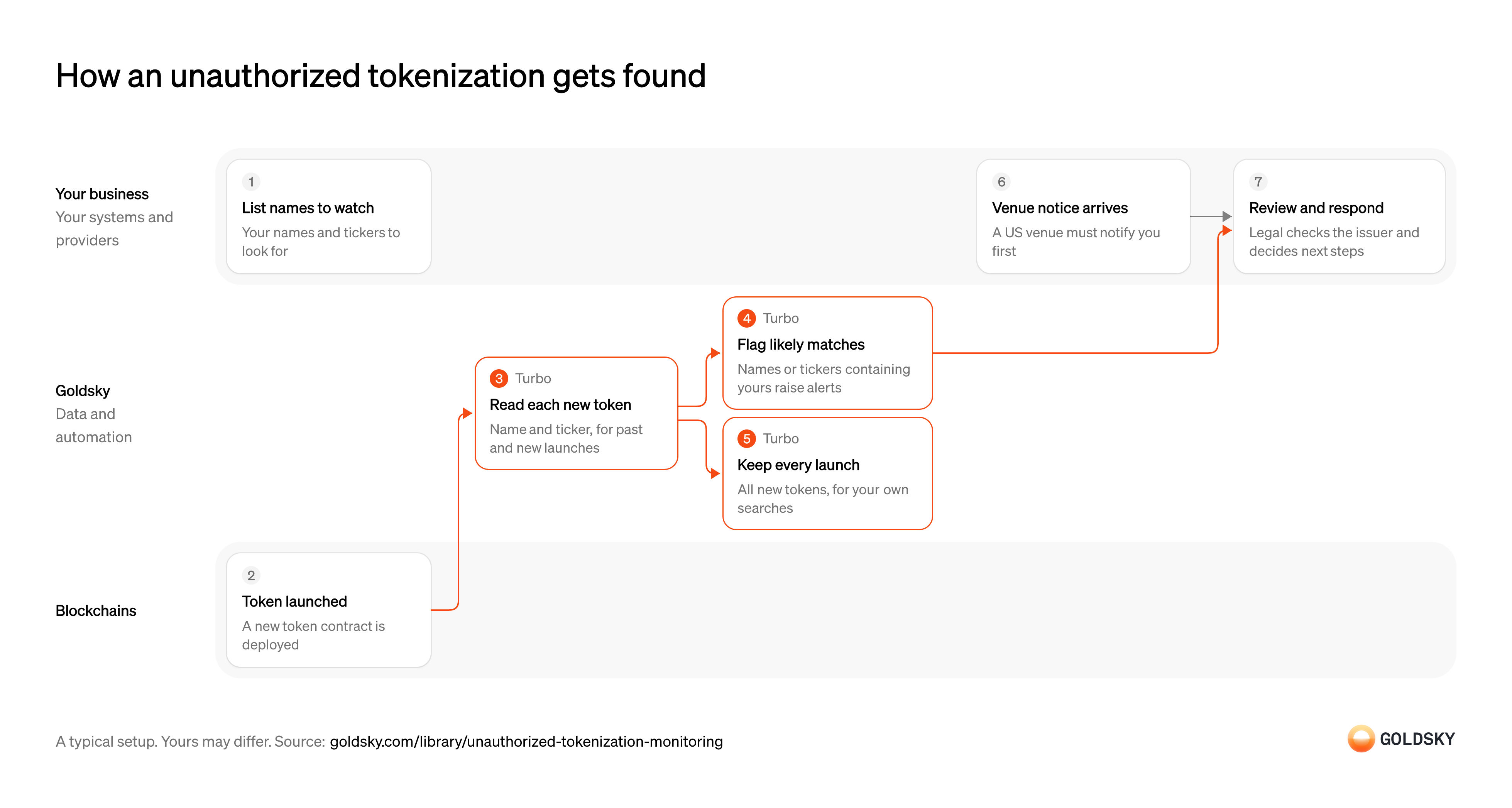
How an unauthorized tokenization gets found
The diagram follows one new token from its launch on the chain, or a venue’s notice, to your legal team’s review. Your setup may differ.
List the names and tickers to watch for
A lookalike token has to be recognized by something, usually a name or ticker close to yours.
Your team lists the security’s legal and trading names, its tickers and the variants someone might use, such as the ticker with a prefix or suffix. A name and ticker scan is one signal among others, such as listings you see on venues and any notice a venue sends you, and your team decides how much each one counts.
A new token contract is deployed
Anyone can deploy a token on a public chain and give it any name and ticker they like.
Deploying a contract is a transaction like any other, and nothing on the chain checks the name against who owns it. The name and ticker sit in the contract’s own storage, so they have to be read from the contract.
Read the name and ticker of each new token
Handled by Goldsky TurboTo compare a new token with your security, you need its name and ticker.
Every new contract has to be found, past ones as well as new, and asked for its name and ticker. Contracts that aren’t tokens return no name, so they drop out at this step.
Turbo Pipelines can find contract creations in a chain’s trace data and call each new contract’s
Read contract metadata in SQL (opens in a new tab)name()andsymbol()with_gs_eth_call(). A pipeline that starts from theearliestblock covers past launches before new ones.Flag likely matches
Handled by Goldsky TurboYour team should see the tokens that might be yours without reading through every launch.
Each new token’s name and ticker are compared with your list, ignoring case, and a match goes to your team with the contract address, the chain and the deployer. A text match can’t tell an unrelated token with a similar ticker from an imitation, so every match needs a person.
Goldsky can compare names and tickers with your list in a SQL transform, using functions such as
Set up the webhook sink (opens in a new tab)lower()andlocate(), and post each match to your endpoint through a webhook sink.Keep every launch for later searches
Handled by Goldsky TurboA token can start using your name after launch, or you may need to search for a variant you didn’t think of.
Every new token is stored with its name, ticker, chain, contract and deployer, whether it matched or not. Without that record, each new search means scanning the chains again from the start.
The same pipeline can write every launch to ClickHouse, or as Parquet files to S3-compatible storage, so your team can search the full record with its own queries.
See where pipelines can write (opens in a new tab)Log each notice a venue sends you
Under the SEC’s exemption for tokenized stocks, a US venue that wants to trade a token of your stock made by someone else must notify you in writing first, and can’t offer it for trading if you object within 30 calendar days of receiving the notice.
Your legal team or corporate secretary logs each notice, checks the token it describes and decides whether to object before trading starts. Tokens offered outside such venues, such as wrapped tokens traded offshore, need no permission and come with no notice, which is why the scan of new launches runs alongside.
Review the issuer and respond
Only your team can say whether a token is authorized and what to do about it.
Your legal team checks who deployed the token, what it claims to represent and where it trades, then decides whether to contact the venue, publish a notice or take further action. Record each decision with the evidence behind it, since you may need to show it later.
What you control
- Your team
- List the names and tickers to watch for
- Log each notice a venue sends you
- Review the issuer and respond
Security and deployment
- SOC 2 Type IIIndependently audited security controls.
- Dedicated infrastructureSingle-tenant options for production workloads.
- Data residencyCloud, on-premises or co-located.
More use cases that monitor transactions
- Compliance monitoringScreen wallets and transfers, watch for misuse of your assets and feed your AML and surveillance tools.
- Securities surveillanceScreen wallets and transfers, watch for misuse of your assets and feed your AML and surveillance tools.
- Crypto wallet screening and sanctions dataFlag transfers that touch sanctioned or high-risk addresses.
- Secondary-market sanctions sweeps for token issuersScreen every holder and transfer of your stablecoin, not only your direct customers.
- Data for crypto AML transaction monitoringFeed complete transfer data to AML tools with lineage from the chain to the case.
- Smart contract and wallet monitoringWatch your contracts and wallets for attacks and unexpected changes.
- Blockchain forensics data feedGive investigators full history and traces across chains.
- VASP and counterparty due diligence dataProfile a VASP, issuer or counterparty by its onchain exposure before onboarding it and while the relationship lasts.
- Crypto source of funds and wealth checksTrace where a client’s onchain funds came from to document legitimate wealth at onboarding.
- Token listing due diligence for exchangesCheck a token’s supply, holders, liquidity and risky links before an exchange lists it, and after.
- Crypto scam and money mule detection dataFlag payments to scam-linked wallets and customer accounts that act as money mules.
- Crypto wallet monitoringGet an alert when a watched wallet makes a large transfer, crosses a balance limit, wakes after dormancy or pays an unknown counterparty.
- Address poisoning detectionFlag the zero-value, dust and fake-token transfers that lookalike addresses plant in a user’s history, and warn before anyone pays one.
- Onchain supervisory monitoring for regulatorsGive examiners one view of licensed firms’ onchain activity to test against what the firms report.
Use cases built the same way
- Stablecoin admin action logRecord every mint, burn, freeze, clawback and role change with its time and signer for risk and audit review.
- NCUA stablecoin reporting dataReport supply, mint and burn, and holder figures for a stablecoin issued by a credit union subsidiary under the NCUA’s proposed rules.
- Onchain data for finance and BI reportingLoad onchain activity into the warehouse so finance and BI teams can report on it.
- Crypto market surveillance for tokenized securitiesWatch trading in tokenized securities for manipulation and other market abuse.
Monitor for unauthorized tokenizations with Goldsky
We’ll map it to your systems and show you what Goldsky runs, so your team builds the product, not the pipelines underneath it.
 Robinhood
 HyperEVM
 Arc
 Solana
 Ethereum
 Polymarket
 Base
 Tempo
 Bitcoin