Blockchain forensics data feed
What is a blockchain forensics data feed?
A blockchain forensics data feed is the full history of a chain, including internal transaction traces, delivered to the investigators and tools that follow funds from wallet to wallet, the work also called crypto tracing.
Blockchain analytics and KYT vendors need one for every chain they cover, because tracing can only follow hops that are in their data, and transfers made inside contracts only show up in traces.
Goldsky loads blocks, transactions, transfers and traces into your warehouse and serves archive state and traces over RPC when a case needs them; the tracing logic, the labels and the cases stay with your investigators.
You can build it two ways: load a chain’s full history, traces included, into your warehouse with Turbo Pipelines and pull extra detail over Edge RPC, or have investigators read archive state and traces over Edge RPC alone.
Who uses a blockchain forensics data feed?
Blockchain analytics firms, KYT vendors and investigation teams that trace funds across chains.
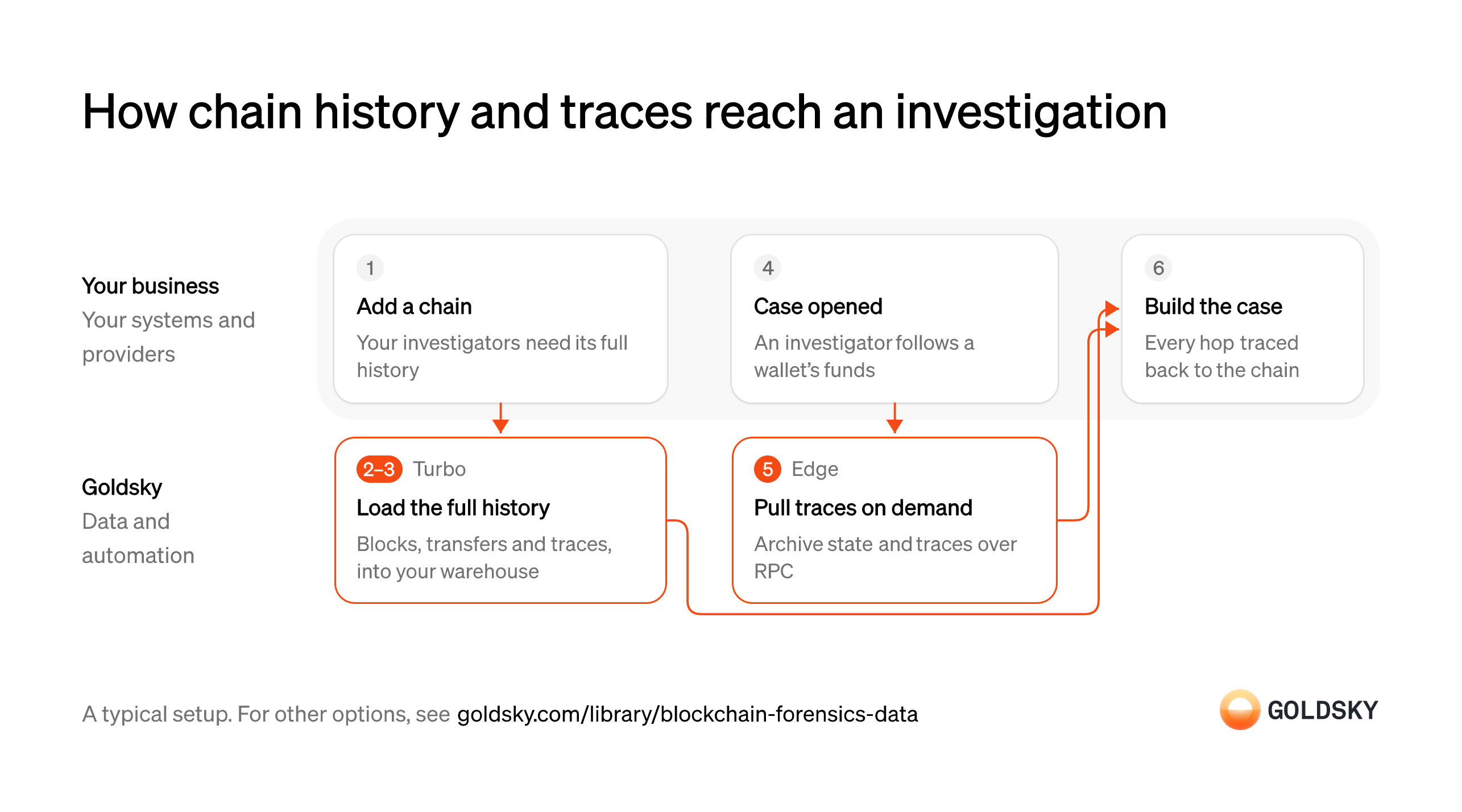
How chain history and traces reach an investigation
The data starts the day you add a chain and ends with an investigator tracing every hop, with bulk history and per-case traces arriving by separate routes. Your setup may differ.
Ways to get chain history and traces for forensics
Loading history puts the whole chain in your warehouse, so your tools can query every hop at once; over RPC alone, investigators fetch one transaction, block or filter at a time and keep only what they save.
- Best for
- Bulk tracing in your warehouse, plus per-case detail
- What you run
- The destination: your database, queue or bucket, or a Postgres database Goldsky hosts
- What you write
- Pipeline YAML and SQL; TypeScript transforms when needed
- Where your data lives
- In your own database or systems
- How results reach you
- Pushed to you
- Best for
- Case-by-case lookups with your own tools
- Products
- Edge
- What you run
- Your own client code
- What you write
- JSON-RPC calls, and the decoding of what comes back
- Where your data lives
- Read from the chain
- How results reach you
- Returned when you call
| Usual setupOption 1: Load history, pull traces | Option 2: Archive and trace RPC | |
|---|---|---|
| Best for | Bulk tracing in your warehouse, plus per-case detail | Case-by-case lookups with your own tools |
| Products | TurboEdge | Edge |
| What you run | The destination: your database, queue or bucket, or a Postgres database Goldsky hosts | Your own client code |
| What you write | Pipeline YAML and SQL; TypeScript transforms when needed | JSON-RPC calls, and the decoding of what comes back |
| Where your data lives | In your own database or systems | Read from the chain |
| How results reach you | Pushed to you | Returned when you call |
Add a chain to your coverage
Investigators can only follow funds onto chains your data covers.
Your team decides which chain to add and what it needs: every block from the start, or only the tokens and contracts your cases involve. Funds that move onto a chain you don’t cover drop out of every trace at that hop.
Load the chain’s full history
Handled by Goldsky TurboTracing a case backward can reach any point in a chain’s past, so the history has to be complete.
Blocks, transactions, token transfers and internal traces have to land in your warehouse from the chain’s first block, then keep up with new ones. Transfers made inside contracts appear only in traces, so a history without them hides hops.
With Goldsky, a Turbo Pipelines pipeline can read the chain’s
See the EVM datasets (opens in a new tab)raw_blocks,raw_transactions,erc20_transfersandraw_tracesdatasets from theearliestblock, keep streaming once it catches up, and write to ClickHouse or to Parquet files in S3-compatible storage.Keep the history correct after reorgs
Handled by Goldsky TurboThe chain sometimes replaces its newest blocks (a reorg), and the warehouse has to follow.
Rows from replaced blocks have to be removed or updated, or a case can rest on a transaction that no longer exists. Tables keyed on a stable record ID can apply those changes in place.
Turbo Pipelines sends reorg corrections as deletes and updates, and a ClickHouse table using
How reorgs reach your sinks (opens in a new tab)ReplacingMergeTreeon the sink’sprimary_keyconverges to the chain as it stands.Open a case
Every investigation starts from a wallet or transaction someone needs explained.
An investigator starts from a wallet, a transaction or an alert from another tool, and writes down the question: where these funds came from, or where they went. A written question keeps the case in scope when the trace branches into many wallets.
Pull traces and past state for the case
Handled by Goldsky EdgeSome cases need detail the warehouse doesn’t hold, such as a full execution trace or a balance at a past block.
Investigators request one transaction’s trace, or every trace for an address over a block range, and read state at the block they’re examining. A node that doesn’t keep archive state can’t return old blocks.
Goldsky’s Edge RPC serves
Filter traces by address (opens in a new tab)trace_filterfor every trace from or to an address over a block range, alongside archive reads such aseth_callat a past block.Build the case
A finding holds up only if each hop can be shown on the chain.
The investigator ties every hop to a transaction hash anyone can check, adds labels from your firm’s own data and writes up the finding. The tracing rules and the labels are yours, and they’re what a reviewer will question.
What to know about loading chain history into your warehouse
- A full-history load works through every block from the start, which takes longer on bigger chains; filtering to certain contracts speeds it up but leaves the rest out.
- Tables keyed on each record’s ID take reorg corrections in place; files in object storage carry correction records your loader applies.
- Trace data isn’t available on every chain, so check a chain’s trace coverage before promising it to investigators.
- You own the warehouse and the queries; Goldsky runs the load and the RPC endpoint.
Open a case
Every investigation starts from a wallet or transaction someone needs explained.
An investigator starts from a wallet, a transaction or an alert from another tool, and writes down the question: where these funds came from, or where they went. A written question keeps the case in scope when the trace branches into many wallets.
Look up the transactions and their traces
Handled by Goldsky EdgeTo follow funds, the investigator needs each transaction and every internal transfer inside it.
Your tools fetch the transaction, its receipt and its trace, then follow each counterparty to the next hop. Calls made inside contracts can move funds without a token transfer event, so skipping traces misses those hops.
Edge RPC serves
Trace a single transaction (opens in a new tab)debug_traceTransactionwith a step-by-step trace of one transaction, andtrace_filterwith every trace from or to an address over a block range.Read state at past blocks
Handled by Goldsky EdgeSome questions are about a moment in the past, such as a wallet’s balance just before the funds moved.
The read has to be made against the exact block in question, which needs a node that keeps archive state. A read against the latest block answers a different question.
Goldsky’s Edge RPC serves archive reads, so
What Edge RPC supports (opens in a new tab)eth_callandeth_getBalancecan be pointed at the block you name, and batch requests let your tool query many blocks in one call.Save what the case relies on
A case has to be reproducible later, after the chain and your tools have moved on.
Store each response the finding depends on, with the block number and the time you fetched it. Rechecking recent blocks before you close the case catches a hop that a reorg changed.
Build the case
A finding holds up only if each hop can be shown on the chain.
The investigator ties every hop to a transaction hash anyone can check, adds labels from your firm’s own data and writes up the finding. The tracing rules and the labels are yours, and they’re what a reviewer will question.
What to know about reading traces over RPC
- Each answer covers one transaction, block or filter, so tracing many hops means many requests from your tools.
- Your tools pull, and nothing is pushed to you when new blocks arrive.
- Results aren’t stored for you, so save the responses a case depends on.
- Answers about the newest blocks can change after a reorg, so recheck recent hops before closing a case.
Related jobs
Choose the chains your product covers
Customers screen transfers on the chains they use, and funds that cross to a chain you don’t cover drop out of every exposure score at that hop.
For each chain, decide whether you need every block from the start or only certain tokens, and check whether traces exist there. Listing a chain before its history is loaded gives customers scores with gaps they can’t see.
Load each new chain’s history
Handled by Goldsky TurboIndirect exposure is traced back as many hops as it takes, so any block in a chain’s past can matter.
Blocks, transactions, logs and traces have to land from the chain’s first block and then keep up with new ones. Value moved inside contract calls shows up only in traces, so a history without them misses those hops.
A Turbo Pipelines pipeline reads the chain’s
See the EVM datasets (opens in a new tab)raw_blocks,raw_transactions,raw_logsandraw_tracesdatasets fromearliestand keeps streaming once it catches up. On chains with traces,native_transfersadds the native value moved by internal transactions.Read archive state and traces
Handled by Goldsky EdgeIndexers and screening calls ask about past blocks: a balance at a given height, or every call inside a transaction.
These reads need nodes that keep archive state and serve trace methods, and results without gaps. A log query that returns only part of a block range quietly drops transfers from your index.
Goldsky’s Edge RPC routes historical requests to archive nodes, splits large
See what Edge RPC checks (opens in a new tab)eth_getLogsranges, checks that block ranges come back complete, and servestrace_*anddebug_*methods.Keep reads flowing when a provider fails
Handled by Goldsky EdgeCustomers screen transfers around the clock, so an outage at one node provider stalls their screening.
Requests have to move to another provider without your code changing, and answers from different nodes have to agree. A lagging node can return an old block as if it were the latest.
Edge RPC fails over automatically across several providers and cross-validates responses from multiple nodes, so stale or partial data doesn’t reach your services.
What Edge RPC supports (opens in a new tab)Cut repeat reads from the provider you pay
Handled by Goldsky BoostRe-indexing and replays read the same blocks, receipts and logs again, and each read costs money at your current provider.
Reads at a fixed height can come from data that’s already indexed, while traces and state reads still need a node. Sending a repeat read to the paid provider adds cost without adding data.
Boost answers eligible block, transaction, receipt and log reads at concrete heights from Goldsky’s indexed data and forwards traces and state reads such as
How Boost routes requests (opens in a new tab)eth_callto your provider. Withcache-only=true, a backfill never forwards at all.Score exposure for your customers
The raw data becomes a product once your labels and risk models turn it into scores and alerts.
Your labels tie addresses to services, and your models score direct and indirect exposure from the history and traces. Re-score transfers in the newest blocks after a reorg (the chain replacing its newest blocks), because a hop a score relied on may no longer exist.
What you control
- Your team
- Add a chain to your coverage
- Open a case
- Build the case
Security and deployment
- SOC 2 Type IIIndependently audited security controls.
- Dedicated infrastructureSingle-tenant options for production workloads.
- Data residencyCloud, on-premises or co-located.
More use cases that monitor transactions
- Compliance monitoringScreen wallets and transfers, watch for misuse of your assets and feed your AML and surveillance tools.
- Securities surveillanceScreen wallets and transfers, watch for misuse of your assets and feed your AML and surveillance tools.
- Crypto wallet screening and sanctions dataFlag transfers that touch sanctioned or high-risk addresses.
- Secondary-market sanctions sweeps for token issuersScreen every holder and transfer of your stablecoin, not only your direct customers.
- Data for crypto AML transaction monitoringFeed complete transfer data to AML tools with lineage from the chain to the case.
- Unauthorized tokenization monitoringFind tokens that claim to represent your security without your consent.
- Smart contract and wallet monitoringWatch your contracts and wallets for attacks and unexpected changes.
- VASP and counterparty due diligence dataProfile a VASP, issuer or counterparty by its onchain exposure before onboarding it and while the relationship lasts.
- Crypto source of funds and wealth checksTrace where a client’s onchain funds came from to document legitimate wealth at onboarding.
- Token listing due diligence for exchangesCheck a token’s supply, holders, liquidity and risky links before an exchange lists it, and after.
- Crypto scam and money mule detection dataFlag payments to scam-linked wallets and customer accounts that act as money mules.
- Crypto wallet monitoringGet an alert when a watched wallet makes a large transfer, crosses a balance limit, wakes after dormancy or pays an unknown counterparty.
- Address poisoning detectionFlag the zero-value, dust and fake-token transfers that lookalike addresses plant in a user’s history, and warn before anyone pays one.
- Onchain supervisory monitoring for regulatorsGive examiners one view of licensed firms’ onchain activity to test against what the firms report.
Supply blockchain forensics data with Goldsky
We’ll map it to your systems and show you what Goldsky runs, so your team builds the product, not the pipelines underneath it.
 Robinhood
 HyperEVM
 Arc
 Solana
 Ethereum
 Polymarket
 Base
 Tempo
 Bitcoin