Crypto wallet screening and sanctions data
What is crypto wallet screening?
Crypto wallet screening, also called address screening or sanctions screening, is checking the sender and the recipient of each onchain transfer against a list of sanctioned or high-risk wallet addresses.
Exchanges, sponsor banks and stablecoin issuers run it so that every transfer touching a listed address reaches their compliance team, which decides whether to clear it, escalate it or report it.
Goldsky streams the transfers, checks both sides against the list you load from your sanctions data provider and hands each hit to your queue or case tool; the list, the review and every decision stay with you.
You can screen wallets two ways: stream every transfer through a screening pipeline with Turbo Pipelines, or pull one wallet’s transfers from the Feeds transfers API when your team reviews it.
Who uses crypto wallet screening?
Crypto exchanges, sponsor banks, stablecoin issuers and KYT vendors that screen customer transfers against sanctions lists.
How crypto wallet screening works
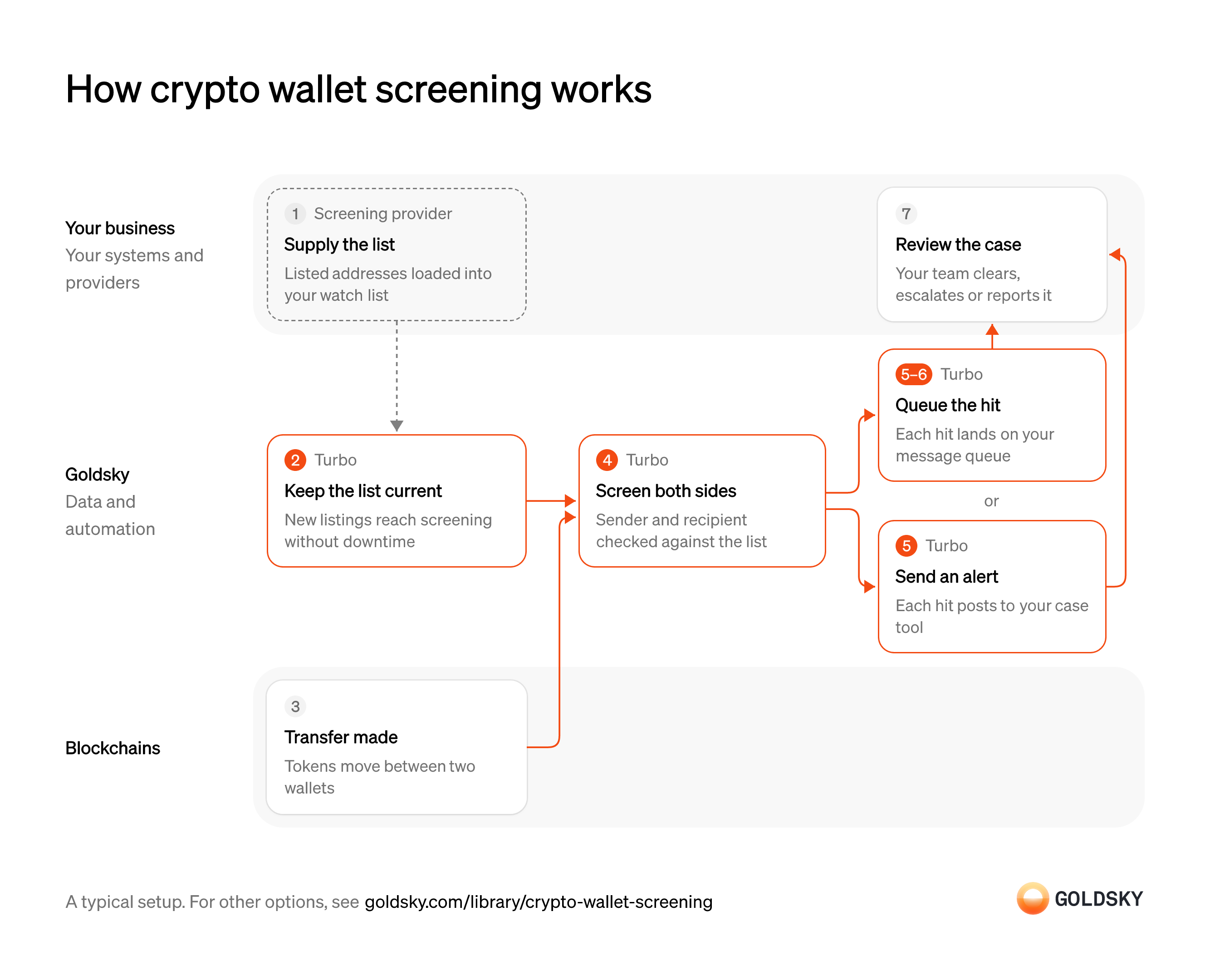
Two inputs meet in this chart, a transfer on the chain and the list from your sanctions provider, and it follows them to the case your team reviews. Your setup may differ.
Ways to screen crypto wallets against sanctions lists
The pipeline screens every transfer as it arrives and pushes each hit to you; the transfers API returns one wallet’s transfers when your code calls it, and your code checks them against the list.
- Best for
- Every transfer screened on arrival, hits pushed to you
- Products
- Turbo
- What you run
- The destination: your database, queue or bucket, or a Postgres database Goldsky hosts
- What you write
- Pipeline YAML and SQL; TypeScript transforms when needed
- Where your data lives
- In your own database or systems
- How results reach you
- Pushed to you
- Best for
- One wallet at a time, at onboarding or review
- Products
- Feeds
- What you run
- Nothing; you call an endpoint and keep what you need
- What you write
- REST requests
- Where your data lives
- Hosted by Goldsky
- How results reach you
- Returned when you call
| Usual setupOption 1: Stream and screen | Option 2: Wallet transfers API | |
|---|---|---|
| Best for | Every transfer screened on arrival, hits pushed to you | One wallet at a time, at onboarding or review |
| Products | Turbo | Feeds |
| What you run | The destination: your database, queue or bucket, or a Postgres database Goldsky hosts | Nothing; you call an endpoint and keep what you need |
| What you write | Pipeline YAML and SQL; TypeScript transforms when needed | REST requests |
| Where your data lives | In your own database or systems | Hosted by Goldsky |
| How results reach you | Pushed to you | Returned when you call |
Load the sanctions list
Screening only catches addresses that are on your list, so the list comes first.
Your sanctions data provider supplies the listed wallet addresses, and your team adds its own blocklist. Store every address in one format, such as lowercase, because an address written another way won’t match.
Keep the list current while screening runs
Handled by Goldsky TurboLists change without warning, and a newly listed address has to be checked from the next transfer on.
Updates have to reach the running screen without a release or a restart. If an update waits for the next deploy, transfers to that address pass unflagged in the meantime.
With Goldsky, the watch list is a Turbo Pipelines dynamic table, which lives in a Postgres database you can keep inside your own compliance boundary. Your list-loading job inserts a row and the running pipeline starts flagging that address, with no redeploy.
Learn about dynamic tables (opens in a new tab)A transfer is made onchain
Tokens move between two wallets, and either of them could be on the list.
The transfer is recorded in a block anyone can read. For a short time the newest blocks can still be replaced (a reorg), so a transfer seen once can still move or disappear.
Check both sides of every transfer
Handled by Goldsky TurboEither the sender or the recipient can be the listed party, so both have to be checked.
Every transfer of the tokens you watch has to be read, both addresses compared with the list, and each hit recorded with the token, the amount, the transaction and which side matched. Checking only incoming transfers misses funds your customers send to a listed wallet.
A Turbo Pipelines SQL transform checks the sender and the recipient with
Match addresses with dynamic tables (opens in a new tab)dynamic_table_check(), keeps only transfers where one of them matches, and labels which side hit.Send each hit to your queue or case tool
Handled by Goldsky TurboA hit only helps once it reaches the people who review it.
Each hit goes to one place your team works from: a message queue your systems read, or the alert endpoint of your case tool. Delivery can repeat after a network error or a restart, so the receiver checks each hit’s ID and skips one it has already opened a case for.
Goldsky can publish each hit to a Kafka topic keyed on the transfer
Set up the webhook sink (opens in a new tab)id, or post it to your case tool through a webhook sink withone_row_per_request: true, so every hit arrives as its own request.Correct hits undone by a reorg
Handled by Goldsky TurboNow and then the chain replaces its newest blocks (a reorg), and a transfer you flagged can disappear or move.
Your queue consumer or case tool has to act on the correction: close the case if the transfer is gone, or update it if the transfer landed in another block. Left alone, the case points at a transaction that no longer exists.
Turbo Pipelines passes reorg corrections through as records of their own. A queue or webhook consumer receives them and applies them, and a database table with a
How reorgs reach your sinks (opens in a new tab)primary_key, if you keep one as well, is corrected in place.Review the case
A list match is a lead, and a person decides what it means.
Your compliance team checks the match, looks at the customer and the funds, and clears, escalates or reports the case under your policy. Keep the transfer, the list entry that matched and who decided what in the case record, because an examiner may ask for all three.
What to know about screening every transfer with a pipeline
- Goldsky runs the pipeline; the list, the queue or case tool it delivers to, and every decision on a hit are yours.
- The pipeline flags transfers whose addresses are on the list. It doesn’t score risk or decide what a hit means.
- Hits are sent when a transfer is seen, before it’s final, so a queue or webhook consumer receives correction records after a reorg and applies them.
- A list change applies to transfers the pipeline reads after it, so past transfers to a newly listed address need a separate look back.
Load the sanctions list
Screening only catches addresses that are on your list, so the list comes first.
Your sanctions data provider supplies the listed wallet addresses, and your team adds its own blocklist. Store every address in one format, such as lowercase, because an address written another way won’t match.
Choose the wallet to review
This way checks one wallet at a time, so something has to start each check.
A new customer’s onboarding, a withdrawal request or an analyst opening a case decides which wallet is checked, and on which chains. A wallet nobody looks up is never screened, so write the events that trigger a check into your policy.
Pull the wallet’s transfers
Handled by Goldsky FeedsTo screen a wallet’s past, you need every wallet it has sent funds to or received them from.
The lookup has to cover every chain and token the wallet uses, and page until the results run out. How far back the history goes can differ by chain, so note the earliest date each check covered.
Feeds returns a wallet’s native and ERC-20 transfers across the chains you name, newest first, with the counterparty on every row. Set
Read the transfers endpoint reference (opens in a new tab)include_unknown_price=trueso transfers in tokens without a price aren’t left out, and followpage_tokento the last page.Check each counterparty against the list
The screen itself is a comparison between the wallets this one dealt with and the list.
Your code compares the counterparty on every transfer with the list, in the same address format, and records each match with its transaction and date. A match on an old transfer can still matter, and your policy decides how far back counts.
Review the case
A list match is a lead, and a person decides what it means.
Your compliance team checks the match, looks at the customer and the funds, and clears, escalates or reports the case under your policy. Keep the transfer, the list entry that matched and who decided what in the case record, because an examiner may ask for all three.
What to know about screening with a wallet transfers API
- Your code pulls, so a listed counterparty shows up only when someone calls the API for that wallet.
- The list and the comparison live in your code; the endpoint returns transfers, not risk scores.
- A transfer undone by a reorg stops appearing in responses with no flag, so a hit you saved can point at a transfer that’s gone.
- Transfers come back without their own ID, so your code decides how to tell a repeat from a second, identical transfer.
What you control
- Your team
- Review the case
- Your providers
- Screening provider
Security and deployment
- SOC 2 Type IIIndependently audited security controls.
- Dedicated infrastructureSingle-tenant options for production workloads.
- Data residencyCloud, on-premises or co-located.
More use cases that monitor transactions
- Compliance monitoringScreen wallets and transfers, watch for misuse of your assets and feed your AML and surveillance tools.
- Securities surveillanceScreen wallets and transfers, watch for misuse of your assets and feed your AML and surveillance tools.
- Secondary-market sanctions sweeps for token issuersScreen every holder and transfer of your stablecoin, not only your direct customers.
- Data for crypto AML transaction monitoringFeed complete transfer data to AML tools with lineage from the chain to the case.
- Unauthorized tokenization monitoringFind tokens that claim to represent your security without your consent.
- Smart contract and wallet monitoringWatch your contracts and wallets for attacks and unexpected changes.
- Blockchain forensics data feedGive investigators full history and traces across chains.
- VASP and counterparty due diligence dataProfile a VASP, issuer or counterparty by its onchain exposure before onboarding it and while the relationship lasts.
- Crypto source of funds and wealth checksTrace where a client’s onchain funds came from to document legitimate wealth at onboarding.
- Token listing due diligence for exchangesCheck a token’s supply, holders, liquidity and risky links before an exchange lists it, and after.
- Crypto scam and money mule detection dataFlag payments to scam-linked wallets and customer accounts that act as money mules.
- Crypto wallet monitoringGet an alert when a watched wallet makes a large transfer, crosses a balance limit, wakes after dormancy or pays an unknown counterparty.
- Address poisoning detectionFlag the zero-value, dust and fake-token transfers that lookalike addresses plant in a user’s history, and warn before anyone pays one.
- Onchain supervisory monitoring for regulatorsGive examiners one view of licensed firms’ onchain activity to test against what the firms report.
Screen crypto wallets against sanctions lists with Goldsky
We’ll map it to your systems and show you what Goldsky runs, so your team builds the product, not the pipelines underneath it.
 Robinhood
 HyperEVM
 Arc
 Solana
 Ethereum
 Polymarket
 Base
 Tempo
 Bitcoin