Data for crypto AML transaction monitoring
What is KYT (know your transaction)?
Crypto AML transaction monitoring, often called KYT (know your transaction), is scoring the transfers your customers send and receive for signs of money laundering, using the rules and risk data in a monitoring tool.
Sponsor banks, exchanges and stablecoin payment companies run it as part of their AML programs, and their investigators need each alert to trace back to a transaction onchain.
Goldsky supplies the transfer data: it loads past transfers, streams new ones to a queue that your service reads to submit them to your AML tool, and keeps a full copy in your warehouse, while the rules, the scores and every decision stay with your tool and your team.
You can supply AML monitoring two ways: stream every transfer, history first, to your AML tool and warehouse with Turbo Pipelines, or pull one wallet’s transfers from the Feeds transfers API when a case needs them.
Who uses KYT (know your transaction)?
Sponsor banks, crypto exchanges, stablecoin payment companies and KYT vendors that monitor customer transfers for money laundering.
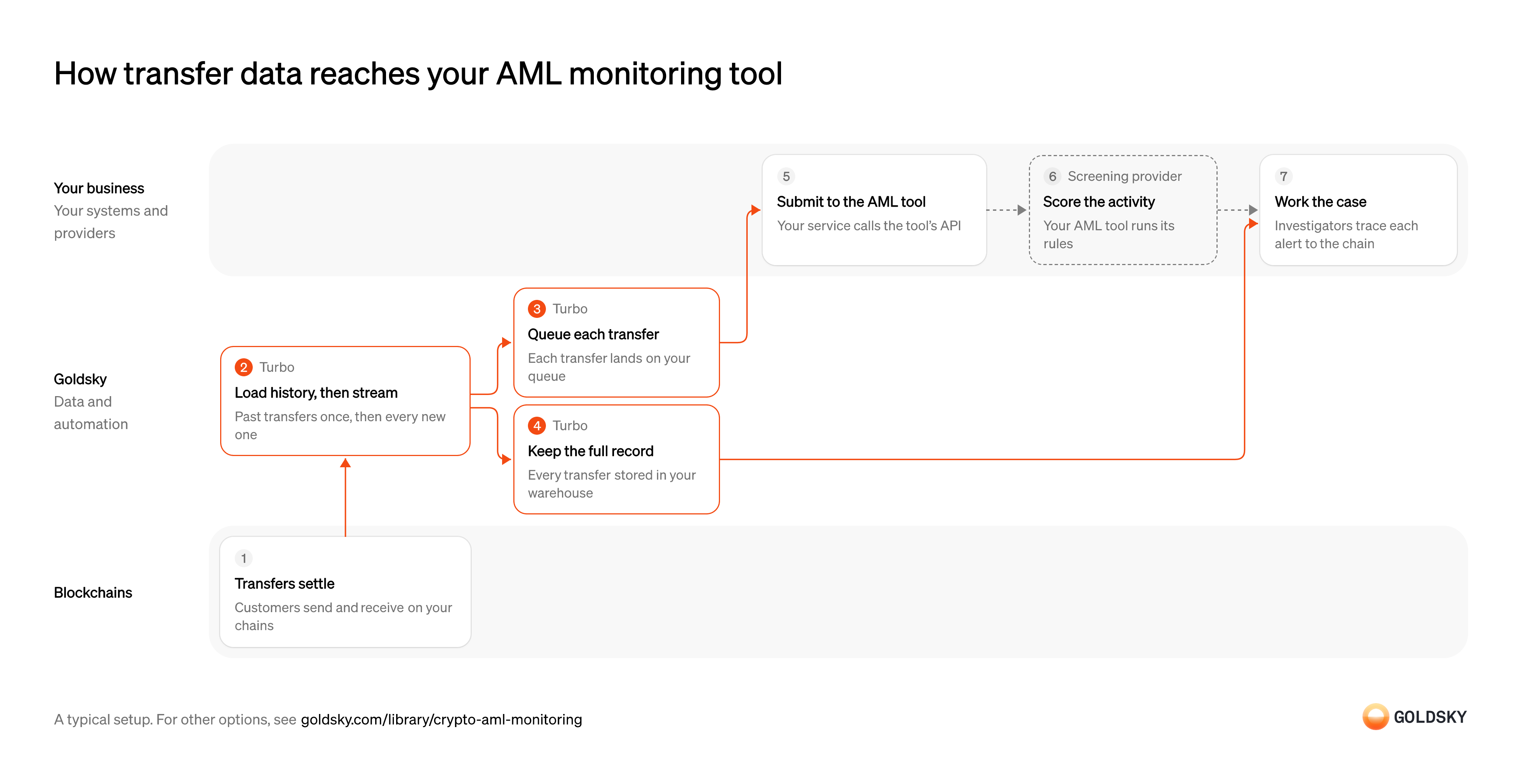
How transfer data reaches your AML monitoring tool
The chart starts with transfers settling on your chains and ends with an investigator working the case, with your AML tool doing the scoring in between. Your setup may differ.
Ways to get transfer data to your AML monitoring tool
Every transfer on the chains and tokens you choose reaches your AML tool and warehouse through the pipeline, while the transfers API returns one wallet’s transfers when you call it.
- Best for
- Continuous monitoring, full record in your warehouse
- Products
- Turbo
- What you run
- The destination: your database, queue or bucket, or a Postgres database Goldsky hosts
- What you write
- Pipeline YAML and SQL; TypeScript transforms when needed
- Where your data lives
- In your own database or systems
- How results reach you
- Pushed to you
- Best for
- Case reviews and periodic checks on a few wallets
- Products
- Feeds
- What you run
- Nothing; you call an endpoint and keep what you need
- What you write
- REST requests
- Where your data lives
- Hosted by Goldsky
- How results reach you
- Returned when you call
| Usual setupOption 1: Stream history and new transfers | Option 2: Wallet transfers API | |
|---|---|---|
| Best for | Continuous monitoring, full record in your warehouse | Case reviews and periodic checks on a few wallets |
| Products | Turbo | Feeds |
| What you run | The destination: your database, queue or bucket, or a Postgres database Goldsky hosts | Nothing; you call an endpoint and keep what you need |
| What you write | Pipeline YAML and SQL; TypeScript transforms when needed | REST requests |
| Where your data lives | In your own database or systems | Hosted by Goldsky |
| How results reach you | Pushed to you | Returned when you call |
Customers send and receive on your chains
Monitoring starts with the transfers themselves: every deposit and withdrawal your customers make.
Each transfer is recorded in a block with the token, the amount and both wallets. The newest blocks can still be replaced for a short time (a reorg), so the data you keep has to follow those changes.
Load past transfers, then stream new ones
Handled by Goldsky TurboScoring a customer fairly needs their history, not only what happened after monitoring started.
The history has to reach back far enough to cover your customers’ past activity, then carry on with each new block. A gap between the backfill and the live stream leaves transfers nobody ever scored.
A Turbo Pipelines pipeline that starts from the chain’s
Configure EVM sources and fast scan (opens in a new tab)earliestblock works through the history, then keeps streaming new transfers once it catches up. A sourcefilteron the token contracts you care about speeds up the backfill.Queue each transfer for your AML tool
Handled by Goldsky TurboThe monitoring tool can only score the transfers it receives, so each one has to reach the service that hands them over.
Each transfer has to arrive with a stable ID, and a repeat delivery has to be recognized and dropped before it’s scored twice. A queue lets the service that feeds the tool fall behind or restart without losing transfers.
With Goldsky, each transfer can be published to a Kafka topic in Avro or JSON, keyed on the transfer
Publish to a Kafka topic (opens in a new tab)id, so a repeat delivery carries the same key and the reader can drop it.Keep the full record in your warehouse
Handled by Goldsky TurboInvestigators need every transfer, not only the ones that raised an alert, to trace where funds came from and went.
Every transfer is stored with its transaction hash, block and time, keyed on the same ID the AML tool received. Without a shared key, matching an alert to its record turns into a search by amount and time.
The same pipeline can write every transfer to ClickHouse keyed on
See the supported sinks (opens in a new tab)id, or as Parquet files to S3-compatible storage, alongside the queue.Submit each transfer to the AML tool
Monitoring tools typically take the transfers they score through their own API, each registered against one of your customers.
Your service reads the queue, ties each transfer to the customer it belongs to and registers it with the tool’s API, keeping the transfer ID so the tool’s alert can be traced back. A transfer the service skips or fails to register is never scored, so log every rejected call and retry it.
Score the activity
The monitoring tool turns raw transfers into risk: exposure to listed or high-risk wallets, unusual patterns and amounts above your thresholds.
Your AML tool applies its rules and risk data to each transfer and raises an alert when one trips. Rules that look at totals or time windows, such as many small deposits in one day, run inside the tool, which keeps the history they need.
Work the case
An alert is a question for an investigator, who decides whether the activity is suspicious.
The investigator finds the alerted transfer in your warehouse, follows the funds back to the chain and records the decision: clear, escalate or file a report. A decision that can’t be traced to its transaction is hard to defend when an examiner asks how it was made.
What to know about streaming transfers to your AML tool
- Goldsky runs the pipeline; your AML tool does the scoring, and your team owns every alert and decision.
- The queue receives each transfer when it’s seen, before it’s final, so its reader applies reorg corrections; tables keyed on the transfer ID correct themselves.
- Each transfer reaches the queue at least once, so the reader skips IDs it has already passed on.
- The pipeline’s SQL decides which tokens and columns you keep, so the record holds what your investigators need.
Pick the wallets to review
This way checks wallets one at a time, so your process decides which ones and when.
A new customer, an alert from another system or a scheduled review names the wallets and chains to check. A customer nobody schedules is never reviewed, so the trigger belongs in your AML policy.
Pull each wallet’s transfers
Handled by Goldsky FeedsThe review needs every transfer in and out of the wallet over the period you’re checking.
The lookup covers every chain and token the wallet uses for the period under review, paging until the results end. Leaving out tokens without a market price drops transfers your tool should see.
Goldsky’s Feeds transfers endpoint takes
Query a wallet’s transfers (opens in a new tab)fromandtotimestamps for the review window and returns the wallet’s transfers newest first; addinclude_unknown_price=trueand followpage_tokenuntil the last page.Store the transfers in your warehouse
Investigators need the records a decision was based on, even after the chain or the prices change.
Save each transfer with its transaction hash, the raw amount and the time you fetched it. Transfers come back without their own ID, so choose a key that doesn’t merge two identical transfers in one transaction.
Score the activity
The monitoring tool turns raw transfers into risk: exposure to listed or high-risk wallets, unusual patterns and amounts above your thresholds.
Your AML tool applies its rules and risk data to each transfer and raises an alert when one trips. Rules that look at totals or time windows, such as many small deposits in one day, run inside the tool, which keeps the history they need.
Work the case
An alert is a question for an investigator, who decides whether the activity is suspicious.
The investigator finds the alerted transfer in your warehouse, follows the funds back to the chain and records the decision: clear, escalate or file a report. A decision that can’t be traced to its transaction is hard to defend when an examiner asks how it was made.
What to know about pulling transfers for an AML review
- Your code pulls, so a wallet’s activity is scored after someone requests it, not as it happens.
- How far back the history goes can differ by chain, so record the window each review covered.
- A transfer undone by a reorg drops out of later responses with no flag, so stored copies can disagree with the chain.
- USD values are worked out when you call and can change for old transfers, so keep the raw amount as the record.
What you control
- Your team
- Submit each transfer to the AML tool
- Work the case
- Your providers
- Screening provider
Questions and answers
What is crypto transaction monitoring?
Crypto transaction monitoring is checking the transfers your customers send and receive onchain for signs of money laundering, sanctions exposure or fraud. A monitoring tool, often called a KYT tool, scores each transfer with its rules and risk data, and analysts work the alerts it raises. Because every transfer sits on a public ledger, the tool can follow funds through wallets that aren’t your customers’. Goldsky’s part is the data: every transfer, decoded and delivered to a queue for the tool and to your warehouse.
How does blockchain transaction monitoring work?
Blockchain transaction monitoring collects every relevant transfer, scores it, and sends what scores high to an analyst. A data feed reads each transfer from the chain and decodes the token, amount, sender and recipient. Your service submits each transfer to the monitoring tool, which applies its rules and risk data and raises alerts. Analysts clear, escalate or report each one, tracing it back to the transaction onchain. With Goldsky, Turbo Pipelines load the history, stream new transfers and keep a copy in your warehouse.
Security and deployment
- SOC 2 Type IIIndependently audited security controls.
- Dedicated infrastructureSingle-tenant options for production workloads.
- Data residencyCloud, on-premises or co-located.
More use cases that monitor transactions
- Compliance monitoringScreen wallets and transfers, watch for misuse of your assets and feed your AML and surveillance tools.
- Securities surveillanceScreen wallets and transfers, watch for misuse of your assets and feed your AML and surveillance tools.
- Crypto wallet screening and sanctions dataFlag transfers that touch sanctioned or high-risk addresses.
- Secondary-market sanctions sweeps for token issuersScreen every holder and transfer of your stablecoin, not only your direct customers.
- Unauthorized tokenization monitoringFind tokens that claim to represent your security without your consent.
- Smart contract and wallet monitoringWatch your contracts and wallets for attacks and unexpected changes.
- Blockchain forensics data feedGive investigators full history and traces across chains.
- VASP and counterparty due diligence dataProfile a VASP, issuer or counterparty by its onchain exposure before onboarding it and while the relationship lasts.
- Crypto source of funds and wealth checksTrace where a client’s onchain funds came from to document legitimate wealth at onboarding.
- Token listing due diligence for exchangesCheck a token’s supply, holders, liquidity and risky links before an exchange lists it, and after.
- Crypto scam and money mule detection dataFlag payments to scam-linked wallets and customer accounts that act as money mules.
- Crypto wallet monitoringGet an alert when a watched wallet makes a large transfer, crosses a balance limit, wakes after dormancy or pays an unknown counterparty.
- Address poisoning detectionFlag the zero-value, dust and fake-token transfers that lookalike addresses plant in a user’s history, and warn before anyone pays one.
- Onchain supervisory monitoring for regulatorsGive examiners one view of licensed firms’ onchain activity to test against what the firms report.
Use cases built the same way
- Onchain data for crypto accountingSend priced onchain activity to a crypto subledger so finance can close the books.
- Form 1099-DA data for brokersSupply the transfer history and USD values behind each customer’s Form 1099-DA.
- DAC8 and CARF reporting dataSupply the valued transfer history behind each user’s yearly DAC8 or CARF report.
- Digital asset audit evidenceGive auditors each wallet’s balance at the year-end cut-off block and the year’s transfers.
Supply data for crypto AML transaction monitoring with Goldsky
We’ll map it to your systems and show you what Goldsky runs, so your team builds the product, not the pipelines underneath it.
 Robinhood
 HyperEVM
 Arc
 Solana
 Ethereum
 Polymarket
 Base
 Tempo
 Bitcoin