Month-end stablecoin supply for reserve reports
What it is
A stablecoin reserve report token schedule is the month-end count of tokens outstanding on every chain: the supply side of the monthly reserve report, which some call the stablecoin attestation report.
Under the GENIUS Act, a registered accounting firm examines that report each month and the issuer’s CEO and CFO certify it, so each chain’s figure has to trace back to a specific block; the weekly PS-01 report, on forms the OCC revised in October 2026 subject to OMB approval, is a separate filing.
New York’s DFS asks the same of the stablecoins it supervises: at least once a month, an independent CPA attests to the end-of-day count of outstanding units on the last business day and on one randomly chosen day.
Goldsky finds the last block before month end on each chain and reads total supply from the token contract, while the reserve holdings, the examination and the certification stay with your custodians, your accounting firm and your executives.
You can build it two ways: keep a supply history in your warehouse with Turbo Pipelines and read it at the month-end block, or find that block with Feeds and read total supply once per chain over Edge RPC.
Who it’s for
Payment stablecoin issuers, the platforms that issue coins for other brands, and the finance teams that prepare their monthly reserve reports.
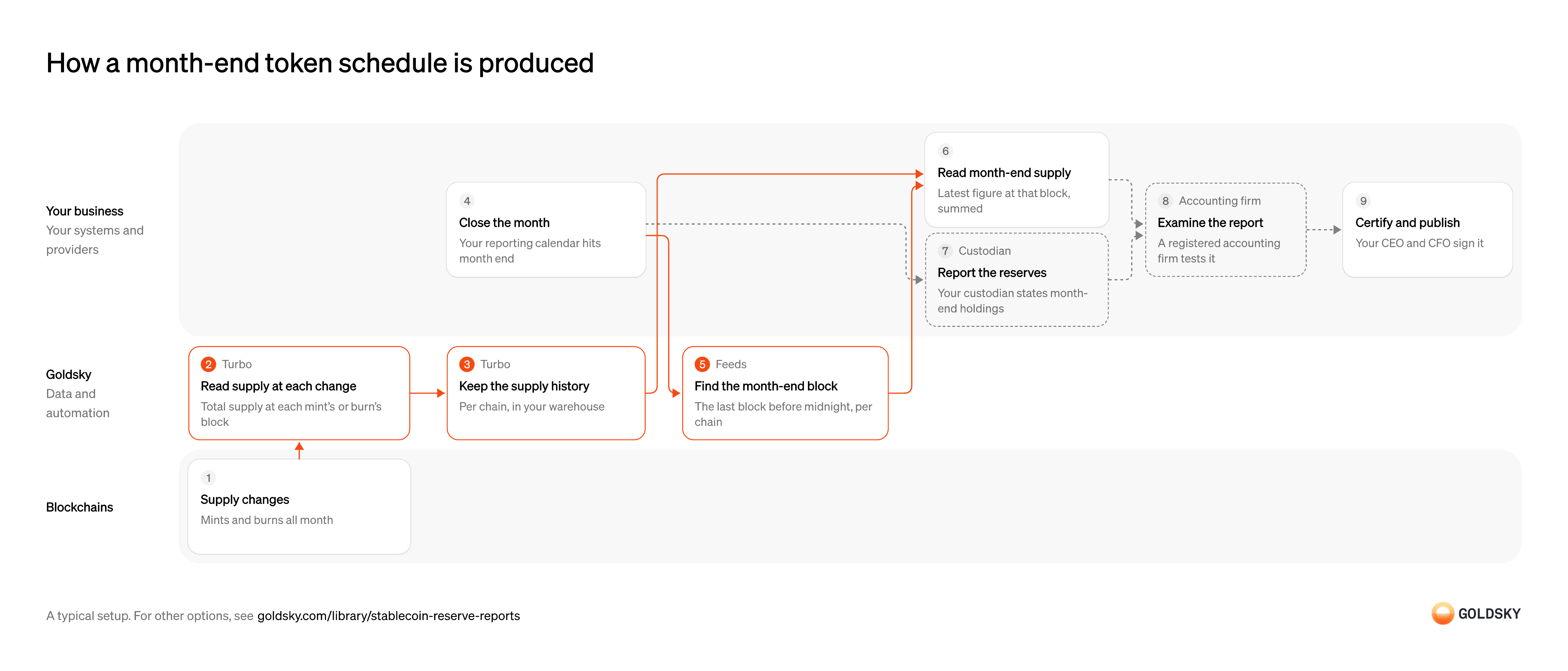
How a month-end token schedule is produced
The diagram follows one month, from the supply changes on each chain to the report your CEO and CFO certify. Your setup may differ.
Ways to produce a stablecoin reserve report token schedule
The pipeline stores supply at every mint and burn, so any date’s figure can be traced and read again; month-end RPC reads give one figure per chain, which your team stores.
- Best for
- A traceable supply history, readable at any date
- What you run
- The destination: your database, queue or bucket, or a Postgres database Goldsky hosts
- What you write
- Pipeline YAML and SQL; TypeScript transforms when needed
- Where your data lives
- In your own database or systems
- How results reach you
- Pushed to you
- Best for
- Month-end figures from a short script, no pipeline
- What you run
- Your own client code
- What you write
- JSON-RPC calls, and the decoding of what comes back
- Where your data lives
- Read from the chain
- How results reach you
- Returned when you call
| Usual setupOption 1: Supply history in your warehouse | Option 2: Month-end RPC reads | |
|---|---|---|
| Best for | A traceable supply history, readable at any date | Month-end figures from a short script, no pipeline |
| Products | TurboFeeds | FeedsEdge |
| What you run | The destination: your database, queue or bucket, or a Postgres database Goldsky hosts | Your own client code |
| What you write | Pipeline YAML and SQL; TypeScript transforms when needed | JSON-RPC calls, and the decoding of what comes back |
| Where your data lives | In your own database or systems | Read from the chain |
| How results reach you | Pushed to you | Returned when you call |
Mint and burn tokens through the month
Supply on each chain moves every time tokens are minted or redeemed.
Each chain records its own changes, and a token can be on several. For a short time the newest blocks can still be rewritten, so figures near the cut-off should be read once those blocks have settled.
Read supply at every change
Handled by Goldsky TurboReading the contract’s total supply at the block of each mint and burn gives an exact figure for any point in the month.
Each reading is tied to its block and chain and taken from the contract itself, so it matches what the examiner can check on the chain. A reading that fails has to be retried or flagged, not left blank.
A Turbo Pipelines transform can call
Read contract state at a block (opens in a new tab)_gs_eth_callwithtotalSupply()(uint256)at each mint’s or burn’s block number, so every row carries the supply right after that change.Keep the supply history
Handled by Goldsky TurboThe month-end figure is read from this history, so every reading needs to sit in your warehouse.
Store chain, block, time and supply for each change. A history with gaps means some month-end figure can’t be traced to a reading.
Turbo Pipelines can write the readings to S3 as Parquet files, partitioned by chain and date with
Write Parquet files to S3 (opens in a new tab)partition_columns, for your warehouse to query.Close the month
The report is cut at a fixed time on the last day of the month, set by your reporting calendar.
Fix the cut-off time and time zone in writing before the month starts. Two teams cutting at different hours produce two different figures for the same report.
Find the month-end block on each chain
Handled by Goldsky FeedsEach chain has its own block times, so the cut-off has to become a block number per chain.
The right block is the last one at or before the cut-off. Using the first block after it pulls the next month’s mints and burns into this month’s figure.
Goldsky’s Feeds Blocks endpoint returns that block: call it with
Turn a timestamp into a block (opens in a new tab)timestamp_lteset to the cut-off,sort=number_descandlimit=1.Read month-end supply
The schedule’s figure for each chain is its supply at that chain’s month-end block.
Take the latest reading at or before the block on each chain, then add the chains up. Keep the block numbers with the figures, since the examiner checks supply at those blocks.
Get month-end reserves from your custodians
The other side of the report is the cash and securities that back the tokens, held by banks and custodians.
Each custodian states its holdings at the same cut-off as the token schedule. A statement dated a day off makes the report compare figures from two different moments.
Have the report examined
A registered accounting firm tests the report before it’s published.
The firm checks the token schedule against the chain at the stated blocks, and the reserves against custodian records. Every figure it can’t trace becomes a question that holds up the report.
Certify and publish the report
The issuer’s CEO and CFO certify the report before it’s published.
They certify what the examined report shows, so any late change goes back through the examination. Listing the block used on each chain lets readers repeat the supply figures.
What to know about keeping a supply history for the reserve report
- Every supply change is stored with its block, so a month-end figure can be rebuilt and checked again at any time.
- Goldsky runs the pipeline; the warehouse, the month-end query and the cut-off rules are yours.
- If your warehouse table isn’t keyed on the row ID, reorg corrections arrive as rows of their own and the month-end query has to apply them.
- The month-end block comes from a separate lookup per chain, so its cut-off has to match your reporting calendar.
Mint and burn tokens through the month
Supply on each chain moves every time tokens are minted or redeemed.
Each chain records its own changes, and a token can be on several. For a short time the newest blocks can still be rewritten, so figures near the cut-off should be read once those blocks have settled.
Close the month
The report is cut at a fixed time on the last day of the month, set by your reporting calendar.
Fix the cut-off time and time zone in writing before the month starts. Two teams cutting at different hours produce two different figures for the same report.
Find the month-end block on each chain
Handled by Goldsky FeedsEach chain has its own block times, so the cut-off has to become a block number per chain.
The right block is the last one at or before the cut-off. Using the first block after it pulls the next month’s mints and burns into this month’s figure.
Goldsky’s Feeds Blocks endpoint returns that block: call it with
Turn a timestamp into a block (opens in a new tab)timestamp_lteset to the cut-off,sort=number_descandlimit=1.Read total supply at the month-end block
Handled by Goldsky EdgeThe contract’s total supply at the month-end block is the figure for that chain.
Read it at the exact block number, not at the latest block, so the figure can be repeated. A read taken later in the day includes mints and burns from the new month.
Edge RPC responds to
Call eth_call at a block (opens in a new tab)eth_callfortotalSupply()with the month-end block number asblockNumber, one call per chain.Add up and store the schedule
The schedule is each chain’s figure plus the total, kept with the blocks they came from.
Store the chain, block, time and supply for every read, then the sum. If the reads live only in a script’s output, the examiner has nothing to trace.
Get month-end reserves from your custodians
The other side of the report is the cash and securities that back the tokens, held by banks and custodians.
Each custodian states its holdings at the same cut-off as the token schedule. A statement dated a day off makes the report compare figures from two different moments.
Have the report examined
A registered accounting firm tests the report before it’s published.
The firm checks the token schedule against the chain at the stated blocks, and the reserves against custodian records. Every figure it can’t trace becomes a question that holds up the report.
Certify and publish the report
The issuer’s CEO and CFO certify the report before it’s published.
They certify what the examined report shows, so any late change goes back through the examination. Listing the block used on each chain lets readers repeat the supply figures.
What to know about reading month-end supply over RPC
- You get the figure at one block per chain, with no history of how supply moved during the month.
- Your script runs the reads and stores the results; Goldsky serves the block lookup and the RPC.
- A read at a fixed block number gives the same answer every time, so the examiner can repeat it.
- A chain the Blocks feed doesn’t cover needs its month-end block found another way.
What you control
- Your team
- Close the month
- Read month-end supply
- Certify and publish the report
- Your providers
- Custodian
- Accounting firm
Security and deployment
- SOC 2 Type IIIndependently audited security controls.
- Dedicated infrastructureSingle-tenant options for production workloads.
- Data residencyCloud, on-premises or co-located.
More use cases that track supply and reserves
- Proof of reserves for stablecoinsKeep a per-chain record of mints, burns and supply, and check it against reserves.
- Stablecoin mint and redemption monitoringRecord every mint and redemption of a stablecoin as it happens, on every chain.
- Continuous proof of reservesCompare onchain supply with reported reserves on a schedule, then publish the ratio or alert on a gap.
- Daily stablecoin supply by chain for PS-01 reportsKeep the daily per-chain supply, issued, redeemed, issuer-held, frozen and lost figures that feed the weekly OCC PS-01 report.
- Stablecoin redemption spike alertsAlert when redemption requests in a single 24-hour period pass 10% of a brand’s outstanding issuance, the point at which the OCC must be told within 24 hours.
- MiCA daily usage cap for stablecoinsTrack the quarterly average of daily transactions and their value against the 1M transactions and €200M a day limits, and warn well before an issuer must stop issuing.
- Supply data for stablecoin issuance platformsGive an issuance platform one view of supply across every coin and chain it runs.
- Stablecoin depeg and manipulation alertsAlert the issuer when its coin trades off peg in its own pools or pool activity looks like manipulation, on every chain it runs on.
- Tokenized money market funds in stablecoin reservesTrack stablecoin reserves held as tokenized money market fund shares and check them against the reserve record.
Use cases built the same way
- GENIUS Act stablecoin reporting dataFile the weekly OCC PS-01 report from daily per-chain supply, freeze and holder data.
- CFTC digital collateral reporting dataReport totals of BTC, ETH and USDC held as margin, per asset and account class, each week during an FCM’s first three months under the CFTC pilot.
- NCUA stablecoin reporting dataReport supply, mint and burn, and holder figures for a stablecoin issued by a credit union subsidiary under the NCUA’s proposed rules.
- Basel cryptoasset disclosure dataRead a bank’s cryptoasset holdings at the period-end block so it can classify them and complete its Basel disclosure tables.
Produce a stablecoin reserve report token schedule with Goldsky
We’ll map it to your systems and show you what Goldsky runs, so your team builds the product, not the pipelines underneath it.
 Robinhood
 HyperEVM
 Arc
 Solana
 Ethereum
 Polymarket
 Base
 Tempo
 Bitcoin