MiCA daily usage cap for stablecoins
What is the MiCA daily usage cap?
The MiCA daily usage cap is the limit on how much an e-money token in a currency outside the EU can be used to pay for things: when the quarter’s average passes both 1 million transactions and €200 million a day, the issuer has to stop issuing and, within 40 working days, give its regulator a plan to bring usage down; compliance teams also call it the MiCA transaction cap.
EU banks and issuance platforms with tokens in dollars or other non-EU currencies count usage every day, because Article 23 of MiCA, which Article 58(3) applies to those tokens, ties crossing the cap to a stop on issuance.
Goldsky records every transfer of your token, keeps each day’s count and amount of payments by your rules, and runs a scheduled check that warns your team near the cap and can send the call you’ve approved to stop minting, while the decision to stop, the counting method, the euro conversion and the report to your regulator stay with you.
Who tracks the MiCA daily usage cap?
EU banks and e-money institutions issuing stablecoins in dollars or other non-EU currencies, and the issuance platforms that run those tokens.
How MiCA daily usage cap monitoring works
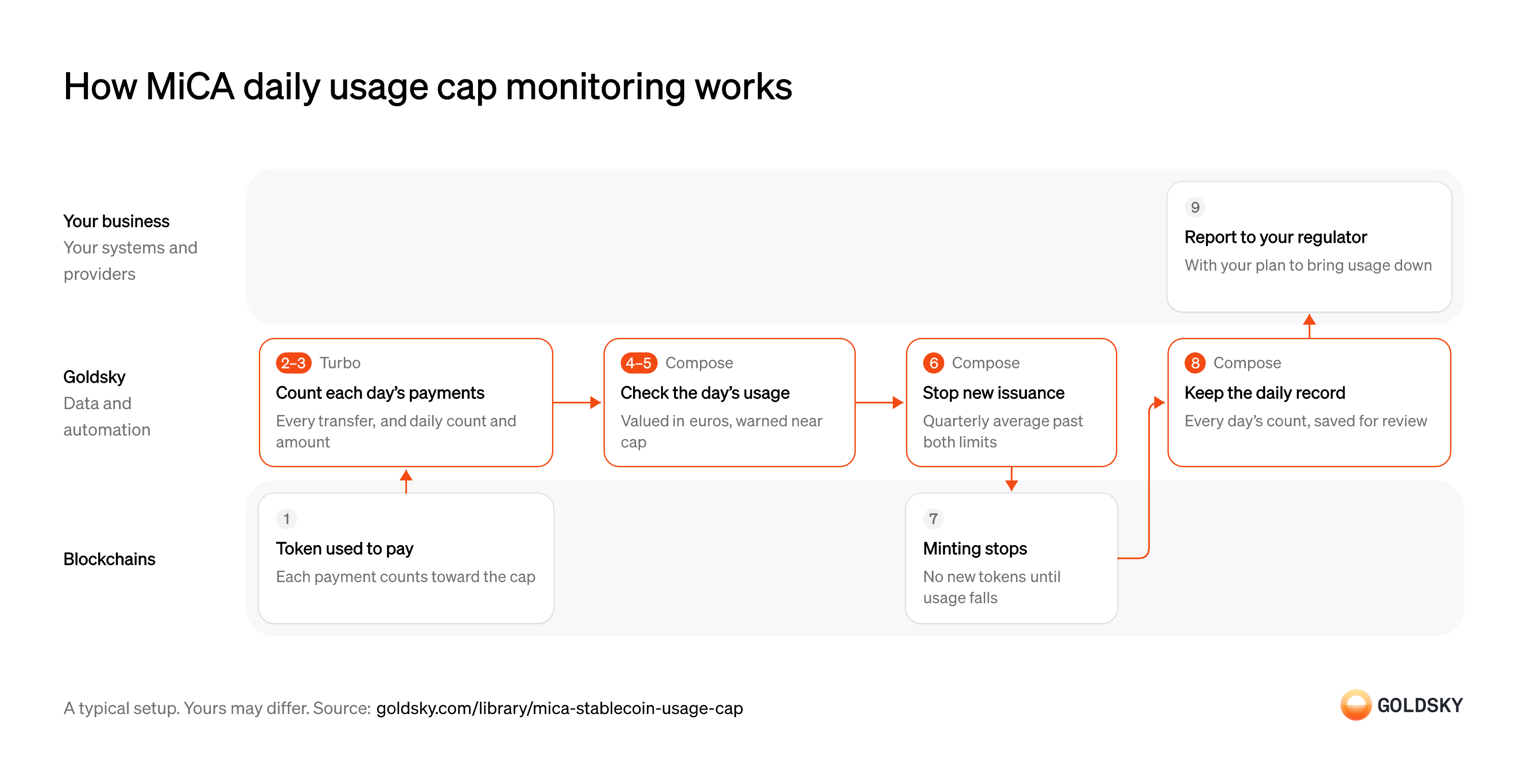
The diagram follows one day of payments in your token, from transfers on the chain to your report to the regulator once usage passes the cap. Your setup may differ.
Pay with the token
Every payment made in the token is a transfer on the chain, and payments are what the cap counts.
Not every transfer is a payment: moves between your own wallets, or to and from exchanges, may not count, depending on your method. The chain records them all the same way, so the sorting happens later.
Record every transfer
Handled by Goldsky ComposeThe day’s count and value are built from individual transfers, so each one has to land in a database with its amount, wallets and time.
Every chain the token is on has to be included, with rows keyed so a repeated delivery isn’t counted twice. A missing chain makes usage look lower than it is.
With Goldsky, a Turbo Pipelines pipeline can write your token’s transfers into the Postgres database behind your Compose app, so the scheduled check reads them where they land.
Write Turbo rows to Compose (opens in a new tab)Count each day’s payments
Handled by Goldsky TurboThe cap is a quarterly average of daily figures, so payments have to be counted and added up for each day as they happen.
The count follows your written method: transfers it leaves out, such as moves between your own wallets or to exchanges, are filtered out before they’re counted. If the method changes, past days should be recounted from the stored transfers the same way, so the trend stays comparable.
Turbo Pipelines’
Keep running totals in your database (opens in a new tab)postgres_aggregatesink keeps a runningcountandsumper day in your Compose app’s database, with the day set in the pipeline’s SQL. Each day’s figures update as transfers arrive and are corrected when a reorg removes one, as long as the SQL keeps the_gs_opcolumn that marks deletes.Check the day’s usage
Handled by Goldsky ComposeThe cap is in euros as well as transactions, and seeing it coming takes a check more often than once a day.
Each check turns the day’s amount into euros at the rate your method names, then compares the quarter’s average daily count and value so far with both limits. A rate taken from a different source than the method says makes the figures hard to defend.
A Compose task on a cron trigger reads the day’s count and amount with
Query your app’s database (opens in a new tab)ctx.db.query, then applies your exchange rate and thresholds.Warn your team near the cap
Handled by Goldsky ComposeA warning before the cap gives your team time to slow usage before issuance has to stop.
Set the warning level below the cap and send it to people who can act, with the figures that set it off. A warning that fires every day gets ignored.
Goldsky Compose posts the day’s figures to your alerting endpoint with
Make auditable HTTP requests (opens in a new tab)ctx.fetch, and the request and its response are recorded on the run.Stop new issuance past the cap
Handled by Goldsky ComposeOnce the quarterly average passes both limits, the issuer has to stop issuing new tokens.
Stopping is the issuer’s duty and decision: it takes a call to the token contract from the issuer’s wallet with the role that allows it, under your usual approval rules. The call has to happen once and be on record, even if the check fails partway through.
On your team’s instruction, the task can send the issuer’s call to the contract’s pause or minting control with
Write to contracts from a task (opens in a new tab)wallet.writeContract, and a transaction that already went through isn’t sent again if the run resumes after a failure.Minting stops on the chain
With the control set, the contract refuses new mints until it’s lifted.
Whether existing tokens can still move depends on the control: a pause on the whole token stops transfers too, while a mint-only control doesn’t. Lifting it follows your regulator’s process, not the next day’s count.
Keep every day’s count on record
Handled by Goldsky ComposeYour regulator may ask how each day’s figure was reached and what the issuer did about it.
Each day’s count, the method and rates used, any warning and any transaction need to be kept together. Counts that can’t be reproduced weaken the report.
Compose logs every call each run makes, including the counting query, the alert and any transaction, so each day’s decision can be reviewed later.
How Compose logs each call (opens in a new tab)Report to your regulator
Crossing the cap means sending your regulator, within 40 working days, a plan to bring usage back under it.
The report draws on the daily counts, the method behind them and what the issuer did when the cap was passed. A plan that names which kinds of use it will reduce is easier to hold to than a target alone.
What you control
- Your team
- Report to your regulator
Security and deployment
- SOC 2 Type IIIndependently audited security controls.
- Dedicated infrastructureSingle-tenant options for production workloads.
- Data residencyCloud, on-premises or co-located.
More use cases that track supply and reserves
- Proof of reserves for stablecoinsKeep a per-chain record of mints, burns and supply, and check it against reserves.
- Stablecoin mint and redemption monitoringRecord every mint and redemption of a stablecoin as it happens, on every chain.
- Continuous proof of reservesCompare onchain supply with reported reserves on a schedule, then publish the ratio or alert on a gap.
- Daily stablecoin supply by chain for PS-01 reportsKeep the daily per-chain supply, issued, redeemed, issuer-held, frozen and lost figures that feed the weekly OCC PS-01 report.
- Month-end stablecoin supply for reserve reportsProduce the month-end supply across all chains that the monthly reserve report and its examination need.
- Stablecoin redemption spike alertsAlert when redemption requests in a single 24-hour period pass 10% of a brand’s outstanding issuance, the point at which the OCC must be told within 24 hours.
- Supply data for stablecoin issuance platformsGive an issuance platform one view of supply across every coin and chain it runs.
- Stablecoin depeg and manipulation alertsAlert the issuer when its coin trades off peg in its own pools or pool activity looks like manipulation, on every chain it runs on.
- Tokenized money market funds in stablecoin reservesTrack stablecoin reserves held as tokenized money market fund shares and check them against the reserve record.
Use cases built the same way
- Confirm x402 and agent stablecoin paymentsConfirm stablecoin payments that AI agents make, often per request, and keep each agent within its spending limits.
- Keep tokenized stocks backed one to oneCheck token supply on every chain against the shares or fund units held in custody, and alert on any gap.
- Wrapped bitcoin reserve monitoringCheck a wrapped bitcoin token’s supply on every chain against the BTC at its custodian’s reserve addresses, and alert on any gap.
- Secondary-market sanctions sweeps for token issuersScreen every holder and transfer of your stablecoin, not only your direct customers.
Monitor the MiCA daily usage cap with Goldsky
We’ll map it to your systems and show you what Goldsky runs, so your team builds the product, not the pipelines underneath it.
 Robinhood
 HyperEVM
 Arc
 Solana
 Ethereum
 Polymarket
 Base
 Tempo
 Bitcoin