Stablecoin payroll and contractor payouts
What it is
Stablecoin payroll for contractors is paying the people who work for you in stablecoins, sent to their own wallets, in place of a bank transfer.
Global payroll and contractor platforms offer it to workers who ask to be paid that way, and each payout still has to be approved, screened, signed and tied back to a payslip.
Goldsky can run the task that screens, sends and confirms each payout and records its transaction hash for the payslip, while the pay run, the keys and the payroll records stay with you.
Who it’s for
Global payroll platforms, employer-of-record providers and contractor-payment apps that pay workers in other countries.
How a stablecoin pay run works
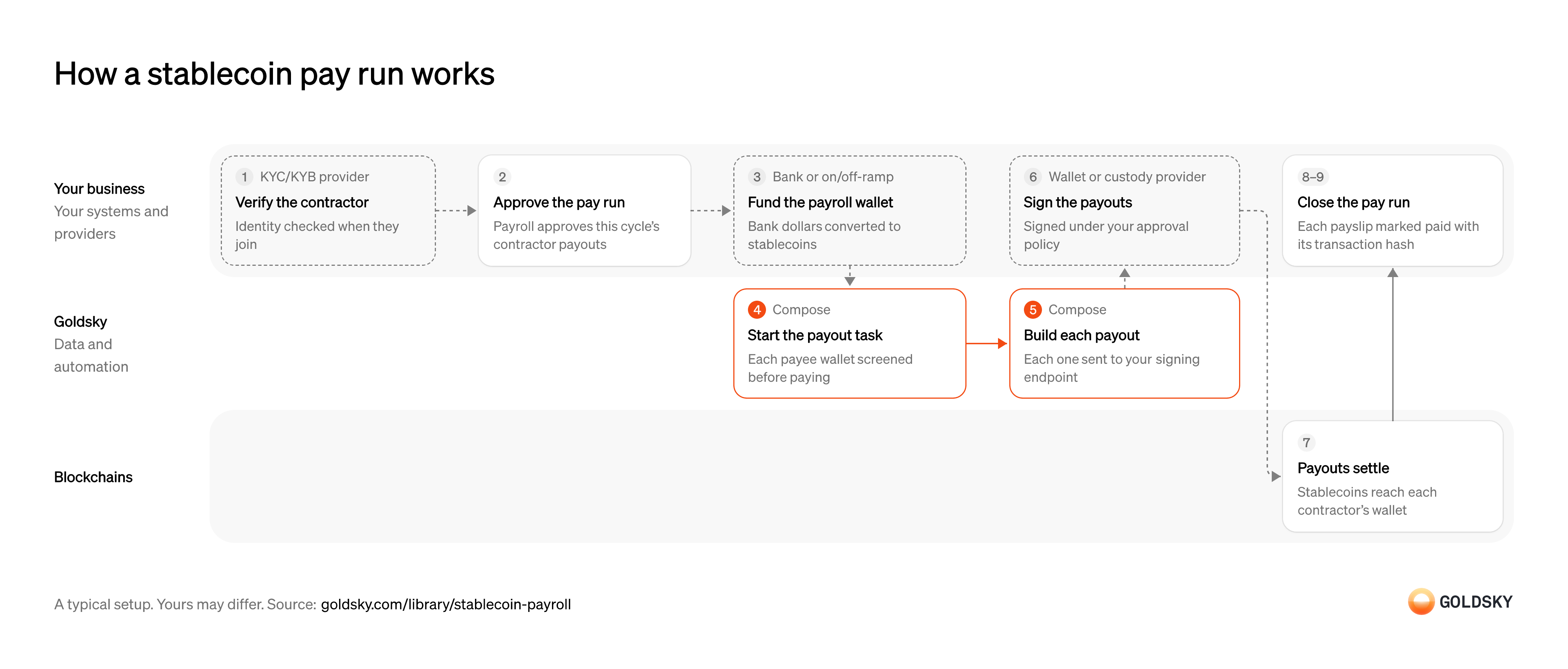
The chart covers one pay run, starting when the contractor is verified and ending when payroll closes the run. Your setup may differ.
Verify the contractor
Before you pay someone, you have to know who they are and where the money is going.
Your identity verification provider checks the contractor when they join, and you record the wallet they want to be paid to. Collect their tax form at the same time, such as the W-8BEN a US payer asks a contractor abroad for, because the payer needs it on file to decide whether to withhold tax. A wallet changed later without a fresh check is a common way payroll fraud gets in.
Approve the pay run
Payroll decides who is paid what this cycle, and nothing should move until that list is signed off.
Someone with authority approves the list of payees, amounts and payslip references. If the list changes after approval, some contractors are paid on numbers nobody signed off. Streaming payroll works without runs: pay accrues by the second from the start of the cycle and the worker withdraws any part of it at any time, so what gets approved is each worker’s rate.
Fund the payroll wallet
Payroll money usually sits in a bank account, and the run pays out stablecoins, so the approved total has to be converted first.
Your banking or on-ramp partner takes the bank transfer and sends the same amount in stablecoins to your payout wallet. Fund the whole approved total before the run starts; a run that starts short pays some contractors and leaves the rest waiting.
Start the run and screen each wallet
Handled by Goldsky ComposeEach payout should go only to a wallet that passes your screening, checked at the moment you pay.
Every payee wallet is checked against your sanctions and risk rules before its payout is built, because sanctions rules apply to a stablecoin payout just as they do to a bank transfer. A wallet that fails is held for review, and the rest of the run carries on.
With Goldsky Compose, your payroll system can start the payout task with an HTTP call, and the task calls your screening provider’s API for each wallet before paying it.
Start a task over HTTP (opens in a new tab)Build each payout and send it for signing
Handled by Goldsky ComposeEach payout has to be turned into a transaction and handed to whoever holds the key.
The transaction carries the contractor’s wallet and the amount. Most stablecoins have no memo field, so the transaction hash each payout returns is what ties it to its payslip. A payout built twice for one payslip pays the contractor twice, so each one needs a fixed identity across retries.
A Compose task can send each payout through a webhook wallet: Compose builds a UserOperation (the transaction format smart-account wallets use), posts it to a signing endpoint you host, and submits it as a gas-sponsored transaction once your server returns the signature. The first time the wallet sends on a chain, your endpoint also signs a one-time EIP-7702 authorization that lets the address act as a smart account there. The task waits for the confirmations you set, resends the payout if a reorg drops it, and doesn’t send again a payout that already went through if it restarts mid-run.
Use a webhook wallet (opens in a new tab)Sign the payouts
Moving payroll money takes a signature, and most firms keep that key with a custody provider whose rules say who can approve what.
Your signing endpoint holds the limits and approvers set before the run starts: it reads the recipient and amount from each payout’s call data, checks them, then asks your custodian to sign. A key kept in application settings with no rules around it lets anyone who can change the app move payroll funds.
Settle each payout in the contractor’s wallet
A payout is done when the chain has accepted it and it can no longer be reversed.
A payout can be dropped before it’s included, or undone when the chain replaces its newest blocks (a reorg). Until enough blocks sit on top of it, treat it as sent and keep the payslip open.
Record each payout’s dollar value
Tax authorities such as the IRS count pay received in digital assets at its fair market value when it arrived, so the value has to be captured then, not worked out later.
Store each payout’s dollar value at the time it landed on the chain, with the contractor’s wallet and the transaction hash, against the payslip. A value looked up weeks later, or a payout recorded without its wallet, is what makes year-end reporting slow.
Close the pay run
The run is finished when every payslip is marked paid or has a reason it wasn’t.
Your payroll system marks each payslip paid against the transaction hash the task recorded for it, and the total paid is checked against the approved run. Held or failed payouts are followed up before the run closes, or they sit unpaid with nobody chasing them.
What you control
- Your team
- Approve the pay run
- Record each payout’s dollar value
- Close the pay run
- Your providers
- KYC/KYB provider
- Bank or on/off-ramp
- Wallet or custody provider
Security and deployment
- SOC 2 Type IIIndependently audited security controls.
- Dedicated infrastructureSingle-tenant options for production workloads.
- Data residencyCloud, on-premises or co-located.
More use cases that automate payouts
- Stablecoin payouts for marketplaces and creatorsPay sellers, gig workers and creators in stablecoins from a marketplace balance.
- Payout prefunding in USDCPrefund a payout network in USDC and track the balance so payouts never stall.
- Token distributions to holders and creditorsPay one asset out to thousands of holders, creditors or employees and prove each delivery.
- Airdrop eligibility lists and sybil filteringScore every address up to a snapshot block, remove sybil clusters and publish the list people claim against.
- Stablecoin disbursements for public-sector programsTrack government benefit or grant payments made in stablecoins, from issue to spend.
- Stablecoin merchant settlementPay each merchant’s settlement in stablecoins to the wallet and network it chose, on any day, and record the transaction against the settlement.
- Programmable escrow for B2B stablecoin paymentsHold a buyer’s stablecoin payment until delivery, a milestone or a deadline, then release it to the seller or refund the buyer.
Use cases built the same way
- Authorize and capture stablecoin paymentsHold a buyer’s stablecoins in an escrow contract at checkout, capture them to the merchant as orders ship, void what can’t be filled and refund after capture.
- Stablecoin remittancesSend money across borders in stablecoins and confirm it reached the recipient’s wallet or card.
- B2B cross-border payments in stablecoinsPay suppliers abroad in stablecoins and track each payment from send to off-ramp.
- Tokenized stock mint and redeem against ordersTrigger mints and redemptions when a customer buys or sells, and record every step for the books.
Pay contractors in stablecoins with Goldsky
We’ll map it to your systems and show you what Goldsky runs, so your team builds the product, not the pipelines underneath it.
 Robinhood
 HyperEVM
 Arc
 Solana
 Ethereum
 Polymarket
 Base
 Tempo
 Bitcoin