Tokenized stock mint and redeem against orders
What it is
Minting and redeeming tokenized stocks against orders means creating tokens when a client’s buy order fills in the underlying share, and burning them when the client sells, so supply moves only with real trades; it’s also called tokenized stock minting and redemption.
Tokenized stock venues and tokenization platforms run it on every order, because each token has to be matched by a share in custody and each mint or burn has to tie back to an order in the books.
Goldsky runs the task your order system calls, which confirms the shares with your custodian, sends the mint or burn once it’s signed and sends it again if a reorg drops it, while the token contract stays with your issuance platform and the books with you.
Who it’s for
Tokenized stock venues, brokers that offer stock tokens and tokenization platforms that issue tokens against shares they hold.
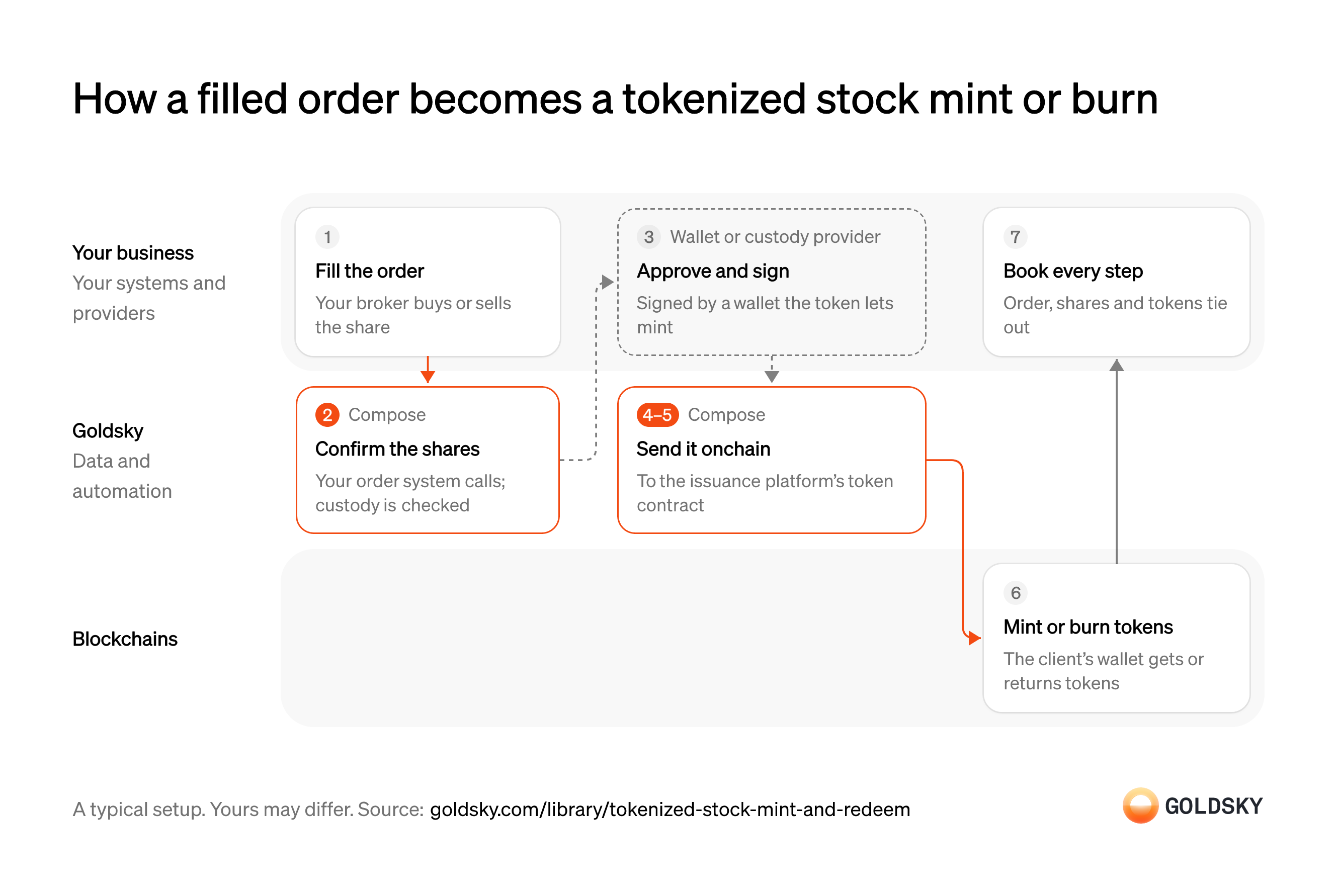
How a filled order becomes a tokenized stock mint or burn
The diagram follows one order, from the broker’s fill to the books tying the order, the shares and the tokens together, and shows who does each step. Your setup may differ.
Fill the order
A mint or burn starts with a real trade in the underlying share.
Your broker buys the share for a client’s buy order, or sells it for a sell order, and your order system records the fill. Minting before the buy fills issues tokens with no share behind them.
Confirm the shares in custody
Handled by Goldsky ComposeA token should be created only once its share is held for the client, and burned only for shares being released.
Your order system starts the run with the order ID, side and quantity, and the shares are checked with your custodian before anything is signed. A check that times out has to stop and retry, never assume the shares arrived.
With Goldsky, your order system can call a Compose task over an authenticated HTTP trigger, and the task checks the position with your custodian’s API through
Make logged HTTP requests (opens in a new tab)fetch, which logs each request and response.Approve and sign the mint or burn
Changing supply takes a signature from the key allowed to mint or burn.
Only a wallet the token’s owner has given the mint role can sign. That’s your own custody provider under an approval policy when your wallet holds the role, or the issuance platform acting on your instruction when it keeps it. Limits per order and per day belong in that policy, so a fault upstream can’t mint without limit.
Send it to the token contract
Handled by Goldsky ComposeThe mint or burn takes effect when its transaction is in a block on the chain.
The call goes to the issuance platform’s token contract once, for the order’s quantity. Sending it twice mints twice, so every resend has to be tied to the same order.
Compose can send the call through a webhook wallet, which has your signing endpoint sign it as a UserOperation (the transaction format smart-account wallets use), plus a one-time EIP-7702 authorization the first time it sends on a chain, then submits it and waits for the confirmations you set before the task moves on.
Sign writes through your own endpoint (opens in a new tab)Resend if a reorg drops it
Handled by Goldsky ComposeA reorg, when the chain replaces its newest blocks, can undo a mint or burn that already looked confirmed.
A dropped mint leaves the client without tokens they paid for, and a dropped burn leaves tokens with no share behind them. Either has to be sent again for the same order, and only once.
Each write can be watched for reorgs: with the
Handle confirmations and reorgs (opens in a new tab)replaybehavior, Compose sends it again with fresh gas settings and nonce.Mint or burn the tokens
The client’s holding changes on the chain, where anyone can check it.
The client’s wallet receives new tokens, or the tokens it returned are burned. Until enough blocks sit on top, the change isn’t final, so the books should treat it as pending.
Book every step
Each mint or burn has to tie to an order and a share movement for the books to balance.
Record the order, the custody confirmation and the transaction together. At the end of each day, tokens minted minus burned should equal shares bought minus sold for clients; any difference is a break to explain.
What you control
- Your team
- Fill the order
- Book every step
- Your providers
- Wallet or custody provider
Security and deployment
- SOC 2 Type IIIndependently audited security controls.
- Dedicated infrastructureSingle-tenant options for production workloads.
- Data residencyCloud, on-premises or co-located.
More use cases that tokenize securities
- Tokenized fund subscriptions and redemptions across chainsTrack subscriptions and redemptions of a tokenized fund as mints and burns across every chain it’s on.
- Keep tokenized stocks backed one to oneCheck token supply on every chain against the shares or fund units held in custody, and alert on any gap.
- Keep gold and commodity tokens backedKeep gold and other commodity tokens matched to vaulted holdings, and alert on any gap.
- Wrapped bitcoin reserve monitoringCheck a wrapped bitcoin token’s supply on every chain against the BTC at its custodian’s reserve addresses, and alert on any gap.
Use cases built the same way
- VRF and verifiable randomness for smart contractsDeliver signed random values to contracts for prize draws, lottery allocations and random selection, checkable by anyone.
- Authorize and capture stablecoin paymentsHold a buyer’s stablecoins in an escrow contract at checkout, capture them to the merchant as orders ship, void what can’t be filled and refund after capture.
- Stablecoin payroll and contractor payoutsPay contractors and staff in stablecoins and confirm each payout settled.
- Stablecoin payouts for marketplaces and creatorsPay sellers, gig workers and creators in stablecoins from a marketplace balance.
Mint and redeem tokenized stocks against orders with Goldsky
We’ll map it to your systems and show you what Goldsky runs, so your team builds the product, not the pipelines underneath it.
 Robinhood
 HyperEVM
 Arc
 Solana
 Ethereum
 Polymarket
 Base
 Tempo
 Bitcoin