Keep gold and commodity tokens backed
What it is
Commodity token backing is keeping the supply of a gold or other commodity token equal to the metal held for it in a vault, and catching any gap between the two.
Issuers and tokenization platforms check it on a schedule because each token is a claim on a set quantity held in custody, and a mint with no metal behind it, or a vault report that has gone stale, breaks that claim.
Goldsky tracks supply on each chain and runs a scheduled comparison with the vault’s report that alerts on a gap; your team vaults the metal, approves mints and publishes the backing.
You can run the backing check two ways: stream every mint and burn into your database with Turbo Pipelines, which also keeps supply per chain there, and check it with a Compose task, or have a Compose task read each chain’s total supply over Edge RPC.
Who it’s for
Issuers of gold and other commodity-backed tokens, and the tokenization and issuance platforms that run those tokens for them.
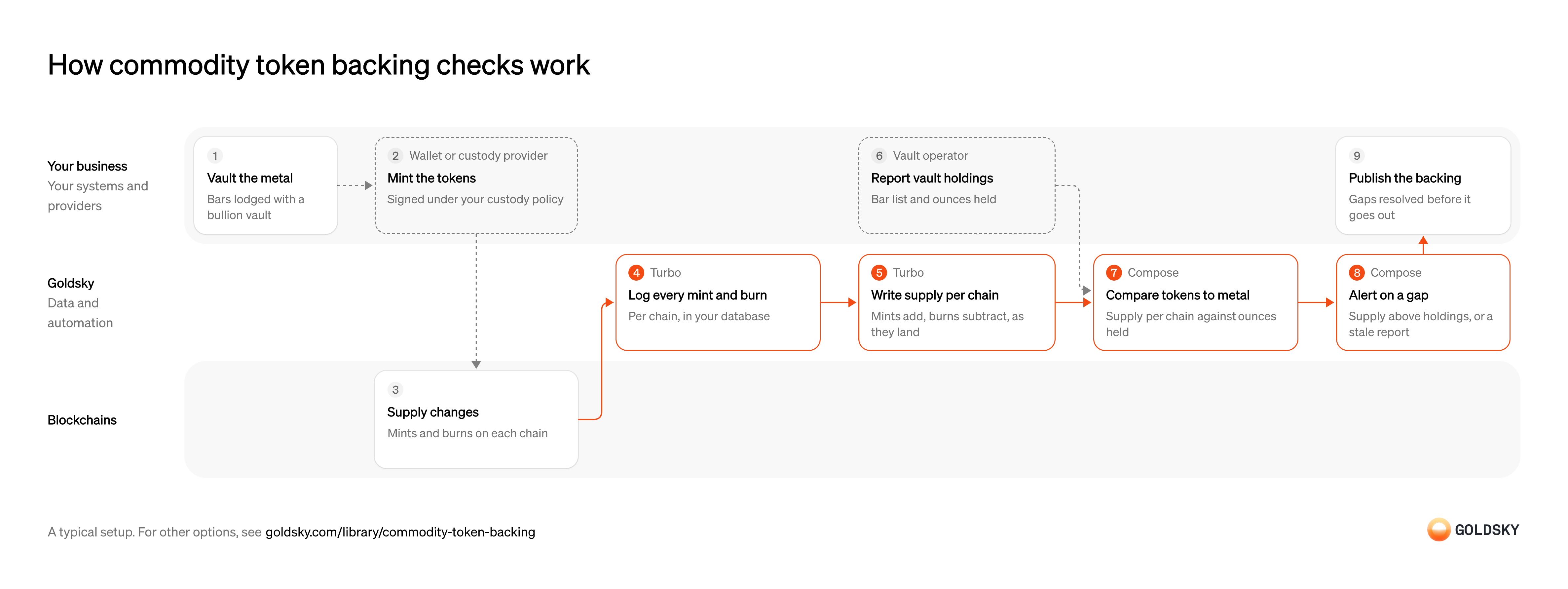
How commodity token backing checks work
The diagram follows the backing from the metal lodged in the vault to the backing figure your team publishes, and shows who does each step. Your setup may differ.
Ways to keep commodity tokens backed
With the pipeline, every mint and burn is kept in your database next to the supply it adds up to, so a gap can be traced to the transactions behind it; the scheduled supply check reads each chain’s current total supply and needs no database.
- Best for
- Many chains, with full mint and burn history
- Best for
- A few EVM chains, where total supply is enough
| Usual setupOption 1: Stream supply, check with a task | Option 2: Scheduled supply check | |
|---|---|---|
| Best for | Many chains, with full mint and burn history | A few EVM chains, where total supply is enough |
| Products | TurboCompose | ComposeEdge |
Lodge the metal with the vault
Each token stands for a set quantity of metal, so the metal has to be in custody before tokens exist.
Bars are lodged with a bullion vault and recorded by serial number, weight and fineness. Tokens minted before the bars are recorded are, for that time, backed by nothing anyone can point to.
Mint the tokens
New tokens are issued against metal that is already in the vault.
Mints and burns are signed under your custody policy, with limits tied to the metal on record. If the minting key can act without that link, supply can grow with no metal behind it.
Change supply on each chain
Every mint adds to supply and every burn removes from it, on whichever chain the token lives.
A token issued on several chains has a separate supply on each, and the backing has to cover their sum. The newest blocks can still be replaced, so a mint seen once isn’t final yet.
Log every mint and burn
Handled by Goldsky TurboSupply is the sum of every mint minus every burn, so each one has to be recorded.
Record every mint and burn on every chain, with its amount, block and transaction, keyed so a retried write doesn’t count it twice. A missed burn makes supply look higher than it is, and a double-counted mint does the same.
With Goldsky, a Turbo pipeline can read the curated
Track supply from mints and burns (opens in a new tab)erc20_transfersdataset and keep transfers from or to the zero address, which are mints and burns on a standard token, writing each one to your database per chain.Keep supply per chain
Handled by Goldsky TurboThe comparison needs one supply figure for each chain and one for the token overall.
Add each mint and take off each burn as it lands, by chain, and add the chains up for the token overall. A row removed by a reorg has to come off the total too, or supply drifts from the chain.
Turbo Pipelines can keep a running sum per key in your database with its
Keep running totals in your database (opens in a new tab)postgres_aggregatesink. Give mints a positive amount and burns a negative one in SQL, keep the_gs_opcolumn that marks deletes, group by chain, and each chain’s supply stays current as rows arrive and comes back down when a reorg removes a mint.Report vault holdings
The other side of the comparison is what the vault says it holds.
The vault or an attestation provider reports the bar list and total ounces held, with the date it was taken. An old report can look fine while the metal behind it has moved, so its date matters as much as its total.
Compare tokens to metal
Handled by Goldsky ComposeThe backing holds only while supply on every chain is covered by the metal in the vault.
On a set schedule, compare total supply with ounces held, and record both figures, the report date and the result. A check that keeps only pass or fail can’t show later what it compared.
Goldsky’s Compose can run a task on a
Make recorded HTTP requests (opens in a new tab)crontrigger that fetches the vault report and your supply per chain withctx.fetch, the supply through an API you expose over your database, and compares them; each call and its response are recorded on the run.Alert on a gap
Handled by Goldsky ComposeA gap between tokens and metal needs someone to act before more tokens are issued against it.
Alert when supply exceeds holdings or the vault report is older than your policy allows, and decide in advance whether a gap should also stop new mints. An alert nobody owns is the same as no alert.
When the check fails, the task can post an alert to your channel, or call the token’s pause function if you’ve given its wallet that role.
Post alerts with fetch (opens in a new tab)Publish the backing
Holders and auditors rely on a published figure that shows tokens and metal agree.
Resolve any gap before the figure goes out, and keep the inputs of each comparison with it. A published figure that can’t be traced back to the supply and the vault report it came from won’t survive an audit.
What to know about streaming supply and checking it on schedule
- Goldsky runs the pipeline and the task; you own the database and the decision on any gap.
- Supply per chain is a running total the pipeline keeps as each mint and burn arrives, and a mint the chain drops in a reorg comes off it again.
- Tables keyed on the event’s ID take reorg corrections, so the mint and burn log follows the chain too.
- The check runs on the schedule you set, so a gap is caught at the next run rather than at the mint itself.
Lodge the metal with the vault
Each token stands for a set quantity of metal, so the metal has to be in custody before tokens exist.
Bars are lodged with a bullion vault and recorded by serial number, weight and fineness. Tokens minted before the bars are recorded are, for that time, backed by nothing anyone can point to.
Mint the tokens
New tokens are issued against metal that is already in the vault.
Mints and burns are signed under your custody policy, with limits tied to the metal on record. If the minting key can act without that link, supply can grow with no metal behind it.
Change supply on each chain
Every mint adds to supply and every burn removes from it, on whichever chain the token lives.
A token issued on several chains has a separate supply on each, and the backing has to cover their sum. The newest blocks can still be replaced, so a mint seen once isn’t final yet.
Report vault holdings
The other side of the comparison is what the vault says it holds.
The vault or an attestation provider reports the bar list and total ounces held, with the date it was taken. An old report can look fine while the metal behind it has moved, so its date matters as much as its total.
Start the check on a schedule
Handled by Goldsky ComposeBacking has to be checked regularly, without anyone remembering to run it.
Run the check at a fixed interval set by your policy, and keep every run’s inputs and result. Gaps that open between runs are caught at the next one, so the interval is a risk decision.
With Goldsky, a Compose task runs on a
Schedule a task with cron (opens in a new tab)crontrigger that accepts standard five-field cron expressions, and each run’s calls are logged against it.Read total supply on each chain
Handled by Goldsky EdgeEach chain’s token contract knows its own total supply, which is the figure the metal has to cover.
Read total supply from the token contract on every chain it’s issued on and add them up. Leaving one chain out understates supply and hides a gap.
Edge RPC responds to
Read state at a block (opens in a new tab)eth_call, so the task can call the token’stotalSupply()on each chain at the latest block or at one you pin.Compare tokens to metal
Handled by Goldsky ComposeThe backing holds only while supply on every chain is covered by the metal in the vault.
Compare the supply total with ounces held, and record both figures, the report date and the result. A check that keeps only pass or fail can’t show later what it compared.
The task fetches the vault report with
Make recorded HTTP requests (opens in a new tab)ctx.fetch, which retries a failedGETand records each request and response on the run.Alert or pause on a gap
Handled by Goldsky ComposeA gap between tokens and metal needs someone to act before more tokens are issued against it.
Alert when supply exceeds holdings or the vault report is older than your policy allows, and decide in advance whether a gap should pause the token. A pause triggered by a stale report stops holders from moving tokens that are fully backed.
Compose can post the alert from the same task, or call the token’s pause function through a wallet you’ve given that role, and keeps retrying the call through brief failures.
Call contracts from a wallet (opens in a new tab)Publish the backing
Holders and auditors rely on a published figure that shows tokens and metal agree.
Resolve any gap before the figure goes out, and keep the inputs of each comparison with it. A published figure that can’t be traced back to the supply and the vault report it came from won’t survive an audit.
What to know about a scheduled supply check
- Goldsky runs the task; there’s no pipeline or database for you to operate.
- The task sees each chain’s total supply when it reads, not the mints and burns behind it, so tracing a gap means looking up transactions separately.
- Giving the task’s wallet a pause role puts a control over the token in code, so the threshold and who can change it need the same review as any other admin key.
What you control
- Your team
- Lodge the metal with the vault
- Publish the backing
- Your providers
- Wallet or custody provider
- Vault operator
Security and deployment
- SOC 2 Type IIIndependently audited security controls.
- Dedicated infrastructureSingle-tenant options for production workloads.
- Data residencyCloud, on-premises or co-located.
More use cases that tokenize securities
- Tokenized fund subscriptions and redemptions across chainsTrack subscriptions and redemptions of a tokenized fund as mints and burns across every chain it’s on.
- Keep tokenized stocks backed one to oneCheck token supply on every chain against the shares or fund units held in custody, and alert on any gap.
- Tokenized stock mint and redeem against ordersTrigger mints and redemptions when a customer buys or sells, and record every step for the books.
- Wrapped bitcoin reserve monitoringCheck a wrapped bitcoin token’s supply on every chain against the BTC at its custodian’s reserve addresses, and alert on any gap.
Use cases built the same way
- Continuous proof of reservesCompare onchain supply with reported reserves on a schedule, then publish the ratio or alert on a gap.
- Tokenized deposit tie-out to the core ledgerTie tokenized-deposit balances onchain to the bank’s core ledger each day.
- Reconcile tokenized and book-entry positionsCheck that tokenized positions match the book-entry or custodial records they mirror.
Keep commodity tokens backed with Goldsky
We’ll map it to your systems and show you what Goldsky runs, so your team builds the product, not the pipelines underneath it.
 Robinhood
 HyperEVM
 Arc
 Solana
 Ethereum
 Polymarket
 Base
 Tempo
 Bitcoin