Stablecoin payouts for marketplaces and creators
What it is
Stablecoin payouts for marketplaces and creators send what a seller, gig worker or creator has earned on a platform to their own wallet in stablecoins.
Marketplaces and creator platforms that pay people in many countries offer them, and every payout still has to be screened, signed and confirmed before the seller’s balance is cleared.
Goldsky can run the task that screens the wallet, sends the payout and flags any that stall, while seller balances, the keys and the decision to pay stay with you.
Who it’s for
Online marketplaces, gig-work platforms, creator platforms and the payment providers that run payouts for them.
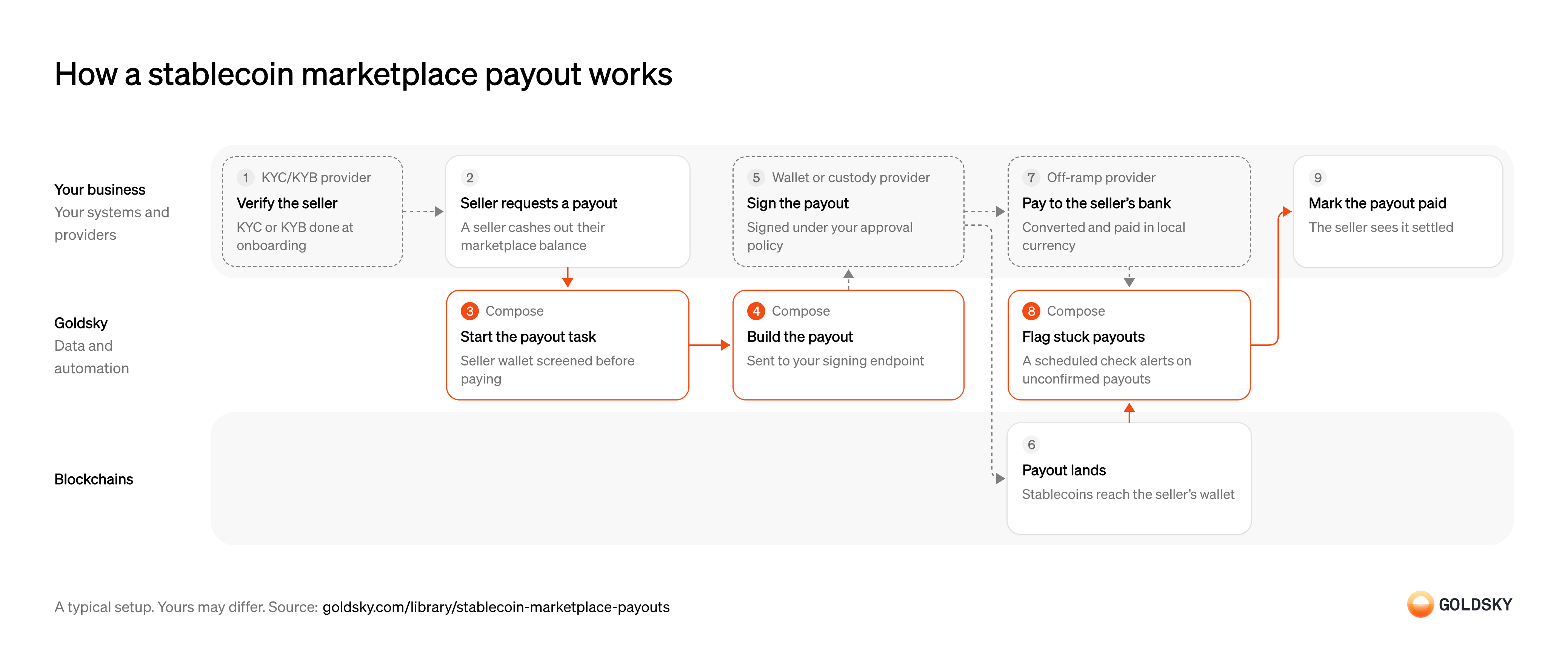
How a stablecoin marketplace payout works
One payout runs through the chart, from verifying the seller to marking the payout paid. Your setup may differ.
Verify the seller
A marketplace has to know who it’s paying before money leaves for their wallet.
Your verification provider checks the seller, or their business, at onboarding, and you record the wallet they want to be paid to. Paying a seller who hasn’t cleared the check leaves you with funds sent to someone you can’t identify.
Take the seller’s payout request
Sellers cash out what they’ve earned, on demand or on a schedule you set.
Your marketplace checks the request against the seller’s available balance and holds that amount so it can’t be paid out twice. A request accepted without the hold can be paid again by a second click.
Start the payout and screen the wallet
Handled by Goldsky ComposeEach payout should go only to a wallet that passes your screening at the moment you pay.
The seller’s wallet is checked against your sanctions and risk rules before the payout is built. A wallet that fails is held for review and the seller’s balance stays reserved.
Your marketplace can start the Compose payout task with an HTTP call, and the task calls your screening provider’s API before it pays.
Start a task over HTTP (opens in a new tab)Build the payout and send it for signing
Handled by Goldsky ComposeThe payout has to become a transaction and reach whoever holds the key.
The transaction carries the seller’s wallet and the amount. A payout built twice for one request pays the seller twice, so it needs a fixed identity across retries.
With Goldsky Compose, the task sends the payout through a webhook wallet, which posts a UserOperation (the transaction format smart-account wallets use) to a signing endpoint you host, plus a one-time EIP-7702 authorization the first time it sends on a chain, and submits the payout, gas-sponsored, once your server returns the signature. The task waits for the confirmations you set, can resend the payout after a reorg, and doesn’t send again a payout that already went through if it restarts.
Use a webhook wallet (opens in a new tab)Sign the payout
Moving marketplace funds takes a signature from a key held under rules about who can approve what.
Your signing endpoint holds your limits per payout and per day: it reads the recipient and amount from the payout’s call data, checks them, then asks your custody provider to sign. A key with no rules around it lets anyone who can change the app move the payout wallet’s funds.
Settle the payout in the seller’s wallet
The payout is done when the chain has accepted it and it can no longer be reversed.
A payout can be dropped before it’s included, or undone when the chain replaces its newest blocks (a reorg). Until enough blocks sit on top of it, keep the seller’s balance reserved.
Pay sellers who want local currency
Some sellers want money in their bank account rather than stablecoins in a wallet.
Your off-ramp provider takes the stablecoins from your payout wallet, converts them and pays the seller’s bank over the local rail. Keep its payout reference with the request, because a payment the bank returns comes back to your wallet and the seller’s balance has to be restored.
Flag payouts that haven’t confirmed
Handled by Goldsky ComposeA payout stuck between sent and settled leaves a seller waiting, and someone has to notice before they do.
On a schedule, every payout still unconfirmed past the time you allow is listed and sent to the team that handles them. Checking each payout only when it’s sent misses the ones that stall later.
A Compose task on a cron trigger can call your payout ledger’s API with
Run a task on a schedule (opens in a new tab)fetchfor open payouts and alert your team about any still unconfirmed, the same way the compliance oracle guide catches transfers stuck in escrow.Mark the payout paid
The seller should see the payout as settled, and your books should show the balance as paid.
Your marketplace releases the reserved balance against the payout’s transaction and shows the seller it’s done. Keep the screening result, the approval and the transaction hash with the payout, so its history from request to settlement can be traced later.
Related jobs
Set the rules a payout must pass
Screening only stops a payout if someone has decided in advance what a failed check means.
Decide which results block a payout outright, such as a wallet on a sanctions list, and which hold it for review, such as a high risk score or indirect exposure to illicit funds. Lists change, so a wallet that passed when it was saved is checked again at every payout.
Call the check before the payout is signed
Handled by Goldsky ComposeFunds sent to the wrong wallet can’t be pulled back, so the check has to finish before anything is signed.
Your payout system sends the wallet, chain, amount and payout ID, and waits for the answer. A payout whose check times out is held, not sent.
A Compose task with an HTTP trigger takes the request at its own endpoint, protected by a Goldsky API token, and returns whatever the task returns as JSON.
Call a task over HTTP (opens in a new tab)Check the wallet against your lists
Handled by Goldsky ComposeSome wallets you already know you can’t pay: those on sanctions lists and those your own team has blocked.
The lists have to change as soon as a new address is designated, without redeploying anything. A list refreshed weekly lets a newly listed wallet through for days.
The task can look the wallet up with
Query the app’s database (opens in a new tab)ctx.db.queryin a table in the Compose app’s own database, which your compliance team updates as lists change.Get a risk verdict from your screening provider
Handled by Goldsky ComposeA wallet can be risky without being listed, for example when it received funds from a listed address a few hops back.
The provider scores the wallet’s direct and indirect exposure to sanctioned or illicit activity. If the provider doesn’t respond, the payout waits, because paying without a verdict defeats the check.
With Goldsky Compose, the task calls the provider with
Call your provider with fetch (opens in a new tab)ctx.fetchand compares the score with your threshold, the way the compliance-oracle guide screens a sender; the request and response stay in the run’s log.Look up a wallet you’ve never paid
Handled by Goldsky FeedsA mistyped address or one from another network passes sanctions screening, and funds sent to it can’t be recovered.
Before a first payout, check whether the address has held anything on the chain you’re paying on. An address with no history there gets a confirmation from the payee before the payout goes.
Goldsky’s Feeds balances endpoint returns a wallet’s latest token balances across the chains you request, and
Read the balances endpoint reference (opens in a new tab)include_historical=trueadds tokens it held and fully sold.Return the decision with its reasons
Handled by Goldsky ComposeThe payout system needs a clear answer, and compliance needs to see later why each payout went or didn’t.
The answer is allow, hold or deny, with the list hit, score and threshold behind it, and every decision is kept, passes included. Your payout system signs only on allow; a hold goes to your compliance team, and a deny keeps the seller’s balance reserved.
The task writes each decision to a Compose collection, stored in the app’s Postgres database, and returns the same decision in its response.
Keep decisions in collections (opens in a new tab)
What you control
- Your team
- Take the seller’s payout request
- Mark the payout paid
- Your providers
- KYC/KYB provider
- Wallet or custody provider
- Off-ramp provider
Security and deployment
- SOC 2 Type IIIndependently audited security controls.
- Dedicated infrastructureSingle-tenant options for production workloads.
- Data residencyCloud, on-premises or co-located.
More use cases that automate payouts
- Stablecoin payroll and contractor payoutsPay contractors and staff in stablecoins and confirm each payout settled.
- Payout prefunding in USDCPrefund a payout network in USDC and track the balance so payouts never stall.
- Token distributions to holders and creditorsPay one asset out to thousands of holders, creditors or employees and prove each delivery.
- Airdrop eligibility lists and sybil filteringScore every address up to a snapshot block, remove sybil clusters and publish the list people claim against.
- Stablecoin disbursements for public-sector programsTrack government benefit or grant payments made in stablecoins, from issue to spend.
- Stablecoin merchant settlementPay each merchant’s settlement in stablecoins to the wallet and network it chose, on any day, and record the transaction against the settlement.
- Programmable escrow for B2B stablecoin paymentsHold a buyer’s stablecoin payment until delivery, a milestone or a deadline, then release it to the seller or refund the buyer.
Use cases built the same way
- Authorize and capture stablecoin paymentsHold a buyer’s stablecoins in an escrow contract at checkout, capture them to the merchant as orders ship, void what can’t be filled and refund after capture.
- B2B cross-border payments in stablecoinsPay suppliers abroad in stablecoins and track each payment from send to off-ramp.
- Stablecoin remittancesSend money across borders in stablecoins and confirm it reached the recipient’s wallet or card.
- Idle stablecoin cash sweepsMove idle stablecoin balances into tokenized money funds when they pass a threshold.
Pay sellers and creators in stablecoins with Goldsky
We’ll map it to your systems and show you what Goldsky runs, so your team builds the product, not the pipelines underneath it.
 Robinhood
 HyperEVM
 Arc
 Solana
 Ethereum
 Polymarket
 Base
 Tempo
 Bitcoin