B2B cross-border payments in stablecoins
What are B2B cross-border payments in stablecoins?
B2B cross-border payments in stablecoins are supplier and vendor payments that cross the border as stablecoins and are converted into local currency by an off-ramp partner at the other end.
Payment platforms, sponsor banks and the companies they serve use them to pay overseas invoices outside banking hours, and each payment still needs screening, an agreed rate and a record that ties it back to the invoice.
Goldsky runs the screening, quoting and sending as one audited task and follows each payment onchain to the off-ramp; approvals, signing keys, licenses and the local payout stay with you and your partners.
Who uses B2B cross-border payments in stablecoins?
Cross-border payment platforms, stablecoin payment providers and sponsor banks that pay suppliers abroad for their business customers.
How B2B stablecoin payments work
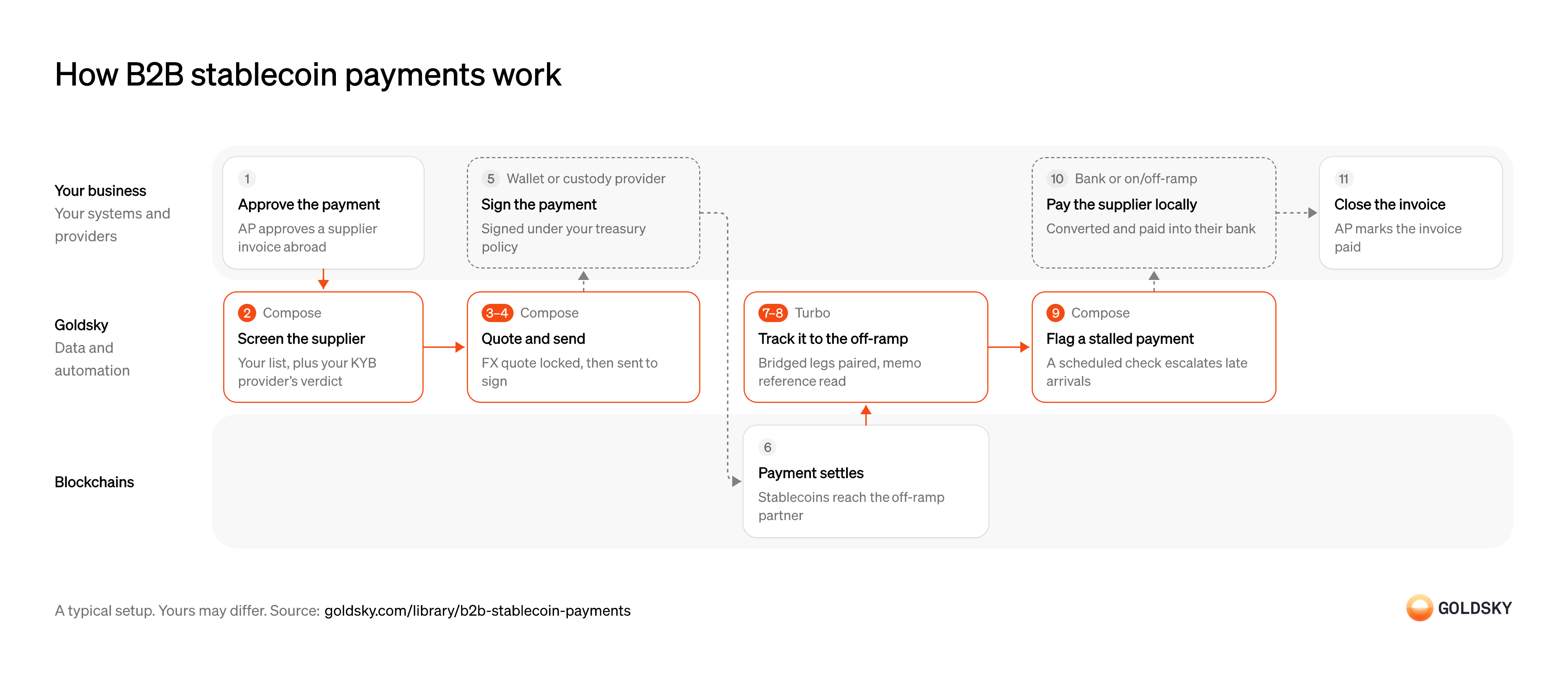
The diagram follows one supplier payment from its approval in accounts payable to the invoice being closed. Your setup may differ.
Approve the supplier payment
A payment starts when accounts payable approves an invoice from a supplier abroad.
The approval fixes the amount, the currency the supplier is paid in and their payout details. A payment sent without it is hard to reverse once it’s on the chain.
Screen the supplier
Handled by Goldsky ComposeYou check who you’re paying before the money leaves, because a stablecoin payment can’t be recalled.
The supplier’s wallet is checked against your own blocked list, and your KYB provider confirms the business behind it. Both results are stored with the payment, so a reviewer can see why it went ahead.
With Goldsky Compose, the approval can start a task through an HTTP trigger. The task checks the wallet against your list, calls your KYB provider and stores the decision as an audit record.
Start a task from an HTTP trigger (opens in a new tab)Get the FX rate
Handled by Goldsky ComposeThe supplier is paid in their own currency, so the rate has to be fixed before the money moves.
The quote comes from whoever prices the corridor in your setup: often the off-ramp partner that will pay the supplier, or your FX liquidity provider. Accept it, which locks it, before any money moves, and store it with the payment, or the amount the supplier receives can’t be checked against what was agreed.
The same task can request the quote from that provider’s API with
How Compose records each request (opens in a new tab)fetch, and the request and response sit in the run’s log next to the screening result.Send the payment for signing
Handled by Goldsky ComposeThe payment is built for the approved amount to the off-ramp partner’s wallet, then signed with a key you control.
It has to go out once. A retry after a timeout that sends it again pays the supplier twice.
A Compose webhook wallet sends the signing endpoint you host the payment as a UserOperation (the transaction format smart-account wallets use) to sign, plus a one-time EIP-7702 authorization the first time it sends on a chain, and submits it once signed. If the task retries after the payment landed, it gets the original receipt back instead of sending again.
Learn about webhook wallets (opens in a new tab)Sign the payment
Most finance teams keep payment keys with a custody provider whose rules say who can approve what.
Your signing endpoint holds your treasury limits and approvers: it reads the recipient and amount from the payment’s call data, checks them, then asks your custody provider to sign. A payment that doesn’t fit is refused before it reaches the chain.
Settle the payment with the off-ramp partner
The payment is settled when the stablecoins land in the off-ramp partner’s wallet.
If the route bridges between chains, the payment is burned on one chain and minted on another, and in between it’s in flight. Either leg can still be replaced by a reorg for a short time after it lands.
Wait for the payment to confirm
Handled by Goldsky ComposeA payment you saw land can still be undone by a reorg, when the chain replaces its newest blocks.
Treat the payment as pending until enough blocks sit on top of it. If it’s dropped, it has to be sent again for the same amount, once.
Goldsky Compose waits for the confirmations you set on the payment and, with the
Handle confirmations and reorgs (opens in a new tab)replaybehavior, resends it with fresh gas and nonce if a reorg drops it.Track the payment to the off-ramp
Handled by Goldsky TurboTreasury needs to know where every payment is: settled at the off-ramp, or still between chains.
Pair each burn with its mint when the payment bridges, and read the payment reference so the payment ties back to its invoice. On chains where a transfer can carry a memo, that’s a lookup on your own reference, not a guess from amount and time.
Turbo Pipelines can decode burns, mints and memo-carrying transfers into your database. Pairing the legs and matching each memo to an invoice are joins you run there.
Decode payment memos (opens in a new tab)Escalate a payment that hasn’t arrived
Handled by Goldsky ComposeA late payment needs a person on it before the supplier calls to ask.
A rule about something missing, such as a payment with no arrival after your cutoff, has to run on a schedule rather than on each transfer. The alert carries the payment reference, so whoever picks it up can trace it.
A Compose task on a cron trigger can call your ledger’s API with
Run a task on a cron schedule (opens in a new tab)fetchfor in-flight payments, check each one with the bridge’s status service and post anything unresolved to your operations tooling.Pay the supplier locally
The supplier is paid in local currency into their bank, not in stablecoins.
Your off-ramp partner converts the stablecoins and pays the supplier’s bank account. Keep its payout reference, because it’s the supplier’s proof of payment if they query it. Some countries limit which partners may settle cross-border payments in stablecoins, so check the rules in each corridor.
Close the invoice
The payment is finished for your books when the invoice is marked paid.
Accounts payable closes the invoice against the onchain payment and the off-ramp’s payout reference. An invoice closed on the send alone hides payments that stalled on the way.
Related jobs
Check the receiver’s account details
Instant rails check who is being paid, and a payout sent on details that don’t match gets rejected.
Your off-ramp provider checks the receiver’s name and tax ID against the account before you send: a Pix key returns the account holder’s name and CPF or CNPJ, and SEPA verification of payee and UK Confirmation of Payee return a name match before payment. A payout the receiving bank rejects comes back and has to be sent again.
Send the stablecoins to the off-ramp
Handled by Goldsky ComposeThe payout leaves your wallet as a stablecoin transfer to the provider, who pays out the local currency.
Each payout carries the amount and your payout reference, and it has to go out once. A retry after a timeout that sends it again pays the receiver twice.
A Compose task can send each payout through a webhook wallet, which sends the signing endpoint you host a UserOperation (the transaction format smart-account wallets use) to sign, plus a one-time EIP-7702 authorization the first time it sends on a chain, then submits the payout. If the task retries after the payout landed, it gets the original receipt back instead of sending again.
Learn about webhook wallets (opens in a new tab)Settle the transfer onchain
The stablecoins reach the provider’s wallet once the transfer is in a block.
For a short time after it lands, a reorg (the chain replacing its newest blocks) can still undo it, so the provider waits for its own confirmation rule before paying out.
Pay out over the local rail
The receiver is paid in local currency into their bank account.
Pix credits the receiver within seconds at any hour, and SPEI requires the receiving bank to credit the payment within seconds of getting it. Keep the rail’s own payment ID with the payout, because it’s what the receiver’s bank can trace.
Record each transfer to the off-ramp
Handled by Goldsky TurboThe onchain leg has to sit beside the rail payment, so each payout can be checked from end to end.
Every transfer from your payout wallets to the provider is stored once with its amount, transaction hash and block, and corrected if a reorg undoes it.
Turbo Pipelines can keep only stablecoin transfers from the payout wallets you list in a dynamic table and write each one to your database, where reorg corrections update the same rows.
Filter transfers with dynamic tables (opens in a new tab)Match each transfer to its rail payment
A payout is finished when both legs agree: the stablecoins arrived and the local payment was credited.
Join each transfer to the provider’s payout record on your reference and compare the amounts at the quoted rate. A transfer with no rail payment, or a rail payment that came back, is a break someone has to chase.
What you control
- Your team
- Approve the supplier payment
- Close the invoice
- Your providers
- Wallet or custody provider
- Bank or on/off-ramp
Questions and answers
How do you send stablecoin payments?
You send a stablecoin payment by signing a transfer of the token from your wallet to the recipient’s address, on a chain both sides use. For a business payment the usual order is to approve the invoice, screen the recipient, fix a rate if the supplier is paid in another currency, sign under your treasury policy and confirm the funds arrived. An off-ramp partner then converts the stablecoins and pays the supplier’s bank in local currency.
Security and deployment
- SOC 2 Type IIIndependently audited security controls.
- Dedicated infrastructureSingle-tenant options for production workloads.
- Data residencyCloud, on-premises or co-located.
More use cases that settle across chains and currencies
- Stablecoin settlementSettle business, card-network and interbank payments in stablecoins or deposit tokens across chains.
- Cross-chain transfer trackingSee every cross-chain stablecoin transfer as settled, in flight or stalled, and catch the stuck ones.
- Stablecoin settlement for card networksSettle card-network obligations with issuers and acquirers in stablecoins across chains.
- Tokenized deposits for interbank settlementSettle payments between banks in tokenized deposits and tie each one to the core.
- Onchain FX between stablecoinsSwap between stablecoin currencies onchain and record the rate and settlement of each trade.
Use cases built the same way
- Stablecoin payouts for marketplaces and creatorsPay sellers, gig workers and creators in stablecoins from a marketplace balance.
- Stablecoin remittancesSend money across borders in stablecoins and confirm it reached the recipient’s wallet or card.
- Authorize and capture stablecoin paymentsHold a buyer’s stablecoins in an escrow contract at checkout, capture them to the merchant as orders ship, void what can’t be filled and refund after capture.
- Stablecoin payroll and contractor payoutsPay contractors and staff in stablecoins and confirm each payout settled.
Pay suppliers abroad in stablecoins with Goldsky
We’ll map it to your systems and show you what Goldsky runs, so your team builds the product, not the pipelines underneath it.
 Robinhood
 HyperEVM
 Arc
 Solana
 Ethereum
 Polymarket
 Base
 Tempo
 Bitcoin