Onchain FX between stablecoins
What is onchain FX between stablecoins?
Onchain FX between stablecoins is swapping one currency’s stablecoin for another’s, dollars for euros say, on a chain where both legs settle in the same transaction.
Payment platforms, stablecoin issuers and treasury desks use it to change currencies at any hour, and each trade has to be booked with its rate, both legs and its value in the reporting currency.
Goldsky decodes each fill from the FX venue’s contract into your systems and supplies the USD value of each leg; the quotes, the trading decisions and the books stay with your desk.
You can record onchain FX trades two ways: stream each fill into your database with Turbo Pipelines, or index the venue’s contract with a hosted subgraph and query it over GraphQL.
Who uses onchain FX between stablecoins?
Payment platforms, stablecoin issuers and treasury desks that convert between currency stablecoins for themselves or their customers.
How onchain FX between stablecoins works
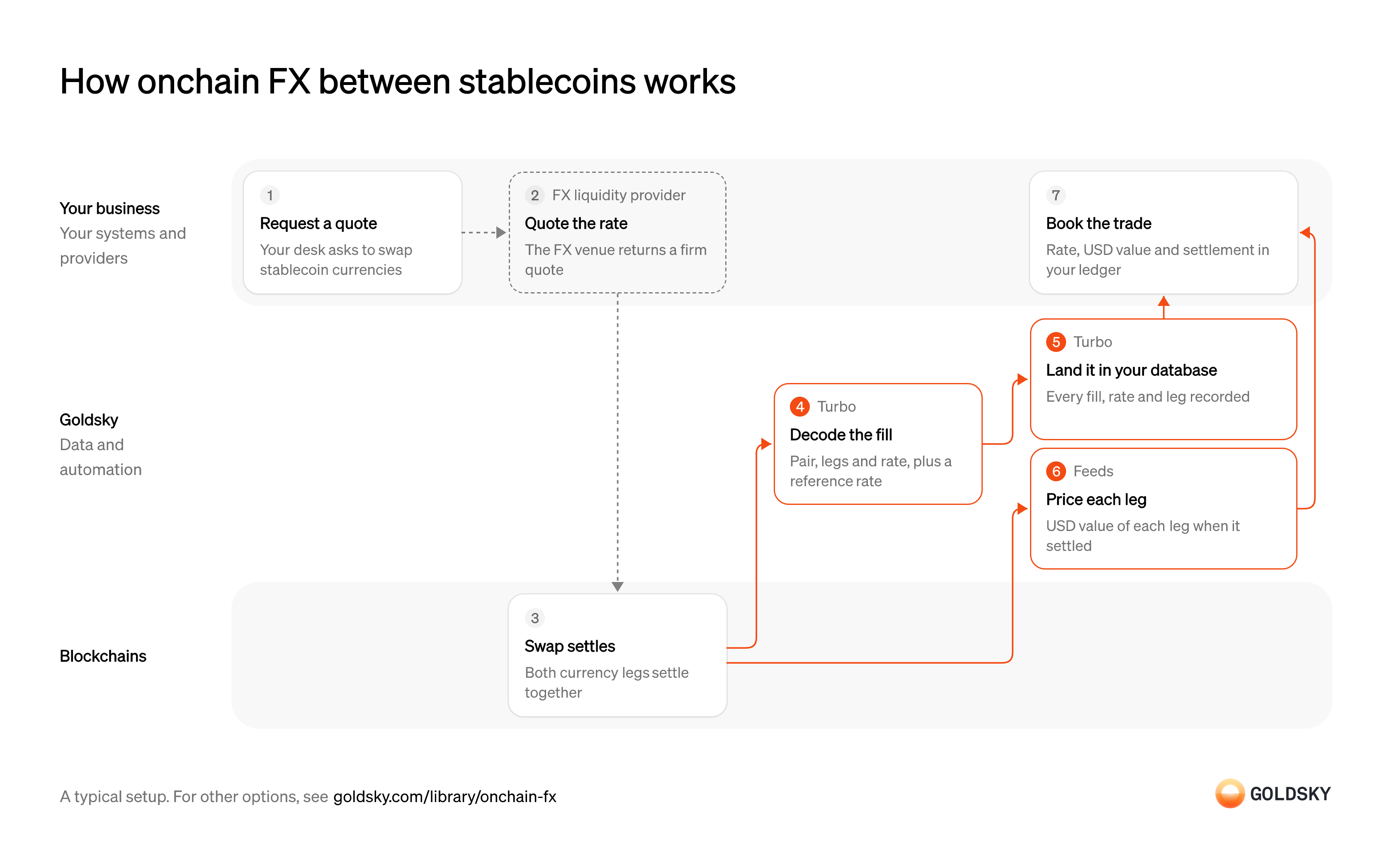
The diagram follows one trade from your desk’s quote request to the booking of its rate, legs and USD value in your ledger. Your setup may differ.
Ways to record onchain FX trades between stablecoins
Fills land in a database you run with the pipeline, which can add a reference rate on the way, or stay behind the subgraph’s hosted API for one chain, with a webhook for each.
- Best for
- Several venues or chains, fills in your database
- What you run
- The destination: your database, queue or bucket, or a Postgres database Goldsky hosts
- What you write
- Pipeline YAML and SQL; TypeScript transforms when needed
- Where your data lives
- In your own database or systems
- How results reach you
- Pushed to you
- Best for
- One venue on one chain, read through an API
- What you run
- Nothing; Goldsky runs indexing, storage and the API
- What you write
- A schema and mapping handlers, or a no-code or low-code config for simple contracts
- Where your data lives
- Hosted by Goldsky
- How results reach you
- You query; changes are pushed
| Usual setupOption 1: Stream to your database | Option 2: Hosted subgraph | |
|---|---|---|
| Best for | Several venues or chains, fills in your database | One venue on one chain, read through an API |
| Products | TurboFeeds | SubgraphsFeeds |
| What you run | The destination: your database, queue or bucket, or a Postgres database Goldsky hosts | Nothing; Goldsky runs indexing, storage and the API |
| What you write | Pipeline YAML and SQL; TypeScript transforms when needed | A schema and mapping handlers, or a no-code or low-code config for simple contracts |
| Where your data lives | In your own database or systems | Hosted by Goldsky |
| How results reach you | Pushed to you | You query; changes are pushed |
Request a quote
A trade starts when your desk asks to swap one currency’s stablecoin for another’s.
The request names the pair, the amount and the side. Keep it with your own trade ID, because the fill on the chain doesn’t carry your internal reference.
Get a firm rate
The rate is the price of the trade, and it has to be fixed before either side commits.
The FX venue or liquidity provider returns a firm quote that holds for a short window. A trade settled after the quote lapses can fill at a rate your desk never agreed.
Settle both legs together
Both currencies change hands in one transaction, so neither side is left having paid without being paid.
The venue’s contract settles both legs at once and records a settlement event with the pair and the amounts. Until the block is deep enough, a reorg can still replace it.
Decode the fill and add a reference rate
Handled by Goldsky TurboYour books need the pair, both amounts and the rate in plain fields, plus a market rate to judge the fill against.
Each settlement event is turned into pair, leg amounts and counterparties, and the rate is worked out from the two amounts. Without a reference rate beside it, nobody can tell a good fill from a bad one later.
With Goldsky, a Turbo Pipelines pipeline can decode the venue’s settlement events with
Learn about the HTTP handler (opens in a new tab)_gs_log_decode. An HTTP handler then sends each batch of fills to your rate service, which returns them with the reference rate attached.Land each fill in your database
Handled by Goldsky TurboReporting and limits run on your own tables, so every fill has to be there, once.
Each fill is written with a stable ID so a repeated delivery overwrites the same row. When a reorg replaces a block, the fill from it has to be corrected or removed, not left in the totals.
A database sink keyed on the fill’s
How reorgs reach your tables (opens in a new tab)idwrites each fill to your database or warehouse, and Turbo Pipelines applies reorg corrections to the same rows.Value each leg in US dollars
Handled by Goldsky FeedsYour books report in one currency, so each leg needs its value at the time the trade settled.
Each leg is valued at the price just before its block, not at today’s price. Store the value you booked, because a price source can fill in its history later and change the figure it returns.
The Feeds transfers endpoint returns each transfer in and out of your settlement wallet with
Read the transfers endpoint reference (opens in a new tab)amount_usd, worked out from the last price recorded shortly before the transfer’s block.Book the trade
The trade is done for your books when its rate, legs and USD value are in your ledger.
Match each fill to the quote by pair, amounts and time, then post both legs. Totals such as volume, average rate and exposure per currency are sums you run in your database or warehouse.
What to know about streaming FX fills to your database
- Goldsky runs the pipeline; the database it writes to, and the SQL that totals volume, spreads and exposure, are yours.
- The reference rate comes from a service you run, which the pipeline calls with each batch of fills.
- Tables keyed on the fill’s ID take reorg corrections in place.
- One pipeline can read several chains when your venues are spread across them.
Request a quote
A trade starts when your desk asks to swap one currency’s stablecoin for another’s.
The request names the pair, the amount and the side. Keep it with your own trade ID, because the fill on the chain doesn’t carry your internal reference.
Get a firm rate
The rate is the price of the trade, and it has to be fixed before either side commits.
The FX venue or liquidity provider returns a firm quote that holds for a short window. A trade settled after the quote lapses can fill at a rate your desk never agreed.
Settle both legs together
Both currencies change hands in one transaction, so neither side is left having paid without being paid.
The venue’s contract settles both legs at once and records a settlement event with the pair and the amounts. Until the block is deep enough, a reorg can still replace it.
Index each fill
Handled by Goldsky SubgraphsYour books need the pair, both amounts and the counterparties as records they can query.
A schema sets the fill record and mappings fill it from each settlement event. If the venue changes its contract interface, the mappings have to change with it.
Subgraphs runs your mappings over the venue’s contract and serves each fill at a hosted GraphQL endpoint.
Learn how Subgraphs work (opens in a new tab)Push each fill to your backend
Handled by Goldsky SubgraphsYour desk books trades as they settle, so each fill has to reach your systems without anyone asking.
Each change has to say whether it’s new, an update or a rollback after a reorg, and your backend adds the reference rate when it receives the fill.
Goldsky sends a subgraph webhook with an
Set up subgraph webhooks (opens in a new tab)INSERT,UPDATEorDELETEpayload for each change to the fill entity.Value each leg in US dollars
Handled by Goldsky FeedsYour books report in one currency, so each leg needs its value at the time the trade settled.
Each leg is valued at the price just before its block, not at today’s price. Store the value you booked, because a price source can fill in its history later and change the figure it returns.
The Feeds transfers endpoint returns each transfer in and out of your settlement wallet with
Read the transfers endpoint reference (opens in a new tab)amount_usd, worked out from the last price recorded shortly before the transfer’s block.Book the trade
The trade is done for your books when its rate, legs and USD value are in your ledger.
Match each fill to the quote by pair, amounts and time, then post both legs. Totals such as volume, average rate and exposure per currency are sums you run in your database or warehouse.
What to know about indexing FX fills with a hosted subgraph
- Goldsky hosts the index and its GraphQL endpoint; your backend adds the reference rate and books each fill.
- Webhooks can arrive out of order, and each record version’s
block_rangetells a reorg rollback from an update. - Totals across fills, such as volume per pair, are queries your code runs or sums your ledger keeps.
- One subgraph covers one chain, so a second venue on another chain needs its own.
What you control
- Your team
- Request a quote
- Book the trade
- Your providers
- FX liquidity provider
Security and deployment
- SOC 2 Type IIIndependently audited security controls.
- Dedicated infrastructureSingle-tenant options for production workloads.
- Data residencyCloud, on-premises or co-located.
More use cases that settle across chains and currencies
- Stablecoin settlementSettle business, card-network and interbank payments in stablecoins or deposit tokens across chains.
- B2B cross-border payments in stablecoinsPay suppliers abroad in stablecoins and track each payment from send to off-ramp.
- Cross-chain transfer trackingSee every cross-chain stablecoin transfer as settled, in flight or stalled, and catch the stuck ones.
- Stablecoin settlement for card networksSettle card-network obligations with issuers and acquirers in stablecoins across chains.
- Tokenized deposits for interbank settlementSettle payments between banks in tokenized deposits and tie each one to the core.
Record onchain FX trades between stablecoins with Goldsky
We’ll map it to your systems and show you what Goldsky runs, so your team builds the product, not the pipelines underneath it.
 Robinhood
 HyperEVM
 Arc
 Solana
 Ethereum
 Polymarket
 Base
 Tempo
 Bitcoin