Payout prefunding in USDC
What is payout prefunding in USDC?
Payout prefunding in USDC is sending USDC to a payout network ahead of time, which the network holds as a balance on its own books so the payouts drawn from it go out without waiting on a bank transfer.
Payout providers, remittance firms and the businesses that send through the network watch that balance closely, because a prefund that runs dry stops payouts until someone tops it up.
Goldsky can check the balance with the network on a schedule, flag it when it nears your floor, work out the next top-up and confirm the USDC landed, while converting dollars and releasing the funds stay with you and your providers.
Who uses payout prefunding in USDC?
Payout and remittance providers, money transmitters and payment firms that prefund a payout network in USDC.
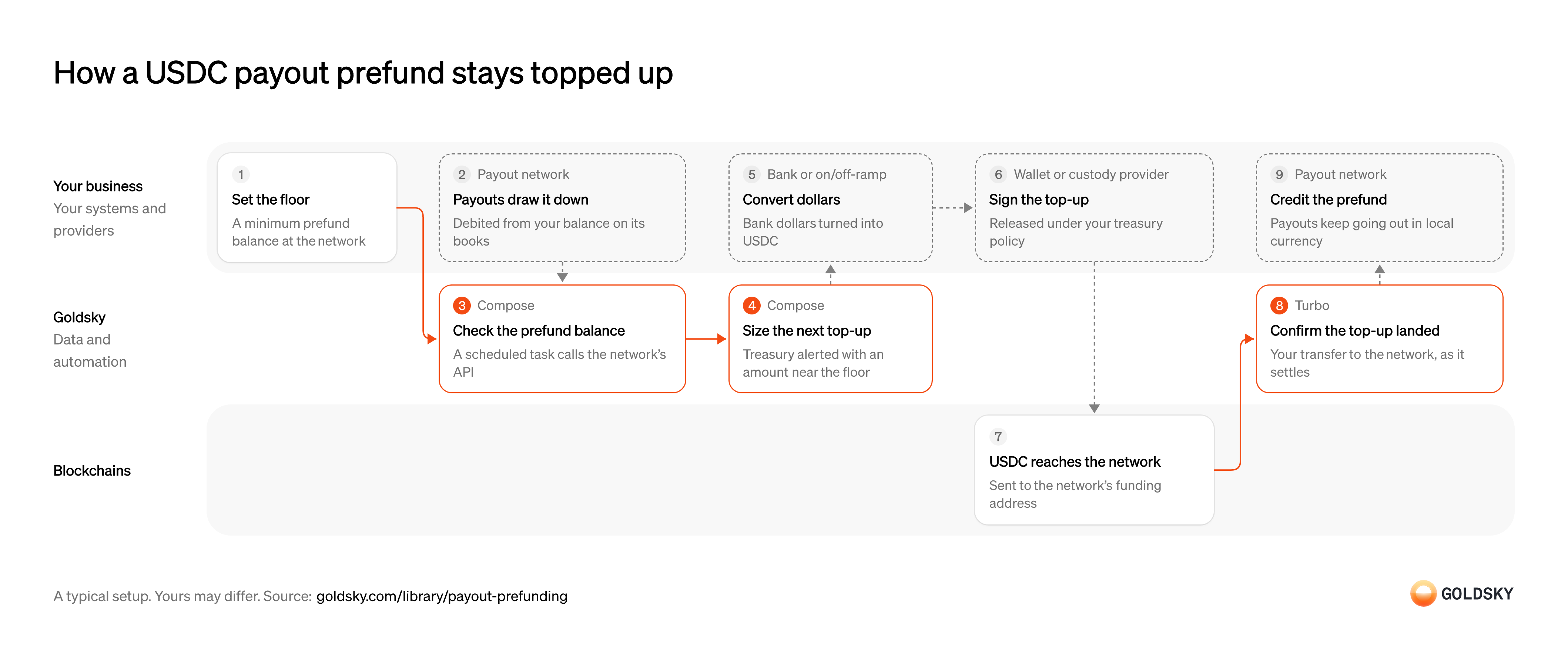
How a USDC payout prefund stays topped up
The chart tracks one cycle of the prefund, from setting its floor to the network crediting the top-up. Your setup may differ.
Set the floor for the prefund
A prefund only works if there’s always enough in it for the payouts coming next, so you decide in advance how low it may go.
Treasury sets a minimum for the balance the payout network holds for you, based on how much is paid out between top-ups and how long a top-up takes to be credited. A floor set too low leaves payouts waiting while the next top-up is still on its way.
Let payouts draw the prefund down
Every payout the network sends is paid from your prefund, so the balance falls as payouts go out.
The network pays each recipient in local currency and debits the amount from your prefund on its own books. Nothing moves onchain when a payout goes out, so the balance can only be read from the network. A payout the receiving bank rejects, for example because the name or tax ID given doesn’t match the account, comes back to the prefund and has to be sent again with corrected details.
Read the prefund balance on a schedule
Handled by Goldsky ComposeYou can only top up in time if you check what the prefund holds often enough.
The balance lives on the payout network’s books, so a scheduled job reads it from the network’s balance API. Check too rarely and a busy day can take the prefund past its floor and down to zero between two checks.
With Goldsky, a Compose task on a cron trigger can call the network’s balance API with
Run a task on a schedule (opens in a new tab)fetch, and every request and response is kept in the run’s log.Flag a low balance and size the top-up
Handled by Goldsky ComposeTreasury needs to hear about a low prefund while there’s still time to top it up, and how much to send.
Each reading is compared with the floor, and one below it raises an alert with the amount that covers the payouts expected before a top-up can be credited. An alert that repeats on every run until the top-up lands is noise, so record which ones are already open.
The same Compose task can post the alert and the amount to your team’s tool with
Keep state between task runs (opens in a new tab)fetch, and keep open alerts in a collection so the next run doesn’t raise the same one.Convert dollars into USDC
The top-up usually starts as dollars in a bank account, and the network is funded in USDC.
Your fiat provider takes the bank dollars and returns USDC to your treasury wallet. The conversion has to start early enough that the top-up is credited before the prefund reaches its floor. Networks that pay out in euros can also take the prefund in EURC, a euro stablecoin, converted from bank euros the same way.
Approve and sign the top-up
Moving treasury money takes a signature, and most firms keep that key with a custody provider under a policy.
The transfer to the network’s funding address is approved and signed under your treasury policy, with limits on how much can move and who can approve it. Without that policy, anyone who can change the sizing logic can move treasury funds.
Send the USDC to the network
The top-up is a stablecoin transfer to the address the network gives you for funding.
The transfer lands in a block on the chain, and for a short time the newest blocks can still be replaced, so a top-up seen once isn’t final yet. USDC sent to the wrong address or chain is hard to get back, so take the funding address from the network’s instructions for each chain.
Confirm the top-up landed
Handled by Goldsky TurboTreasury wants to see the USDC arrive at the network before it chases the credit.
Each transfer from your treasury wallet to the network’s funding address is recorded with its amount and transaction, so it can be checked against the top-up you sized. A top-up the chain later undoes has to come out of that record again.
Turbo Pipelines can keep only token transfers to the network’s funding address and write each one to your database, where reorg corrections arrive as updates and deletes to the same rows.
Detect transfers to an address (opens in a new tab)Credit the prefund
The prefund is ready again once the network has credited the top-up to your balance.
The network credits the USDC to your prefund, and payouts keep going out in local currency. A top-up that landed onchain but hasn’t been credited is a question for the network, not a reason to send another.
Related jobs
Work out each agent’s balance for the cycle
Agents pay out cash for incoming transfers and take in cash for new ones, so each one ends a cycle owing money or being owed it.
Your agent ledger nets the cycle’s payouts and collections for each agent into one amount and a direction. Operators usually settle these balances by bank transfer in a few major currencies, which can take days; stablecoin settlement is meant to cut that wait.
Watch every agent settlement wallet
Handled by Goldsky TurboYou only see settlements to and from wallets you watch, and agents join, leave and change wallets.
Your treasury wallet and each agent’s settlement wallet go on one list that changes without restarting anything. A wallet added late leaves its first settlement unrecorded.
With Goldsky, the list is a Turbo Pipelines dynamic table, which lives in a Postgres database, so adding an agent’s wallet starts tracking it with no redeploy.
Learn about dynamic tables (opens in a new tab)Send or receive the settlement
Settling moves treasury money, so what you owe an agent is signed under your treasury policy.
Your custody provider signs each payment to an agent, and agents that owe you send stablecoins from their own wallet. A payment to an agent’s old wallet is hard to get back, so a wallet change goes through the same approval as a payment.
Settle on the chain
The settlement is a stablecoin transfer between your treasury and the agent’s wallet.
It lands in a block that a reorg can still replace for a short time, so a settlement seen once isn’t final yet.
Record each settlement transfer
Handled by Goldsky TurboYour agent ledger needs every settlement in its own records, in both directions.
Every transfer where the sender or the receiver is a watched wallet is stored once with the amount, transaction hash and block. Watching only one direction misses the agents who owe you.
A Turbo Pipelines SQL transform can check both
Filter transfers with dynamic tables (opens in a new tab)senderandrecipientagainst the list withdynamic_table_check()and write each match to your database, where reorg corrections update the same rows.Close the agent’s cycle
A cycle is closed when every agent’s balance is settled or has a named break.
Your ledger matches each transfer to the agent’s balance for the cycle, and agents that need local currency convert through their own provider. A short or missing settlement is followed up before the next cycle starts, or it rolls into it.
What you control
- Your team
- Set the floor for the prefund
- Your providers
- Payout network
- Wallet or custody provider
Security and deployment
- SOC 2 Type IIIndependently audited security controls.
- Dedicated infrastructureSingle-tenant options for production workloads.
- Data residencyCloud, on-premises or co-located.
More use cases that automate payouts
- Stablecoin payroll and contractor payoutsPay contractors and staff in stablecoins and confirm each payout settled.
- Stablecoin payouts for marketplaces and creatorsPay sellers, gig workers and creators in stablecoins from a marketplace balance.
- Token distributions to holders and creditorsPay one asset out to thousands of holders, creditors or employees and prove each delivery.
- Airdrop eligibility lists and sybil filteringScore every address up to a snapshot block, remove sybil clusters and publish the list people claim against.
- Stablecoin disbursements for public-sector programsTrack government benefit or grant payments made in stablecoins, from issue to spend.
- Stablecoin merchant settlementPay each merchant’s settlement in stablecoins to the wallet and network it chose, on any day, and record the transaction against the settlement.
- Programmable escrow for B2B stablecoin paymentsHold a buyer’s stablecoin payment until delivery, a milestone or a deadline, then release it to the seller or refund the buyer.
Use cases built the same way
- Wrapped bitcoin reserve monitoringCheck a wrapped bitcoin token’s supply on every chain against the BTC at its custodian’s reserve addresses, and alert on any gap.
- Cross-chain transfer trackingSee every cross-chain stablecoin transfer as settled, in flight or stalled, and catch the stuck ones.
- Continuous proof of reservesCompare onchain supply with reported reserves on a schedule, then publish the ratio or alert on a gap.
Keep a USDC payout prefund topped up with Goldsky
We’ll map it to your systems and show you what Goldsky runs, so your team builds the product, not the pipelines underneath it.
 Robinhood
 HyperEVM
 Arc
 Solana
 Ethereum
 Polymarket
 Base
 Tempo
 Bitcoin