Crypto exchange deposit detection
What is crypto exchange deposit detection?
Crypto exchange deposit detection is how an exchange learns that a user has sent funds to one of their deposit addresses, so it can credit the user once the chain has confirmed the transfer.
Exchanges and custodial wallet platforms run it because a missed deposit becomes a support ticket, and a deposit credited before it’s final can be taken back by a reorg after the user has traded or withdrawn it.
Goldsky can watch every deposit address you issue, catch each transfer to them and publish it to your queue with reorg corrections, while the addresses, the confirmation rule and the credit stay with your team.
Who uses crypto exchange deposit detection?
Centralized crypto exchanges, brokers and custodial wallet platforms that give each user their own deposit addresses and credit an internal balance.
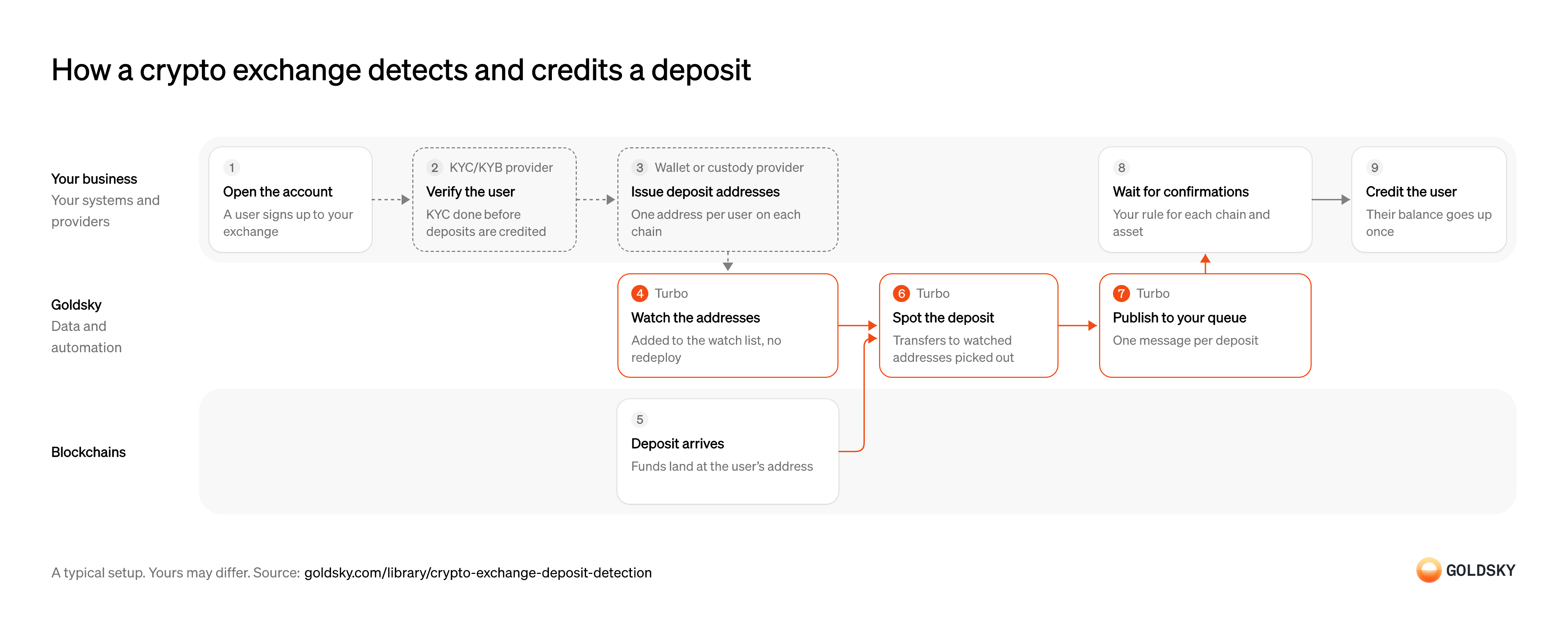
How a crypto exchange detects and credits a deposit
The diagram follows one deposit from the user opening an account to the exchange crediting their balance, and shows who does each step. Your setup may differ.
Open the user’s account
Every deposit is credited to a user, so the account comes first.
Your platform creates the account record that deposits will be credited to. Without a stable user ID, a deposit has nowhere to go and support ends up placing it by hand.
Verify the user
An exchange has to know who a user is before it lets them move money through it.
Your KYC provider checks the user against your onboarding policy. If deposits are credited before the check clears, you hold funds from someone you haven’t approved and have to decide what to do with them.
Issue the user’s deposit addresses
Each user gets their own address on each chain you support, so a deposit there can only belong to them.
Your custody provider creates the addresses and holds their keys, and your platform records which user and asset each one belongs to. Arbitrum’s exchange checklist keys every detection rule off two sets: your deposit addresses and the token contracts you support, with their decimals.
Add the addresses to the watch list
Handled by Goldsky TurboYou only spot deposits to addresses you’re watching, so every new address goes on the list as soon as it’s issued.
The list grows with every sign-up and every new chain, without stopping anything that’s running. A gap between issuing an address and watching it means the user’s first deposit can arrive unnoticed.
With Goldsky, the watch list can be a Turbo Pipelines dynamic table, which lives in a Postgres database. Insert the new address and the running pipeline starts matching it, with no redeploy.
Learn about dynamic tables (opens in a new tab)Receive the deposit
The user funds their account by sending crypto to their deposit address, from another exchange or their own wallet.
The transfer is recorded in a block on the chain. For a short time the newest blocks can still be replaced, so a deposit seen once isn’t final yet.
Spot every deposit to a watched address
Handled by Goldsky TurboUsers expect a deposit to show up without opening a ticket.
Every incoming transfer to a watched address has to be recorded with the address, token, amount and transaction, including transfers made by another contract (an internal call). Arbitrum’s checklist lists internal calls and reorgs (the chain replacing its newest blocks) among the ways an exchange misses a deposit or credits one that never happened.
A Turbo Pipelines SQL transform keeps only transfers whose recipient is on the watch list, using
Build a deposit detection pipeline (opens in a new tab)dynamic_table_check(), and carries each match forward with its transaction hash and block.Publish each deposit to your queue
Handled by Goldsky TurboYour backend takes work from a queue, so each deposit should arrive there as one message.
A message can be delivered more than once after a network error or a restart, and a deposit the chain later undoes arrives as a correction. The consumer has to ignore repeats by a stable ID and apply corrections, or the same deposit is credited twice.
Turbo Pipelines can publish each deposit to a Kafka topic, keyed on the transfer
Set up the Kafka sink (opens in a new tab)id, and reorg corrections reach the same topic as delete records for your consumer to apply.Wait for enough confirmations
A deposit credited too early can be undone by the chain after the user has traded or withdrawn it.
Set a confirmation depth for each chain and asset, or wait for the chain’s finalized block where it has one, and hold the deposit as pending until then. Kraken, for example, credits Bitcoin after three confirmations, about 45 minutes.
Credit the user’s balance
The deposit is done for the user only when it shows in their balance.
Your ledger looks up the user who owns the receiving address and credits the deposit once, keyed on the transfer ID. A deposit the chain removed before it was credited is dropped, not credited.
Related jobs
Issue the account’s funding address
Each customer sends stablecoins to an address of their own, so a deposit there can only belong to their account.
Your custody provider creates an address for each supported stablecoin and chain, and your platform records which account it funds. Customers send from wallets you don’t control, so the address is the only thing that ties a deposit to them.
Watch the funding addresses
Handled by Goldsky TurboFunding works around the clock, so new addresses have to be watched the moment they’re issued.
The list grows with every customer and every chain you add, without stopping anything that’s running. A gap between issuing an address and watching it leaves a first deposit unnoticed.
With Goldsky, the funding addresses can sit in a Turbo Pipelines dynamic table, which lives in a Postgres database. Insert a new address and the running pipeline starts matching it, with no redeploy.
Learn about dynamic tables (opens in a new tab)Receive the stablecoins
The customer funds the account by sending supported stablecoins from an external wallet, at any hour.
The transfer is recorded in a block on the chain. For a short time the newest blocks can still be replaced, so a deposit seen once isn’t final yet.
Publish each funding deposit
Handled by Goldsky TurboScreening, conversion and the credit all start from one record of the deposit.
Every incoming transfer to a funding address is recorded with the token, amount, sender and transaction. A message can arrive twice, and a deposit the chain later undoes arrives as a correction, so the consumer ignores repeats and applies corrections.
Goldsky’s Turbo Pipelines keeps transfers whose
Set up the Kafka sink (opens in a new tab)recipientis a funding address and publishes each to a Kafka topic keyed on the transferid; reorg corrections reach the same topic for your consumer to apply.Screen, check limits and convert
A regulated platform has to check where the money came from before it can be traded, and trading runs in dollars.
The funding provider screens the sending wallet, monitors the transaction, applies the limits you set and converts the stablecoins into dollars. A deposit that fails a check is held for review instead of credited.
Credit the account for trading
The customer can trade once the dollars show as buying power.
Your ledger credits the converted amount to the account that owns the address, once, keyed on the transfer ID and after the deposit is final by your rule. A deposit the chain removed before it was credited is dropped, not credited.
Set the chains and tokens you credit
A deposit is only on the wrong network measured against the chains and tokens you accept, so that list comes first.
Your platform shows customers the one chain to use for each asset on its deposit page, and credits only deposits that match. Anything sent another way isn’t credited automatically, so the customer sees no balance and assumes the money is lost.
Receive a deposit on a chain you don’t credit
Many chains share one address format, so a customer can send to their correct deposit address on the wrong chain.
The transfer lands at the customer’s address on that other chain, and the funds are there, but a deposit system that watches only your supported chains never sees it. Where the address format is shared, the key you already hold controls the address on the other chain too, which is why recovery is sometimes possible.
Watch your deposit addresses on other chains
Handled by Goldsky TurboYou only find misdirected deposits if something looks for your addresses on the chains you don’t credit.
The watch list is the set of deposit addresses you already issue, checked on each chain that shares their format, and it has to grow as new addresses are issued. An address missing from the list leaves its misdirected deposit unnoticed until the customer complains.
With Goldsky, the deposit addresses can sit in a Turbo Pipelines dynamic table, which lives in a Postgres database, and the pipeline reads the transfer dataset for each other chain you want covered. Insert a new address and the running pipeline starts matching it, with no redeploy.
Learn about dynamic tables (opens in a new tab)Spot each transfer to a watched address
Handled by Goldsky TurboSupport needs to know a customer’s money landed somewhere you don’t credit before the customer has to ask.
Each incoming transfer on those chains has to be recorded with the chain, token, amount, sender and transaction hash, because recovery starts from those details. Tokens you don’t list at all are worth catching too, since to the customer they look like any other deposit.
A Turbo Pipelines SQL transform keeps only transfers whose
Build a deposit detection pipeline (opens in a new tab)recipientis on the watch list, usingdynamic_table_check(), and carries each match forward with its transaction hash and block.Send each one to your support queue
Handled by Goldsky TurboSupport works from a queue, so each misdirected deposit should arrive there as one case.
Delivery can repeat after a network error, so the queue has to ignore a case it already has by a stable ID. A reorg (the chain replacing its newest blocks) can also undo a transfer after the case opens, so check it against the chain before anyone acts on it.
Goldsky’s webhook sink posts each match to the endpoint you choose and retries server errors and timeouts, so your queue should dedupe on the row
Set up the webhook sink (opens in a new tab)id.Contact the customer
The customer may not know the deposit went astray, and recovery needs details only they can confirm.
Support tells the customer what arrived and on which chain, and asks them to confirm the transaction and agree that the funds can go back to the address they came from. Where you charge a recovery fee, the customer agrees to it before any work starts.
Recover or return the funds
Moving the funds takes the key for the address on that chain, which stays with whoever holds your keys.
Your custody provider or team checks each case, then credits the funds or sends them back to the address they came from. Whether recovery works depends on the chain and the token, and some deposits can’t be recovered, so record the outcome on the case either way.
List your hot wallets
Handled by Goldsky TurboEvery withdrawal leaves from one of your hot wallets, so those addresses define what to watch.
The list changes as wallets are added or rotated, and it has to stay current without stopping anything that’s running. A hot wallet missing from the list is one whose outflows nobody sees.
With Goldsky, the hot wallets can sit in a Turbo Pipelines dynamic table, which lives in a Postgres database, and the pipeline filters on the transfer’s
Learn about dynamic tables (opens in a new tab)senderinstead of itsrecipient.Sign and send the withdrawal
A withdrawal is a transfer from your hot wallet to the customer’s address, signed under your policy.
Your custody provider signs approved withdrawals; some are held for manual review first, and the customer can see a pending withdrawal in their account. Record the transaction hash with the request as soon as it’s sent, because that hash is how the outflow is matched later.
The withdrawal settles onchain
The withdrawal is done only once the chain has accepted it and can no longer undo it.
A transaction can revert, be dropped or be replaced in a reorg (the chain replacing its newest blocks). Mark it complete only when its receipt shows success and its block is final by your rule.
Record every outflow from a hot wallet
Handled by Goldsky TurboYou can only tie outflows to requests, and spot ones nobody asked for, if every outflow is on record.
Each transfer leaving a hot wallet is written with the token, amount, recipient and transaction hash. A row repeated after a network error, or undone by a reorg, has to correct the table rather than add to it.
Goldsky’s Postgres sink writes each outflow as an upsert on its
Set up the Postgres sink (opens in a new tab)id, and reorg corrections arrive as updates and deletes to the same rows, so the table follows the canonical chain.Alert on outflows above your limit
Handled by Goldsky TurboA large outflow is worth a look the moment it happens, before any request has been matched.
Set a limit per token and send any single outflow above it to the team on call. Rules about a pattern over time, such as total outflow in an hour, need the rows in your database rather than one transfer at a time.
A SQL filter in the same Turbo Pipelines pipeline sends rows over your limit to a webhook sink. The webhook fires when the transfer is seen, before it’s final, so whatever it starts checks the chain first.
Set up the webhook sink (opens in a new tab)Match each outflow to a withdrawal request
Every transfer out should belong to a request, and one that doesn’t may mean a key used outside your process.
Your backend joins the outflow rows to requests on the transaction hash, marks each withdrawal complete once final and shows its status to the customer. An outflow with no request, or a request with no outflow, goes to someone who investigates it, so anomalous activity is caught and answered rather than only logged.
What you control
- Your team
- Open the user’s account
- Wait for enough confirmations
- Credit the user’s balance
- Your providers
- KYC/KYB provider
- Wallet or custody provider
Security and deployment
- SOC 2 Type IIIndependently audited security controls.
- Dedicated infrastructureSingle-tenant options for production workloads.
- Data residencyCloud, on-premises or co-located.
More use cases that detect deposits
- Deposit detectionSpot incoming stablecoin transfers to your customers’ wallets and credit them once confirmed.
- Stablecoin wallet top-upsCredit a user’s app balance when a stablecoin transfer to their embedded wallet confirms.
- Stablecoin deposits to business bank accountsDetect stablecoin deposits into business bank and fintech accounts and post them to the account alongside fiat.
- Accept stablecoin paymentsConfirm stablecoin payments from shoppers and mark the order paid.
- Authorize and capture stablecoin paymentsHold a buyer’s stablecoins in an escrow contract at checkout, capture them to the merchant as orders ship, void what can’t be filled and refund after capture.
- Stablecoin off-rampsDetect the stablecoin a customer sends to cash out, so the provider can pay fiat to their bank account or card.
- Confirm x402 and agent stablecoin paymentsConfirm stablecoin payments that AI agents make, often per request, and keep each agent within its spending limits.
- Stablecoin subscription paymentsConfirm each scheduled stablecoin charge onchain and mark the subscription paid.
Use cases built the same way
- Stablecoin settlement for card networksSettle card-network obligations with issuers and acquirers in stablecoins across chains.
- Post onchain transfers to your ledgerPost each confirmed onchain transfer to the fintech’s own ledger, corrected for reorgs.
- Stablecoin card programsDetect stablecoin top-ups to the wallets that back a card program so spend limits update.
- Tokenized deposits for interbank settlementSettle payments between banks in tokenized deposits and tie each one to the core.
Detect and credit crypto exchange deposits with Goldsky
We’ll map it to your systems and show you what Goldsky runs, so your team builds the product, not the pipelines underneath it.
 Robinhood
 HyperEVM
 Arc
 Solana
 Ethereum
 Polymarket
 Base
 Tempo
 Bitcoin