Improve blockchain webhook reliability
What are blockchain webhooks?
Blockchain webhooks are HTTP callbacks that push onchain events, such as a transfer into a watched address, to your backend, and making them reliable means no missed webhooks, retries until your endpoint accepts each one and a correction when a reorg undoes an event.
Wallets, payment apps and custody platforms that credit users from a provider’s address activity webhooks depend on every one of those callbacks arriving, because a webhook that never comes, or comes late, is a deposit nobody credits on time.
You can improve blockchain webhook reliability three ways: replace your provider’s webhooks with a Turbo Pipelines pipeline that posts each event to your endpoint, run that pipeline beside your provider as a backup feed, or publish the events to a queue your services read.
Who uses blockchain webhooks?
Wallet apps, payment and on-ramp platforms, neobanks and custody providers that act on transfers a blockchain data provider pushes to their backend.
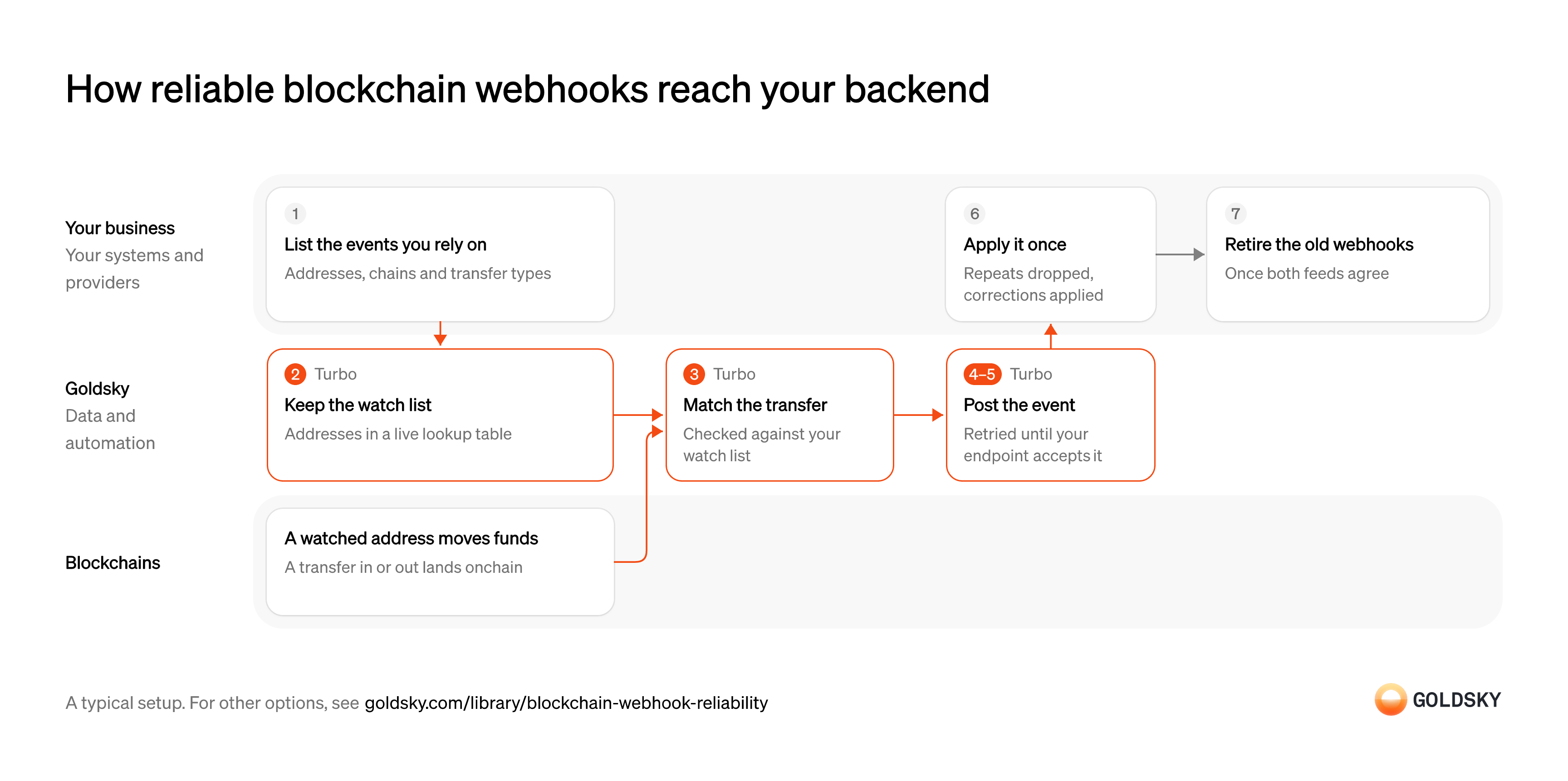
How reliable blockchain webhooks reach your backend
The diagram follows one transfer from a watched address on the chain to your backend applying it once, and shows who does each step. Your setup may differ.
Ways to improve blockchain webhook reliability
Replacing moves your events to one feed with retries and reorg corrections; a backup feed keeps your provider and adds redundancy, at the cost of deduping two feeds; a queue swaps HTTP delivery for topics your consumers read at their own pace.
- Best for
- Teams moving their address activity webhooks to one feed
- Products
- Turbo
- Your provider’s webhooks
- Replaced
- How events reach you
- Posted to your HTTPS endpoint
- Best for
- Teams that keep their provider and want redundancy beside it
- Products
- Turbo
- Your provider’s webhooks
- Kept; a second feed runs beside them
- How events reach you
- Two feeds to your endpoint, which keeps the first copy
- Best for
- High event volume, or several services reading the same events
- Products
- Turbo
- Your provider’s webhooks
- Replaced
- How events reach you
- Published to a Kafka topic your consumers read
| Usual setupOption 1: Replace provider webhooks | Option 2: Backup event feed | Option 3: Stream to a queue | |
|---|---|---|---|
| Best for | Teams moving their address activity webhooks to one feed | Teams that keep their provider and want redundancy beside it | High event volume, or several services reading the same events |
| Products | Turbo | Turbo | Turbo |
| Your provider’s webhooks | Replaced | Kept; a second feed runs beside them | Replaced |
| How events reach you | Posted to your HTTPS endpoint | Two feeds to your endpoint, which keeps the first copy | Published to a Kafka topic your consumers read |
List the events you rely on today
A replacement only helps if it sends every event your backend acts on.
Pull the addresses, chains and kinds of transfer your current webhooks cover, such as native coin, token and NFT transfers, and note what your endpoint does with each. An event type nobody listed is the deposit that stops being credited after the switch.
Keep the watch list where the pipeline reads it
Handled by Goldsky TurboWebhooks fire only for the addresses you watch, and that list changes every time a user gets a new wallet.
New addresses have to be watched from the moment they’re issued, and removed ones dropped. A list that only updates on a redeploy misses the first deposit to every new wallet.
With Goldsky, the watch list lives in a Turbo Pipelines dynamic table backed by Postgres, so adding an address is a SQL insert and the running pipeline picks it up without a redeploy.
Learn about dynamic tables (opens in a new tab)Match transfers to your addresses
Handled by Goldsky TurboEvery block holds transfers for addresses you don’t care about, so only the ones touching your list should reach your backend.
Each transfer is checked against the list on both sides, sender and recipient, for every kind of transfer you rely on. Matching only token transfers misses native coin sent by a contract, which shows up only in the chain’s traces.
A Turbo Pipelines SQL transform keeps the transfers whose sender or recipient is on the list with
Filter transfers with dynamic tables (opens in a new tab)dynamic_table_check(), reading Goldsky’s curated ERC-20, ERC-721, ERC-1155 and native transfer datasets; native transfers include internal transactions on chains with traces.Post each event to your endpoint, with retries
Handled by Goldsky TurboA webhook that fails once and is never sent again is the missed event you’re trying to stop.
While your endpoint is down or slow, events have to wait and be resent, not dropped. Your endpoint confirms each one only after storing it, so a crash between receiving and storing leads to a resend rather than a loss.
Goldsky’s Turbo Pipelines webhook sink posts rows as JSON and retries network errors, timeouts,
Set up the webhook sink (opens in a new tab)408,429and any5xxindefinitely with exponential backoff, slowing the pipeline to your endpoint’s pace rather than dropping data. Any other4xxstops the pipeline, so return one only for a request you never want resent.Send a correction when a reorg undoes an event
Handled by Goldsky TurboThe chain sometimes replaces its newest blocks, and a transfer in a dropped block may never have happened.
Your backend has to hear about the undone event, not just stop seeing it, so it can reverse a credit it already made. A feed that goes quiet after a reorg leaves balances the chain no longer backs.
Goldsky checks the block-hash chain as it ingests and sends deletes and updates through the pipeline after a reorg. Each webhook payload carries the
How reorg corrections propagate (opens in a new tab)_gs_opsystem column,dfor a delete, so your endpoint can tell a correction from a new transfer and apply it.Apply each event once
At-least-once delivery means a retried batch can arrive twice, and a deposit credited twice is money lost.
Store a stable ID for every event you’ve applied and skip any you’ve already seen, then apply corrections against the same ID. A credit that runs on every request, with no check, turns each retry into a duplicate payment.
Retire the old webhooks
Once the pipeline has carried your events long enough to trust, the provider’s webhooks are a second cost.
Run both for a period and compare what each sent, then switch the old webhooks off or keep them as a backup feed. Switching off before comparing hides any event type the new feed doesn’t cover.
What to know about replacing provider webhooks
- Delivery is at least once and nothing deduplicates webhooks on the way, so your endpoint drops repeats on a stable ID.
- Reorg corrections arrive as records, and your endpoint reverses or updates what it already applied.
- Any
4xxother than408or429stops the pipeline, so return a success code for payloads you park for review. - The watch list is a Postgres table you write to, so address changes don’t need a redeploy.
Keep your provider’s webhooks on
The backup only adds redundancy if the main feed keeps running.
Leave the provider’s webhooks pointed at your endpoint, and note which fields in its payload identify the chain, transaction and log. You need those fields to match its events with the second feed’s.
Keep the watch list where the pipeline reads it
Handled by Goldsky TurboWebhooks fire only for the addresses you watch, and that list changes every time a user gets a new wallet.
New addresses have to be watched from the moment they’re issued, and removed ones dropped. A list that only updates on a redeploy misses the first deposit to every new wallet.
With Goldsky, the watch list lives in a Turbo Pipelines dynamic table backed by Postgres, so adding an address is a SQL insert and the running pipeline picks it up without a redeploy.
Learn about dynamic tables (opens in a new tab)Match transfers to your addresses
Handled by Goldsky TurboEvery block holds transfers for addresses you don’t care about, so only the ones touching your list should reach your backend.
Each transfer is checked against the list on both sides, sender and recipient, for every kind of transfer you rely on. Matching only token transfers misses native coin sent by a contract, which shows up only in the chain’s traces.
A Turbo Pipelines SQL transform keeps the transfers whose sender or recipient is on the list with
Filter transfers with dynamic tables (opens in a new tab)dynamic_table_check(), reading Goldsky’s curated ERC-20, ERC-721, ERC-1155 and native transfer datasets; native transfers include internal transactions on chains with traces.Post the same events as a second feed
Handled by Goldsky TurboA second sender only helps if it keeps running when the first one stops.
The backup has to cover the same addresses, chains and transfer types as the main feed, and run on separate infrastructure. A backup that shares the main provider’s systems goes down with it.
A running Turbo Pipelines pipeline posts each matching transfer to your endpoint through its webhook sink, retrying failures with backoff, and a custom header on every request lets your endpoint tell the two feeds apart.
Set up the webhook sink (opens in a new tab)Send a correction when a reorg undoes an event
Handled by Goldsky TurboThe chain sometimes replaces its newest blocks, and a transfer in a dropped block may never have happened.
Your backend has to hear about the undone event, not just stop seeing it, so it can reverse a credit it already made. A feed that goes quiet after a reorg leaves balances the chain no longer backs.
Goldsky checks the block-hash chain as it ingests and sends deletes and updates through the pipeline after a reorg. Each webhook payload carries the
How reorg corrections propagate (opens in a new tab)_gs_opsystem column,dfor a delete, so your endpoint can tell a correction from a new transfer and apply it.Key each event the same way in both feeds
Each sender has its own event IDs, so you need a key that both feeds share.
Build the key from chain facts both payloads carry, such as the chain, transaction hash and log index, with a separate rule for native transfers that have no log. Keying on either sender’s own ID lets the same deposit through twice.
Keep the first copy and drop the rest
Two feeds only add redundancy if your backend acts on each event once.
Your endpoint applies whichever copy arrives first, records its key and skips the second. If one feed sends a reorg correction the other doesn’t, apply it and flag the event for a look.
Watch for gaps between the feeds
An event only one feed sent shows you which one missed it.
Count the keys that arrived from only one source after a set delay, and alert when the count rises. Without that check, the backup hides a failing feed until the day both miss the same event.
What to know about a backup event feed
- Every event arrives twice in normal times, so both feeds need one shared key built from the chain, not from either sender’s IDs.
- You run and pay for two feeds, and keep both watch lists the same.
- An event only one feed sent is your earliest sign that the other missed it.
- If your provider’s RPC fails along with its webhooks, RPC failover covers the calls; this way covers the events.
Set up the topic and its consumers
A queue only helps if the services that act on events read from it.
Pick the topic, its partition count and the services that consume it, and decide how long messages are kept. A topic with too few partitions caps how many consumers can read in parallel.
Keep the watch list where the pipeline reads it
Handled by Goldsky TurboWebhooks fire only for the addresses you watch, and that list changes every time a user gets a new wallet.
New addresses have to be watched from the moment they’re issued, and removed ones dropped. A list that only updates on a redeploy misses the first deposit to every new wallet.
With Goldsky, the watch list lives in a Turbo Pipelines dynamic table backed by Postgres, so adding an address is a SQL insert and the running pipeline picks it up without a redeploy.
Learn about dynamic tables (opens in a new tab)Match transfers to your addresses
Handled by Goldsky TurboEvery block holds transfers for addresses you don’t care about, so only the ones touching your list should reach your backend.
Each transfer is checked against the list on both sides, sender and recipient, for every kind of transfer you rely on. Matching only token transfers misses native coin sent by a contract, which shows up only in the chain’s traces.
A Turbo Pipelines SQL transform keeps the transfers whose sender or recipient is on the list with
Filter transfers with dynamic tables (opens in a new tab)dynamic_table_check(), reading Goldsky’s curated ERC-20, ERC-721, ERC-1155 and native transfer datasets; native transfers include internal transactions on chains with traces.Publish each event to the topic
Handled by Goldsky TurboA queue holds events until consumers take them, so a slow or restarting service doesn’t lose any.
Each event needs a key, so repeats and corrections for the same event land on the same partition in order. Messages without a key can be read out of order and are harder to drop as repeats.
Goldsky’s Turbo Pipelines Kafka sink publishes rows as Avro or JSON with
Set up the Kafka sink (opens in a new tab)acks=all, keys each message on theprimary_keyand keeps order per key; Amazon SQS and Google Cloud Pub/Sub sinks work for teams on those clouds.Mark corrections after a reorg
Handled by Goldsky TurboA consumer can only reverse an undone transfer if the message says it’s a reversal.
Each message has to say whether it adds, changes or removes an event. Without that, a correction looks like a second deposit.
Each Kafka message carries a
Read the operation header (opens in a new tab)dbz.opheader ofc,uordfor insert, update or delete, so a correction after a reorg arrives as a message your consumer applies.Consume each event once
At-least-once delivery can repeat a message, and a consumer that acts twice credits twice.
Consumers record the key of each event they apply and skip repeats, and apply updates and deletes against the same key. A consumer that only handles inserts keeps events a reorg removed.
What to know about streaming events to a queue
- Kafka has no upsert, so consumers drop repeats on the message key.
- Order holds per message key, not across keys.
- A topic Goldsky creates with a primary key is compacted, so it keeps only the latest message per key.
- Reorg corrections arrive as messages marked as updates or deletes, which consumers apply themselves.
What you control
- Your team
- List the events you rely on today
- Apply each event once
- Retire the old webhooks
Security and deployment
- SOC 2 Type IIIndependently audited security controls.
- Dedicated infrastructureSingle-tenant options for production workloads.
- Data residencyCloud, on-premises or co-located.
More use cases that access chains reliably
- Archive node RPCRead any past state through archive RPC.
- Archive RPC and indexing for a new chainGive a new chain archive RPC and indexing from mainnet day one.
- RPC and indexed data for a payments blockchainProvide RPC and indexed data for a chain run by a fintech.
- Improve RPC uptime and reliability with failoverRun a second data provider behind the incumbent and fail over when it drops data.
- Optimize your RPC endpoints and cut RPC costsAutomatically optimize your RPC endpoints and lower billable calls while keeping your current provider.
- Improve blockchain data API reliability and coverageKeep wallet balances, transfers and token prices arriving when a third-party blockchain data API has an outage, rate limits you, lacks a chain or returns wrong balances.
- Improve subgraph uptime and reliability with failoverKeep app screens up when a hosted subgraph lags, stops syncing or goes down, with a backup to fail queries over to.
Use cases built the same way
- Stablecoin wallet top-upsCredit a user’s app balance when a stablecoin transfer to their embedded wallet confirms.
- Accept stablecoin paymentsConfirm stablecoin payments from shoppers and mark the order paid.
- Stablecoin card programsDetect stablecoin top-ups to the wallets that back a card program so spend limits update.
- Stablecoin deposits to business bank accountsDetect stablecoin deposits into business bank and fintech accounts and post them to the account alongside fiat.
Improve blockchain webhook reliability with Goldsky
We’ll map it to your systems and show you what Goldsky runs, so your team builds the product, not the pipelines underneath it.
 Robinhood
 HyperEVM
 Arc
 Solana
 Ethereum
 Polymarket
 Base
 Tempo
 Bitcoin