Improve subgraph uptime and reliability with failover
What is subgraph failover?
Subgraph failover means running a backup subgraph, a second and independently hosted copy of the subgraph your app reads, so GraphQL queries move to it when the main endpoint is down, not syncing or lagging behind the chain.
Front ends and dashboards that read from a single hosted subgraph depend on that host staying up and in sync, because indexing lag or an outage there turns into stale or empty screens for users, often with no error to show that anything is wrong, and a second copy is the redundancy that keeps those screens available.
You can improve subgraph uptime and reliability three ways: run a backup deployment of the same subgraph on Goldsky and fail GraphQL queries over to it, move the subgraph to Goldsky outright, or stream the same events into your own database with Turbo Pipelines so no third-party endpoint sits in your read path.
Who needs subgraph failover?
DeFi protocols, games, wallets and analytics dashboards whose screens read from a hosted subgraph and go stale or blank when it lags or goes down.
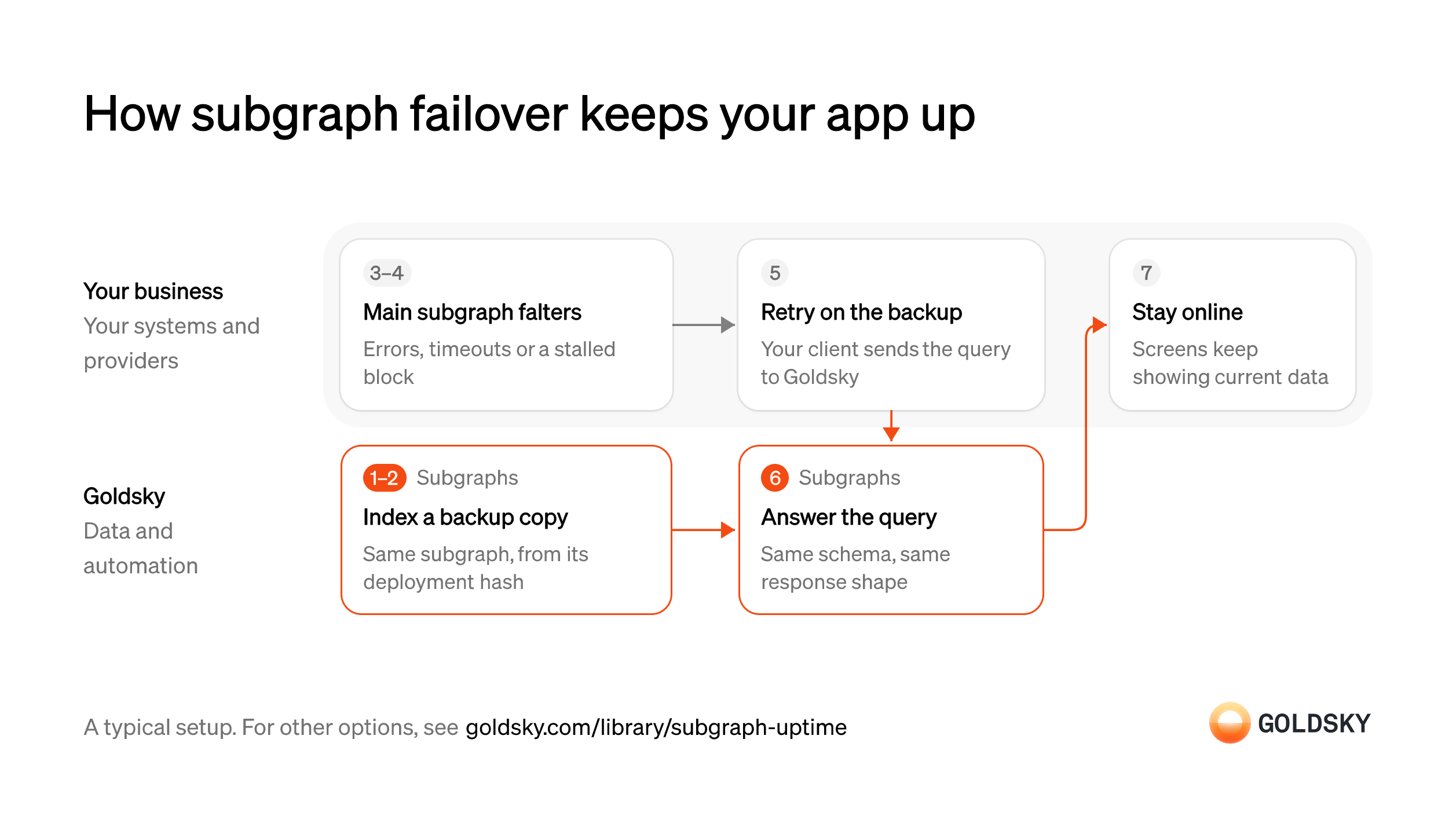
How subgraph failover keeps your app up
The diagram follows one query from the moment your main subgraph falls behind or stops answering to your app still serving users from the backup. Your setup may differ.
Ways to improve subgraph uptime and reliability
A backup subgraph keeps your current host and adds a second endpoint behind it. Moving replaces the host with Goldsky, which indexes through load-balanced RPC nodes and alerts your team when a subgraph stalls. Streaming takes the hosted endpoint out of the read path, so your app reads a database you run.
- Best for
- Apps that keep their subgraph host and need a backup
- Products
- Subgraphs
- What you run
- Nothing; Goldsky runs indexing, storage and the API
- What you write
- A schema and mapping handlers, or a no-code or low-code config for simple contracts
- Where your data lives
- Hosted by Goldsky
- How results reach you
- You query; changes are pushed
- Best for
- Teams replacing an unreliable subgraph host in one move
- Products
- Subgraphs
- What you run
- Nothing; Goldsky runs indexing, storage and the API
- What you write
- A schema and mapping handlers, or a no-code or low-code config for simple contracts
- Where your data lives
- Hosted by Goldsky
- How results reach you
- You query; changes are pushed
- Best for
- Teams that want no third-party endpoint in the read path
- Products
- Turbo
- What you run
- The destination: your database, queue or bucket, or a Postgres database Goldsky hosts
- What you write
- Pipeline YAML and SQL; TypeScript transforms when needed
- Where your data lives
- In your own database or systems
- How results reach you
- Pushed to you
| Usual setupOption 1: Backup subgraph | Option 2: Move the subgraph to Goldsky | Option 3: Stream to your database | |
|---|---|---|---|
| Best for | Apps that keep their subgraph host and need a backup | Teams replacing an unreliable subgraph host in one move | Teams that want no third-party endpoint in the read path |
| Products | Subgraphs | Subgraphs | Turbo |
| What you run | Nothing; Goldsky runs indexing, storage and the API | Nothing; Goldsky runs indexing, storage and the API | The destination: your database, queue or bucket, or a Postgres database Goldsky hosts |
| What you write | A schema and mapping handlers, or a no-code or low-code config for simple contracts | A schema and mapping handlers, or a no-code or low-code config for simple contracts | Pipeline YAML and SQL; TypeScript transforms when needed |
| Where your data lives | Hosted by Goldsky | Hosted by Goldsky | In your own database or systems |
| How results reach you | You query; changes are pushed | You query; changes are pushed | Pushed to you |
Deploy a second copy of the same subgraph
Handled by Goldsky SubgraphsA backup only helps if it answers the same queries as the main subgraph, so it has to run the same schema and mappings.
Deploy the exact version your app queries now, on a different host from the main one. A backup built from different code returns different fields or values, and failing over to it turns an outage into wrong data.
Goldsky Subgraphs can deploy a subgraph straight from its IPFS deployment hash with
Deploy a subgraph from its hash (opens in a new tab)goldsky subgraph deploy name/version --from-ipfs-hash, and you can read that hash from the main endpoint with a_meta { deployment }query.Let the backup catch up to the chain
Handled by Goldsky SubgraphsA new deployment indexes from the subgraph’s start block and is no use as a backup until it reaches the latest block.
Wait until the backup has indexed up to the chain tip before your client sends it traffic, then run a few real queries against both endpoints at the same block. A backup that is still syncing answers with old data.
If Goldsky has already indexed a subgraph with the same IPFS hash, the new deployment syncs instantly with its own endpoint; otherwise
Why a known subgraph syncs instantly (opens in a new tab)goldsky subgraph listand the dashboard show how far indexing has got.Keep your main subgraph as the first call
The backup sits behind your current host, so your app still sends its queries to the endpoint it already uses.
Your client holds both endpoints in order of preference, with the main one first. If each service or front end sets its own subgraph URL, a failover in one can leave another still querying the endpoint that’s down.
Notice when the main subgraph falls behind or fails
A subgraph that has stopped syncing still answers, just with old data, so your client needs a test beyond errors.
Set what counts as a failure: a timeout, a GraphQL error, or a latest indexed block, which every subgraph reports through its
_metafield, that stops moving or trails the chain by more than your app can accept. Checking the indexed block catches a subgraph that is not syncing even when every query succeeds.Retry failed queries on the backup
A query that failed or came back stale at the main endpoint has to be answered somewhere before the user notices.
Your client sends the same query to the backup endpoint, once, within the time your page can wait, or asks both and keeps the answer with the higher indexed block. Retrying the failing endpoint in a loop adds delay without an answer.
Answer from the backup index
Handled by Goldsky SubgraphsThe backup only helps if it responds in the same shape and is still following the chain.
The second endpoint has to return the same entities and fields as the main one, from an index that keeps up with new blocks. A backup that has stalled too leaves you with two endpoints that are both wrong.
Goldsky serves the backup over its own GraphQL endpoint and monitors every deployed subgraph for indexing progress, emailing your team when one stalls.
How Goldsky detects stalled subgraphs (opens in a new tab)Keep serving users through the outage
The point of the backup is that users see current data while the main subgraph is down or behind.
Your app serves from whichever endpoint answered and records which one it was, then returns to the main endpoint once it has caught up, by the rule you set. Without that record, support can’t explain a number that briefly looked different.
What to know about running a backup subgraph
- Your client decides when to fail over and when to return; Goldsky runs the second index and its endpoint.
- The backup is a second deployment, indexed and billed on its own.
- The two indexes reach each new block at slightly different moments, so a response can differ by a few blocks depending on which endpoint answered.
- Pointing your client at a tag rather than a version lets you ship a new version of the backup without changing the client.
List the subgraphs behind the screens that break
The subgraphs worth moving first are the ones whose lag or downtime your users already see.
Find each subgraph your app and dashboards query, its deployment hash, and which screens went stale in recent incidents. A dashboard nobody listed keeps its outages after the move.
Redeploy each subgraph with the same code
Handled by Goldsky SubgraphsKeeping the same schema and mappings is what lets your queries work unchanged on the new host.
Deploy the exact version your app uses now and let it index to the chain tip before anyone queries it. Changing the schema during the move means rewriting queries as well.
Goldsky Subgraphs deploys a subgraph from its IPFS deployment hash with
Redeploy a subgraph from its hash (opens in a new tab)goldsky subgraph deploy name/version --from-ipfs-hash, andgoldsky subgraph listshows its indexing progress.Index through redundant RPC nodes
Handled by Goldsky SubgraphsMuch indexing lag starts upstream, when the node a subgraph reads blocks and calls from slows down or fails.
The indexer needs more than one source for blocks, logs and contract calls, chosen by how each is responding. An indexer tied to one node stalls whenever that node does.
Goldsky proxies all subgraph data ingestion through a load balancer of RPC endpoints and prioritizes between them by latency, time of day and historical responsiveness.
How Subgraphs balance RPC load (opens in a new tab)Catch stalls and bad data early
Handled by Goldsky SubgraphsA subgraph can stop syncing because of a mapping error or bad chain data, and someone has to notice before users do.
You need an alert when indexing stops making progress and a way to repair data a reorg corrupted. Without them, the first sign of a stalled subgraph is a user report.
Goldsky emails every team member on the project when a subgraph stops making indexing progress and may pause it if it stays stalled, so you can fix the mapping and resume or redeploy.
What happens when a subgraph stalls (opens in a new tab)Serve the API behind a stable endpoint
Handled by Goldsky SubgraphsYour app needs one URL that keeps working when you ship a fix or a new version later.
The endpoint has to stay the same across versions, or every release means another config change and another chance to point a screen at the wrong index.
Goldsky serves the same subgraph API your app already uses, and a tag such as
Point a tag at a version (opens in a new tab)prodkeeps one GraphQL endpoint that you repoint to a new version withgoldsky subgraph tag create.Switch the app over
Uptime improves only when users read from the new endpoint.
Compare your app’s real queries against both endpoints at the same block, then change the subgraph URL in the app’s config and watch for errors. Keep the old endpoint as a fallback in your client if you want a second host behind the first.
What to know about moving a subgraph to a new host
- Goldsky runs indexing, the RPC layer behind it and stall monitoring; you keep the subgraph code and decide when to switch.
- The schema and queries stay as they are; the endpoint URL is what changes.
- With one host, its availability is your app’s, so keep the old endpoint as a client-side fallback if you want a second line.
List what the subgraph indexes
The stream has to cover the same contracts, events and history your app reads today.
Pull the subgraph’s contracts, events and start blocks from its manifest, and note mapping logic that builds totals or links records. Logic you don’t rebuild in your database leaves the new tables unable to answer the same questions.
Backfill the contracts’ history
Handled by Goldsky TurboYour database has to hold every past event the subgraph held before your app can read from it.
The backfill starts at each contract’s start block and covers every event up to now. Scanning every block of the chain for a handful of contracts is slow, and a gap shows up later as missing records in the app.
With a source
Speed up backfills with fast scan (opens in a new tab)filteron the contract addresses andstart_at: earliest, Turbo Pipelines uses fast scan to skip blocks that hold none of your events during the backfill, then keeps streaming at the chain tip.Decode the events
Handled by Goldsky TurboRaw logs are encoded, so each event has to be turned into named fields before your app can query it.
Each contract’s events are decoded with its ABI into the columns your queries need. A wrong ABI decodes into nonsense without an error, so check a few rows against a block explorer.
A Turbo Pipelines SQL transform decodes raw logs on the fly with
Decode contract events with an ABI (opens in a new tab)_gs_log_decodeand the contract’s ABI, so one pass can decode every event a contract emits and fan them out to a table per event.Stream new events into your database
Handled by Goldsky TurboAfter the backfill, every new event has to reach the same tables, or your app falls behind the chain.
New rows have to arrive as the chain moves, and rows from blocks a reorg replaced have to be corrected. Without corrections, the app shows events that no longer exist.
Turbo Pipelines delivers every record at least once and passes reorg corrections through as updates and deletes to Postgres, ClickHouse or MySQL tables keyed by a
How reorgs reach your tables (opens in a new tab)primary_key.Watch how far behind the chain your tables are
Handled by Goldsky TurboWith no hosted endpoint to check, lag shows up as how old the newest row in your database is.
Track how many seconds the newest stored block trails the chain tip, and alert before it reaches what your app can accept. A slow database often causes the lag, not the chain.
The Turbo Pipelines health dashboard shows each pipeline’s block lag behind the chain tip and its sink flush latency, and you can set Slack or email alerts on those metrics.
Read pipeline block lag (opens in a new tab)Serve the data from your own API
Your app used to query a subgraph endpoint, so it now needs an endpoint on your database.
Your team rebuilds the queries the app makes against your tables and keeps the API running under your traffic. Compare responses with the subgraph while it still runs, then remove its URL from the app.
What to know about streaming in place of a hosted subgraph
- Your app reads only your database, so its availability is that of your database and API, which your team runs.
- If the pipeline falls behind, your app still serves what is already in the tables, so lag shows as slightly old data rather than failed queries.
- Your app’s GraphQL queries have to be rewritten against the new API, and mapping logic that links records moves into SQL in your database.
- Tables with a primary key take reorg corrections as updates and deletes.
What you control
- Your team
- Keep your main subgraph as the first call
- Notice when the main subgraph falls behind or fails
- Retry failed queries on the backup
- Keep serving users through the outage
Security and deployment
- SOC 2 Type IIIndependently audited security controls.
- Dedicated infrastructureSingle-tenant options for production workloads.
- Data residencyCloud, on-premises or co-located.
More use cases that access chains reliably
- Archive node RPCRead any past state through archive RPC.
- Archive RPC and indexing for a new chainGive a new chain archive RPC and indexing from mainnet day one.
- RPC and indexed data for a payments blockchainProvide RPC and indexed data for a chain run by a fintech.
- Improve RPC uptime and reliability with failoverRun a second data provider behind the incumbent and fail over when it drops data.
- Optimize your RPC endpoints and cut RPC costsAutomatically optimize your RPC endpoints and lower billable calls while keeping your current provider.
- Improve blockchain data API reliability and coverageKeep wallet balances, transfers and token prices arriving when a third-party blockchain data API has an outage, rate limits you, lacks a chain or returns wrong balances.
- Improve blockchain webhook reliabilityKeep onchain event notifications arriving at your backend, with retries, reorg corrections and a backup feed.
Use cases built the same way
- DeFi data for apps and dashboards: positions, TVL and yieldsShow users their positions, the protocol’s TVL and yields, pool and market data and activity history in a DeFi app’s front end and dashboards.
- How to build a subgraphWrite a schema and mappings for your contracts and serve the index over a hosted GraphQL API.
- Speed up subgraph indexing and queriesCut the time a subgraph takes to sync, reindex and answer queries.
- Migrate subgraphs off a retired or pricier indexerMove subgraphs and pipelines off a retired or pricier indexer.
Improve subgraph uptime with failover on Goldsky
We’ll map it to your systems and show you what Goldsky runs, so your team builds the product, not the pipelines underneath it.
 Robinhood
 HyperEVM
 Arc
 Solana
 Ethereum
 Polymarket
 Base
 Tempo
 Bitcoin