How to build a subgraph
What is a subgraph?
A subgraph is an index of a smart contract’s events: you describe the records you want, and an indexer turns each event into those records and serves them over a GraphQL API.
Teams building apps, wallets and chains use one so their front end can ask for only the data it shows without running an indexer or a database.
Goldsky hosts the subgraph, indexes the contract’s history, keeps it current and serves it at a public or private endpoint, with webhooks when records change; the schema, the mappings and the app that queries them are yours.
Who uses a subgraph?
DeFi teams, wallet apps, chain and rollup teams, and data firms that need a contract’s history behind an API.
How a subgraph gets built, deployed and queried
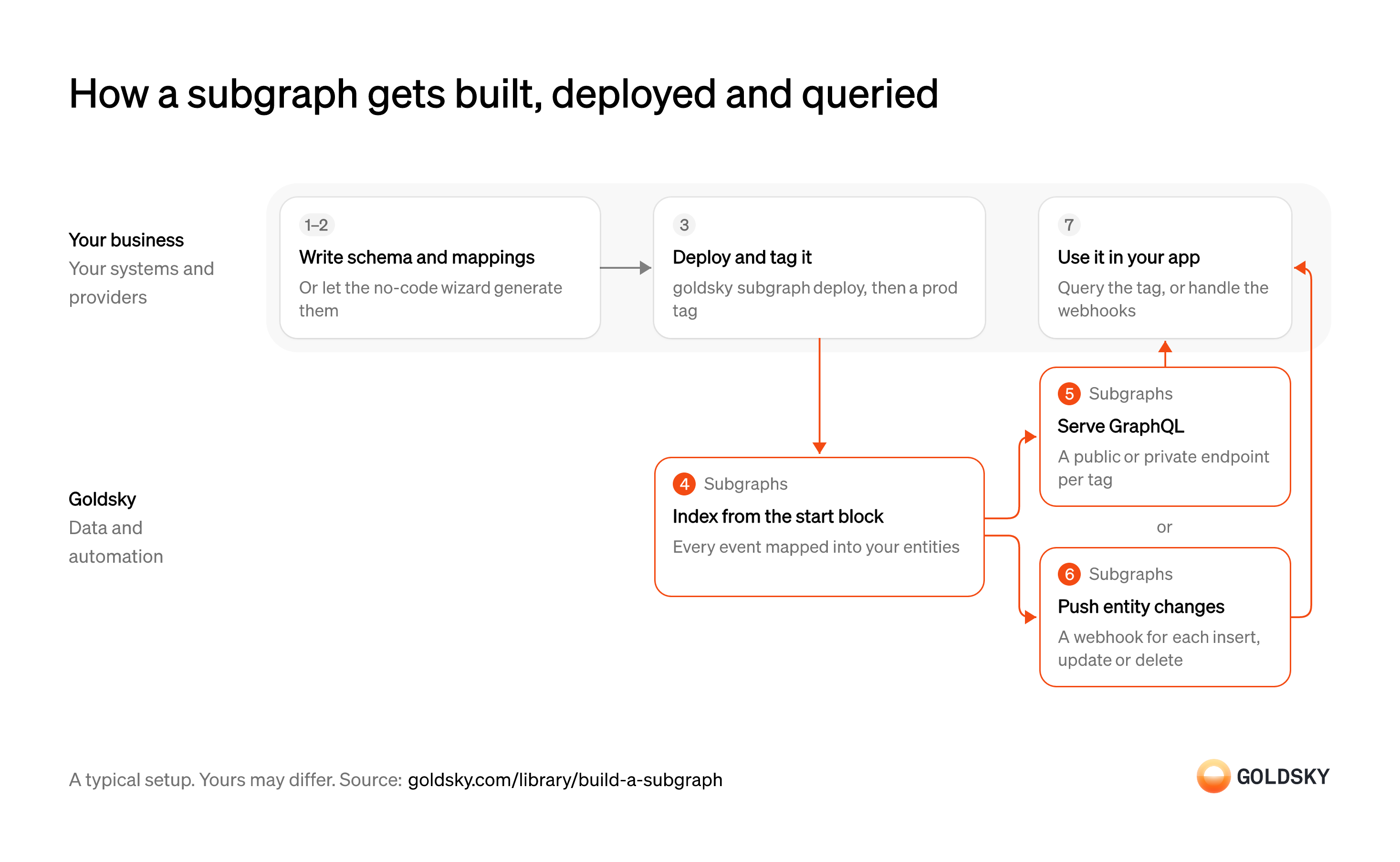
The diagram follows one subgraph from the schema and mappings you write to the app that queries it or handles its webhooks. Your setup may differ.
Install the CLI and log in
Every deploy goes through a command-line tool, and it needs to know which project to deploy into.
Install the tool on the machine or build server you deploy from and sign in to the right project. Deploy from the wrong project and the subgraph, its endpoint and its usage end up under another team’s account.
Define the schema and mappings
A subgraph has to know which contract events matter and how to turn each one into records your app can query.
The schema sets the records (entities) and their fields, and the mappings are the code that creates or updates them from each event. A field you leave out can’t be queried later without changing the subgraph and indexing again; if you only need the contract’s events as they are, a no-code wizard can write both from the contract address.
Deploy the subgraph
Deploying hands your subgraph to the service that will index it and answer queries.
Each deploy creates a new version that doesn’t change after it’s made, so the version your app uses keeps answering queries while a new one indexes.
Index the contract’s history from the start block
Handled by Goldsky SubgraphsYour app usually needs every past event too, so indexing starts from the block where the contract was deployed.
Every event from that block on runs through your mappings into records, then new blocks are added as they arrive; reading the same history by scanning raw logs over RPC gets slower and runs into provider limits as the block range grows. A start block set too late skips early history without warning; one set too early only makes indexing take longer.
Goldsky Subgraphs runs the same mapping code as other subgraph hosts, so an existing subgraph deploys unchanged with
Deploy a subgraph to Goldsky (opens in a new tab)goldsky subgraph deploy. If you use the no-code wizard, it looks up the start block for you when it can.Serve the index over GraphQL
Handled by Goldsky SubgraphsYour app reads the data by sending queries to a web address (an endpoint).
The endpoint has to keep answering while new blocks are indexed. An endpoint anyone can find can be queried by anyone, so data that isn’t meant to be public needs one that asks for a key.
Every subgraph and tag gets a hosted GraphQL endpoint in Subgraphs. Public endpoints are on by default, and you can turn on the private one so each request needs an API token in the
Set up public and private endpoints (opens in a new tab)Authorizationheader.Push record changes to your backend
Handled by Goldsky SubgraphsSome features, like a notification, need to react the moment data changes instead of asking over and over.
Each change has to reach your server with enough detail to tell a new record from an update, or from a rollback after a reorg. Changes can arrive out of order, so your server keeps its own last-updated time for each record and doesn’t rely on arrival order.
You can attach a webhook to any entity in Subgraphs, and it sends an
Set up subgraph webhooks (opens in a new tab)INSERT,UPDATEorDELETEpayload for every change. Each entity version carries ablock_range, which is how you tell a reorg rollback from an ordinary update.Query from your app through a tag
Your app needs one address that keeps working when you ship a new version of the subgraph.
Point the app at a stable name, then move that name to the new version once it has caught up. Hard-code a version number instead and every subgraph update becomes an app release too.
What you control
- Your team
- Install the CLI and log in
- Define the schema and mappings
- Deploy the subgraph
- Query from your app through a tag
Questions and answers
How do you create a subgraph?
You create a subgraph by writing a schema of the records you want and mappings that build them from contract events, then deploying it to an indexer. On Goldsky, the goldsky subgraph init command starts a no-code wizard that takes a contract address, fetches the ABI and generates the subgraph for you. When you need custom logic, write the schema and mappings yourself and deploy them with goldsky subgraph deploy; either way, you get a hosted GraphQL endpoint.
Security and deployment
- SOC 2 Type IIIndependently audited security controls.
- Dedicated infrastructureSingle-tenant options for production workloads.
- Data residencyCloud, on-premises or co-located.
More use cases that stream chain data to your systems
- Blockchain data in your own warehouseStream decoded chain data into your own warehouse for BI.
- Power a blockchain data productFeed a resold data product with multi-chain data and fast backfills.
- Blockchain indexing for app backendsKeep an app’s database in sync with the chain.
- Onchain data for index and benchmark calculationsSupply the onchain fundamentals an index or benchmark provider calculates from.
- Onchain data for risk ratings and scoringSupply wallet and protocol history to the models that rate DeFi risk or score borrowers.
- Speed up subgraph indexing and queriesCut the time a subgraph takes to sync, reindex and answer queries.
- Replace in-house blockchain ETL and cut its costRetire your own nodes and ETL jobs and load the same chain data tables from a managed pipeline.
Use cases built the same way
- DeFi data for apps and dashboards: positions, TVL and yieldsShow users their positions, the protocol’s TVL and yields, pool and market data and activity history in a DeFi app’s front end and dashboards.
- DeFi lending risk monitoringWatch collateral, liquidity and bad debt in lending markets and vaults, and cut caps before losses land.
- Improve subgraph uptime and reliability with failoverKeep app screens up when a hosted subgraph lags, stops syncing or goes down, with a backup to fail queries over to.
- Migrate subgraphs off a retired or pricier indexerMove subgraphs and pipelines off a retired or pricier indexer.
Build and host a subgraph with Goldsky
We’ll map it to your systems and show you what Goldsky runs, so your team builds the product, not the pipelines underneath it.
 Robinhood
 HyperEVM
 Arc
 Solana
 Ethereum
 Polymarket
 Base
 Tempo
 Bitcoin