Replace in-house blockchain ETL and cut its cost
What is in-house blockchain ETL?
In-house blockchain ETL is the nodes, indexers and scheduled jobs a data team runs itself to extract chain data, decode it and load it into a warehouse or database, and replacing it means loading the same tables from a managed data pipeline instead.
Exchanges, analytics firms and fintechs with their own ledger switch those nodes and jobs off when node costs, slow backfills, reorg fixes and on-call for the pipeline take more of the team’s time and budget than the data work itself.
You can replace in-house blockchain ETL two ways: stream decoded tables straight into your database or warehouse with Turbo Pipelines and retire the whole stack, or publish chain data to your own Kafka topics and keep the jobs that transform and load it.
Who runs in-house blockchain ETL?
Data and analytics firms, crypto exchanges and fintechs that run their own nodes and ETL jobs to keep chain data in their warehouse or database.
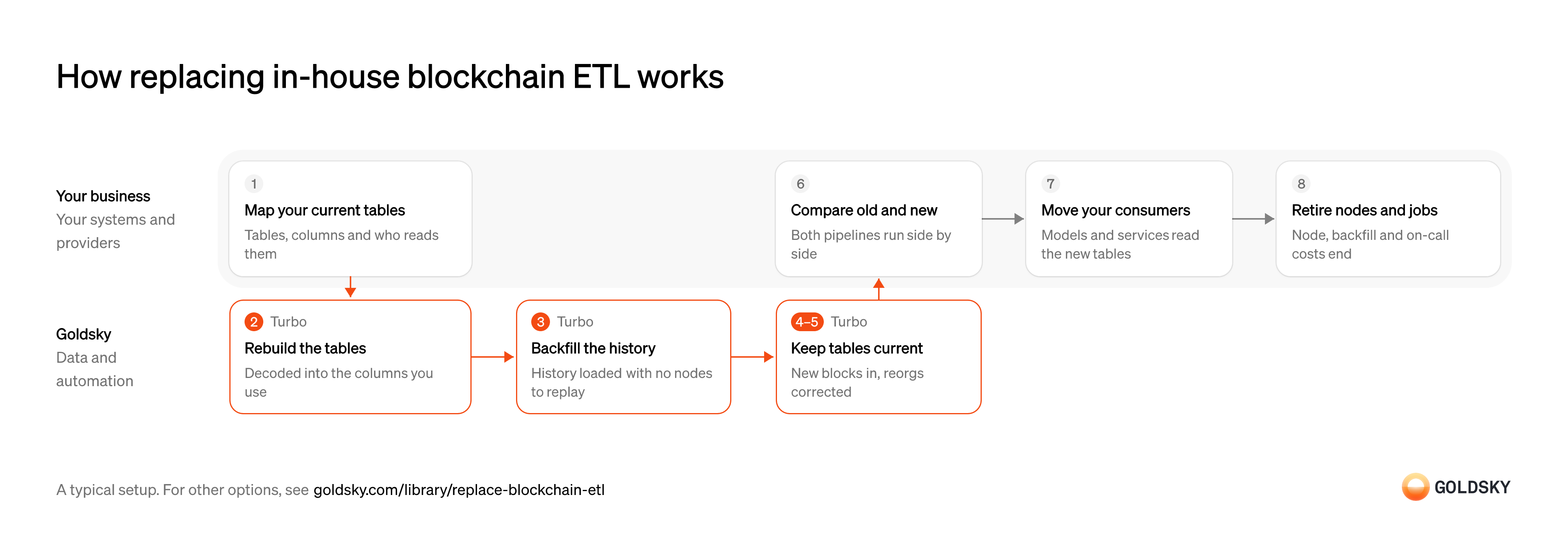
How replacing in-house blockchain ETL works
The diagram follows one migration from mapping the tables your ETL produces today to switching off the nodes and jobs behind them, and shows who does each step. Your setup may differ.
Ways to replace in-house blockchain ETL
Streaming to your tables retires the nodes, extractors and load jobs together; feeding your Kafka retires only the nodes and extractors, and your jobs keep deduping and loading.
- Best for
- Teams retiring the whole stack behind their chain data tables
- Products
- Turbo
- What you retire
- Nodes, extractors and load jobs
- Where the data lands
- Tables in your database or warehouse
- Best for
- Teams keeping their own transforms and replacing node-based extraction
- Products
- Turbo
- What you retire
- Nodes and extractors; your transform and load jobs stay
- Where the data lands
- Your Kafka topics, for your jobs to load
| Usual setupOption 1: Stream to your tables | Option 2: Feed your own load jobs | |
|---|---|---|
| Best for | Teams retiring the whole stack behind their chain data tables | Teams keeping their own transforms and replacing node-based extraction |
| Products | Turbo | Turbo |
| What you retire | Nodes, extractors and load jobs | Nodes and extractors; your transform and load jobs stay |
| Where the data lands | Tables in your database or warehouse | Your Kafka topics, for your jobs to load |
Map what your ETL produces today
A replacement is done when every table, column and consumer your current pipeline feeds is covered.
List each table with its chains, contracts, columns and update frequency, and the dashboards, models and services that read it. A column nobody listed is the one that breaks a report after the switch.
Rebuild the tables from decoded datasets
Handled by Goldsky TurboYour dashboards and models read particular tables and columns, so the new pipeline has to produce the same ones.
Each table needs the names, types and full-precision amounts it has now, or every model built on it changes too. Matching the old schema first and improving it later keeps the switch to one change at a time.
Turbo Pipelines reads Goldsky’s datasets for blocks, transactions, logs, traces and token transfers, and a SQL transform decodes your contracts’ logs with
Decode contract events (opens in a new tab)_gs_log_decode()and renames columns to match the tables you already have.Backfill history without your own nodes
Handled by Goldsky TurboYour tables hold history from each contract’s first block, so the replacement has to load it before it can take over.
The backfill has to cover the same block range as your current tables and hand over to new blocks without a gap. Replaying history through your own nodes is often the slowest and costliest part of running ETL yourself.
A Turbo Pipelines source with a
Run backfills in job mode (opens in a new tab)filteron your contract addresses andstart_at: earliestuses fast scan to skip unrelated blocks, and job mode runs a bounded block range as a one-time pipeline that exits once it’s written.Keep the tables current through reorgs
Handled by Goldsky TurboNew blocks keep arriving and the newest ones are sometimes replaced, so loaded rows need updates and deletes as well as inserts.
Rows from a block the chain later drops have to be removed or replaced, and a retried write must not add a row twice. ETL jobs that only append leave those rows behind.
Goldsky checks the block-hash chain as it ingests and sends deletes and updates through the pipeline after a reorg; Postgres, ClickHouse and MySQL sinks with a
How reorgs reach your tables (opens in a new tab)primary_keyapply them as upserts and deletes, so your tables converge on the canonical chain.Watch the pipeline instead of the nodes
Handled by Goldsky TurboSomeone still needs to know when data falls behind, but what they watch is one pipeline rather than a fleet of nodes and jobs.
Track how far the tables trail the chain and whether writes are failing, and alert the team that owns the data. Lag that grows while the source is healthy usually points at a slow destination, which is where to optimize first.
Goldsky’s health dashboard shows each pipeline’s block lag, checkpoint failures and sink flush latency, and enterprise projects can set alerts on them that go to Slack, email or PagerDuty.
Read the health dashboard (opens in a new tab)Run both pipelines and compare
You switch only once the new tables match the old ones.
Compare row counts per block range, totals per day and a sample of rows between old and new tables over a period of live data. A difference is either a gap in one pipeline or a reorg one of them didn’t correct, so check the chain before deciding which is right.
Move consumers to the new tables
The old pipeline can only go once nothing reads from it.
Point dashboards, models and services at the new tables one at a time, starting with the least critical. A consumer still reading the old tables keeps the old pipeline running.
Retire the nodes and ETL jobs
The running cost only goes away when the nodes, scheduled jobs and the on-call that watches them are switched off.
Shut down the nodes, extractors, backfill scripts and schedulers once nothing reads from them, and keep the old tables until the retention you need has passed. A node left running for one forgotten job keeps its full cost.
What to know about replacing your ETL with a streaming pipeline
- Postgres, ClickHouse and MySQL tables keyed on a
primary_keyabsorb repeats and reorg corrections; Parquet files are append-only, so the warehouse load dedupes on that key. - Goldsky has no native Snowflake, Databricks or BigQuery sink; those warehouses load the Parquet files with their own S3 ingestion.
- Fast scan and job mode speed up filtered EVM backfills; a full, unfiltered chain runs as a streaming pipeline from its first block and takes longer.
- You still run and pay for the destination, but no nodes, extractors or schedulers, and no node upgrades or extractor maintenance.
Find where your extractors hand off
The new source has to feed the same point your jobs read from today.
List the topics your extractors write, the fields each message carries and the jobs that read them. Jobs that read straight from a node, rather than a topic, need moving to a topic first.
Backfill history into the topics
Handled by Goldsky TurboYour jobs need the same history they load today, not just new blocks.
History and new blocks have to arrive in the same topics in the same shape, so your jobs don’t need a separate backfill path. A backfill sent somewhere else doubles the jobs you maintain.
A Turbo Pipelines source set to
Learn about fast scan (opens in a new tab)start_at: earliestreads a dataset from its first block and then keeps streaming, and afilteron contract addresses turns on fast scan so the backfill skips unrelated blocks.Publish chain data to your topics
Handled by Goldsky TurboYour jobs parse messages, so the pipeline has to write the kind your extractors did.
Each message carries a key, and its fields match what your jobs parse today, or the jobs change once to read the new shape. A shape that changes without notice breaks the jobs downstream.
Goldsky’s Turbo Pipelines Kafka sink publishes raw blocks, logs and traces or decoded rows as Avro or JSON, keys each message on the
Set up the Kafka sink (opens in a new tab)primary_key, and marks inserts, updates and deletes in adbz.opheader.Dedupe and apply corrections in your jobs
Delivery is at least once and the chain sometimes replaces blocks, so your jobs see repeats and reversals.
Your jobs skip messages whose key they’ve already loaded and apply update and delete messages to the tables they write. Jobs that only append keep rows from blocks a reorg replaced.
Compare the two sources
You switch your jobs over only once the new topics carry what the old ones did.
Run the new topics beside the old ones for a period and compare message counts per block range. A gap on either side is a missed block or an uncorrected reorg, so check the chain before deciding which is right.
Retire the nodes and extractors
The node and extraction costs only go away when those machines and scripts are switched off.
Point your jobs at the new topics, then shut down the nodes and extractors once nothing reads from them. A node left running for one forgotten job keeps its full cost.
What to know about feeding your own load jobs from Kafka
- You keep running the cluster and the jobs after it, so this cuts node and extractor costs, not the rest of the pipeline.
- Kafka has no upsert, so your jobs dedupe on the message key.
- Reorg corrections arrive as update and delete messages that your jobs apply to the tables they load.
- Avro schemas are registered with your schema registry automatically; JSON needs none.
What you control
- Your team
- Map what your ETL produces today
- Run both pipelines and compare
- Move consumers to the new tables
- Retire the nodes and ETL jobs
Security and deployment
- SOC 2 Type IIIndependently audited security controls.
- Dedicated infrastructureSingle-tenant options for production workloads.
- Data residencyCloud, on-premises or co-located.
More use cases that stream chain data to your systems
- Blockchain data in your own warehouseStream decoded chain data into your own warehouse for BI.
- Power a blockchain data productFeed a resold data product with multi-chain data and fast backfills.
- Blockchain indexing for app backendsKeep an app’s database in sync with the chain.
- Onchain data for index and benchmark calculationsSupply the onchain fundamentals an index or benchmark provider calculates from.
- Onchain data for risk ratings and scoringSupply wallet and protocol history to the models that rate DeFi risk or score borrowers.
- How to build a subgraphWrite a schema and mappings for your contracts and serve the index over a hosted GraphQL API.
- Speed up subgraph indexing and queriesCut the time a subgraph takes to sync, reindex and answer queries.
Use cases built the same way
- Authorize and capture stablecoin paymentsHold a buyer’s stablecoins in an escrow contract at checkout, capture them to the merchant as orders ship, void what can’t be filled and refund after capture.
- Programmable escrow for B2B stablecoin paymentsHold a buyer’s stablecoin payment until delivery, a milestone or a deadline, then release it to the seller or refund the buyer.
- Cross-chain transfer trackingSee every cross-chain stablecoin transfer as settled, in flight or stalled, and catch the stuck ones.
- Stablecoin mint and redemption monitoringRecord every mint and redemption of a stablecoin as it happens, on every chain.
Replace in-house blockchain ETL with Goldsky
We’ll map it to your systems and show you what Goldsky runs, so your team builds the product, not the pipelines underneath it.
 Robinhood
 HyperEVM
 Arc
 Solana
 Ethereum
 Polymarket
 Base
 Tempo
 Bitcoin