Migrate subgraphs off a retired or pricier indexer
What it is
Migrating subgraphs off a retired or pricier indexer means moving the schema, mappings and history behind your app’s GraphQL queries to a new host, or to your own database, after the old provider shuts down or raises its prices.
Teams whose apps and dashboards read from subgraphs have to do it before the old endpoint stops responding, or their screens go blank.
You can migrate subgraphs off a retired indexer two ways: redeploy the same subgraphs on Goldsky so your app’s GraphQL queries keep working, or stream the same events into your own database with Turbo Pipelines.
Who it’s for
DeFi protocols, games, consumer crypto apps and wallets whose front ends and dashboards read from hosted subgraphs.
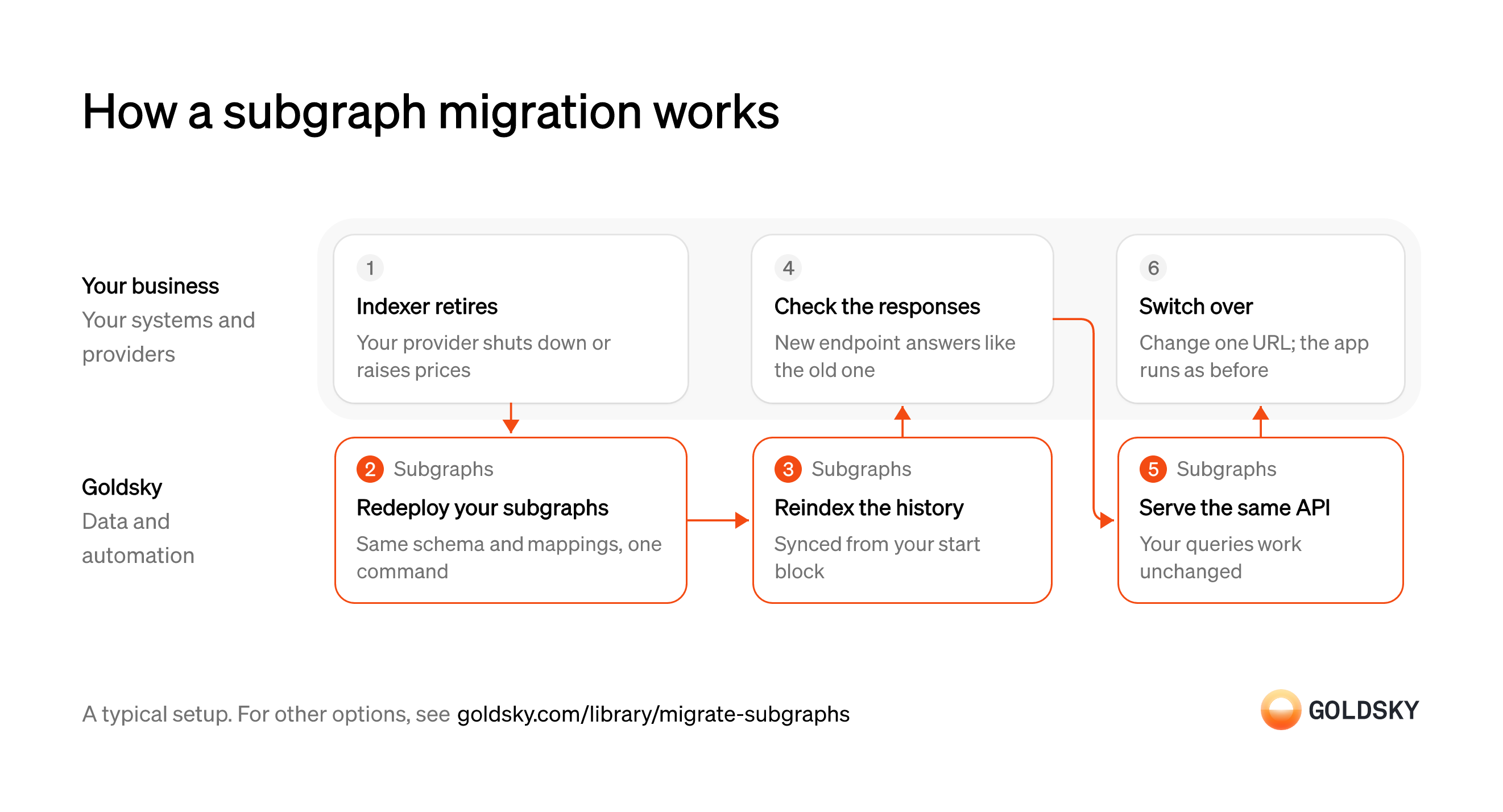
How a subgraph migration works
The diagram follows a subgraph from the old indexer retiring to your app switching over to the new endpoint. Your setup may differ.
Ways to migrate subgraphs off a retired indexer
Redeploying keeps your schema and queries and changes only the endpoint URL; streaming moves the data into a database you own, so you rewrite the queries once.
- Best for
- Apps that keep their subgraphs and queries unchanged
- Products
- Subgraphs
- What you run
- Nothing; Goldsky runs indexing, storage and the API
- What you write
- A schema and mapping handlers, or a no-code or low-code config for simple contracts
- Where your data lives
- Hosted by Goldsky
- How results reach you
- You query; changes are pushed
- Best for
- Teams that want to own the data and never migrate an index again
- Products
- Turbo
- What you run
- The destination: your database, queue or bucket, or a Postgres database Goldsky hosts
- What you write
- Pipeline YAML and SQL; TypeScript transforms when needed
- Where your data lives
- In your own database or systems
- How results reach you
- Pushed to you
| Usual setupOption 1: Redeploy the subgraphs | Option 2: Stream to your database | |
|---|---|---|
| Best for | Apps that keep their subgraphs and queries unchanged | Teams that want to own the data and never migrate an index again |
| Products | Subgraphs | Turbo |
| What you run | Nothing; Goldsky runs indexing, storage and the API | The destination: your database, queue or bucket, or a Postgres database Goldsky hosts |
| What you write | A schema and mapping handlers, or a no-code or low-code config for simple contracts | Pipeline YAML and SQL; TypeScript transforms when needed |
| Where your data lives | Hosted by Goldsky | In your own database or systems |
| How results reach you | You query; changes are pushed | Pushed to you |
List the subgraphs your app depends on
The old endpoint will stop responding, so you need to know everything that calls it.
Find each subgraph, its deployment hash and every app, dashboard or script that queries it. A forgotten dashboard is the one that breaks on the shutdown date.
Redeploy each subgraph with the same code
Handled by Goldsky SubgraphsKeeping the same schema and mappings is what lets your queries work unchanged.
Deploy the exact version your app uses now, not a rewrite. Changing the schema during the move means rewriting queries as well, which turns one change into two.
Goldsky Subgraphs can deploy a subgraph straight from its IPFS deployment hash with
Redeploy a subgraph from its hash (opens in a new tab)goldsky subgraph deploy name/version --from-ipfs-hash, so you don’t need to rebuild it.Reindex the history
Handled by Goldsky SubgraphsA redeployed subgraph starts empty and has to process every event again from its start block.
Let it catch up to the chain tip before anyone queries it. Switching early means the app shows old or missing data until the index catches up.
Subgraphs indexes from the start block in the subgraph’s manifest, and
Monitor indexing progress (opens in a new tab)goldsky subgraph listor the dashboard shows how far it has got.Check the new endpoint returns the same responses
Before switching, you want proof that the app will see what it saw before.
Run your app’s real queries against both endpoints and compare the results at the same block. A difference usually means the old index had an error or the new one hasn’t caught up yet.
Serve the same GraphQL API
Handled by Goldsky SubgraphsYour app’s queries need an endpoint that returns them in the same shape.
The endpoint has to stay stable when you later ship a new version, or every release means another config change in the app.
Goldsky serves the same subgraph API your app already uses, and tags let you move a stable endpoint to a new version without frontend changes.
Learn about subgraph tags (opens in a new tab)Switch the app over
The migration is done when users are reading from the new endpoint.
Change the subgraph URL in the app’s config and watch for errors. Keep the old endpoint as a fallback until its shutdown, if it’s still responding.
What to know about redeploying subgraphs
- The schema, mappings and queries stay as they are; the endpoint URL is what changes.
- Goldsky hosts the subgraphs and runs the indexing; you keep the code and decide when to switch.
- Tags let you point a stable endpoint at a new version later without changing the app again.
List what the old subgraphs index
The stream has to cover the same contracts, events and history the app relies on.
Pull each subgraph’s contracts, events and start blocks from its manifest, and note logic in the mappings that builds totals or links records. The pipeline can keep running sums and counts per key as rows land; logic that links records has to be rebuilt in your database, or the new tables won’t answer the same questions.
Backfill the contracts’ history
Handled by Goldsky TurboYour database has to hold every past event before the app can read from it.
The backfill starts at each contract’s start block and covers every event up to now. A gap shows up as missing records in the app.
Goldsky’s Turbo Pipelines can backfill filtered history from
Backfill history with a pipeline (opens in a new tab)start_at: earliest, either as a long-running pipeline that keeps going at the tip or as a one-time job.Decode the events
Handled by Goldsky TurboRaw logs are encoded, so each event has to be turned into named fields before the app can use it.
Each contract’s events are decoded with its ABI into columns that match what the app needs. A wrong ABI decodes into nonsense without an error, so check a few rows against a block explorer.
A Turbo Pipelines SQL transform can decode raw logs with the contract’s ABI on the fly, so each event arrives with named columns.
Decode contract events with an ABI (opens in a new tab)Stream new events into your database
Handled by Goldsky TurboAfter the backfill, every new event has to reach the same tables.
New rows have to arrive as the chain moves, and rows from blocks a reorg replaced have to be corrected. Without corrections, the app shows events that no longer exist.
The pipeline writes to Postgres, ClickHouse or another sink, and reorg corrections arrive as updates and deletes on tables keyed by a
How reorgs reach your tables (opens in a new tab)primary_key. For running totals the old mappings kept, apostgres_aggregatesink keeps asum,countoravgper key in a Postgres table and takes back rows a reorg removes.Serve the data from your own API
The app used to query GraphQL, so it now needs an endpoint on your database.
Your team rebuilds the queries the app makes against your tables, including the ones that read running totals. Compare responses with the old endpoint while it still runs.
Switch the app over
The migration is done when users read from your database.
Point the app at your API and remove the old subgraph URL. From then on, a change of indexing vendor doesn’t touch the app.
What to know about streaming in place of subgraphs
- You own the database and the API on top of it, and your team runs both.
- Your app’s GraphQL queries have to be rewritten against the new API.
- The pipeline can keep running sums and counts per key, such as a balance per account, in your database as rows arrive; other mapping logic, such as linking records, moves into SQL in your database.
- Tables with a primary key take reorg corrections as updates and deletes.
What you control
- Your team
- List the subgraphs your app depends on
- Check the new endpoint returns the same responses
- Switch the app over
Security and deployment
- SOC 2 Type IIIndependently audited security controls.
- Dedicated infrastructureSingle-tenant options for production workloads.
- Data residencyCloud, on-premises or co-located.
Use cases built the same way
- DeFi data for apps and dashboards: positions, TVL and yieldsShow users their positions, the protocol’s TVL and yields, pool and market data and activity history in a DeFi app’s front end and dashboards.
- How to build a subgraphWrite a schema and mappings for your contracts and serve the index over a hosted GraphQL API.
- Speed up subgraph indexing and queriesCut the time a subgraph takes to sync, reindex and answer queries.
- Improve subgraph uptime and reliability with failoverKeep app screens up when a hosted subgraph lags, stops syncing or goes down, with a backup to fail queries over to.
Migrate subgraphs off a retired indexer with Goldsky
We’ll map it to your systems and show you what Goldsky runs, so your team builds the product, not the pipelines underneath it.
 Robinhood
 HyperEVM
 Arc
 Solana
 Ethereum
 Polymarket
 Base
 Tempo
 Bitcoin